


- Posts: 24
- Thank you received: 0
3 Post Moderation Rule for New Boarders (25 Jan 2021)
New boarders will have their posts moderated - Don't worry if you cannot see your post immediately.
Fit to selected clip on timeline?
15 Jan 2017 20:31 #84863
by Juha
Fit to selected clip on timeline? was created by Juha
Hi,
I have a 45 min long show and I would like to quickly fit my timeline view to fit selected clip. Is it possible with some command? Basically that would be clip version of Shift+Z to avoid zooming in with zoom tool.
Thanks!
I have a 45 min long show and I would like to quickly fit my timeline view to fit selected clip. Is it possible with some command? Basically that would be clip version of Shift+Z to avoid zooming in with zoom tool.
Thanks!
Please Log in to join the conversation.
- Karsten Schlüter
-

- Offline
- Moderator
-

Less
More
- Posts: 3790
- Thank you received: 718
16 Jan 2017 06:29 #84867
by Karsten Schlüter
Replied by Karsten Schlüter on topic Fit to selected clip on timeline?
pinch 'n zoom … but I'm using a Magic Track Pad here 
Please Log in to join the conversation.


16 Jan 2017 12:55 #84879
by JoeEditor
Replied by JoeEditor on topic Fit to selected clip on timeline?
I'm with Karsten on this one. Nothing beats the Magic Trackpad!
But no, there is not "Zoom to selected clip" command. Good one for the feedback page as a suggestion.
But no, there is not "Zoom to selected clip" command. Good one for the feedback page as a suggestion.
Please Log in to join the conversation.
16 Jan 2017 19:45 #84901
by Juha
Replied by Juha on topic Fit to selected clip on timeline?
Hi, thanks for replys!
I'm very supprised no one ever needed that function in FCP history if there isn't such a command yet!
yeah, I'll make sure to add as suggestion.
Cheers!
I'm very supprised no one ever needed that function in FCP history if there isn't such a command yet!
yeah, I'll make sure to add as suggestion.
Cheers!
Please Log in to join the conversation.
16 Jan 2017 21:46 #84905
by JoeEditor
Replied by JoeEditor on topic Fit to selected clip on timeline?
Not something I've ever needed. Because I have to see the clips before and after to work them as a group. Zooming with pinch gestures are fast and easy. Clips aren't isolated in a timeline, they are influenced by each other. But sounds like something some folks would use.
Please Log in to join the conversation.
- Karsten Schlüter
-
- Offline
- Moderator
-
Less
More
- Posts: 3790
- Thank you received: 718
17 Jan 2017 05:15 #84913
by Karsten Schlüter
what Ben says …
rare use of 'single-clip full-zoom' … you can select single, whole clips in the Timeline Index, a clip is selected in toto by one click on it, you can jump to edit points (more important, imho) etc…
so, in return: what is your scenario for such a representation? (not meant offensive, I love to learn new 'tricks')
Replied by Karsten Schlüter on topic Fit to selected clip on timeline?
Juha wrote: …I'm very supprised no one ever needed that function in FCP history if there isn't such a command yet!…
what Ben says …
rare use of 'single-clip full-zoom' … you can select single, whole clips in the Timeline Index, a clip is selected in toto by one click on it, you can jump to edit points (more important, imho) etc…
so, in return: what is your scenario for such a representation? (not meant offensive, I love to learn new 'tricks')
Please Log in to join the conversation.
17 Jan 2017 06:01 #84914
by Juha
Replied by Juha on topic Fit to selected clip on timeline?
Well, fit to selection can mean multiple selection as well if you want to see clips before and after specific clip. Some kind of fit "with user configurable handles" could be also handy. That would mean selecting single clip and hitting shortcut won't fill timeline with single clip, but for example 1 or 5 seconds handles to see relations for one before and after.
I'm adding custom Titles and Lower Thirds for 45 minute show. Those will appear here and there and can be between 2 seconds to 5 seconds. Often I have to start with place holders before getting draft from producer. Then I have to fix names and typos multiple times as client or who ever made fixes.
In this case I'm not dealing with clip it self, but titles. Those are scattered and not connected to one or another.
With trackpad pinch gesture, depending of how long is your actual timeline and how short is your clip (title in this case) you want to see and edit, it requires some kind of precision to fit it nicely. It can easily zoom in too much too.
I can live with zoom tool yes. At least it precise and fast enough, but love to see "show selected" command.
Cheers!
I'm adding custom Titles and Lower Thirds for 45 minute show. Those will appear here and there and can be between 2 seconds to 5 seconds. Often I have to start with place holders before getting draft from producer. Then I have to fix names and typos multiple times as client or who ever made fixes.
In this case I'm not dealing with clip it self, but titles. Those are scattered and not connected to one or another.
With trackpad pinch gesture, depending of how long is your actual timeline and how short is your clip (title in this case) you want to see and edit, it requires some kind of precision to fit it nicely. It can easily zoom in too much too.
I can live with zoom tool yes. At least it precise and fast enough, but love to see "show selected" command.
Cheers!
Please Log in to join the conversation.
- Karsten Schlüter
-
- Offline
- Moderator
-
Less
More
- Posts: 3790
- Thank you received: 718
17 Jan 2017 09:40 #84915
by Karsten Schlüter
ahh, I see.
You are aware, that holding Z and than click'n drag the mouse over some areal zooms this selections?
Replied by Karsten Schlüter on topic Fit to selected clip on timeline?
Juha wrote: // full quote //
ahh, I see.
You are aware, that holding Z and than click'n drag the mouse over some areal zooms this selections?
Please Log in to join the conversation.
17 Jan 2017 09:46 #84917
by Juha
Replied by Juha on topic Fit to selected clip on timeline?
Yes, with zoom tool I meant that 
It's cool that if I hold Z when clicking and dragging then release Z key it will pop back to what ever tool I had before zooming.
It's cool that if I hold Z when clicking and dragging then release Z key it will pop back to what ever tool I had before zooming.
Please Log in to join the conversation.

17 Jan 2017 16:22 #84928
by Soran
Replied by Soran on topic Fit to selected clip on timeline?
Yes, the zoom tool does the job, however, although it's a tiny feature it has always speeded up my working in timeline FCP 6/7, many will remember the keyboard shortcut : Fit to Selection command Option+Shift+Z (I call it zoom to selection). I use it in audio repair a lot.
Somehow I can't see that command exist in FCPX,
It'd be a nice addition to FCPX, though.
Somehow I can't see that command exist in FCPX,
It'd be a nice addition to FCPX, though.
Please Log in to join the conversation.
17 Jan 2017 23:16 - 17 Jan 2017 23:17 #84934
by toxotis70
Replied by toxotis70 on topic Fit to selected clip on timeline?
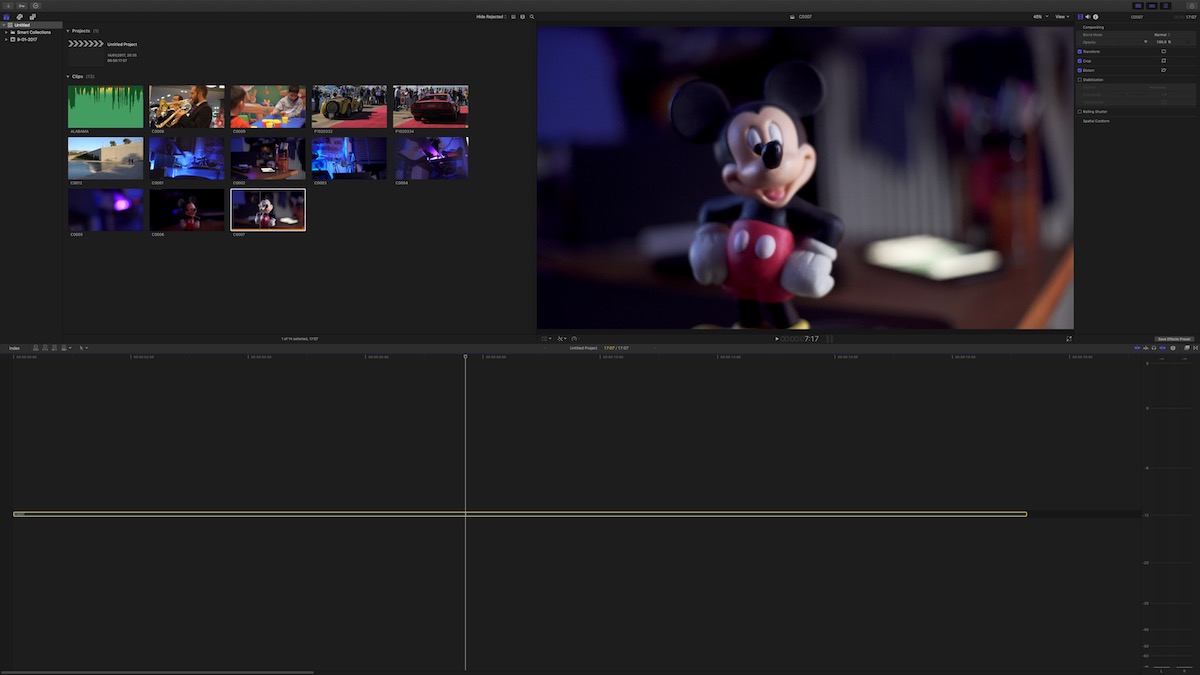
does anyone knows if we can adjust the height of clips in timeline if we select not to show thumbnails or waveforms ? Its very tiny in height...
Last edit: 17 Jan 2017 23:17 by toxotis70.
Please Log in to join the conversation.
