


- Posts: 2
- Thank you received: 0
3 Post Moderation Rule for New Boarders (25 Jan 2021)
New boarders will have their posts moderated - Don't worry if you cannot see your post immediately.
dialogue track greyed out but not disabled?
11 Jan 2017 05:16 #84756
by dmcnewman
dialogue track greyed out but not disabled? was created by dmcnewman
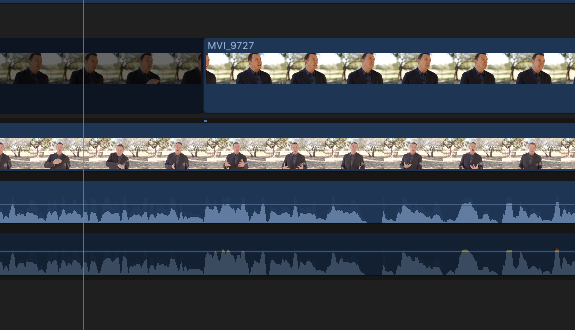
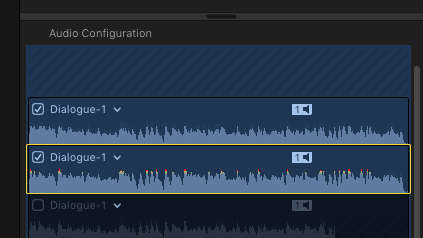
I have pairs of dialogue tracks embedded on my video files in my timeline. They are mono tracks from separate mics. One of my dialogue tracks is more greyed out than the other. It previews & plays fine in the Inspector window under Audio Configuration, but will not playback in the timeline/project. The track in question is not disabled, it is set to +6db, no effects or enhancements ......anything I'm missing?
Please Log in to join the conversation.

14 Jan 2017 11:33 #84835
by ianstubbs
Replied by ianstubbs on topic dialogue track greyed out but not disabled?
It looks like the second dialogue track is turned off in the inspector as the box is unchecked in the second shot you uploaded.
Please Log in to join the conversation.


14 Jan 2017 12:46 - 14 Jan 2017 12:49 #84837
by JoeEditor
Replied by JoeEditor on topic dialogue track greyed out but not disabled?
I was going to post what Ian posted, it is a disabled clip/role. If it were disabled in the Inspector, it wouldn't show in the Timeline at all. If it were disabled in the Timeline Index, all clips of that Role would be disabled. You disabled it as an individual clip in the Timeline, so select it and use the keyboard shortcut of "X" to reenable it.
Last edit: 14 Jan 2017 12:49 by JoeEditor.
Please Log in to join the conversation.
14 Jan 2017 17:15 #84843
by dmcnewman
Replied by dmcnewman on topic dialogue track greyed out but not disabled?
the unchecked dialogue track you see in the screenshot is not the track in question. that is the 3rd of four dialogue tracks. track one and two are not disabled, they are both visible in the project. their respective roles are also not disabled. they are not muted, no effects are added. The problem track "track 2", is also not disabled directly in the project. I think you mean to say, use the shortcut "V" to re-enable it. 'X" is the default shortcut for selecting a clip range. "V" does not re-enable it in this case, it either disables it by making it even darker than it is now, or brings it back to its state of not playing and being slightly dimmed.
thanks though! still looking for an answer!
thanks though! still looking for an answer!
Please Log in to join the conversation.
14 Jan 2017 19:58 #84849
by ianstubbs
Replied by ianstubbs on topic dialogue track greyed out but not disabled?
Yes, quite right, it should not appear in the timeline at all if switched off in the inspector. In my defence I've been quite ill for the last few days so thinking is not as sharp as it could be. The X key on the default keyboard shortcut settings marks an in and out around the clip under the playhead but, maybe, this is visibility? Try the V key with the audio clip selected in the timeline. A surprise to me, so I thought I'd share is the the V key enables or disables an audio component in the inspector if the cursor is over it. Who knew?
Please Log in to join the conversation.
