


- Posts: 2
- Thank you received: 0
3 Post Moderation Rule for New Boarders (25 Jan 2021)
New boarders will have their posts moderated - Don't worry if you cannot see your post immediately.
Archiving/Moving a Library with Compound Clips
09 Jan 2017 08:03 #84682
by rodrigo
Archiving/Moving a Library with Compound Clips was created by rodrigo
Does anyone know how to move or archive a Library that contains Compound Clips?
What's happening is that I have an external drive(s) that house my Library, and I need to work on a couple of different computers.
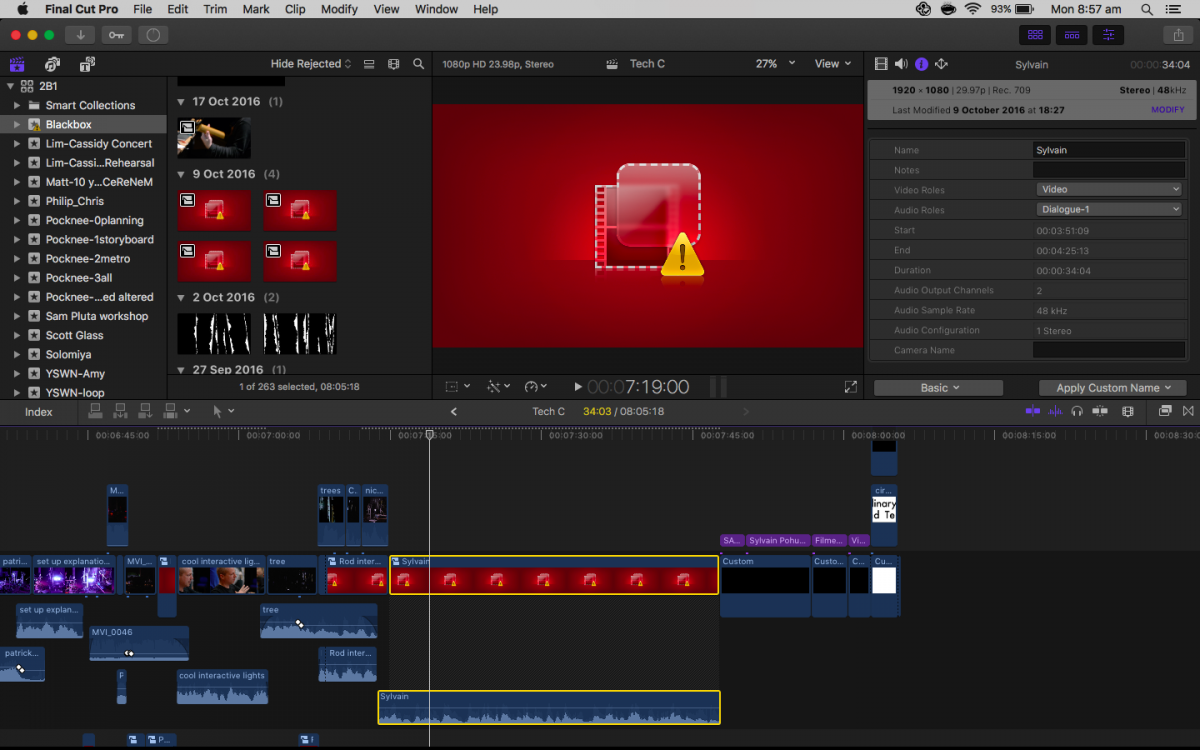
Attached is what my Library looks like on another computer (you can see that the Compound Clips in the browser on the left are the main problem)
I have the Storage Locations set that all Media and Cache are stored in the "Library". (Motion Content is stored in "Motion Templates folder" and Backups in "Final Cut Backups") (I'm using no Motion footage, and the Backups are all just the .fcpevent files)
I have also tried to Consolidate Media, which just says "There are no files to consolidate."
So the media is all on the drive, but it seems that creating a Compound Clip creates a new file somewhere else and/or FCPX is not properly keeping the links in place?
I found this thread about it on another forum (with no functional solutions):
forums.creativecow.net/thread/344/17396
Has anyone encountered similar problems, or is there a 'best practice' for creating a final Library archive that has all clips working?
What's happening is that I have an external drive(s) that house my Library, and I need to work on a couple of different computers.
Attached is what my Library looks like on another computer (you can see that the Compound Clips in the browser on the left are the main problem)
I have the Storage Locations set that all Media and Cache are stored in the "Library". (Motion Content is stored in "Motion Templates folder" and Backups in "Final Cut Backups") (I'm using no Motion footage, and the Backups are all just the .fcpevent files)
I have also tried to Consolidate Media, which just says "There are no files to consolidate."
So the media is all on the drive, but it seems that creating a Compound Clip creates a new file somewhere else and/or FCPX is not properly keeping the links in place?
I found this thread about it on another forum (with no functional solutions):
forums.creativecow.net/thread/344/17396
Has anyone encountered similar problems, or is there a 'best practice' for creating a final Library archive that has all clips working?
Please Log in to join the conversation.
- ronny courtens
-

- Offline
- Moderator
-

Less
More
- Posts: 4455
- Thank you received: 962
11 Jan 2017 05:07 #84755
by ronny courtens
Replied by ronny courtens on topic Archiving/Moving a Library with Compound Clips
Hi Rodrigo, welcome to the forums.
I don't think that your problem has anything to do with compound clips. Actually your compound clips are okay, and there are no missing media.
The alert message you get tells you that there are one or more effects missing on your compound clips, or on clips inside these compound clips. This often happens when moving projects across computers that don't have the same effects installed, so this would be a logical explanation.
- Either you make sure that every computer you work on has the same third-party effects and custom motion templates, or you remove the missing effects from the compound clip (or any of the clips inside the CC), and the error message will disappear.
- If you are running 10.3 or 10.3.1 and you need to move your Libraries across different computers, you can avoid such problems by storing your Motion Templates inside the Library. This way, when you move the Library to a different computer, you will also move any custom motion templates with it and you won't get these error messages.
- Ronny
I don't think that your problem has anything to do with compound clips. Actually your compound clips are okay, and there are no missing media.
The alert message you get tells you that there are one or more effects missing on your compound clips, or on clips inside these compound clips. This often happens when moving projects across computers that don't have the same effects installed, so this would be a logical explanation.
- Either you make sure that every computer you work on has the same third-party effects and custom motion templates, or you remove the missing effects from the compound clip (or any of the clips inside the CC), and the error message will disappear.
- If you are running 10.3 or 10.3.1 and you need to move your Libraries across different computers, you can avoid such problems by storing your Motion Templates inside the Library. This way, when you move the Library to a different computer, you will also move any custom motion templates with it and you won't get these error messages.
- Ronny
Please Log in to join the conversation.
11 Jan 2017 12:11 #84761
by rodrigo
Replied by rodrigo on topic Archiving/Moving a Library with Compound Clips
Hmm, interesting.
I just assumed that that was the "offline media" icon, and FCP isn't too verbose about letting you know what the problem is. (or if it is, I've missed it!)
I'm pretty sure I have the same fx installed on both machines, but will double check everything. I don't use any motion templates, so it would only be effects that could be the problem.
I just assumed that that was the "offline media" icon, and FCP isn't too verbose about letting you know what the problem is. (or if it is, I've missed it!)
I'm pretty sure I have the same fx installed on both machines, but will double check everything. I don't use any motion templates, so it would only be effects that could be the problem.
Please Log in to join the conversation.
