


- Posts: 7
- Thank you received: 0
3 Post Moderation Rule for New Boarders (25 Jan 2021)
New boarders will have their posts moderated - Don't worry if you cannot see your post immediately.
Help with fixing an adult video, possibly in Motion
- oneironaut
-
 Topic Author
- Offline
- New Member
-

Less
More
08 Jan 2017 20:57 #84674
by oneironaut
Help with fixing an adult video, possibly in Motion was created by oneironaut
Hey guys, long time reader, first time poster here. I'm in desperate need of some motion graphics help but it's of an adult nature so I don't really want to post specifics here. Basically, I need to align two objects in the image, as right now they are slightly apart and I need them to overlap. The example I've been using is: imagine a VERY shot shot of a car on a mountain road with just sky behind it, and wanting to nudge the car just a tiny bit so that it looks like it's dangerously close to the edge of the road.
I know this is possible within Motion and without plugins, and I actually managed to achieve it once... but I have no idea how I did it! I duplicated the video and drew a mask around the object I wanted to move, added an image mask and had it follow the draw mask, then just moved that piece around as needed, adding a feather to the mask so it blended in naturally with the background. I know there was a little more to it than that but I totally don't remember exactly what I did. I can't figure out how to "cut out" the shape mask to move it around, basically.
If there's anyone who can suggest a step-by-step method for this, I'd really appreciate it!! If you don't mind the material being of a sexual nature, I can give you more specific information!
I know this is possible within Motion and without plugins, and I actually managed to achieve it once... but I have no idea how I did it! I duplicated the video and drew a mask around the object I wanted to move, added an image mask and had it follow the draw mask, then just moved that piece around as needed, adding a feather to the mask so it blended in naturally with the background. I know there was a little more to it than that but I totally don't remember exactly what I did. I can't figure out how to "cut out" the shape mask to move it around, basically.
If there's anyone who can suggest a step-by-step method for this, I'd really appreciate it!! If you don't mind the material being of a sexual nature, I can give you more specific information!
Please Log in to join the conversation.
- Karsten Schlüter
-

- Offline
- Moderator
-

Less
More
- Posts: 3790
- Thank you received: 718
09 Jan 2017 09:08 - 09 Jan 2017 09:15 #84683
by Karsten Schlüter
Replied by Karsten Schlüter on topic Help with fixing an adult video, possibly in Motion
'adult video ', 63 views, no reply - great 
OK, I'm European, my standards conc. 'adult content' et al are a bit different.…
You stumble into a few hurdles-to-go, heres an illustrated (yeah!!) example:
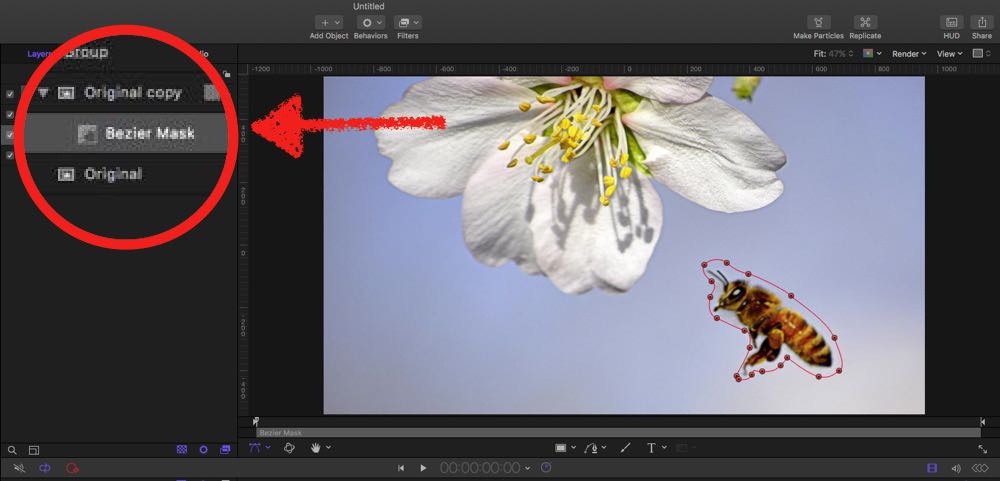
In Motion, I duplicated the original and applied a bezier-mask…
Then…
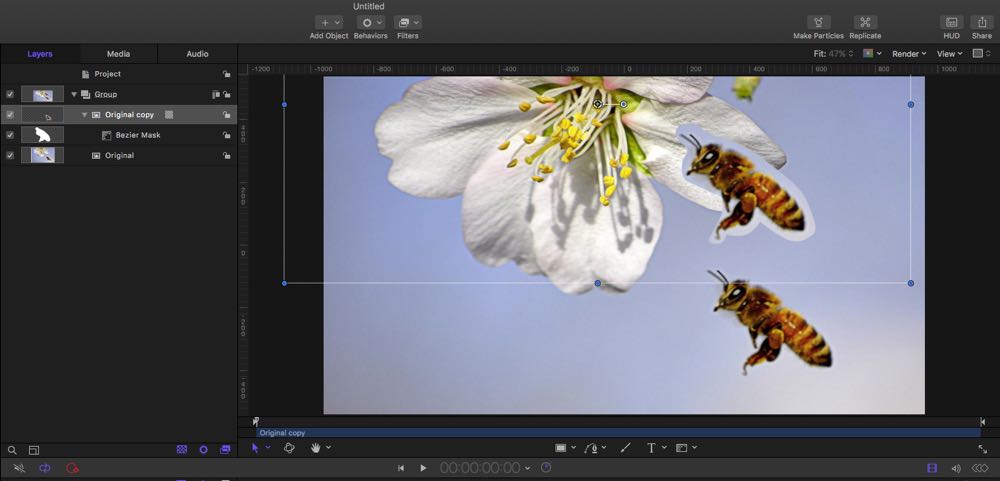
… it is easy to place subject #1 nearer to subject #2
But …
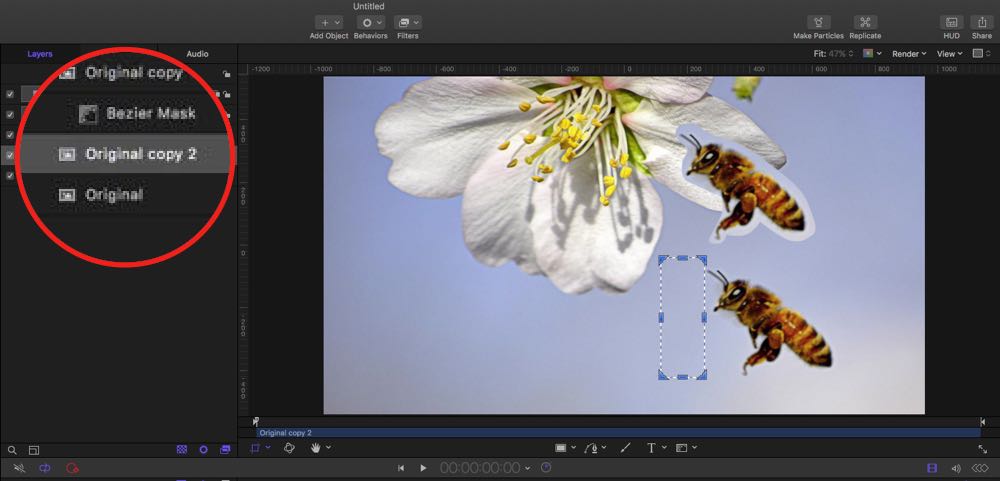
You have to 'cover'/make vanish the original! So, I helped me here with a 2nd duplicate of the original, cropping it to the blue part aside subject #1 and …
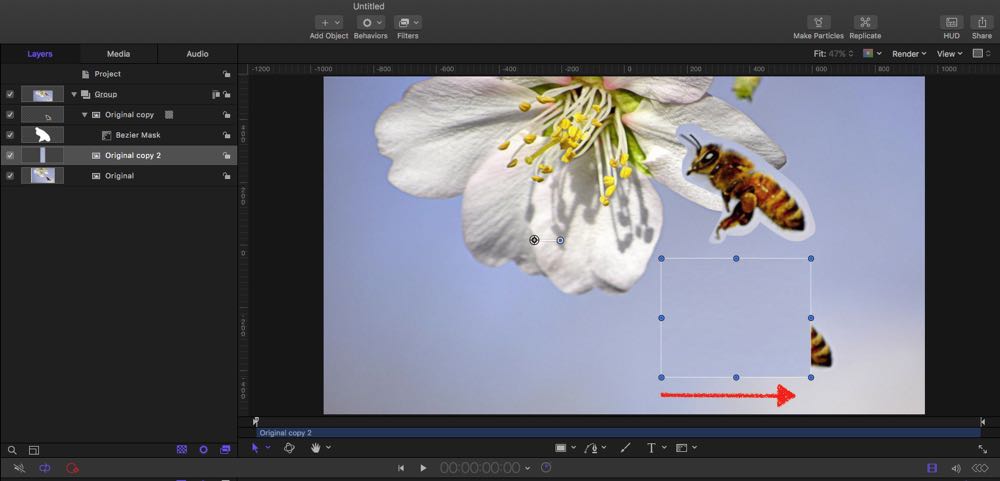
… transforming/stretching it.
You see the obvious difficulties: a manual mask is never as precise than a colour-key (green screen) ; the 'plaster' needs refinement to fit seamless into scenery; and finally: what when subjects move, rotate, breath...??
There're famous plugins, which do marvel, SliceX and TrackX from coremelt.com, which allow to punch-out moving objects and has a built in 'spot healer' to make content vanish.
… but it depends much on the original scene… feel free to [strike]post here[/strike] to send me an example… as long as everything is within legal limits. :blush:
OK, I'm European, my standards conc. 'adult content' et al are a bit different.…
You stumble into a few hurdles-to-go, heres an illustrated (yeah!!) example:
In Motion, I duplicated the original and applied a bezier-mask…
Then…
… it is easy to place subject #1 nearer to subject #2
But …
You have to 'cover'/make vanish the original! So, I helped me here with a 2nd duplicate of the original, cropping it to the blue part aside subject #1 and …
… transforming/stretching it.
You see the obvious difficulties: a manual mask is never as precise than a colour-key (green screen) ; the 'plaster' needs refinement to fit seamless into scenery; and finally: what when subjects move, rotate, breath...??
There're famous plugins, which do marvel, SliceX and TrackX from coremelt.com, which allow to punch-out moving objects and has a built in 'spot healer' to make content vanish.
… but it depends much on the original scene… feel free to [strike]post here[/strike] to send me an example… as long as everything is within legal limits. :blush:
Last edit: 09 Jan 2017 09:15 by Karsten Schlüter.
Please Log in to join the conversation.

09 Jan 2017 21:40 #84708
by JoeEditor
Replied by JoeEditor on topic Help with fixing an adult video, possibly in Motion
An adult video with masks... Ill keep my comments to myself. :lol:
Please Log in to join the conversation.
- Karsten Schlüter
-
- Offline
- Moderator
-
Less
More
- Posts: 3790
- Thank you received: 718
10 Jan 2017 08:50 #84719
by Karsten Schlüter
hmmm... tracked AND dynamic masks… - should make Roger an enhancement suggestion for SliceX.
… I knew, this thread gets out of control!! :silly:
Replied by Karsten Schlüter on topic Help with fixing an adult video, possibly in Motion
FCPX.guru wrote: An adult video with masks... Ill keep my comments to myself. :lol:
hmmm... tracked AND dynamic masks… - should make Roger an enhancement suggestion for SliceX.
… I knew, this thread gets out of control!! :silly:
Please Log in to join the conversation.

10 Jan 2017 09:19 #84720
by Redifer
Replied by Redifer on topic Help with fixing an adult video, possibly in Motion
Feel free to explain what exactly you need to do here. Perhaps others were looking in here expecting pictures (which is probably against site rules). We're all grown-ups (I imagine). I myself am quite immature, but that's OK. I can't believe they're using Motion for porn now, but I am quite amused. I can't even fathom what you could possibly be doing (and I've been racking my brain), but again at least I am amused.
Please Log in to join the conversation.
- Andreas Kiel
-
- Offline
- Platinum Member
-

Less
More
- Posts: 1077
- Thank you received: 189
10 Jan 2017 12:59 #84727
by Andreas Kiel
Replied by Andreas Kiel on topic Help with fixing an adult video, possibly in Motion
A perfect but expensive solution:
www.silhouettefx.com/
Another option PhotoShop rotopaint.
Another option PhotoShop rotopaint.
Please Log in to join the conversation.
