


- Posts: 2
- Thank you received: 0
3 Post Moderation Rule for New Boarders (25 Jan 2021)
New boarders will have their posts moderated - Don't worry if you cannot see your post immediately.
Burnt in timecode in 10.3
- christopher.rowe
-
 Topic Author
- Offline
- New Member
-

Less
More
08 Jan 2017 15:08 #84648
by christopher.rowe
Burnt in timecode in 10.3 was created by christopher.rowe
Bunt-in timecode is no longer a title effect on a separate video track but a video effect and allows source TC to be displayed, which is great! BUT as the TC is now part of the picture, any adjustment to the image, in particular resizing will also affect the TC. A couple of edits in my latest piece use clips that are flipped, so now the TC is back-to-front too! Can't find a way to fix this in the effect controls - any suggestions?
Thanks!
Chris
Thanks!
Chris
Please Log in to join the conversation.
- Tom Wolsky
-

- Offline
- Moderator
-

08 Jan 2017 17:33 #84656
by Tom Wolsky
Replied by Tom Wolsky on topic Burnt in timecode in 10.3
The stack otdervif the effects should control the processing order. If the TC is below flipped doesn't it process correctly?
Please Log in to join the conversation.
- ronny courtens
-

- Offline
- Moderator
-
Less
More
- Posts: 4455
- Thank you received: 962
08 Jan 2017 18:16 - 08 Jan 2017 18:21 #84659
by ronny courtens
Replied by ronny courtens on topic Burnt in timecode in 10.3
Hey Chris, welcome to the forums.
Tom is correct.
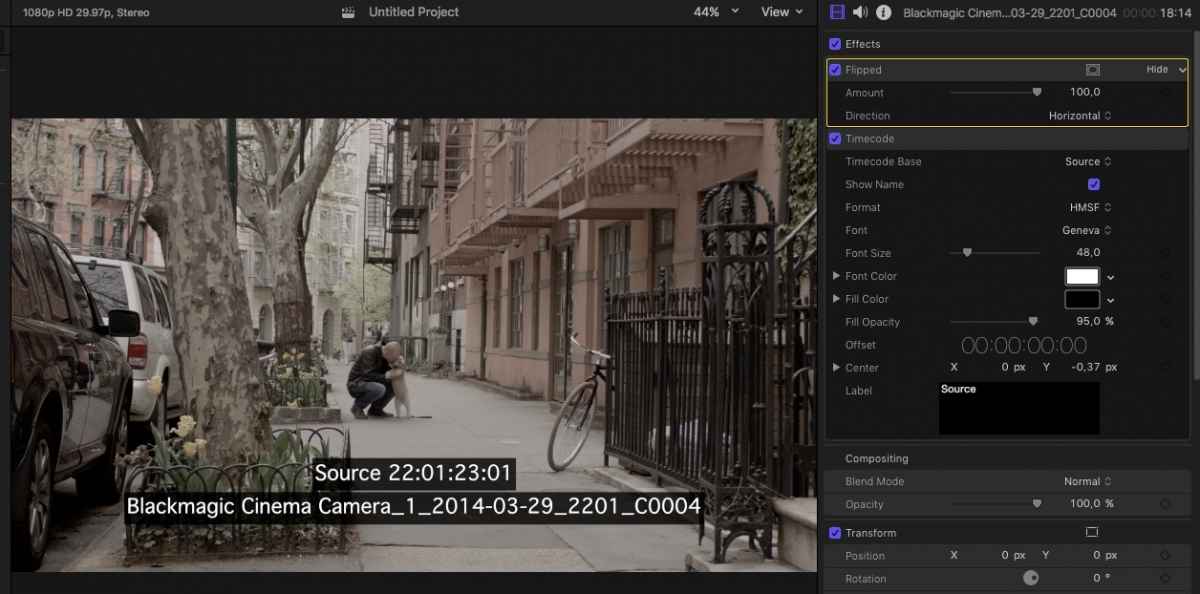
If you have flipped the image using the Flipped effect: select the flipped clip and in the Inspector drag the Flipped effect above the Timecode effect. Your image will be flipped, but not the Timecode.
Image with Timecode effect above Flipped effect:
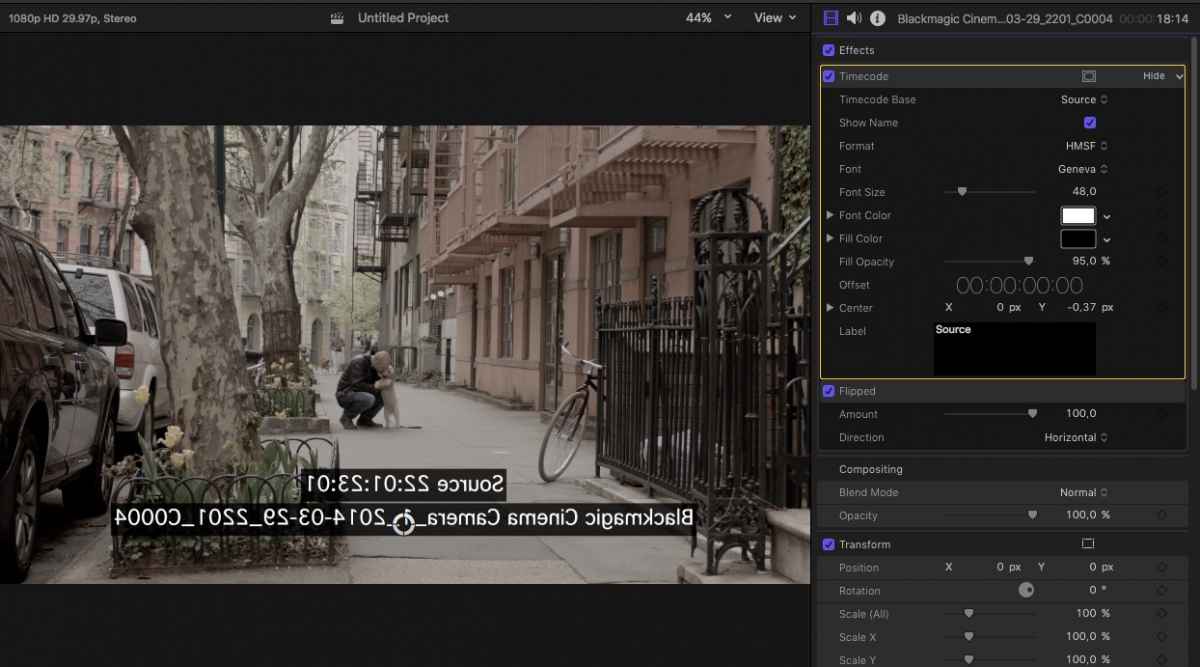
Image with Flipped effect above Timecode effect:
If you have flipped the image using the Transform tools (X-scale = -100), this won't work. You need to use the Flipped effect.
- Ronny
Tom is correct.
If you have flipped the image using the Flipped effect: select the flipped clip and in the Inspector drag the Flipped effect above the Timecode effect. Your image will be flipped, but not the Timecode.
Image with Timecode effect above Flipped effect:
Image with Flipped effect above Timecode effect:
If you have flipped the image using the Transform tools (X-scale = -100), this won't work. You need to use the Flipped effect.
- Ronny
Last edit: 08 Jan 2017 18:21 by ronny courtens.
Please Log in to join the conversation.
- christopher.rowe
-
Topic Author
- Offline
- New Member
-
Less
More
- Posts: 2
- Thank you received: 0
08 Jan 2017 22:15 #84676
by christopher.rowe
Replied by christopher.rowe on topic Burnt in timecode in 10.3
I was indeed using Transform, pointing me to the Flipped effect solved the problem. Many thanks!!!
Please Log in to join the conversation.
