


- Posts: 62
- Thank you received: 6
3 Post Moderation Rule for New Boarders (25 Jan 2021)
New boarders will have their posts moderated - Don't worry if you cannot see your post immediately.
Anyone successfully sharing XML to Premiere CC?
08 Jan 2017 04:09 - 08 Jan 2017 04:12 #84634
by spurratic
Anyone successfully sharing XML to Premiere CC? was created by spurratic
Hi everyone,
I use Final Cut Pro X (10.3.1), and my business partner uses Premiere CC (I believe he has it up to the current version).
We have been trying to find a workflow so that we can use our preferred NLE but still collaborate a bit on edits.
We recently shot a 3 camera product video, and that is the one we are using to try and figure things out.
3 Cameras:
Sony FS5 - XAVC Format (MXF files)
2 x Sony FS100 - AVCHD Format (MTS files)
I initiated everything on my end, using Final Cut to import clips to an external media folder.....and I transcoded just the Sony FS5 footage to ProRes since that was the easiest way to get Premiere to recognize the files. (Since he doesn't have FCPX on his system, he can't view rewrapped MXF files).
I learned that I couldn't use multicam.....I had to stack the clips all in lanes otherwise Premiere wouldn't recognize that I had 3 cameras. I also learned that the only way my colleague could properly see the audio was if I exported my timeline audio to wav stems and placed those in lanes as well. If I left the audio attached to the clips.....Premiere thinks they are video only clips.
(a lot of fiddling, already doesn't seem worth it)
I exported an XML of my timeline, (xml version 1.6) and then used XtoCC to convert it.
Sent him the XML file, he opened in Premiere......and after relinking all of the media, he was able to successfully open the timeline......although I had to completely change my workflow to basically FCP7 style editing to make it happen.
Here's where things go south.
He sends an xml right back to me after making one slight edit....
I use SendtoX to open it,
And.....I can open the timeline but a few random clips won't relink.
The error message says that the clips are incompatible, but no explanation why. We are using the same media, with the same names, in the same folder structure, with the same audio channels....
Has anyone been able to successfully do this?
In the past, any time my colleague has sent me XML from Premiere, Final Cut can never translate it properly. I end up spending as much time replacing clips and manually finding audio.....I might as well have just edited myself.
I know that eventually we will each have to learn both systems.....but until then, why does Final Cut randomly deem clips incompatible?
Thanks.....hope I explained things well enough.
I use Final Cut Pro X (10.3.1), and my business partner uses Premiere CC (I believe he has it up to the current version).
We have been trying to find a workflow so that we can use our preferred NLE but still collaborate a bit on edits.
We recently shot a 3 camera product video, and that is the one we are using to try and figure things out.
3 Cameras:
Sony FS5 - XAVC Format (MXF files)
2 x Sony FS100 - AVCHD Format (MTS files)
I initiated everything on my end, using Final Cut to import clips to an external media folder.....and I transcoded just the Sony FS5 footage to ProRes since that was the easiest way to get Premiere to recognize the files. (Since he doesn't have FCPX on his system, he can't view rewrapped MXF files).
I learned that I couldn't use multicam.....I had to stack the clips all in lanes otherwise Premiere wouldn't recognize that I had 3 cameras. I also learned that the only way my colleague could properly see the audio was if I exported my timeline audio to wav stems and placed those in lanes as well. If I left the audio attached to the clips.....Premiere thinks they are video only clips.
(a lot of fiddling, already doesn't seem worth it)
I exported an XML of my timeline, (xml version 1.6) and then used XtoCC to convert it.
Sent him the XML file, he opened in Premiere......and after relinking all of the media, he was able to successfully open the timeline......although I had to completely change my workflow to basically FCP7 style editing to make it happen.
Here's where things go south.
He sends an xml right back to me after making one slight edit....
I use SendtoX to open it,
And.....I can open the timeline but a few random clips won't relink.
The error message says that the clips are incompatible, but no explanation why. We are using the same media, with the same names, in the same folder structure, with the same audio channels....
Has anyone been able to successfully do this?
In the past, any time my colleague has sent me XML from Premiere, Final Cut can never translate it properly. I end up spending as much time replacing clips and manually finding audio.....I might as well have just edited myself.
I know that eventually we will each have to learn both systems.....but until then, why does Final Cut randomly deem clips incompatible?
Thanks.....hope I explained things well enough.
Last edit: 08 Jan 2017 04:12 by spurratic.
Please Log in to join the conversation.
- ronny courtens
-

- Offline
- Moderator
-

Less
More
- Posts: 4455
- Thank you received: 962
08 Jan 2017 11:41 - 08 Jan 2017 11:46 #84640
by ronny courtens
Replied by ronny courtens on topic Anyone successfully sharing XML to Premiere CC?
Hey Ben,
Problems like these are often related to the fact that Premiere is adding XMP metadata to clips during import, relinking or export. These metadata tags are incorporated in the XML, and FCP X sees them as modified files.
This is what you can try. Tell your partner to launch Premiere, go to Edit>Preferences>Media and UNCHECK" Write XMP ID to Files on Import" & UNCHECK "Enable Clip and XMP Metadata Linking." This screenshot is from Pr.CC 2017:
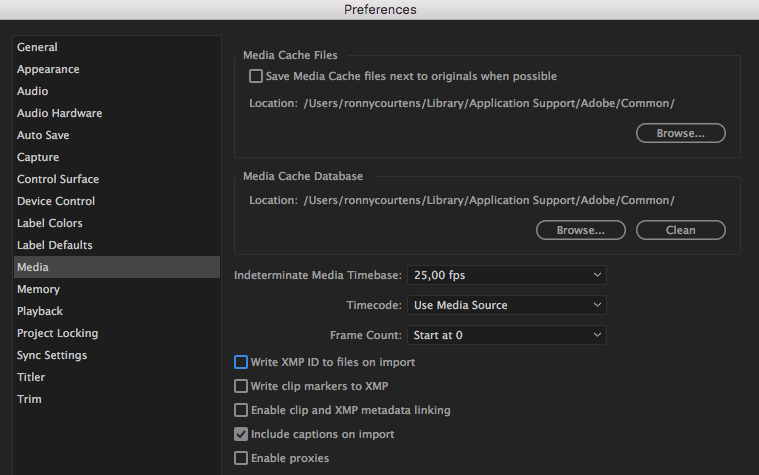
This will not solve your current issue, but it should prevent the issue from happening again next time you share a project between FCP and Pr. So you will have to start from scratch to see if it works.
In the long run you will find that sharing projects between NLEs is not really a good idea. You spend much more time trying to work around the many pitfalls than both of you would spend learning the same NLE.
- Ronny
Problems like these are often related to the fact that Premiere is adding XMP metadata to clips during import, relinking or export. These metadata tags are incorporated in the XML, and FCP X sees them as modified files.
This is what you can try. Tell your partner to launch Premiere, go to Edit>Preferences>Media and UNCHECK" Write XMP ID to Files on Import" & UNCHECK "Enable Clip and XMP Metadata Linking." This screenshot is from Pr.CC 2017:
This will not solve your current issue, but it should prevent the issue from happening again next time you share a project between FCP and Pr. So you will have to start from scratch to see if it works.
In the long run you will find that sharing projects between NLEs is not really a good idea. You spend much more time trying to work around the many pitfalls than both of you would spend learning the same NLE.
- Ronny
Last edit: 08 Jan 2017 11:46 by ronny courtens.
Please Log in to join the conversation.


08 Jan 2017 13:02 #84642
by JoeEditor
Replied by JoeEditor on topic Anyone successfully sharing XML to Premiere CC?
We have a 13x60 reality TV show that's selling at NAPTE in a couple of weeks. The editor who started working on the original promos and pilot used PPro. When he left and I took over, we tried to go XML to FCPX. Man, one project and two promos, after a week, we gave up. We spent a fraction of that time just re-editing the material from scratch.
Point is; XML between NLEs is not worth it, IMHO. You're fighting a losing, barefoot in the snow, uphill both ways, type of battle. My personal advice based on experience, is to NEVER cross NLEs if there is anyway possible to do it. Total nightmare on the best day.
Tell him to learn FCPX and hit him about the head with a stick. Just kidding...
PPro and FCPX in the same office, man, I am SO glad I made the TV station I'm at trash all their Adobe products. Never looked back.
Point is; XML between NLEs is not worth it, IMHO. You're fighting a losing, barefoot in the snow, uphill both ways, type of battle. My personal advice based on experience, is to NEVER cross NLEs if there is anyway possible to do it. Total nightmare on the best day.
Tell him to learn FCPX and hit him about the head with a stick. Just kidding...
PPro and FCPX in the same office, man, I am SO glad I made the TV station I'm at trash all their Adobe products. Never looked back.
Please Log in to join the conversation.
08 Jan 2017 13:34 #84645
by Axel
I too have a friend who uses Premiere since 15 years now. He was an Adobe teacher for a system vendor. He actually knows FCP X rudimentarily, BUT DOESN'T LIKE IT. The same with me, I know Premiere to some extend, BUT DON'T LIKE IT. On two occasions I did some preparatory work for him, with Premiere, I hope he will never ask again. At one occasion he got a really interesting job offer, he talked about it for days. Then they mentioned, oh, by the way, we use X, and he resigned immediately.
It can be less dangerous to deal an hour or two with some conversion issues than to convince the other of your NLE.
Replied by Axel on topic Anyone successfully sharing XML to Premiere CC?
ronny courtens wrote: In the long run you will find that sharing projects between NLEs is not really a good idea. You spend much more time trying to work around the many pitfalls than both of you would spend learning the same NLE.
I too have a friend who uses Premiere since 15 years now. He was an Adobe teacher for a system vendor. He actually knows FCP X rudimentarily, BUT DOESN'T LIKE IT. The same with me, I know Premiere to some extend, BUT DON'T LIKE IT. On two occasions I did some preparatory work for him, with Premiere, I hope he will never ask again. At one occasion he got a really interesting job offer, he talked about it for days. Then they mentioned, oh, by the way, we use X, and he resigned immediately.
It can be less dangerous to deal an hour or two with some conversion issues than to convince the other of your NLE.
Please Log in to join the conversation.
08 Jan 2017 15:44 #84650
by spurratic
Replied by spurratic on topic Anyone successfully sharing XML to Premiere CC?
Thanks! We'll try this. Having 'grown up' using FCP7, I have no issues using Premiere.....its pretty much the same from a basic cutting and exporting perspective. Its just trying to convince him to even try FCPX!
I tried a few tests last night sending timelines from FCPX to Premiere and I got them working to a pretty good degree. Hopefully your suggestion above will help when he returns the xml to me.
I tried a few tests last night sending timelines from FCPX to Premiere and I got them working to a pretty good degree. Hopefully your suggestion above will help when he returns the xml to me.
Please Log in to join the conversation.
08 Jan 2017 15:45 #84651
by spurratic
Replied by spurratic on topic Anyone successfully sharing XML to Premiere CC?
You guys know how it is......as a FCPX editor, I had no problem paying for a 1 month subscription to CC and loading up Premiere to do a quick troubleshoot.
But try convincing a Premiere editor to even glance at FCPX! Its like a trip to the dentist!
But try convincing a Premiere editor to even glance at FCPX! Its like a trip to the dentist!
Please Log in to join the conversation.
