


- Posts: 3
- Thank you received: 0
3 Post Moderation Rule for New Boarders (25 Jan 2021)
New boarders will have their posts moderated - Don't worry if you cannot see your post immediately.
Color Grading Has Mind Of Its Own
- geoffreygonzales
-
 Topic Author
- Offline
- New Member
-

Less
More
07 Jan 2017 05:30 #84603
by geoffreygonzales
Color Grading Has Mind Of Its Own was created by geoffreygonzales
Have an issue were apple's color correction or a plugin color correction will be effected by a clip or text layered on top.
what happens:
upload gopro footage
do editing stuff
add color correction
add text or title on top
the color correction displayed will change slightly - not turn off, but flicker a slight variance in color correction
I've narrowed down the occurrence to when a clip or text it layered on top of the color corrected clip; the frames close the point where the clip was layered on top will be slightly off, and can be seen if i hover back and forth.
this issue also happens to random parts of clips, where nothing is layered over the color corrected clip, but a small section of the clip will still "flicker" to a slightly different color correction variance. its driving me crazy.
ive screen captured the issues
any insight could be spectacular
what happens:
upload gopro footage
do editing stuff
add color correction
add text or title on top
the color correction displayed will change slightly - not turn off, but flicker a slight variance in color correction
I've narrowed down the occurrence to when a clip or text it layered on top of the color corrected clip; the frames close the point where the clip was layered on top will be slightly off, and can be seen if i hover back and forth.
this issue also happens to random parts of clips, where nothing is layered over the color corrected clip, but a small section of the clip will still "flicker" to a slightly different color correction variance. its driving me crazy.
ive screen captured the issues
any insight could be spectacular
Please Log in to join the conversation.

07 Jan 2017 10:12 - 07 Jan 2017 12:03 #84606
by Axel
Replied by Axel on topic Color Grading Has Mind Of Its Own
By chance, I'm currently playing with the Neumann GH5 downloadable clips - snow. I tried to reproduce your bug with two titles above them, but there is no color shift whatsoever in the storyline clip. Please check if you accidentally applied any filter to one of the titles. An empty title was invented by Alex Gollner as a makeshift adjustment layer. Any filter applied to it will affect the clip beneath it.
EDIT: I now saw that the cast appears only if you not deactivated the color correction of the footage clip. It's a riddle.
EDIT: I now saw that the cast appears only if you not deactivated the color correction of the footage clip. It's a riddle.
Last edit: 07 Jan 2017 12:03 by Axel.
Please Log in to join the conversation.
- Karsten Schlüter
-

- Offline
- Moderator
-

Less
More
- Posts: 3790
- Thank you received: 718
07 Jan 2017 12:33 #84609
by Karsten Schlüter
Replied by Karsten Schlüter on topic Color Grading Has Mind Of Its Own
Is this a 3rd party title-plug-in? If so, it needs some tweaking, look:
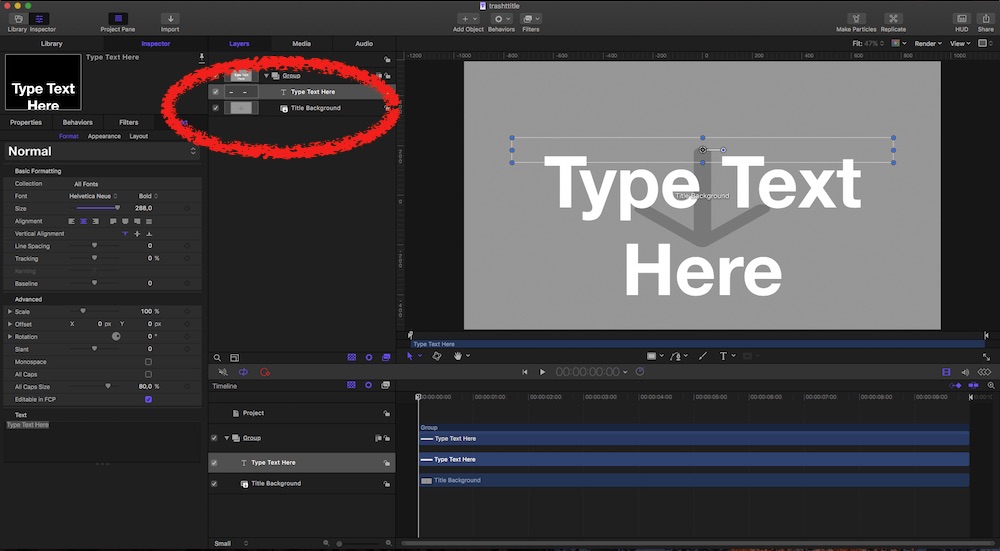
When choosing 'Title' in the Project Browser, Motion adds a group with a Dropzone 'Title Background'…
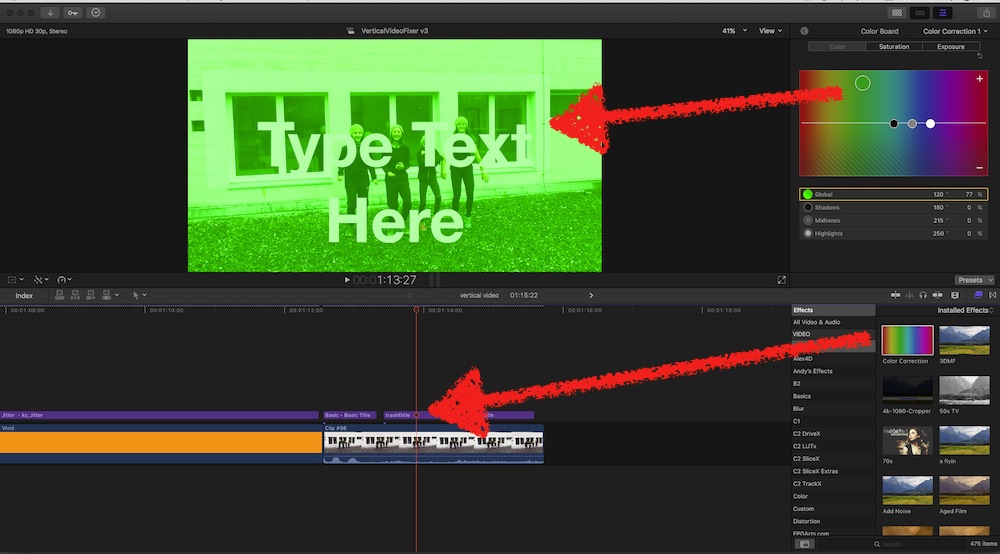
If you apply a color-correction to such a title (which isn't best-practice, more on that in a minute), it affects the clip in the story-line:
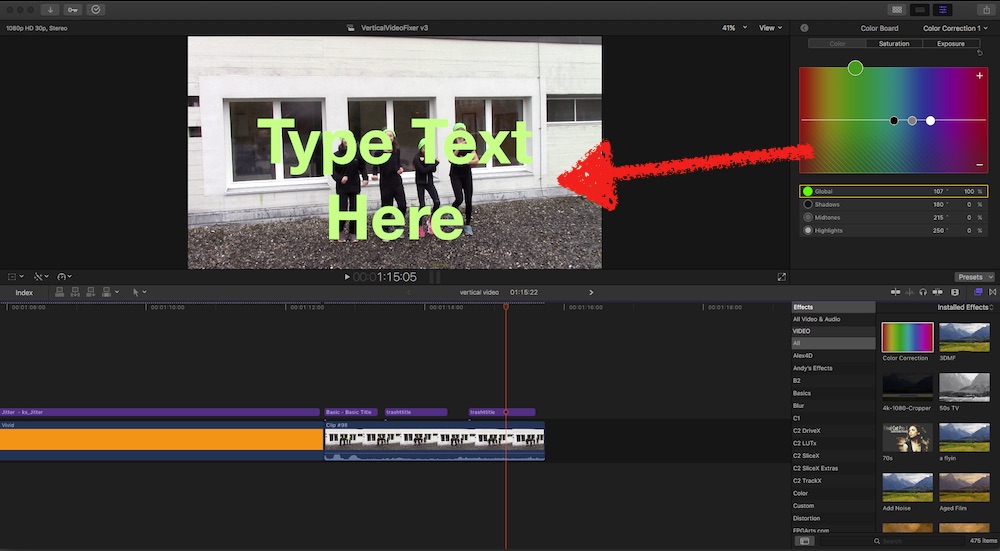
When you deactivate/delete that Dropzone in Motion, color-changes do NOT affect the storyline:
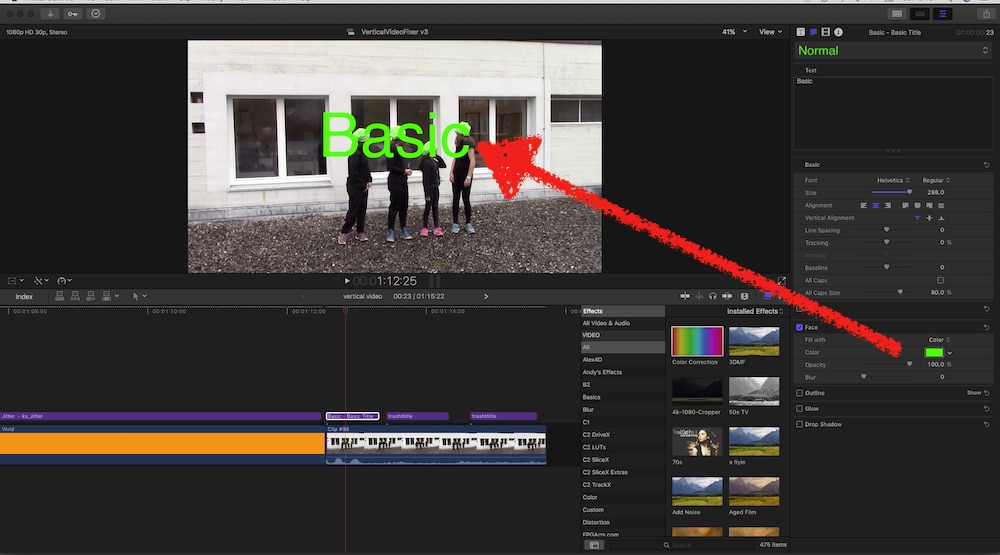
best-practice:
The Title-plugin allows usage of the standard color-picker - as the Basic title does:
That 'naughty' Dropzone can also affect the position or size of the clip in the storyline !
I'm not sure why Apple has added that Dropzone - simply not needed (imho!). Maybe in previous versions of FCPX it was needed…
When choosing 'Title' in the Project Browser, Motion adds a group with a Dropzone 'Title Background'…
If you apply a color-correction to such a title (which isn't best-practice, more on that in a minute), it affects the clip in the story-line:
When you deactivate/delete that Dropzone in Motion, color-changes do NOT affect the storyline:
best-practice:
The Title-plugin allows usage of the standard color-picker - as the Basic title does:
That 'naughty' Dropzone can also affect the position or size of the clip in the storyline !
I'm not sure why Apple has added that Dropzone - simply not needed (imho!). Maybe in previous versions of FCPX it was needed…
Please Log in to join the conversation.
- geoffreygonzales
-
Topic Author
- Offline
- New Member
-
Less
More
- Posts: 3
- Thank you received: 0
07 Jan 2017 18:48 #84622
by geoffreygonzales
Replied by geoffreygonzales on topic Color Grading Has Mind Of Its Own
thanks for the help guys. yes I've figured out the mistaken colored title - i accidentally applied a filter to it when mass selecting clips to apply a filter to. so thats solved.
the issue now is demonstrated around 1:57 in that video - the shift of color due to the funky rendering of the layered title. right now my best guess is it has to do something with the - oh i figured a solution. I'm gonna cut it with no white balance, export it, then use the exported clip and apply a color correction and titles to that. that way the funky rendering (maybe due to go pro's pro tune lut, thats my best guess) won't be called.
thanks y'all.
just general info in case you encounter this bug when working with gopro footage - cut it raw, then color and add effects on top.
the issue now is demonstrated around 1:57 in that video - the shift of color due to the funky rendering of the layered title. right now my best guess is it has to do something with the - oh i figured a solution. I'm gonna cut it with no white balance, export it, then use the exported clip and apply a color correction and titles to that. that way the funky rendering (maybe due to go pro's pro tune lut, thats my best guess) won't be called.
thanks y'all.
just general info in case you encounter this bug when working with gopro footage - cut it raw, then color and add effects on top.
Please Log in to join the conversation.
- geoffreygonzales
-
Topic Author
- Offline
- New Member
-
Less
More
- Posts: 3
- Thank you received: 0
07 Jan 2017 18:52 #84623
by geoffreygonzales
Replied by geoffreygonzales on topic Color Grading Has Mind Of Its Own
thanks for the help guys. yes I've figured out the mistaken colored title - i accidentally applied a filter to it when mass selecting clips to apply a filter to. so thats solved.
the issue now is demonstrated around 1:57 in that video - the shift of color due to the funky rendering of the layered title. right now my best guess is it has to do something with the - oh i figured a solution. I'm gonna cut it with no white balance, export it, then use the exported clip and apply a color correction and titles to that. that way the funky rendering (maybe due to go pro's pro tune lut, thats my best guess) won't be called.
thanks y'all
just general info in case you encounter this bug when working with gopro footage - cut it raw, then color and add effects on top.
the issue now is demonstrated around 1:57 in that video - the shift of color due to the funky rendering of the layered title. right now my best guess is it has to do something with the - oh i figured a solution. I'm gonna cut it with no white balance, export it, then use the exported clip and apply a color correction and titles to that. that way the funky rendering (maybe due to go pro's pro tune lut, thats my best guess) won't be called.
thanks y'all
just general info in case you encounter this bug when working with gopro footage - cut it raw, then color and add effects on top.
Please Log in to join the conversation.
07 Feb 2017 22:25 #85569
by AL
Replied by AL on topic Color Grading Has Mind Of Its Own
I'm experiencing something a little similar, although in my case there are no color corrections, effects or titles involved. But it looks a little bit similar than what Geoffrey's video showed.
Here's what I'm experiencing: drive.google.com/file/d/0BxfXZZHzRxhRNjd...RkE/view?usp=sharing
So I'm working on some 120fps 1080p Protune footage from a GoPro Hero 4 Black. I'm getting a weird color shift for the clips on my timeline and it happens totally randomly. Sometimes it occurs when I play/pause my timeline (like in the video I linked). Sometimes the color shift gets rendered in the clip and it jumps back and forth as I play my timeline. In these cases it also shows on final exports.
After a lot of struggle and re-rendering clips I noticed that optimizing my footage fixes this issue, but it's still kinda annoying since I don't usually need to transcode my footage for the short projects I work on.
Here's what I'm experiencing: drive.google.com/file/d/0BxfXZZHzRxhRNjd...RkE/view?usp=sharing
So I'm working on some 120fps 1080p Protune footage from a GoPro Hero 4 Black. I'm getting a weird color shift for the clips on my timeline and it happens totally randomly. Sometimes it occurs when I play/pause my timeline (like in the video I linked). Sometimes the color shift gets rendered in the clip and it jumps back and forth as I play my timeline. In these cases it also shows on final exports.
After a lot of struggle and re-rendering clips I noticed that optimizing my footage fixes this issue, but it's still kinda annoying since I don't usually need to transcode my footage for the short projects I work on.
Please Log in to join the conversation.

08 Feb 2017 00:46 #85572
by JoeEditor
Replied by JoeEditor on topic Color Grading Has Mind Of Its Own
I work with a lot of GoPro footage, and I HATE the ProTune. We never use it in the cameras. I've had headaches with it natively in FCPX. Just my two cents.
Please Log in to join the conversation.
