


- Posts: 3
- Thank you received: 0
3 Post Moderation Rule for New Boarders (25 Jan 2021)
New boarders will have their posts moderated - Don't worry if you cannot see your post immediately.
Jim Beam Commercial effect
30 Dec 2016 13:23 #84406
by bbader416
Jim Beam Commercial effect was created by bbader416
Maybe this isn't a question for this forum but I haven't been able to find an answer anywhere I have looked. Does anyone know how the effect in the Jim Beam commercial is accomplished? The one I am asking about is where the rack house comes apart board by board and then the barrels start to come off the racks and finally a barrel opens and the whisky starts to come out. This type of effect was also used in a Sci-Fi movie where aliens took apart a farm house. I can't remember the name of that at the moment.
I'm guessing that if anything this would probably be done in motion but I haven't a clue so I thought I would ask here.
Thank you
I'm guessing that if anything this would probably be done in motion but I haven't a clue so I thought I would ask here.
Thank you
Please Log in to join the conversation.
- Karsten Schlüter
-

- Offline
- Moderator
-

Less
More
- Posts: 3790
- Thank you received: 718
30 Dec 2016 14:21 #84409
by Karsten Schlüter
Replied by Karsten Schlüter on topic Jim Beam Commercial effect
Welcome, Bob, to fcp.co 
Which one? I'm just aware of the Mila Kunis ones… do you have a link?
But by your description - that is by far far away from the possibilities of M5; usually, those 'disintegrate' effects ask for a full-flavored 3D animation program, such as Maya, 4D… or Blender, which is free.
bbader416 wrote: … how the effect in the Jim Beam commercial is accomplished? …
Which one? I'm just aware of the Mila Kunis ones… do you have a link?
But by your description - that is by far far away from the possibilities of M5; usually, those 'disintegrate' effects ask for a full-flavored 3D animation program, such as Maya, 4D… or Blender, which is free.
Please Log in to join the conversation.
30 Dec 2016 15:39 #84410
by bbader416
Replied by bbader416 on topic Jim Beam Commercial effect
Karsten
Thank you for the welcome.
Yes I am referring to the Mila Kunis ones.
I have installed Blender and looked at it some. I will look at the Maya and 4D apps for reference.
You know, I'm a software engineer but sometimes some of the things you can do with these programs baffle me. Trying to learn this on my own is hard. I may be able to write software but being artistic and creative does not come easily. Considering I'm trying to start this in my late 50's probably doesn't help either.
Bob
Thank you for the welcome.
Yes I am referring to the Mila Kunis ones.
I have installed Blender and looked at it some. I will look at the Maya and 4D apps for reference.
You know, I'm a software engineer but sometimes some of the things you can do with these programs baffle me. Trying to learn this on my own is hard. I may be able to write software but being artistic and creative does not come easily. Considering I'm trying to start this in my late 50's probably doesn't help either.
Bob
Please Log in to join the conversation.


30 Dec 2016 17:09 #84413
by JoeEditor
Replied by JoeEditor on topic Jim Beam Commercial effect
Yep, that was a full blown 3D modeling and animation package. Don't forget Modo in that list (cause I use it).
Now, if you made the elements into fonts, Motion could do most of it... :silly:
Now, if you made the elements into fonts, Motion could do most of it... :silly:
Please Log in to join the conversation.
- MarkNelsonMovies
-

- Offline
- Elite Member
-

Less
More
- Posts: 256
- Thank you received: 48
31 Dec 2016 00:49 #84415
by MarkNelsonMovies
Replied by MarkNelsonMovies on topic Jim Beam Commercial effect
Don't forget Nuke, and also Fusion (which has a free version with some limitations.
If you just want the basic idea, you could just break the image into sections, and then keyframe/use a behavior to spread them apart. you would have to do something for a background image underneath though.
If you just want the basic idea, you could just break the image into sections, and then keyframe/use a behavior to spread them apart. you would have to do something for a background image underneath though.
Please Log in to join the conversation.
- Karsten Schlüter
-
- Offline
- Moderator
-
Less
More
- Posts: 3790
- Thank you received: 718
31 Dec 2016 04:23 - 31 Dec 2016 04:25 #84418
by Karsten Schlüter
… could be helpful to understand, tried several times to learn it , incl several books & videos - nope, no chance, above me. Blender is an incredible powerful, feature-rich tool, but very … different, starts with 'selecting with a right-mouse-click' - hu??? :blink:
Havent't notice flying interiors in the Jim Beam ads around here … but stakes are extremely highl to simulate 'reality'. Plus, I would consider 'practicals'. I'm teaching 'video' once week as a volunteer, and we do crazy stuff with plain editing, invisible wires/fishing lines, green screen ( here's one of my weird instructional I do for my kids ) …
If you don't want to compete with Hollywood, a lot of movie-magic can be created with grey-matter v1.0 and a blanket from the penny-store.
Looking forward for your projects …!
don't challenge Pielle, Ben, he's daring doing so! LOL :woohoo:
(@Bob: Pielle is one of the wizards here at fcp.co teaching Motion5 unbelievable tricks in 3D)
Replied by Karsten Schlüter on topic Jim Beam Commercial effect
bbader416 wrote: … I have installed Blender and looked at it some. I will look at the Maya and 4D apps for reference.
You know, I'm a software engineer …
… could be helpful to understand, tried several times to learn it , incl several books & videos - nope, no chance, above me. Blender is an incredible powerful, feature-rich tool, but very … different, starts with 'selecting with a right-mouse-click' - hu??? :blink:
Havent't notice flying interiors in the Jim Beam ads around here … but stakes are extremely highl to simulate 'reality'. Plus, I would consider 'practicals'. I'm teaching 'video' once week as a volunteer, and we do crazy stuff with plain editing, invisible wires/fishing lines, green screen ( here's one of my weird instructional I do for my kids ) …
If you don't want to compete with Hollywood, a lot of movie-magic can be created with grey-matter v1.0 and a blanket from the penny-store.
Looking forward for your projects …!
Now, if you made the elements into fonts, Motion could do most of it... :silly:
don't challenge Pielle, Ben, he's daring doing so! LOL :woohoo:
(@Bob: Pielle is one of the wizards here at fcp.co teaching Motion5 unbelievable tricks in 3D)
Last edit: 31 Dec 2016 04:25 by Karsten Schlüter.
Please Log in to join the conversation.
- Karsten Schlüter
-
- Offline
- Moderator
-
Less
More
- Posts: 3790
- Thank you received: 718
31 Dec 2016 07:56 #84419
by Karsten Schlüter
Replied by Karsten Schlüter on topic Jim Beam Commercial effect
ahh, finally found it, you talked about that one (haven't made on my German screen) :
No, this is perfectly crafted 3D-wizardry … asks for sculpting, texturing, setting 'lights', compo with the real parts of the set… not to mention, one of the Holy Grails of CGI, 'liquids' … (read a story about a German team of engineers worked 3 (!) years for the sea-simulation in The Perfect Storm… okayyyyy)
I've seen many 'fan projects', 'solo flights' from garage-producers… but not even close to that quality.
Keep in mind, for such projects teams of +100 people, all specialists of their own, work together.
Watch making-ofs from ILM, Weta, etc. ...
But I don't want to discourage you!
The tools are available, perhaps for a start, begin with something simple, e.g magically levitating basketball, a 'Stargate', or what I'm tinkering around now for about half a year, an UFO generator…
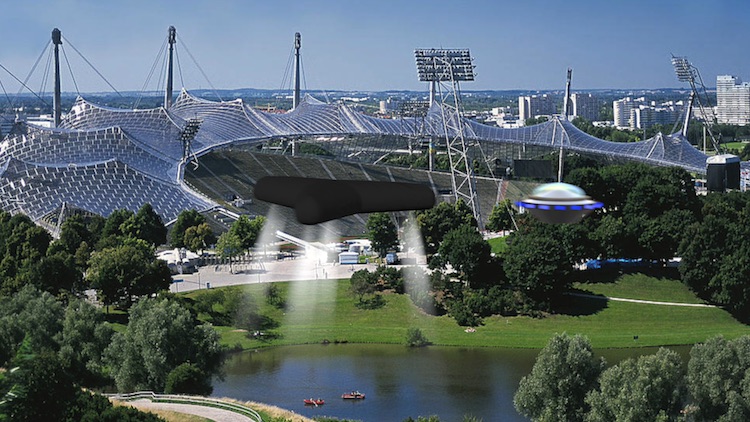
… so many ideas, so little skills :silly:
No, this is perfectly crafted 3D-wizardry … asks for sculpting, texturing, setting 'lights', compo with the real parts of the set… not to mention, one of the Holy Grails of CGI, 'liquids' … (read a story about a German team of engineers worked 3 (!) years for the sea-simulation in The Perfect Storm… okayyyyy)
I've seen many 'fan projects', 'solo flights' from garage-producers… but not even close to that quality.
Keep in mind, for such projects teams of +100 people, all specialists of their own, work together.
Watch making-ofs from ILM, Weta, etc. ...
But I don't want to discourage you!
The tools are available, perhaps for a start, begin with something simple, e.g magically levitating basketball, a 'Stargate', or what I'm tinkering around now for about half a year, an UFO generator…
… so many ideas, so little skills :silly:
Please Log in to join the conversation.
31 Dec 2016 13:02 #84422
by bbader416
Replied by bbader416 on topic Jim Beam Commercial effect
Karsten,
Thank you. Yes that is the commercial. I know you asked for a link to it and I should have realized that you may not have seen it. I apologize for that oversight.
I like your UFO's. What 3D package do you use?
As for my original question, I wasn't so much interested in duplicating the effect as I was in understanding how it was accomplished. As I do more with video and editing I am trying to understand more of how to make the magic.
Here's something silly I put together with stock footage and sound effects. I did one scene in Motion, doesn't look that good but it's there.
Bob
Thank you. Yes that is the commercial. I know you asked for a link to it and I should have realized that you may not have seen it. I apologize for that oversight.
I like your UFO's. What 3D package do you use?
As for my original question, I wasn't so much interested in duplicating the effect as I was in understanding how it was accomplished. As I do more with video and editing I am trying to understand more of how to make the magic.
Here's something silly I put together with stock footage and sound effects. I did one scene in Motion, doesn't look that good but it's there.
Bob
Please Log in to join the conversation.
31 Dec 2016 14:08 #84424
by JoeEditor
Replied by JoeEditor on topic Jim Beam Commercial effect
Actually, a team of 5 or less does a spot like that. But with very high end software, like Karsten said, and a lot of educational and skill. Lots of green screen, 3D, the liquid itself is very sophisticated particle emitters you only find in 3D modeling packages.
Please Log in to join the conversation.
- Karsten Schlüter
-
- Offline
- Moderator
-
Less
More
- Posts: 3790
- Thank you received: 718
01 Jan 2017 15:11 - 01 Jan 2017 15:17 #84444
by Karsten Schlüter
oops, sorry, thought mentioning 'plug-in' makes it clear: those UFOs are done 'abusing' FCPX/Motion5s 3D-font-feature. And I try to use standard fonts, not custom-made fonts, what board-member Pielle uses for his pieces of pure art (examples here or here ) Those pieces are breathtaking!
No, the UFOs are 'bended' Arial glyphs, like • or ▶︎.
Announcing that asa plugin for FCPX for months, but showing not enough endurance with that. Plus too many ideas, too little time. And skills.
_________
Not meant seriously, but as a quick'n dirty example:
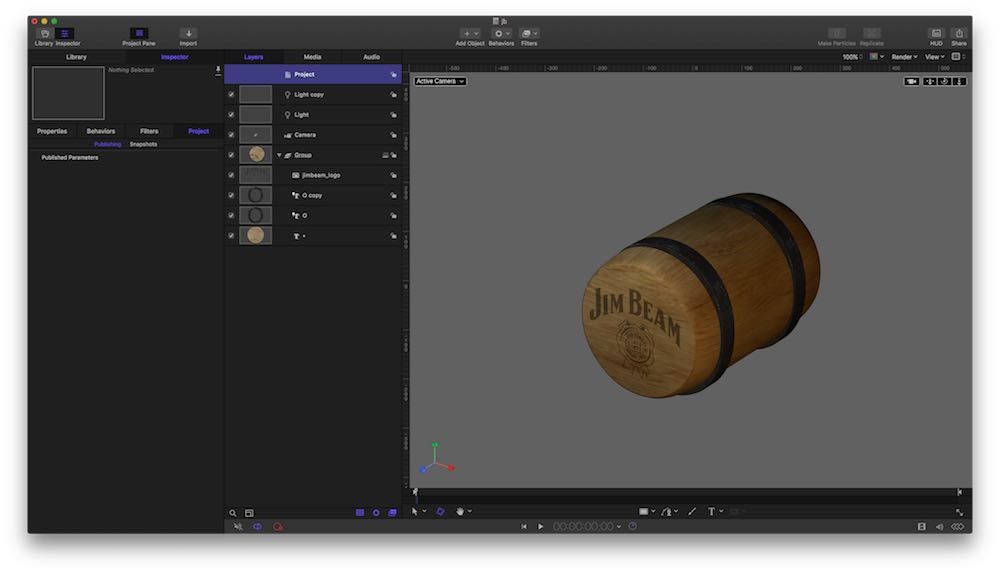
this is Motion5, a 'twisted' '•', two 'o', an imported png and some light
ok, you'd need two bottles of JB to accept this as a 'real' barrel - but for fun, learning the basics, done in minutes, and with an app which isn't meant for CGI not too bad, hmm? :whistle:
hahaha, your StarWars clone is nice, my son would like it ("Dad, more explosions. Much more explosions!"), plus 'Don LaFontaine' - what can possibly go wrong with that? LOL
Replied by Karsten Schlüter on topic Jim Beam Commercial effect
bbader416 wrote: …I like your UFO's. What 3D package do you use?…
oops, sorry, thought mentioning 'plug-in' makes it clear: those UFOs are done 'abusing' FCPX/Motion5s 3D-font-feature. And I try to use standard fonts, not custom-made fonts, what board-member Pielle uses for his pieces of pure art (examples here or here ) Those pieces are breathtaking!
No, the UFOs are 'bended' Arial glyphs, like • or ▶︎.
Announcing that asa plugin for FCPX for months, but showing not enough endurance with that. Plus too many ideas, too little time. And skills.
_________
Not meant seriously, but as a quick'n dirty example:
this is Motion5, a 'twisted' '•', two 'o', an imported png and some light
ok, you'd need two bottles of JB to accept this as a 'real' barrel - but for fun, learning the basics, done in minutes, and with an app which isn't meant for CGI not too bad, hmm? :whistle:
hahaha, your StarWars clone is nice, my son would like it ("Dad, more explosions. Much more explosions!"), plus 'Don LaFontaine' - what can possibly go wrong with that? LOL
Last edit: 01 Jan 2017 15:17 by Karsten Schlüter.
Please Log in to join the conversation.
