


- Posts: 5
- Thank you received: 0
3 Post Moderation Rule for New Boarders (25 Jan 2021)
New boarders will have their posts moderated - Don't worry if you cannot see your post immediately.
jittery Flickery text effect
22 Dec 2016 11:51 - 22 Dec 2016 19:21 #84196
by PhilMTX
jittery Flickery text effect was created by PhilMTX
Hello,
I am trying to improve the way I animate jittery text with handmade style.
I basically draw 3 PNGs of the word, I want to animate and loop it/retime it to create the effect.
It works well but
1 - it's time consuming to manually draw a word many time and export it as PNG
2 - I would like to randomize the shape and appearance of the text.
Here is a video, where I try to summarize how I do it.
<iframe width="560" height="315" src="/" frameborder="0" allowfullscreen>
Any tips on how to do this better would be really welcome.
Thank you for your time.
Phil
Ps: this is my first contribution to this forum, I hope i did not miss a thread that address this issue.
I am trying to improve the way I animate jittery text with handmade style.
I basically draw 3 PNGs of the word, I want to animate and loop it/retime it to create the effect.
It works well but
1 - it's time consuming to manually draw a word many time and export it as PNG
2 - I would like to randomize the shape and appearance of the text.
Here is a video, where I try to summarize how I do it.
<iframe width="560" height="315" src="/" frameborder="0" allowfullscreen>
Any tips on how to do this better would be really welcome.
Thank you for your time.
Phil
Ps: this is my first contribution to this forum, I hope i did not miss a thread that address this issue.
Last edit: 22 Dec 2016 19:21 by PhilMTX.
Please Log in to join the conversation.


22 Dec 2016 16:04 #84201
by JoeEditor
Replied by JoeEditor on topic jittery Flickery text effect
One option off the top of my head, cause I've done something similar before. Draw it in Motion, and you can animate the line parameters there, then only have one object to put in the FCPX timeline.
I'd encourage you to contact MotionVFX and ask them if they could produce an FCPX plugin that would do this. As I'm sure this type of thing would require some programing to make work as a template. Not sure you could get lines in a replicator or generator to conform to text like that automatically.
I'd encourage you to contact MotionVFX and ask them if they could produce an FCPX plugin that would do this. As I'm sure this type of thing would require some programing to make work as a template. Not sure you could get lines in a replicator or generator to conform to text like that automatically.
Please Log in to join the conversation.
22 Dec 2016 16:50 #84205
by VidGreg
Replied by VidGreg on topic jittery Flickery text effect
Hi Phil
Welcome to the forums
There is no attachment or link to see what you want. At least I don't see one.
Have you checked in the "Free Plugins and Templets" section of this site?
I know that several contributors have provided plugins that "flicker" like Karsten Schlüter, NocoDave, Alex4d
Here is just one from NocoDave for "Strobe" for video clips… www.fcp.co/forum/simulated-effects/17299-strobe
Try to add your link and maybe someone can point you to a plugin and let us know if you have Motion 5 or not.
Hope this Helps, Greg
Welcome to the forums
There is no attachment or link to see what you want. At least I don't see one.
Have you checked in the "Free Plugins and Templets" section of this site?
I know that several contributors have provided plugins that "flicker" like Karsten Schlüter, NocoDave, Alex4d
Here is just one from NocoDave for "Strobe" for video clips… www.fcp.co/forum/simulated-effects/17299-strobe
Try to add your link and maybe someone can point you to a plugin and let us know if you have Motion 5 or not.
Hope this Helps, Greg
Please Log in to join the conversation.
22 Dec 2016 19:11 #84210
by PhilMTX
Replied by PhilMTX on topic jittery Flickery text effect
Thank you - I did not know about MOTIONVFX. I'll take a look. Thanks again for the quick reply. Enjoy the holidays.
Please Log in to join the conversation.
22 Dec 2016 19:17 #84211
by PhilMTX
Replied by PhilMTX on topic jittery Flickery text effect
Hello Greg,
Thanks for your quick reply. I have not yet looked in the Free Plugins and template section. Definitely something I ned to look into.
It seems that the link I put in my post embed youtube in the thread but does not work.
if you copy the below link, I hope it will bring you to my video:
What I describe in my video works, but I need at least 10 minutes to animate one word. It looks great but it's quite slow.
I was thinking of randomizing the shape of a font, but I did not see anything that would do that.
let me know if the link above works, otherwise, I can upload a 10 seconds low quality video to illustrate what I am after.
Thanks again for taking the time to answer,
Enjoy your holiday.
Phil
Thanks for your quick reply. I have not yet looked in the Free Plugins and template section. Definitely something I ned to look into.
It seems that the link I put in my post embed youtube in the thread but does not work.
if you copy the below link, I hope it will bring you to my video:
What I describe in my video works, but I need at least 10 minutes to animate one word. It looks great but it's quite slow.
I was thinking of randomizing the shape of a font, but I did not see anything that would do that.
let me know if the link above works, otherwise, I can upload a 10 seconds low quality video to illustrate what I am after.
Thanks again for taking the time to answer,
Enjoy your holiday.
Phil
Please Log in to join the conversation.
23 Dec 2016 16:30 #84221
by VidGreg
Replied by VidGreg on topic jittery Flickery text effect
Hi Phil
Today the links are working, not sure why it didn't before.
If this is something that you want to use over and over again, say a signature Title's effect (it is a pretty cool effect!) then I suggest you create a font family (or 3) using a font creation program. While the initial effort and time to create a font will be somewhat greater, once created you can simply type in whatever letters you want, change size, style etc… and you could then also use any of the Motion Type effects you want including distortions, movements, scaling… Your font would behave just like any other fonts in any app you want including FCPX/Motion/Word/Pages…
You may want to go ahead and create 3 versions, or more just like you show on your video, but I recommend using a tablet and stylus/pencil like an iPad Pro and Apple Pencil. Would be so much faster and accurate. You could also hire this out.
Once you have created your fonts--Phils Jittery -- you could even sell them as a bundle if you wanted.
Now you could add your font as a Title to any video you make. It is possible to either do it as you have shown, or you could create a Motion based Title that stacked the variations and you can publish parameters for timings, positions, distortions etc… for the "Jitters".
This would be the most versatile way to make this.
There are some alternatives, but I think this is the way I would go.
Today it isn't that hard to make fonts, especially something like this where the look is a so loose. You could most likely even use the letters you have already created, maybe??
Happy Holidays
Hope this Helps, Greg
Today the links are working, not sure why it didn't before.
If this is something that you want to use over and over again, say a signature Title's effect (it is a pretty cool effect!) then I suggest you create a font family (or 3) using a font creation program. While the initial effort and time to create a font will be somewhat greater, once created you can simply type in whatever letters you want, change size, style etc… and you could then also use any of the Motion Type effects you want including distortions, movements, scaling… Your font would behave just like any other fonts in any app you want including FCPX/Motion/Word/Pages…
You may want to go ahead and create 3 versions, or more just like you show on your video, but I recommend using a tablet and stylus/pencil like an iPad Pro and Apple Pencil. Would be so much faster and accurate. You could also hire this out.
Once you have created your fonts--Phils Jittery -- you could even sell them as a bundle if you wanted.
Now you could add your font as a Title to any video you make. It is possible to either do it as you have shown, or you could create a Motion based Title that stacked the variations and you can publish parameters for timings, positions, distortions etc… for the "Jitters".
This would be the most versatile way to make this.
There are some alternatives, but I think this is the way I would go.
Today it isn't that hard to make fonts, especially something like this where the look is a so loose. You could most likely even use the letters you have already created, maybe??
Happy Holidays
Hope this Helps, Greg
Please Log in to join the conversation.
06 Jan 2017 11:34 #84578
by PhilMTX
Replied by PhilMTX on topic jittery Flickery text effect
Thanks again for taking the time to answer. I have been working on Fonts, to make the process quicker. I will update my progress in this thread. Enjoy the rest of your week. Phil
Please Log in to join the conversation.
- Karsten Schlüter
-

- Offline
- Moderator
-

Less
More
- Posts: 3790
- Thank you received: 718
06 Jan 2017 14:02 - 08 Jan 2017 07:25 #84581
by Karsten Schlüter
Replied by Karsten Schlüter on topic jittery Flickery text effect
Not exactly what you are looking for, but a 70% sort-of:
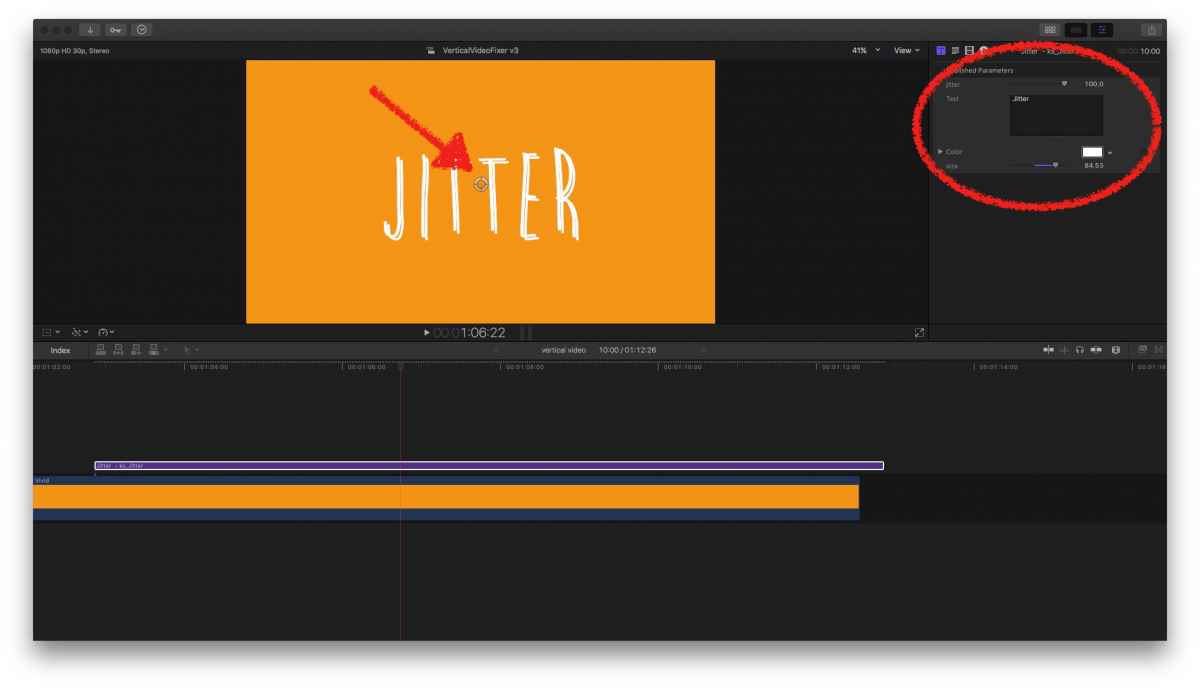
Before using it, goto
dl.dafont.com/dl/?f=brain_flower
to download & install that font …
Then dl , unzip and install my plugin… (drag folder into ~/Movies/Motion Templates/Titles)
In FCPX, you should find under Titles a new one, ks_Jitter.
In the Inspector you notice a few settings, .e.g. a 'Jitter Slider' to set the amount of shake.
There's an OSC to move the title around the screen…
Please do NOT use the generic Font/Face settings for regular titles… then the effect gets broken....
What ks_Jitter does not do, is transforming each line of the glyph; I just adopted Greg's idea of stacking a few clones and transform each randomly…
Feel free to use it!
Before using it, goto
dl.dafont.com/dl/?f=brain_flower
to download & install that font …
Then dl , unzip and install my plugin… (drag folder into ~/Movies/Motion Templates/Titles)
In FCPX, you should find under Titles a new one, ks_Jitter.
In the Inspector you notice a few settings, .e.g. a 'Jitter Slider' to set the amount of shake.
There's an OSC to move the title around the screen…
Please do NOT use the generic Font/Face settings for regular titles… then the effect gets broken....
What ks_Jitter does not do, is transforming each line of the glyph; I just adopted Greg's idea of stacking a few clones and transform each randomly…
Feel free to use it!
Last edit: 08 Jan 2017 07:25 by Karsten Schlüter.
Please Log in to join the conversation.
06 Jan 2017 19:09 #84588
by PhilMTX
Replied by PhilMTX on topic jittery Flickery text effect
Thanks - that looks good. I will try it over the week-end. Thanks for sharing.
Phil
Phil
Please Log in to join the conversation.
07 Jan 2017 15:13 #84613
by VidGreg
Replied by VidGreg on topic jittery Flickery text effect
Hey Karsten
Could you post a short vid of your plugin?
I promise to "Thank You" so your Thank You's Page can be Found :silly:

Greg
Could you post a short vid of your plugin?
I promise to "Thank You" so your Thank You's Page can be Found :silly:
Greg
Please Log in to join the conversation.
- Karsten Schlüter
-
- Offline
- Moderator
-
Less
More
- Posts: 3790
- Thank you received: 718
07 Jan 2017 15:21 #84614
by Karsten Schlüter
Yep, sure, should have done that in the first place. Unfortunately I'm actually Miles away from my trusty lil Mini... Gimme another 18 hours....
Replied by Karsten Schlüter on topic jittery Flickery text effect
VidGreg wrote: Hey Karsten
Could you post a short vid of your plugin
Yep, sure, should have done that in the first place. Unfortunately I'm actually Miles away from my trusty lil Mini... Gimme another 18 hours....
Please Log in to join the conversation.
07 Jan 2017 15:25 #84616
by VidGreg
Replied by VidGreg on topic jittery Flickery text effect
No wonder Page cannot be Found 404 error pops up. Your Mini is having separation anxiety.
Please Log in to join the conversation.
- Karsten Schlüter
-
- Offline
- Moderator
-
Less
More
- Posts: 3790
- Thank you received: 718
07 Jan 2017 15:29 #84617
by Karsten Schlüter
Replied by Karsten Schlüter on topic jittery Flickery text effect
... And it's cold And Dark here (that autocorrector on my Phone kills me!!!).... Poor lil Mini....
Please Log in to join the conversation.
- Karsten Schlüter
-
- Offline
- Moderator
-
Less
More
- Posts: 3790
- Thank you received: 718
08 Jan 2017 07:11 - 08 Jan 2017 07:26 #84636
by Karsten Schlüter
Replied by Karsten Schlüter on topic jittery Flickery text effect
so, here's a fast slammed together demo of my plugin in use:
hmmm, just noticing: the amount of jitter should take into calc the size of the font … ok, maybe in a future upgrade :lol:
=edit= oops, and I forgot to publish the font selection ..... needs definitely an update!!
=done= Don't miss the updated version 1_1 in. my original lost!i
hmmm, just noticing: the amount of jitter should take into calc the size of the font … ok, maybe in a future upgrade :lol:
=edit= oops, and I forgot to publish the font selection ..... needs definitely an update!!
=done= Don't miss the updated version 1_1 in. my original lost!i
Last edit: 08 Jan 2017 07:26 by Karsten Schlüter.
Please Log in to join the conversation.
