


- Posts: 8
- Thank you received: 0
3 Post Moderation Rule for New Boarders (25 Jan 2021)
New boarders will have their posts moderated - Don't worry if you cannot see your post immediately.
PROBLEM IMPORTING R3D FROM EPIC W IN FCPX
17 Dec 2016 23:30 #84073
by lucavolpe
PROBLEM IMPORTING R3D FROM EPIC W IN FCPX was created by lucavolpe
Hi Everyone! I hope someone here can help me out.
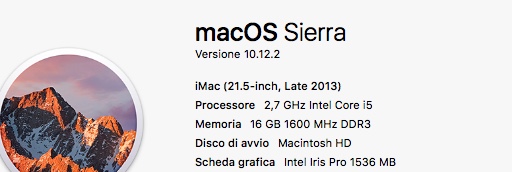
Untill few days ago I was able to import R3D files from my EPIC W (8k files) in FCPX. I was already on Sierra.
Then it was a Sierra update to 10.12.2 and after that something very strange happened.
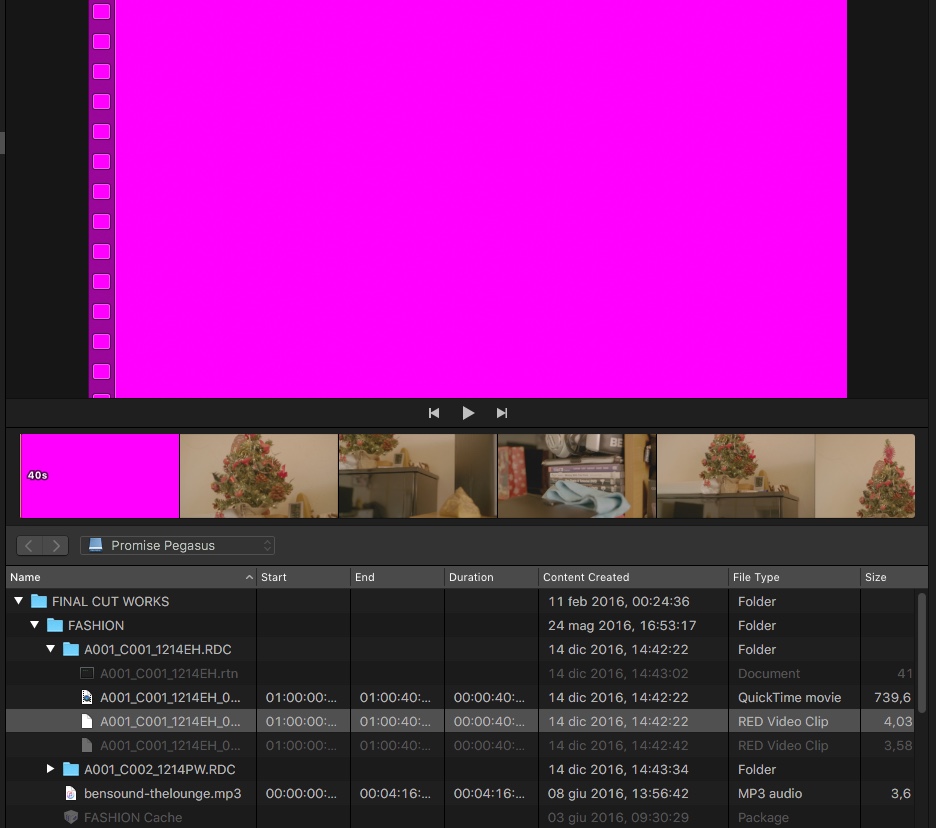
When I tried to import the R3D again, I just see a pink frame. You can actually scrub on it (so you see the video) but as you stop it become pink. The as soon I try to import FCPX Crashes!
Crashed Thread: 31 Dispatch queue: com.apple.helium.rq.gpu-ru0.vs0.gcd
.I thought was Color Finale that was doing some kind of conflict...so I removed it and today I decided to reinstall FCPX.
Also I reinstalled the red workflow from red.com
And nothing happened...same problem (see picture!)
Here is what I don't understand:
1. The file 8k from Red Epic W, works perfectly in red cine, so is NOT my GPU actually it works quite fast in red cine x.
2. I also downloaded 8K Helium files from red.com and I have the same problem, so is NOT my camera....
3. If I import in FCPX a files from SCARLET W it works great!
So at this point...I really don't know what can be!
Strange thing is that some people say that it works for them, but I dont know if they have same updated both in FCPX (the latest one) and SIERRA.
HOpe someone can help, there is also anothers person have my same problems.
Untill few days ago I was able to import R3D files from my EPIC W (8k files) in FCPX. I was already on Sierra.
Then it was a Sierra update to 10.12.2 and after that something very strange happened.
When I tried to import the R3D again, I just see a pink frame. You can actually scrub on it (so you see the video) but as you stop it become pink. The as soon I try to import FCPX Crashes!
Crashed Thread: 31 Dispatch queue: com.apple.helium.rq.gpu-ru0.vs0.gcd
.I thought was Color Finale that was doing some kind of conflict...so I removed it and today I decided to reinstall FCPX.
Also I reinstalled the red workflow from red.com
And nothing happened...same problem (see picture!)
Here is what I don't understand:
1. The file 8k from Red Epic W, works perfectly in red cine, so is NOT my GPU actually it works quite fast in red cine x.
2. I also downloaded 8K Helium files from red.com and I have the same problem, so is NOT my camera....
3. If I import in FCPX a files from SCARLET W it works great!
So at this point...I really don't know what can be!
Strange thing is that some people say that it works for them, but I dont know if they have same updated both in FCPX (the latest one) and SIERRA.
HOpe someone can help, there is also anothers person have my same problems.
Please Log in to join the conversation.
- brian.barr
-

- Offline
- New Member
-

Less
More
- Posts: 2
- Thank you received: 0
20 Dec 2016 16:20 #84133
by brian.barr
Replied by brian.barr on topic PROBLEM IMPORTING R3D FROM EPIC W IN FCPX
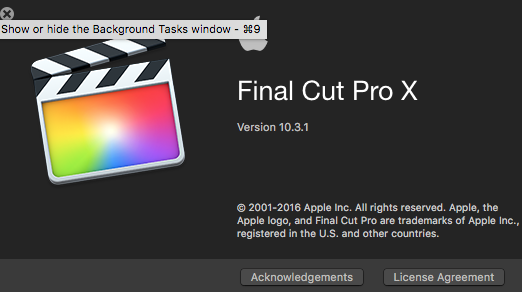
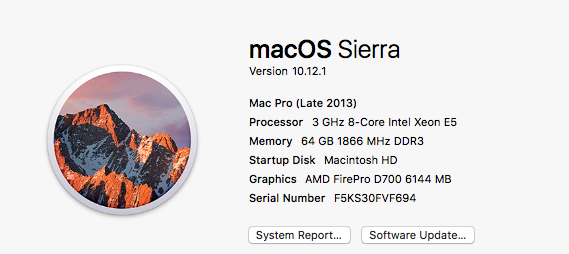
I have the same problem and have for a while! See my pictures for what I am running. We are using a Red Scarlet Dragon.
The only work around I have found is to copy the footage over the top of the same footage. That will at least let me preview the footage. But that makes editing very difficult..
I'm having trouble finding others that have this problem.. hope someone has a solution.
The only work around I have found is to copy the footage over the top of the same footage. That will at least let me preview the footage. But that makes editing very difficult..
I'm having trouble finding others that have this problem.. hope someone has a solution.
Please Log in to join the conversation.
- brian.barr
-
- Offline
- New Member
-
Less
More
- Posts: 2
- Thank you received: 0
20 Dec 2016 17:01 #84137
by brian.barr
Replied by brian.barr on topic PROBLEM IMPORTING R3D FROM EPIC W IN FCPX
Ok, I was able to find a solution that seems to fix the problem. Doesn't actually get to the root of the problem, but does fix it. Create optimized media with the files and they won't show up pink anymore.
Please Log in to join the conversation.
21 Dec 2016 10:34 #84153
by lucavolpe
Replied by lucavolpe on topic PROBLEM IMPORTING R3D FROM EPIC W IN FCPX
HI Guys, thanks just been at the phone with Apple for 2 hours...they have no idea...the guy installed same configuration I have on his Mac and worked fine...he said that if was a Ram or GPU problem it also affect other things not only FCPX. We also resetted the Vram but nothing.....so the only thing I have to do is to reinstall the OS on my computer but I can't do right now as I have some works to finish in prores (which works fine)
I can't even do proxy or optimized media as it crashes!!
The frustrating thing is that WHY dragon files works and helium files not, I suppose something in the plug in has crashed or has been deleted somehow??? If was a gpu or ram problem it should do that also with others files!
6k Helium Dont' work
6k Dragon works perfectly!
I am shattered...a week behind this issue.....
I can't even do proxy or optimized media as it crashes!!
The frustrating thing is that WHY dragon files works and helium files not, I suppose something in the plug in has crashed or has been deleted somehow??? If was a gpu or ram problem it should do that also with others files!
6k Helium Dont' work
6k Dragon works perfectly!
I am shattered...a week behind this issue.....
Please Log in to join the conversation.
- ronny courtens
-

- Offline
- Moderator
-

Less
More
- Posts: 4455
- Thank you received: 962
21 Dec 2016 11:01 #84156
by ronny courtens
Replied by ronny courtens on topic PROBLEM IMPORTING R3D FROM EPIC W IN FCPX
Hey Luca,
It is obvious that your problem has began after updating the OS. OS updates always screw up some (or a lot of) things, and that's why we advise never to install any OS updates as soon as they are available. Especially if you use your computer for payed work and/or if you are in the middle of a project.
Just reinstalling the OS may solve the issue.
If it doesn't, it could be that the OS update has damaged your User preferences (which also affect the RED plugin preferences). In that case you might try to create a new Admin User and see if the problem still happens when you work with the new User. If the problem is solved by creating a new User, post back here so we can show you how to safely restore your old User account.
- Ronny
It is obvious that your problem has began after updating the OS. OS updates always screw up some (or a lot of) things, and that's why we advise never to install any OS updates as soon as they are available. Especially if you use your computer for payed work and/or if you are in the middle of a project.
Just reinstalling the OS may solve the issue.
If it doesn't, it could be that the OS update has damaged your User preferences (which also affect the RED plugin preferences). In that case you might try to create a new Admin User and see if the problem still happens when you work with the new User. If the problem is solved by creating a new User, post back here so we can show you how to safely restore your old User account.
- Ronny
Please Log in to join the conversation.
21 Dec 2016 13:21 #84162
by lucavolpe
Replied by lucavolpe on topic PROBLEM IMPORTING R3D FROM EPIC W IN FCPX
Hi Ronny thanks for the message. Yes we tried to create a new user and sadly we had the same problem. Also the guy at apple was quite confused!
Please Log in to join the conversation.
08 Jan 2017 08:00 #84637
by lucavolpe
Replied by lucavolpe on topic PROBLEM IMPORTING R3D FROM EPIC W IN FCPX
Update:
I uave reinstalled Sierra and sadly nothing is changed still I can't import anymore R3D files I am so annoyed!!!!
I uave reinstalled Sierra and sadly nothing is changed still I can't import anymore R3D files I am so annoyed!!!!
Please Log in to join the conversation.


08 Jan 2017 13:08 - 08 Jan 2017 13:09 #84644
by JoeEditor
Replied by JoeEditor on topic PROBLEM IMPORTING R3D FROM EPIC W IN FCPX
Pardon if this has been mentioned before, but did you install Red's "Quicktime Workflow" update for Sierra? I'll assume everyone is up to date with this, right? Or at least did a reinstall after the OS update?
www.red.com/downloads/5340f90826465a7c2b000338
www.red.com/downloads/5340f90826465a7c2b000338
Last edit: 08 Jan 2017 13:09 by JoeEditor.
Please Log in to join the conversation.
08 Jan 2017 17:54 #84657
by lucavolpe
Replied by lucavolpe on topic PROBLEM IMPORTING R3D FROM EPIC W IN FCPX
Yes and I also did two times ans nothing 
Today Installed Davinci Resolve and it works....so the problem is in FCPX somewhere! I also reinstalled fcpx but nothing...now no idea!!!!
Today Installed Davinci Resolve and it works....so the problem is in FCPX somewhere! I also reinstalled fcpx but nothing...now no idea!!!!
Please Log in to join the conversation.
- erick.wilczynski
-
- Offline
- New Member
-
Less
More
- Posts: 11
- Thank you received: 0
26 Apr 2017 00:06 #87553
by erick.wilczynski
Replied by erick.wilczynski on topic PROBLEM IMPORTING R3D FROM EPIC W IN FCPX
In the Notes for the link to the Apple Quicktime Plugins it says:
"Note: FCPX does not currently support RED material above 6K resolution."
So create proxies.
Next time tell the production to hire a DIT.
"Note: FCPX does not currently support RED material above 6K resolution."
So create proxies.
Next time tell the production to hire a DIT.
Please Log in to join the conversation.
- ronny courtens
-
- Offline
- Moderator
-
Less
More
- Posts: 4455
- Thank you received: 962
26 Apr 2017 04:19 - 26 Apr 2017 04:23 #87559
by ronny courtens
Replied by ronny courtens on topic PROBLEM IMPORTING R3D FROM EPIC W IN FCPX
Those notes from Blackmagic are outdated. Here you see native RED Weapon 8K R3D footage both in the FCP X 10.3.3 clip browser and on the 8K timeline on a maxed out 2015 MBP running Sierra 10.12.3:
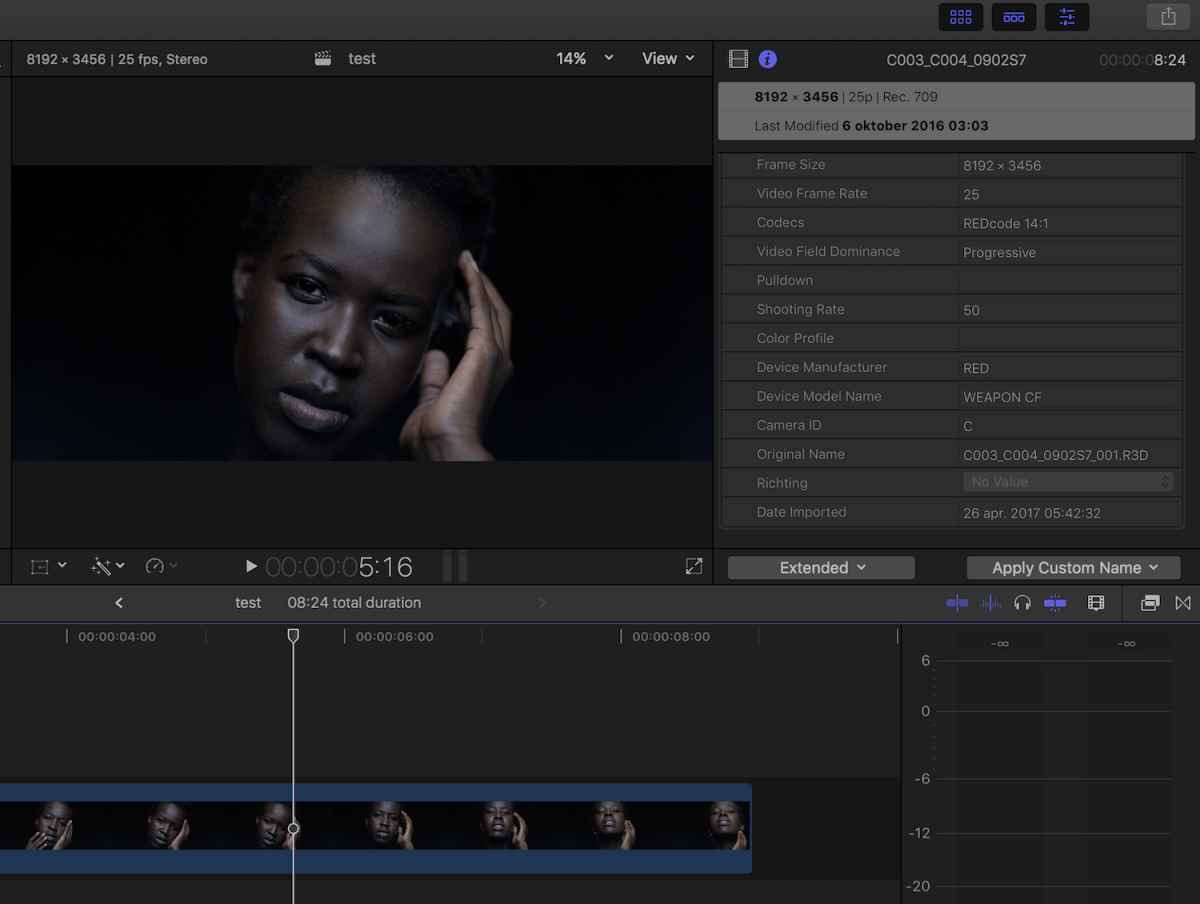
The clips play without any hiccup in the clip browser. On the timeline they play smoothly using Better Performance in either a 2K or 4K project, or using Better Quality in a 1080p project. Which is quite amazing.
And here you see native RED 8K R3D playing smoothly from a LumaForge rack server on a 6NMP machine running Sierra and FCP X 10.3.2 using Better Performance with an 8K monitor attached to it in a studio in London:


Of course this does not solve your problem, it just shows that there must be something within your specific configuration that causes this issue, and it's not related to FCP X. If creating optimized or proxy media can help you going for the moment, do so.
If you wish you can send me one or two of your problematic R3D clips so I can run a test with them on different configurations to see where the cause of the issue really lies: ronnycourtens@mac.com
- Ronny
The clips play without any hiccup in the clip browser. On the timeline they play smoothly using Better Performance in either a 2K or 4K project, or using Better Quality in a 1080p project. Which is quite amazing.
And here you see native RED 8K R3D playing smoothly from a LumaForge rack server on a 6NMP machine running Sierra and FCP X 10.3.2 using Better Performance with an 8K monitor attached to it in a studio in London:
Of course this does not solve your problem, it just shows that there must be something within your specific configuration that causes this issue, and it's not related to FCP X. If creating optimized or proxy media can help you going for the moment, do so.
If you wish you can send me one or two of your problematic R3D clips so I can run a test with them on different configurations to see where the cause of the issue really lies: ronnycourtens@mac.com
- Ronny
Last edit: 26 Apr 2017 04:23 by ronny courtens.
Please Log in to join the conversation.
- erick.wilczynski
-
- Offline
- New Member
-
Less
More
- Posts: 11
- Thank you received: 0
26 Apr 2017 04:58 #87561
by erick.wilczynski
Replied by erick.wilczynski on topic PROBLEM IMPORTING R3D FROM EPIC W IN FCPX
He's on 10.3.1 so maybe that's the issue? Ronny's reference was from 10.3.3. Also that quote was from your link to the red webiajte Ronny.
Please Log in to join the conversation.
- erick.wilczynski
-
- Offline
- New Member
-
Less
More
- Posts: 11
- Thank you received: 0
26 Apr 2017 05:02 #87562
by erick.wilczynski
Replied by erick.wilczynski on topic PROBLEM IMPORTING R3D FROM EPIC W IN FCPX
Oh sorry, Ronny you didn't post the link I was referencing.
Please Log in to join the conversation.
27 Apr 2017 09:36 #87602
by lucavolpe
Replied by lucavolpe on topic PROBLEM IMPORTING R3D FROM EPIC W IN FCPX
Thanks guys!
We maybe find the problem (only me and anither guy inthe USA have the sma issue) and it looks like is related to our graphic card the Intel Iris. Are the photo above Macs with which graphic card?
Many thanks!
We maybe find the problem (only me and anither guy inthe USA have the sma issue) and it looks like is related to our graphic card the Intel Iris. Are the photo above Macs with which graphic card?
Many thanks!
Please Log in to join the conversation.
- ronny courtens
-
- Offline
- Moderator
-
Less
More
- Posts: 4455
- Thank you received: 962
27 Apr 2017 09:52 #87603
by ronny courtens
Replied by ronny courtens on topic PROBLEM IMPORTING R3D FROM EPIC W IN FCPX
Hi Luca,
The MacBookPro has an NVIDIA Force GT 750M card and the new MacPro has dual 700 AMD cards. I agree that your Intel Iris card could be causing your issues.
- Ronny
The MacBookPro has an NVIDIA Force GT 750M card and the new MacPro has dual 700 AMD cards. I agree that your Intel Iris card could be causing your issues.
- Ronny
Please Log in to join the conversation.

27 Apr 2017 10:57 - 27 Apr 2017 10:58 #87605
by ronfya
Replied by ronfya on topic PROBLEM IMPORTING R3D FROM EPIC W IN FCPX
Hey Luca,
I alsi had a pink frames problem with RED footage. Check this topic for its description and solution.
www.fcp.co/forum/4-final-cut-pro-x-fcpx/...h-red-camera-footage
cheers
I alsi had a pink frames problem with RED footage. Check this topic for its description and solution.
www.fcp.co/forum/4-final-cut-pro-x-fcpx/...h-red-camera-footage
cheers
Last edit: 27 Apr 2017 10:58 by ronfya.
Please Log in to join the conversation.
27 Apr 2017 12:07 #87608
by lucavolpe
Replied by lucavolpe on topic PROBLEM IMPORTING R3D FROM EPIC W IN FCPX
Thanks guys, sadly it doesn't work at all. The problem we thinknis indeed the Intel card, if Intell will not send an update the files will never work. I only can use davinci with R3D files or red cine. I contacted Intell too but they said we need to wait!!!
No chance then lol
No chance then lol
Please Log in to join the conversation.
- kyungmo.choi
-
- Offline
- New Member
-
Less
More
- Posts: 1
- Thank you received: 0
30 Jun 2017 14:24 #89125
by kyungmo.choi
Replied by kyungmo.choi on topic PROBLEM IMPORTING R3D FROM EPIC W IN FCPX
I'm also experiencing pink frame issue on fcp x. I agree with it caused from graphic card problem. I am using Mac Pro Late 2013 with dual AMD D700. There are no issue when I using this set up.
Recently, I bought external gpu - GeForce 1080Ti. I always met pink frame issue whenever I am using with external NVida GPU.
Recently, I bought external gpu - GeForce 1080Ti. I always met pink frame issue whenever I am using with external NVida GPU.
Please Log in to join the conversation.
