


- Posts: 228
- Thank you received: 16
3 Post Moderation Rule for New Boarders (25 Jan 2021)
New boarders will have their posts moderated - Don't worry if you cannot see your post immediately.
Export & Optical flow / background task ?
09 Dec 2016 13:30 - 09 Dec 2016 14:10 #83827
by Schnurr
Export & Optical flow / background task ? was created by Schnurr
Hi,
I receive below messaging indicating that a optical flow task is still ongoing. Any chance to figure out how long this might take as in the background information panel nothing shows up.
Export set to standard.

In addition how can I display in the timeline the clips where I applied opt. flow? Shouldn't speed adjustments be displayed too in the "Video animation"?
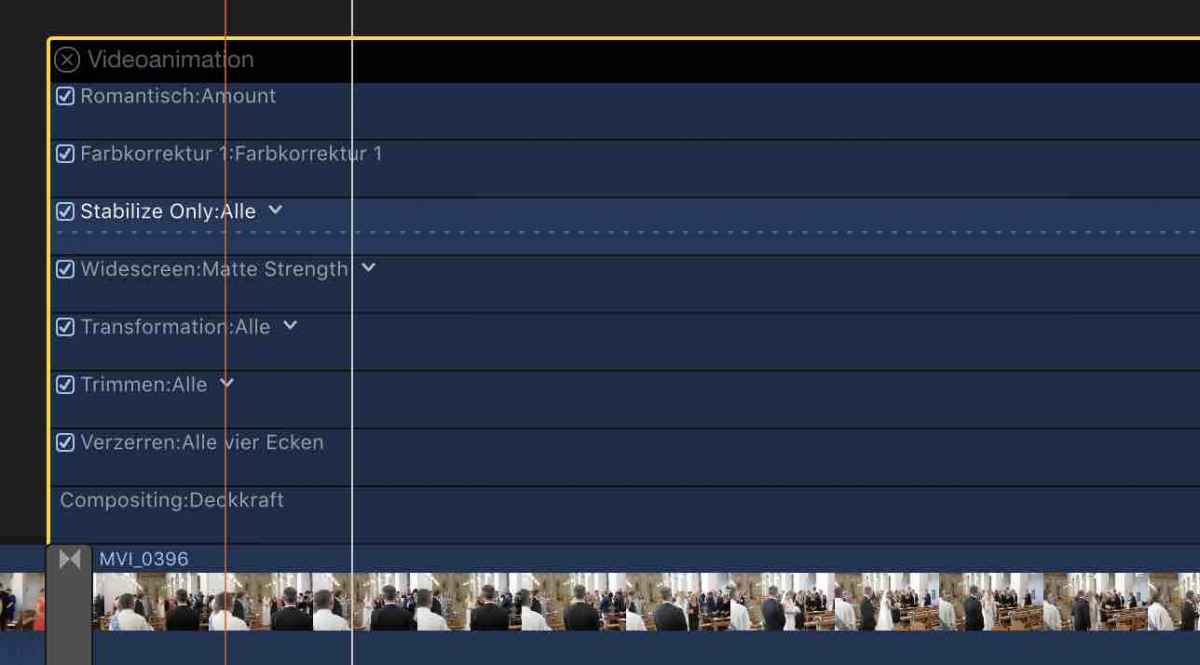
Thanks
Tobias
I receive below messaging indicating that a optical flow task is still ongoing. Any chance to figure out how long this might take as in the background information panel nothing shows up.
Export set to standard.
In addition how can I display in the timeline the clips where I applied opt. flow? Shouldn't speed adjustments be displayed too in the "Video animation"?
Thanks
Tobias
Last edit: 09 Dec 2016 14:10 by Schnurr.
Please Log in to join the conversation.


09 Dec 2016 20:07 #83854
by JoeEditor
Replied by JoeEditor on topic Export & Optical flow / background task ?
Known bug, I get it a lot.
Please Log in to join the conversation.
10 Dec 2016 12:38 #83872
by Schnurr
Replied by Schnurr on topic Export & Optical flow / background task ?
Hi Guru,
aha you mean bug or feature Hard to belief that such a basic thing doesn't work in a software that is called professional. I guess Apple has received enough Feedback requests on that already ... Would be cool to have one thread with "Known bugs" for newbies.
Any chance to filter the clips in the timeline where optical flow is applied or do I need to check every single clip?
Tobias
aha you mean bug or feature
Hard to belief that such a basic thing doesn't work in a software that is called professional. I guess Apple has received enough Feedback requests on that already ... Would be cool to have one thread with "Known bugs" for newbies.Any chance to filter the clips in the timeline where optical flow is applied or do I need to check every single clip?
Tobias
Please Log in to join the conversation.
10 Dec 2016 14:23 #83873
by JoeEditor
Replied by JoeEditor on topic Export & Optical flow / background task ?
It's only applied to clips you retime, pretty simple. All software has bugs, try using PPro or Media Composer.
Please Log in to join the conversation.
10 Dec 2016 16:57 #83878
by Schnurr
Replied by Schnurr on topic Export & Optical flow / background task ?
Sure it only applies to clips with retime (wasn't the question)
Meanwhile called Apple and they suggested to create a new user and delete/reinstall FCpX. Didn't help but seems that I figure out that in my situation it is related to a clip with "ramp" retiming as the "......." indicators in the timeline don't make any progress at all. MAYBE optical flow can't be applied in such a scenario.
By the way in order to answer my question reg. "showing clips where speed adjustments have been applied " Command R should show that but based on below screenshot unfortunately not for all clips which is wired...

Meanwhile called Apple and they suggested to create a new user and delete/reinstall FCpX. Didn't help but seems that I figure out that in my situation it is related to a clip with "ramp" retiming as the "......." indicators in the timeline don't make any progress at all. MAYBE optical flow can't be applied in such a scenario.
By the way in order to answer my question reg. "showing clips where speed adjustments have been applied " Command R should show that but based on below screenshot unfortunately not for all clips which is wired...
Please Log in to join the conversation.
10 Dec 2016 18:05 #83880
by Axel
Replied by Axel on topic Export & Optical flow / background task ?
Hello fellow wedding videographer!
Explain why almost all your clips including music have Normal 100%. This of course makes it more difficult to find a timeramp (but easy enough, I'd say), and I don't see the point in the first place.
You wrote:
"that in my situation it is related to a clip with "ramp" retiming as the "......." indicators in the timeline don't make any progress at all. MAYBE optical flow can't be applied in such a scenario.
"
Yes, it can. Tried it in 10.3.1 just now (short timeline though, just for the test), and it worked. So, as often, I can't reproduce the problem. If it's a known bug, it has to be configuration-related I guess.
A different question is, if optical flow gives you the optimal quality in every case. Which it doesn't. It doesn't treat existing motion blur well, and it will make many movements (particularly facial expressions) look as if the people were made of jelly.
I'd always try frame blending first, particularly if the speeds are as close to realtime as 50% or 200% and divide by 2.
Then there is the "trailer slomo", crudely repeating frames to push emotions (Quality: "Normal"). Sure, it doesn't look as smooth as a real slomo (you know of course that a camera capable of recording 50p can be used for perfect slomos in a 25p timeline), but in most cases I'd prefer it over optical flow. The audience senses the time manipulation anyway, why hide it? The same can be true for time ramps. Experiment.
I hope you find a solution. Maybe I encountered no problem because I made the test export in one sitting. A known bug, and one which everybody knows of, is that FCP X forgets unfinished background processes after restart, and that there seems no way to trigger them anew but to delete the effect and then apply it again.
Explain why almost all your clips including music have Normal 100%. This of course makes it more difficult to find a timeramp (but easy enough, I'd say), and I don't see the point in the first place.
You wrote:
"that in my situation it is related to a clip with "ramp" retiming as the "......." indicators in the timeline don't make any progress at all. MAYBE optical flow can't be applied in such a scenario.
"
Yes, it can. Tried it in 10.3.1 just now (short timeline though, just for the test), and it worked. So, as often, I can't reproduce the problem. If it's a known bug, it has to be configuration-related I guess.
A different question is, if optical flow gives you the optimal quality in every case. Which it doesn't. It doesn't treat existing motion blur well, and it will make many movements (particularly facial expressions) look as if the people were made of jelly.
I'd always try frame blending first, particularly if the speeds are as close to realtime as 50% or 200% and divide by 2.
Then there is the "trailer slomo", crudely repeating frames to push emotions (Quality: "Normal"). Sure, it doesn't look as smooth as a real slomo (you know of course that a camera capable of recording 50p can be used for perfect slomos in a 25p timeline), but in most cases I'd prefer it over optical flow. The audience senses the time manipulation anyway, why hide it? The same can be true for time ramps. Experiment.
I hope you find a solution. Maybe I encountered no problem because I made the test export in one sitting. A known bug, and one which everybody knows of, is that FCP X forgets unfinished background processes after restart, and that there seems no way to trigger them anew but to delete the effect and then apply it again.
Please Log in to join the conversation.
11 Dec 2016 10:08 - 11 Dec 2016 10:11 #83889
by Schnurr
Replied by Schnurr on topic Export & Optical flow / background task ?
Hi Axel,
well I am not a wedding videographer.. just my own one three years ago and need a free Xmas gift
Well in my scenario I can reproduce it to own clip where I applied speed ramping to 0%. In this clip optical flow causes the error. Switching it off and apply normal the error message doesn't appear. Applying again optical flow error appears again. But okay at least I know right now which clip that is out of 50-60 clips in the timeline
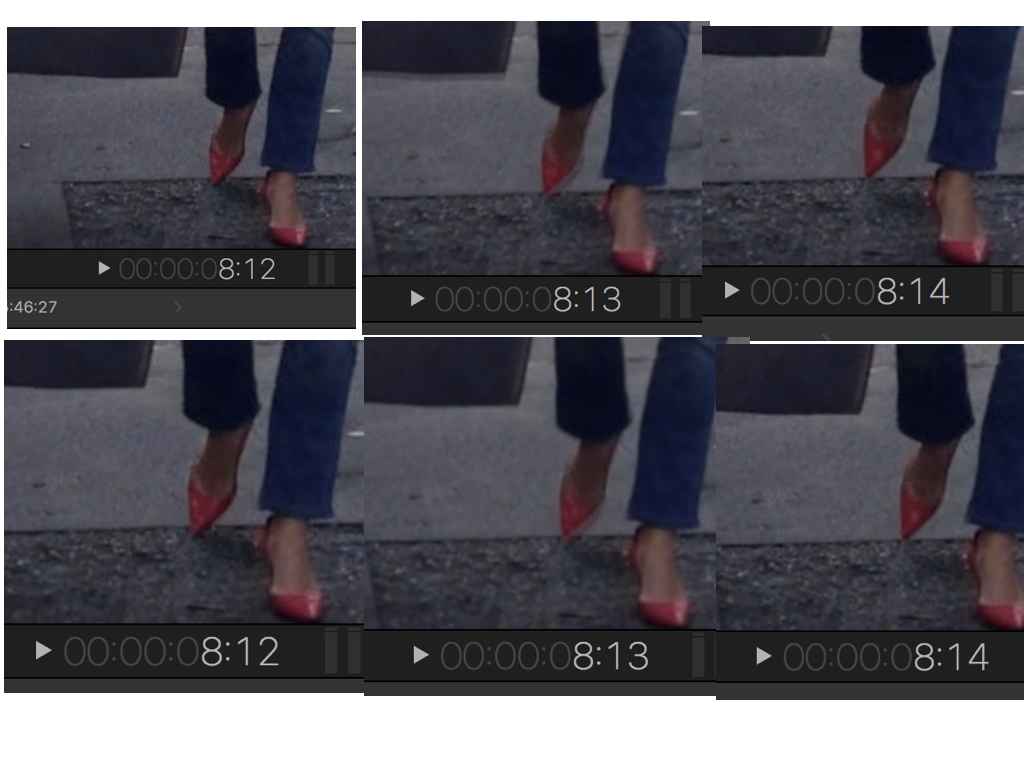
Regarding quality I figure out that even with 50% the results are better with optical flow at least in my clips
Compare the two rows... e.g.. the bag, jeans etc..
"A known bug, and one which everybody knows of, is that FCP X forgets unfinished background processes after restart, and that there seems no way to trigger them anew but to delete the effect and then apply it again."
Jesus... everybody knows of ahhhhhh does Apple know that too ?) Sorry but seems that a "Know bug FAQ" would make sense for newbies...
What is new for me too this green indictaor any idea?
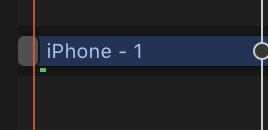
well I am not a wedding videographer.. just my own one three years ago and need a free Xmas gift
Well in my scenario I can reproduce it to own clip where I applied speed ramping to 0%. In this clip optical flow causes the error. Switching it off and apply normal the error message doesn't appear. Applying again optical flow error appears again. But okay at least I know right now which clip that is out of 50-60 clips in the timeline
Regarding quality I figure out that even with 50% the results are better with optical flow at least in my clips
Compare the two rows... e.g.. the bag, jeans etc..
"A known bug, and one which everybody knows of, is that FCP X forgets unfinished background processes after restart, and that there seems no way to trigger them anew but to delete the effect and then apply it again."
Jesus... everybody knows of ahhhhhh does Apple know that too ?
) Sorry but seems that a "Know bug FAQ" would make sense for newbies...What is new for me too this green indictaor any idea?
Last edit: 11 Dec 2016 10:11 by Schnurr.
Please Log in to join the conversation.
- Karsten Schlüter
-

- Offline
- Moderator
-

Less
More
- Posts: 3790
- Thank you received: 718
11 Dec 2016 10:36 #83891
by Karsten Schlüter
recorded with an iPhone? and low-light conditions, obviously …
if so, open original file with a tool like MediaHUD and check frame rate …
The variable frame-rates of iPhones cause all kind of troubles …
Replied by Karsten Schlüter on topic Export & Optical flow / background task ?
Schnurr wrote: … I can reproduce it to own clip where I applied speed ramping to 0%. In this clip optical flow causes the error. Switching it off and apply normal the error message doesn't appear. Applying again optical flow error appears again. …
recorded with an iPhone? and low-light conditions, obviously …
if so, open original file with a tool like MediaHUD and check frame rate …
The variable frame-rates of iPhones cause all kind of troubles …
Please Log in to join the conversation.
11 Dec 2016 13:37 - 11 Dec 2016 13:38 #83899
by Schnurr
hope you do well... and nice template by the way hope we will have real snow soon...
Hmm no. 11 CET but yes with an iPhone 5 in 2013 but quite light as you can see.
Bildwiederholungsrate : 29,970 (29970/1000) FPS
minimale Bildwiederholungsrate : 28,571 FPS
maximale Bildwiederholungsrate : 30,000 FPS
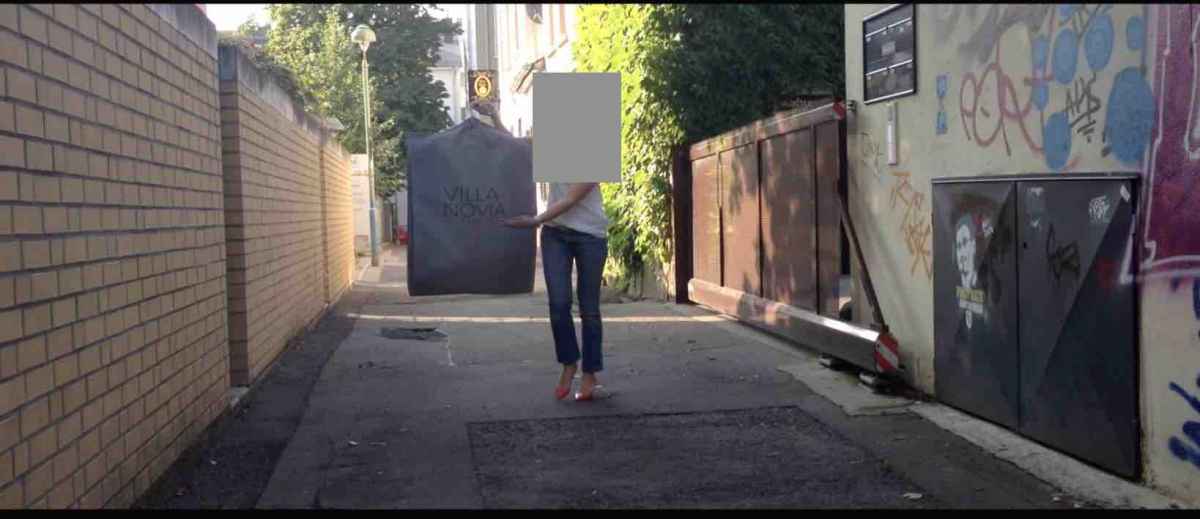
But this is just regarding the statement that optical flow is better even with 50% speed reduction then blending in this clip.
Project set to 30fps but again the initial error message "effect will not be applied due to pending background..." appears with only that clip in a project and using speed ramping to 0%
And testing the same (speed ramping to 0%) with a 25fps clip and a 25fps project and only a single clip in the timeline, using speed ramping to 0% causes the error message with a NEX-FS100 cam.
Clip Info:
Bildwiederholungsrate : 25,000 FPS
ColorSpace : YUV
ChromaSubsampling/String : 4:2:2
Scantyp : progressiv
Bits/(Pixel*Frame) : 0.707
Stream-Größe : 31,8 MiB (96%)
Titel : Apple Video Mediensteuerung / Apple Alias-Datensteuerung
verwendete Encoder-Bibliothek : Apple
Should I laugh or cry ?))
Anyway have a ticket open on Apple support let's see what they will tell because creating a new user and installing FCX again as advised didn't help at all.
Tobias
Replied by Schnurr on topic Export & Optical flow / background task ?
Hi Karsten,Karsten Schlüter wrote:
Schnurr wrote: …
recorded with an iPhone? and low-light conditions, obviously …
hope you do well... and nice template by the way hope we will have real snow soon...
Hmm no. 11 CET but yes with an iPhone 5 in 2013 but quite light as you can see.
Bildwiederholungsrate : 29,970 (29970/1000) FPS
minimale Bildwiederholungsrate : 28,571 FPS
maximale Bildwiederholungsrate : 30,000 FPS
But this is just regarding the statement that optical flow is better even with 50% speed reduction then blending in this clip.
Project set to 30fps but again the initial error message "effect will not be applied due to pending background..." appears with only that clip in a project and using speed ramping to 0%
And testing the same (speed ramping to 0%) with a 25fps clip and a 25fps project and only a single clip in the timeline, using speed ramping to 0% causes the error message with a NEX-FS100 cam.
Clip Info:
Bildwiederholungsrate : 25,000 FPS
ColorSpace : YUV
ChromaSubsampling/String : 4:2:2
Scantyp : progressiv
Bits/(Pixel*Frame) : 0.707
Stream-Größe : 31,8 MiB (96%)
Titel : Apple Video Mediensteuerung / Apple Alias-Datensteuerung
verwendete Encoder-Bibliothek : Apple
Should I laugh or cry ?
))Anyway have a ticket open on Apple support let's see what they will tell because creating a new user and installing FCX again as advised didn't help at all.
Tobias
Last edit: 11 Dec 2016 13:38 by Schnurr.
Please Log in to join the conversation.
- Karsten Schlüter
-
- Offline
- Moderator
-
Less
More
- Posts: 3790
- Thank you received: 718
11 Dec 2016 14:12 #83902
by Karsten Schlüter
Glad you like my plugin, and NO, no snow please … less bike, more tumble - not my season…
I'm (not the first time…) a bit lost in your 'topic hopping'.
Quoted YOUR statement in my reply to make clear what I answered to:
Axel made a test. Me right now either: OF on speed-ramped video = no issue.
So…
… my assumption was, an iPhone clip = irregular frame rate.
=> Your answer confirmed my assumption:
28.571fps doesn't exist in the world of video. Poor iPhone with a fix aperture has no other option to set exposure… And poor FCPX hiccups on that non-standard clip…
You can give MpegStreamclip or iMovie a try, to re-encode that clip, now with a regular frame rate , 25/30, whatever…
Next topic…
Indexing speed-ramp - for those who need it, probably a good thing. Enhancement request to Apple. Actual workaround: give Steve Martins Reverse Favourising a try… (rippletrainings YT channel)
Replied by Karsten Schlüter on topic Export & Optical flow / background task ?
Schnurr wrote: …hope you do well... and nice template by the way hope we will have real snow soon...
Glad you like my plugin, and NO, no snow please … less bike, more tumble - not my season…
I'm (not the first time…) a bit lost in your 'topic hopping'.
Quoted YOUR statement in my reply to make clear what I answered to:
Schnurr wrote:
… I can reproduce it to own clip where I applied speed ramping to 0%. In this clip optical flow causes the error. Switching it off and apply normal the error message doesn't appear. Applying again optical flow error appears again. …
Axel made a test. Me right now either: OF on speed-ramped video = no issue.
So…
… my assumption was, an iPhone clip = irregular frame rate.
=> Your answer confirmed my assumption:
minimale Bildwiederholungsrate : 28,571 FPS
maximale Bildwiederholungsrate : 30,000 FPS
28.571fps doesn't exist in the world of video. Poor iPhone with a fix aperture has no other option to set exposure… And poor FCPX hiccups on that non-standard clip…
You can give MpegStreamclip or iMovie a try, to re-encode that clip, now with a regular frame rate , 25/30, whatever…
Next topic…
Indexing speed-ramp - for those who need it, probably a good thing. Enhancement request to Apple. Actual workaround: give Steve Martins Reverse Favourising a try… (rippletrainings YT channel)
Please Log in to join the conversation.
11 Dec 2016 14:15 #83903
by Axel
Please ask them what the green rectangle means. :side:
I too suspect it has to do something with the not constant frame rate of your iPhone. I'd make a 30p timeline, through the clip in, export as ProRes, reimport it and then repeat the time ramp. I bet it works. For future iPhone videos, consider buying FiLMiC Pro (or any other iPhone app that allows to fix frame rate, shutter, WB and exposure manually).
"Jesus... everybody knows of ahhhhhh does Apple know that too ?) Sorry but seems that a "Know bug FAQ" would make sense for newbies..."
It's not a real bug insofar as FCP X warns you in advance that something unpleasant may happen. Who wants to read a lengthy bug report anyway? Just for consolidation, hey, you're not alone?
Replied by Axel on topic Export & Optical flow / background task ?
Schnurr wrote: Anyway have a ticket open on Apple support let's see what they will tell because creating a new user and installing FCX again as advised didn't help at all.
Please ask them what the green rectangle means. :side:
I too suspect it has to do something with the not constant frame rate of your iPhone. I'd make a 30p timeline, through the clip in, export as ProRes, reimport it and then repeat the time ramp. I bet it works. For future iPhone videos, consider buying FiLMiC Pro (or any other iPhone app that allows to fix frame rate, shutter, WB and exposure manually).
"Jesus... everybody knows of ahhhhhh does Apple know that too ?
) Sorry but seems that a "Know bug FAQ" would make sense for newbies..."It's not a real bug insofar as FCP X warns you in advance that something unpleasant may happen. Who wants to read a lengthy bug report anyway? Just for consolidation, hey, you're not alone?
Please Log in to join the conversation.
11 Dec 2016 14:27 #83904
by Schnurr
Replied by Schnurr on topic Export & Optical flow / background task ?
Hi,
sure will ask them with the green box symbol and "...." dots in timeline. At first they disappeared with rendering but over some clips they do remain. Export works fine (avoiding speed ramping to 0 & optical flow)
Karsten, would agree reg. pure iPhone and less professionell "camera" but strange is that this even applies in my scenario with fixed frame (25fps) and a high end Sony camera with project set to 25fps..
but lets see what Apple will tell. Thanks for your support on that subject too.
Tobias
sure will ask them with the green box symbol and "...." dots in timeline. At first they disappeared with rendering but over some clips they do remain. Export works fine (avoiding speed ramping to 0 & optical flow)
Karsten, would agree reg. pure iPhone and less professionell "camera" but strange is that this even applies in my scenario with fixed frame (25fps) and a high end Sony camera with project set to 25fps..
but lets see what Apple will tell. Thanks for your support on that subject too.
Tobias
Please Log in to join the conversation.
- Karsten Schlüter
-
- Offline
- Moderator
-
Less
More
- Posts: 3790
- Thank you received: 718
11 Dec 2016 14:48 - 11 Dec 2016 14:52 #83907
by Karsten Schlüter
they will tell RTFM
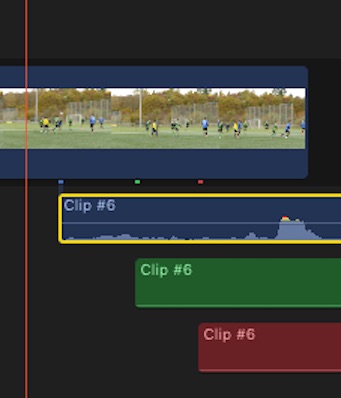
it's the 'connector' to some audio-role; in my example, I created two diff. ones
Blue is for Dialogue, e.g. when you detach audio from a clip …
Replied by Karsten Schlüter on topic Export & Optical flow / background task ?
Axel wrote: …
Please ask them what the green rectangle means. …
but lets see what Apple will tell.
they will tell RTFM
it's the 'connector' to some audio-role; in my example, I created two diff. ones
Blue is for Dialogue, e.g. when you detach audio from a clip …
Last edit: 11 Dec 2016 14:52 by Karsten Schlüter.
Please Log in to join the conversation.
11 Dec 2016 19:28 - 11 Dec 2016 19:29 #83918
by Schnurr
Replied by Schnurr on topic Export & Optical flow / background task ?
Karsten,
Regarding the green dot.
Günther J would say you are right and you made the step to the next 64.000Euro question
Axel
Well clip was from 2013 and at that point in time Filmic wasn't in the App store but since a couple of month I use it too. And you wrote "not a real bug insofar as FCP X warns you in advance that something unpleasant may happen. Who wants to read a lengthy bug report anyway? Just for consolidation, hey, you're not alone?"
I don't want to read length of bug reports neither but would prefer instead of a general statement that effect couldn't be applied an indication like 'check clip 123 as a problem was detected with optical flow' instead having to go through each single clip. That would be more userfriedly.
Will check the tipp from Karsten for the one iPhone clip but thi will not solve the ones where I have fixed frame clips from the Sony cam. But luckily project is done and glad with the result.
thanks again for the support
Tobias
Regarding the green dot.
Günther J would say you are right and you made the step to the next 64.000Euro question
Axel
Well clip was from 2013 and at that point in time Filmic wasn't in the App store
but since a couple of month I use it too. And you wrote "not a real bug insofar as FCP X warns you in advance that something unpleasant may happen. Who wants to read a lengthy bug report anyway? Just for consolidation, hey, you're not alone?"I don't want to read length of bug reports neither but would prefer instead of a general statement that effect couldn't be applied an indication like 'check clip 123 as a problem was detected with optical flow' instead having to go through each single clip. That would be more userfriedly.
Will check the tipp from Karsten for the one iPhone clip but thi will not solve the ones where I have fixed frame clips from the Sony cam. But luckily project is done and glad with the result.
thanks again for the support
Tobias
Last edit: 11 Dec 2016 19:29 by Schnurr.
Please Log in to join the conversation.
