


- Posts: 321
- Thank you received: 6
3 Post Moderation Rule for New Boarders (25 Jan 2021)
New boarders will have their posts moderated - Don't worry if you cannot see your post immediately.
Relinking, Resyncing clips in the Timeline
06 Dec 2016 20:20 #83690
by AppleGuru
Relinking, Resyncing clips in the Timeline was created by AppleGuru
I received a Project to finish up, about 96min long.
The problem I have is... Video and Audio has been synced but in the timeline all the clips where ungrouped so the audio is now just connected. Is there away, has to be a way, to resync the video and audio back to the stage if there where synchronized?
The problem I have is... Video and Audio has been synced but in the timeline all the clips where ungrouped so the audio is now just connected. Is there away, has to be a way, to resync the video and audio back to the stage if there where synchronized?
Please Log in to join the conversation.
- Tom Wolsky
-

- Offline
- Moderator
-

06 Dec 2016 21:13 #83692
by Tom Wolsky
Replied by Tom Wolsky on topic Relinking, Resyncing clips in the Timeline
The audio's been detached? The only way is to replace the project clip with a browser clip that has video and audio combined.
Please Log in to join the conversation.
07 Dec 2016 09:11 #83704
by AppleGuru
Replied by AppleGuru on topic Relinking, Resyncing clips in the Timeline
Well that sucks! That means I will have to rebuild the complete edit by searching the through the Sync clips which have a different timecode then the original clips.
Why not add a link function like in Premiere with the timeline!
Why not add a link function like in Premiere with the timeline!
Please Log in to join the conversation.


07 Dec 2016 16:54 #83725
by bogiesan
Replied by bogiesan on topic Relinking, Resyncing clips in the Timeline
Tom, is there a way that a compound clip could help?
Please Log in to join the conversation.
- Tom Wolsky
-
- Offline
- Moderator
-
07 Dec 2016 17:02 #83727
by Tom Wolsky
Replied by Tom Wolsky on topic Relinking, Resyncing clips in the Timeline
Maybe. Don't know what's been done here or what's being referred to.
Please Log in to join the conversation.
07 Dec 2016 19:06 #83731
by Overturf
Replied by Overturf on topic Relinking, Resyncing clips in the Timeline
Compound clip might be it. From what I understand you do have the audio in the right position (synced to video but as a connected clip)? Then you could just select each video-audio-pair, press ALT-G to make a compound clip and give it a name. The compound clip will include video and audio and when you move it around, audio stays with the video.
Please Log in to join the conversation.
07 Dec 2016 19:10 #83732
by bogiesan
Replied by bogiesan on topic Relinking, Resyncing clips in the Timeline
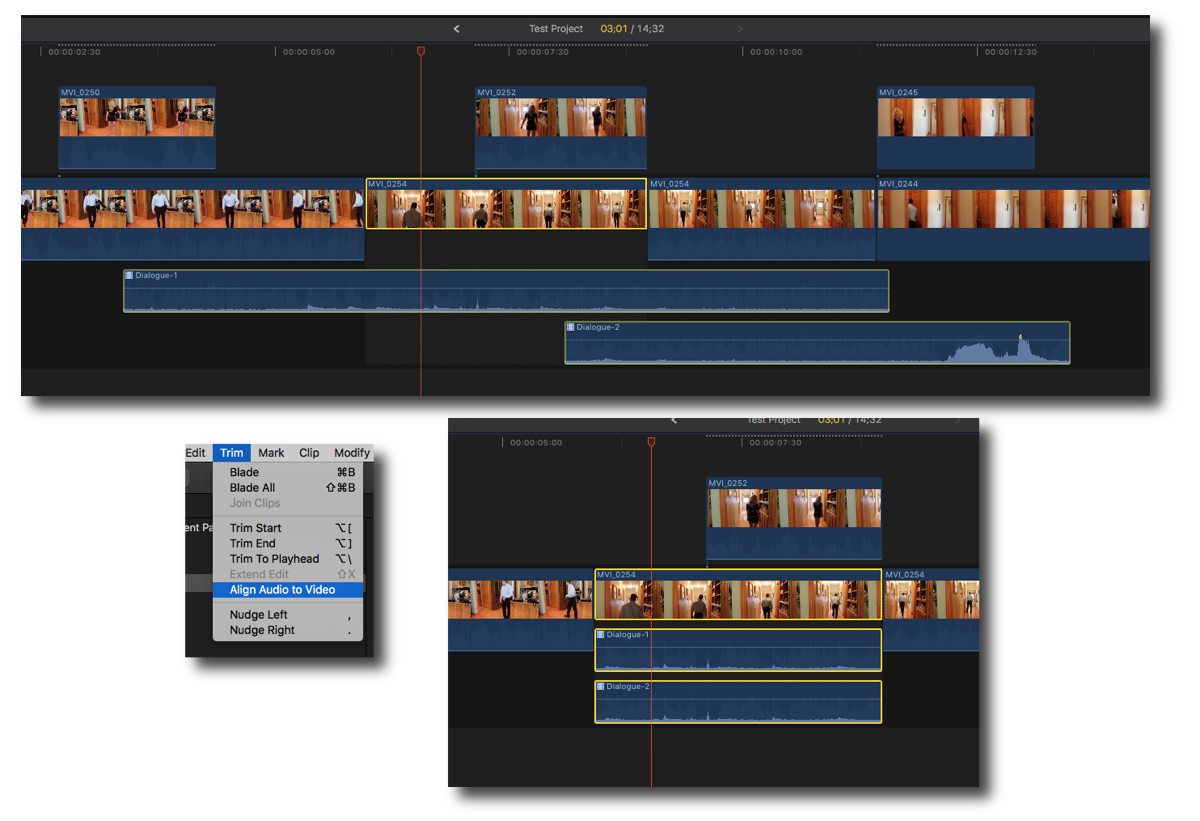
There's a resync command in 10.3.
I don't know how it works. Just saw it mentioned in some of the 10.3 feature roundup posts.
I don't know how it works. Just saw it mentioned in some of the 10.3 feature roundup posts.
Please Log in to join the conversation.

07 Dec 2016 22:57 #83738
by odedh
Replied by odedh on topic Relinking, Resyncing clips in the Timeline
Haven't heard of it, what they added was the ability to cancel all L/J Cuts with the align to video command
Please Log in to join the conversation.
08 Dec 2016 09:10 #83743
by AppleGuru
Please post your source so we can check it out!
Replied by AppleGuru on topic Relinking, Resyncing clips in the Timeline
bogiesan wrote: There's a resync command in 10.3.
I don't know how it works. Just saw it mentioned in some of the 10.3 feature roundup posts.
Please post your source so we can check it out!
Please Log in to join the conversation.
- Scrubelicious
-

- Offline
- Platinum Member
-

Less
More
- Posts: 1228
- Thank you received: 114
08 Dec 2016 09:12 #83744
by Scrubelicious
Replied by Scrubelicious on topic Relinking, Resyncing clips in the Timeline
if you think your request makes sense, don't forget to request in there
feedback
....
Please Log in to join the conversation.

08 Dec 2016 11:43 #83754
by JoeEditor
Replied by JoeEditor on topic Relinking, Resyncing clips in the Timeline
It only brings separately trimmed audio components of a video clip back in alignment with the video portion of the clip.
Please Log in to join the conversation.
