


- Posts: 730
- Thank you received: 26
3 Post Moderation Rule for New Boarders (25 Jan 2021)
New boarders will have their posts moderated - Don't worry if you cannot see your post immediately.
Audio roles and multicam clips...
- DmitriZigany
-
 Topic Author
- Offline
- Platinum Member
-

Less
More
02 Dec 2016 14:19 - 02 Dec 2016 14:34 #83568
by DmitriZigany
Audio roles and multicam clips... was created by DmitriZigany
Hey!
Working on a simple live music performance video... just two angles and three different audio sources...
When expanding the audio in the timeline, they don't have the names of the roles but same name as the multicam clip. Making it hard to quickly tell which is which... Am I doing something wrong or is this they way it's supposed to be?
Also music drops out and sometime playback stops when adjusting EQ and gain etc, anyone else seeing this??
And when adjusting an audio effect it gets highlighted so I cannot start playback using space without first activating the timeline "window". This is crap.
And the audio waveforms don't change to reflect gain made in effects anymore... Is that the way it is now???
Seems like audio is all effed up in 10.3? Or is this just multicam annomalities? Or am I doing something fundamentally wrong???
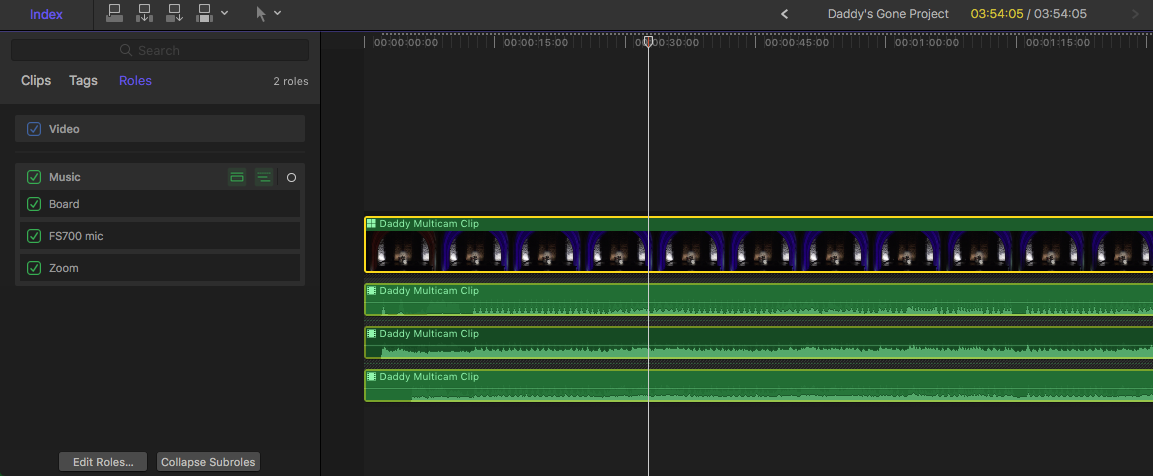
Working on a simple live music performance video... just two angles and three different audio sources...
When expanding the audio in the timeline, they don't have the names of the roles but same name as the multicam clip. Making it hard to quickly tell which is which... Am I doing something wrong or is this they way it's supposed to be?
Also music drops out and sometime playback stops when adjusting EQ and gain etc, anyone else seeing this??
And when adjusting an audio effect it gets highlighted so I cannot start playback using space without first activating the timeline "window". This is crap.
And the audio waveforms don't change to reflect gain made in effects anymore... Is that the way it is now???
Seems like audio is all effed up in 10.3? Or is this just multicam annomalities? Or am I doing something fundamentally wrong???
Last edit: 02 Dec 2016 14:34 by DmitriZigany.
Please Log in to join the conversation.
02 Dec 2016 14:30 #83570
by lichinho
Replied by lichinho on topic Audio roles and multicam clips...
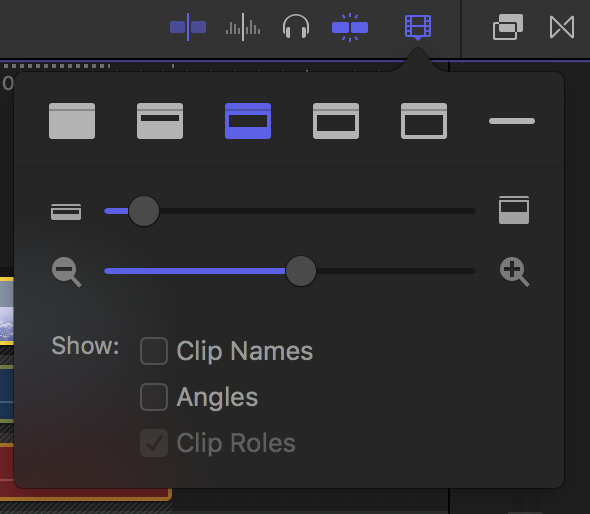
Click the clip Appearance button at the top right of the timeline and make sure that the box for Roles is checked.
Please Log in to join the conversation.


02 Dec 2016 14:32 - 02 Dec 2016 14:36 #83571
by rjvddoes
Replied by rjvddoes on topic Audio roles and multicam clips...
Hi Dmitri,
You can change the clip appearance in the timeline. Click the button with the small filmstrip icon, just right from the snapping button. Check "Show Angles" and "Show Clip Roles"
Hope this helps
(Indeed Lichinho's screen print shows it clearly)
You can change the clip appearance in the timeline. Click the button with the small filmstrip icon, just right from the snapping button. Check "Show Angles" and "Show Clip Roles"
Hope this helps
(Indeed Lichinho's screen print shows it clearly)
Last edit: 02 Dec 2016 14:36 by rjvddoes.
Please Log in to join the conversation.
- DmitriZigany
-
Topic Author
- Offline
- Platinum Member
-
Less
More
- Posts: 730
- Thank you received: 26
02 Dec 2016 14:36 - 02 Dec 2016 14:38 #83572
by DmitriZigany
Replied by DmitriZigany on topic Audio roles and multicam clips...
Thanks! Now I see the roles at least!
I like to keep my effects browser always open, so those buttons get too far from the actual timeline... Really not digging 10.3
But updated my original post with further issues I discovered as well!
I like to keep my effects browser always open, so those buttons get too far from the actual timeline... Really not digging 10.3
But updated my original post with further issues I discovered as well!
Last edit: 02 Dec 2016 14:38 by DmitriZigany.
Please Log in to join the conversation.
