


- Posts: 2
- Thank you received: 0
3 Post Moderation Rule for New Boarders (25 Jan 2021)
New boarders will have their posts moderated - Don't worry if you cannot see your post immediately.
help problème d'ouverture du logiciel fcpx à cause de la mémoire vive (?)
30 Nov 2016 14:09 #83470
by luranus
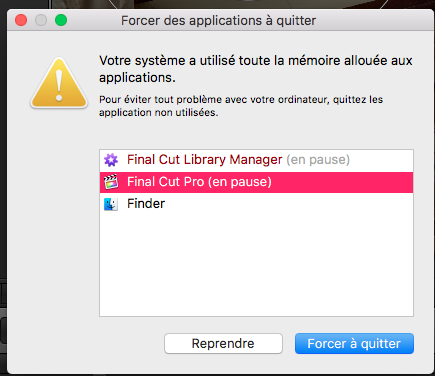
bonjour et surtout HELP MEGA HELP, je suis sur un montage sur fcpx 10.2.3 et je dois finir le montage dans des délais très bref, seulement (et oui y'a toujours un truc qu'on connait pas c'est pourquoi je m'adresse à vous); "votre systeme a utilisé toute la mémoire allouée aux applications" est le message qui m'explique pourquoi aujourd'hui je ne peux plus OUVRIR mon logiciel quand je lance une des bibliothèques en particulier. En effet, les autres bibliothèques s’ouvrent sans problème, avec fluidité, mais celle-là non, elle a la particularité d’avoir un montage très lourd (multiples couches d’images, cuts et tout le tralala), et peut être est-ce une des raisons.
je suis en 4k, mon ordinateur possède 8go de mémoire vive, je travaille sur un ssd de plus de 700go (directement installé dans l'ordinateur) donc normalement je devrais avoir de quoi faire, 2,5 GHz Intel Core i5 c'est le processeur sur lequel je suis, je suis sur le systeme sierra heuu que renseigner de plus ? peut etre n'hésitez pas à me demander s'il manque des infos, mais normalement je devrais trouver un moyen de ne pas saturer ma mémoire vive dès ouverture de mon logiciel. Surtout que celle-ci s’emballe, fait chauffer le mac, mais uniquement sur cette bibliothèque que je ne peux pas du tout alléger puisque je ne peux pas y rentrer. Que faire de l’extérieur alors ?
(Pour plus d’info sur les ram, memory clean me montre que c'est fcpx qui recherche autant de ram et qu’il n’arrête pas d’en user jusqu’à blocage du logiciel).
^^Merci mille fois d'avoir lu ce pavé et de réfléchir à cette requête
je suis en 4k, mon ordinateur possède 8go de mémoire vive, je travaille sur un ssd de plus de 700go (directement installé dans l'ordinateur) donc normalement je devrais avoir de quoi faire, 2,5 GHz Intel Core i5 c'est le processeur sur lequel je suis, je suis sur le systeme sierra heuu que renseigner de plus ? peut etre n'hésitez pas à me demander s'il manque des infos, mais normalement je devrais trouver un moyen de ne pas saturer ma mémoire vive dès ouverture de mon logiciel. Surtout que celle-ci s’emballe, fait chauffer le mac, mais uniquement sur cette bibliothèque que je ne peux pas du tout alléger puisque je ne peux pas y rentrer. Que faire de l’extérieur alors ?
(Pour plus d’info sur les ram, memory clean me montre que c'est fcpx qui recherche autant de ram et qu’il n’arrête pas d’en user jusqu’à blocage du logiciel).
^^Merci mille fois d'avoir lu ce pavé et de réfléchir à cette requête
Please Log in to join the conversation.


01 Dec 2016 02:18 #83490
by JoeEditor
Replied by JoeEditor on topic help problème d'ouverture du logiciel fcpx à cause de la mémoire vive (?)
Hello and most importantly HELP MEGA HELP, I am on a montage on fcpx 10.2.3 and I have to finish editing in very short time, only (and yes there is always something we do not know that is why I m Address to you); "Your system used all the memory allocated to applications" is the message that explains why today I can no longer OPEN my software when I run one of the particular libraries. Indeed, the other libraries open without problem, with fluidity, but that no, it has the peculiarity to have a very heavy editing (multiple layers of images, cuts and all the tralala), and can be -one of the reasons.
I am in 4k, my computer has 8go of RAM, I work on a ssd of more than 700go (directly installed in the computer) so normally I should have what to do, 2.5 GHz Intel Core i5 Processor on which I am, I am on the system sierra heuu that inquire more? Maybe do not hesitate to ask me if it lacks information, but normally I should find a way not to saturate my memory when opening my software. Especially that it runs, heats the mac, but only on this library that I can not lighten at all because I can not get back. What to do from the outside then?
(For more info on ram, memory clean shows me that fcpx is looking for as much ram and that it does not stop to use until blocking of the software).
^^ Thanks a thousand times to have read this pavement and to think about this request
I am in 4k, my computer has 8go of RAM, I work on a ssd of more than 700go (directly installed in the computer) so normally I should have what to do, 2.5 GHz Intel Core i5 Processor on which I am, I am on the system sierra heuu that inquire more? Maybe do not hesitate to ask me if it lacks information, but normally I should find a way not to saturate my memory when opening my software. Especially that it runs, heats the mac, but only on this library that I can not lighten at all because I can not get back. What to do from the outside then?
(For more info on ram, memory clean shows me that fcpx is looking for as much ram and that it does not stop to use until blocking of the software).
^^ Thanks a thousand times to have read this pavement and to think about this request
Please Log in to join the conversation.
01 Dec 2016 02:22 #83491
by JoeEditor
Replied by JoeEditor on topic help problème d'ouverture du logiciel fcpx à cause de la mémoire vive (?)
Right off the bat, 8 GB RAM is barely enough to edit standard def, and will never handle 4K stuff.
What is the pixel dimensions of your photos? I suspect they are much larger than the pixel dimensions of your timeline. Maybe?
What "percentage" specifically of your system drive is free space?
Are your Libraries and media on an external drive? If so: capacity, connection type, percentage of free space"
What is the pixel dimensions of your photos? I suspect they are much larger than the pixel dimensions of your timeline. Maybe?
What "percentage" specifically of your system drive is free space?
Are your Libraries and media on an external drive? If so: capacity, connection type, percentage of free space"
Please Log in to join the conversation.
- ronny courtens
-

- Offline
- Moderator
-

Less
More
- Posts: 4455
- Thank you received: 962
01 Dec 2016 06:59 - 01 Dec 2016 13:13 #83495
by ronny courtens
Replied by ronny courtens on topic help problème d'ouverture du logiciel fcpx à cause de la mémoire vive (?)
Bonjour luranus, bienvenue sur les forums.
Vous n'avez pas suffisamment de RAM pour travailler sur un large projet avec des média 4K. Je vous conseille de doubler le RAM dans voter ordinateur, et vous remarquerez immédiatement une grande différence. Non seulement avec ce projet compliqué que vous n'arrivez plus à ouvrir par manque de RAM, mais avec tous les montages que vous ferez dans le futur.
- Ronny
//google translate//
Hello luranus, welcome to the forums.
You do not have enough RAM to work on a large project with 4K media. I advise you to double the RAM in voting computer, and you will immediately notice a big difference. Not only with this complicated project that you can no longer open because of lack of RAM, but with all the mounts you will make in the future.
Vous n'avez pas suffisamment de RAM pour travailler sur un large projet avec des média 4K. Je vous conseille de doubler le RAM dans voter ordinateur, et vous remarquerez immédiatement une grande différence. Non seulement avec ce projet compliqué que vous n'arrivez plus à ouvrir par manque de RAM, mais avec tous les montages que vous ferez dans le futur.
- Ronny
//google translate//
Hello luranus, welcome to the forums.
You do not have enough RAM to work on a large project with 4K media. I advise you to double the RAM in voting computer, and you will immediately notice a big difference. Not only with this complicated project that you can no longer open because of lack of RAM, but with all the mounts you will make in the future.
Last edit: 01 Dec 2016 13:13 by Karsten Schlüter.
Please Log in to join the conversation.
- Ponponpostprod
-

- Offline
- Premium Member
-

Less
More
- Posts: 134
- Thank you received: 9
01 Dec 2016 08:10 - 01 Dec 2016 13:14 #83496
by Ponponpostprod
Replied by Ponponpostprod on topic help problème d'ouverture du logiciel fcpx à cause de la mémoire vive (?)
Effectivement pour travailler en 4K, 8GB c'est un peu légé, sauf à travailler avec des proxies.
Mais comme tu es en phase de finition, j'imagine que ça a marché un moment.
Est-ce que tu as identifié un moment ou une opération particulière à partir de laquelle FCP a refusé de s'ouvrir ?
Une idée me vient à l'esprit, est-ce que tu possèdes Final Cut Library Manager ? A partir de ce logiciel, (dans sa version Advanced Management à 19,90€) tu pourrais sans avoir à ouvrir ta bibliothèque , réussir à vider les render files, caches, Flux optiques, Médias optimisés. Peut-être que cela pourrait éventuellement te permettre de réouvrir ta bibliothèque si il y a un loup dedans .?.
Benoît
//google translate//
Effectively to work in 4K, 8GB is a little light, except to work with proxies.
But as you're finishing, I guess it worked for a while.
Did you identify a particular moment or transaction from which FCP declined to open?
An idea comes to mind, do you own Final Cut Library Manager? From this software, (in its Advanced Management version at 19.90 €) you could without having to open your library, succeed in emptying render files, caches, Optical flows, Optimized media. Maybe this could possibly allow you to reopen your library if there is a wolf in it.?
Mais comme tu es en phase de finition, j'imagine que ça a marché un moment.
Est-ce que tu as identifié un moment ou une opération particulière à partir de laquelle FCP a refusé de s'ouvrir ?
Une idée me vient à l'esprit, est-ce que tu possèdes Final Cut Library Manager ? A partir de ce logiciel, (dans sa version Advanced Management à 19,90€) tu pourrais sans avoir à ouvrir ta bibliothèque , réussir à vider les render files, caches, Flux optiques, Médias optimisés. Peut-être que cela pourrait éventuellement te permettre de réouvrir ta bibliothèque si il y a un loup dedans .?.
Benoît
//google translate//
Effectively to work in 4K, 8GB is a little light, except to work with proxies.
But as you're finishing, I guess it worked for a while.
Did you identify a particular moment or transaction from which FCP declined to open?
An idea comes to mind, do you own Final Cut Library Manager? From this software, (in its Advanced Management version at 19.90 €) you could without having to open your library, succeed in emptying render files, caches, Optical flows, Optimized media. Maybe this could possibly allow you to reopen your library if there is a wolf in it.?
Last edit: 01 Dec 2016 13:14 by Karsten Schlüter.
Please Log in to join the conversation.
- ronny courtens
-
- Offline
- Moderator
-
Less
More
- Posts: 4455
- Thank you received: 962
01 Dec 2016 08:43 - 01 Dec 2016 13:15 #83497
by ronny courtens
Replied by ronny courtens on topic help problème d'ouverture du logiciel fcpx à cause de la mémoire vive (?)
Excellente idée. Si tu arrives à ouvrir la bibliothèque après avoir vidé les fichiers de rendition en FCL Manager, va dans Préférences pour désactiver le "Background Render", et essaye de finir et d'exporter le projet sans rendition.
Il faudra néanmoins doubler le RAM de ton système dés que possible, afin de prévenir qu'une situation pareille se répète.
- Ronny
//google translate//
Excellent idea. If you can open the library after emptying the render files in FCL Manager, go to Preferences to disable the Background Render, and try to finish and export the project without rendering.
It will be necessary to double the RAM of your system as soon as possible, to prevent a similar situation from repeating itself.
Il faudra néanmoins doubler le RAM de ton système dés que possible, afin de prévenir qu'une situation pareille se répète.
- Ronny
//google translate//
Excellent idea. If you can open the library after emptying the render files in FCL Manager, go to Preferences to disable the Background Render, and try to finish and export the project without rendering.
It will be necessary to double the RAM of your system as soon as possible, to prevent a similar situation from repeating itself.
Last edit: 01 Dec 2016 13:15 by Karsten Schlüter.
Please Log in to join the conversation.
01 Dec 2016 08:46 - 01 Dec 2016 13:16 #83498
by luranus
Replied by luranus on topic help problème d'ouverture du logiciel fcpx à cause de la mémoire vive (?)
Je réponds d'abord aux copains francais @Ponponpostprod j'y ai pensé évidemment, mais j'avoue que je ne sais pas exactement quelle partie du logiciel avheter parce qu'ils font ça à la carte
www.macg.co/logiciels/2016/02/final-cut-...tions-la-carte-92952
et pour la 4k, réponse à tous, peut être surprenante mais toutes mes autres bibli fonctionnent plus que bien, sans bugs, et sont parfois plus lourdes, c'est vraiment celle-là qui a perdu pied, pour une raison plus obscure. (et au fait, oui je travaille en proxy)
Cette bibli a commencé à buguer quand j'ai sans le vouloir, fait un copier coller d'un nombre important de cuts, de fragments de mon montage, dans l'idée: d'apres ma capture qui va me servir d'exp pour expliquer; un fragment comme celui-ci, fait de pleins de cuts, a été enregistré dans ma manip copier à un moment, puis en faisant une mauvaise manip je l'ai collée, ca a paru bien bien lourd à mon mac (ou au logiciel?) qui a commencé à réagir, puis quand il a fallu réouvrir le projet avec toutes ces infos non rendues (à ce moment là je metais le rendu en arrière plan, ce qui a vmt pas été judicieux non plus), ca n'a plus été possible.
Et pour répondre à @FCPX.guru
THANK YOU soo much ! a translation is very enjoyable :lol:

and because i work with proxies, my computer is okay in 4K for all the other libraries, (it may looks amazing but it does! even with heavier libraries)
322G are free in my system drive, so maybe it's not the problem.
my Libraries and media aren't an external drive
For the pixel dimension of my photo i think its around 157octets, thats what i found when i searched in my originals media with crt+i, is it what you were asking for ?
//google translate//
I reply first to the french buddies @Ponponpostprod I thought of it obviously, but I confess that I do not know exactly what part of the software avheter because they do this à la carte
Www.macg.co/logiciels/2016/02/final-cut-...tions-la-carte-92952
And for the 4k, answer to all, can be surprising but all my other bibli works more than well, without bugs, and are sometimes heavier, it's really that one who lost foot, for a more obscure reason. (And by the way, yes I work in proxy)
This bibliography started to bug when I unwittingly, made a copy paste of a large number of cuts, fragments of my montage, in the idea: according to my capture which will serve me as exp for explain; A fragment like this, made full of cuts, was recorded in my copying copy at a time, then by doing a bad manipulation I pasted it, it seemed very heavy to my mac (or the software? ) Which started to react, then when it was necessary to reopen the project with all these infos not rendered (at that time I put the rendering in the background, which was not wise either) Been possible.
www.macg.co/logiciels/2016/02/final-cut-...tions-la-carte-92952
et pour la 4k, réponse à tous, peut être surprenante mais toutes mes autres bibli fonctionnent plus que bien, sans bugs, et sont parfois plus lourdes, c'est vraiment celle-là qui a perdu pied, pour une raison plus obscure. (et au fait, oui je travaille en proxy)
Cette bibli a commencé à buguer quand j'ai sans le vouloir, fait un copier coller d'un nombre important de cuts, de fragments de mon montage, dans l'idée: d'apres ma capture qui va me servir d'exp pour expliquer; un fragment comme celui-ci, fait de pleins de cuts, a été enregistré dans ma manip copier à un moment, puis en faisant une mauvaise manip je l'ai collée, ca a paru bien bien lourd à mon mac (ou au logiciel?) qui a commencé à réagir, puis quand il a fallu réouvrir le projet avec toutes ces infos non rendues (à ce moment là je metais le rendu en arrière plan, ce qui a vmt pas été judicieux non plus), ca n'a plus été possible.
Et pour répondre à @FCPX.guru
THANK YOU soo much ! a translation is very enjoyable
:lol: and because i work with proxies, my computer is okay in 4K for all the other libraries, (it may looks amazing but it does! even with heavier libraries)
322G are free in my system drive, so maybe it's not the problem.
my Libraries and media aren't an external drive
For the pixel dimension of my photo i think its around 157octets, thats what i found when i searched in my originals media with crt+i, is it what you were asking for ?
//google translate//
I reply first to the french buddies @Ponponpostprod I thought of it obviously, but I confess that I do not know exactly what part of the software avheter because they do this à la carte
Www.macg.co/logiciels/2016/02/final-cut-...tions-la-carte-92952
And for the 4k, answer to all, can be surprising but all my other bibli works more than well, without bugs, and are sometimes heavier, it's really that one who lost foot, for a more obscure reason. (And by the way, yes I work in proxy)
This bibliography started to bug when I unwittingly, made a copy paste of a large number of cuts, fragments of my montage, in the idea: according to my capture which will serve me as exp for explain; A fragment like this, made full of cuts, was recorded in my copying copy at a time, then by doing a bad manipulation I pasted it, it seemed very heavy to my mac (or the software? ) Which started to react, then when it was necessary to reopen the project with all these infos not rendered (at that time I put the rendering in the background, which was not wise either) Been possible.

Last edit: 01 Dec 2016 13:16 by Karsten Schlüter.
Please Log in to join the conversation.
01 Dec 2016 13:01 - 01 Dec 2016 13:18 #83504
by JoeEditor
Replied by JoeEditor on topic help problème d'ouverture du logiciel fcpx à cause de la mémoire vive (?)
Can the rest of the class learn from this, also?
//Karsten, the Janitor, translates//
Kann der Rest der Klasse auch 'was davon lernen?
:lol:
//Karsten, the Janitor, translates//
Kann der Rest der Klasse auch 'was davon lernen?
:lol:
Last edit: 01 Dec 2016 13:18 by Karsten Schlüter.
Please Log in to join the conversation.
- Karsten Schlüter
-

- Offline
- Moderator
-
Less
More
- Posts: 3790
- Thank you received: 718
01 Dec 2016 13:21 - 01 Dec 2016 13:24 #83505
by Karsten Schlüter
Replied by Karsten Schlüter on topic help problème d'ouverture du logiciel fcpx à cause de la mémoire vive (?)
//Janitor speaking here….//
lingua franca on this board is English… or at least a kind-of…
I did fire up translate.google, if native speakers like to polish the text, don't be shy…
@Ben:
thought you Southerns are familiar , Laissez les bons temps rouler … and so on
lingua franca on this board is English… or at least a kind-of…
I did fire up translate.google, if native speakers like to polish the text, don't be shy…
@Ben:
thought you Southerns are familiar , Laissez les bons temps rouler … and so on
Last edit: 01 Dec 2016 13:24 by Karsten Schlüter.
Please Log in to join the conversation.
- Ponponpostprod
-
- Offline
- Premium Member
-
Less
More
- Posts: 134
- Thank you received: 9
01 Dec 2016 13:50 #83506
by Ponponpostprod
Replied by Ponponpostprod on topic help problème d'ouverture du logiciel fcpx à cause de la mémoire vive (?)
For FCP Library Manager you have to buy the "Advanced Manager", another thing : have you try to open one of the auto backup Library in the Final Cut Backups folder ?
Please Log in to join the conversation.
01 Dec 2016 17:53 - 01 Dec 2016 17:57 #83523
by JoeEditor
Replied by JoeEditor on topic help problème d'ouverture du logiciel fcpx à cause de la mémoire vive (?)
"@Ben:
thought you Southerns are familiar , Laissez les bons temps rouler … and so on"
Cajun French and European French are quit different. Beside, I can't speak either. My french grandmother's family made everyone speak English. So, no I don't know no French, but know American super well (and just enough Cherokee to get my ass beaten down pretty badly).
Thanks for the translations! I know just enough French to get some of it, but was missing the details. Thanks!
I gotta learn a "useful" second language some day...
thought you Southerns are familiar , Laissez les bons temps rouler … and so on
"Cajun French and European French are quit different. Beside, I can't speak either. My french grandmother's family made everyone speak English. So, no I don't know no French, but know American super well (and just enough Cherokee to get my ass beaten down pretty badly).
Thanks for the translations! I know just enough French to get some of it, but was missing the details. Thanks!
I gotta learn a "useful" second language some day...
Last edit: 01 Dec 2016 17:57 by JoeEditor.
Please Log in to join the conversation.
