


- Posts: 2
- Thank you received: 0
3 Post Moderation Rule for New Boarders (25 Jan 2021)
New boarders will have their posts moderated - Don't worry if you cannot see your post immediately.
How to save space when footage already imported
30 Nov 2016 12:26 #83468
by Sel
How to save space when footage already imported was created by Sel
Dear all,
Im having a huge problem with a current video project. Its a montage of many feature films and I made the mistake of importing the whole file (original footage) on all films - also when im mostly using only 1 min of the entire file. So, my problem now is that the project takes up 881,71 GB on disk and it makes it impossible for me to keep working on it.
I have already done most of the editing and I am moving on to details. So, I still need to be abel to edit the project and look trough it etc. BUT, I would love to find a way to perhaps delete the part of the files that im not using in my edit.
The only way I know is to do it "by hand" = cutting the material and then deleting individual parts from my library.
I also though of deleting optimized media and proxy but as I am stille editing and not done with the project im not sure this is good (?). Rendered files can be deleted as well - but again I wonder if theres a way to get all the material im not using out of my library to save space.
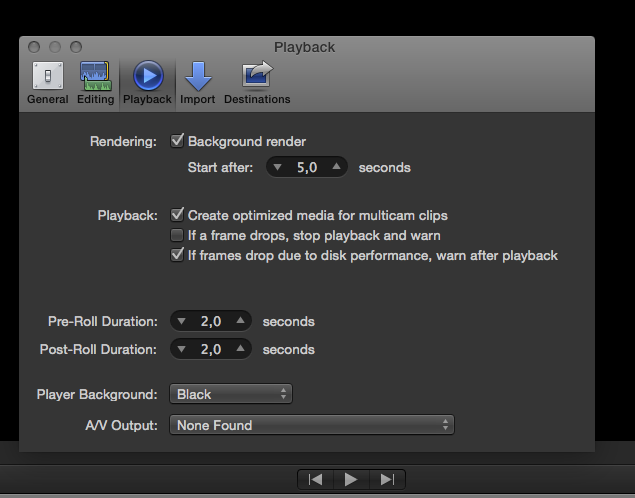
when I go to playback mode I dont have the option to use Proxy media (perhaps because i did not choose this when importing).
Im totally lost in how to continue with this edit - any help would be much appreciated!
THANKS
(additional info: original media takes up:101,6 GB on disk / Event = 1,4 MB on disk / render files (only) = 21,17 GB on disk / transcoded media takes up 758,67 GB on disk - just to give you an idea on what might be the problem)
Im having a huge problem with a current video project. Its a montage of many feature films and I made the mistake of importing the whole file (original footage) on all films - also when im mostly using only 1 min of the entire file. So, my problem now is that the project takes up 881,71 GB on disk and it makes it impossible for me to keep working on it.
I have already done most of the editing and I am moving on to details. So, I still need to be abel to edit the project and look trough it etc. BUT, I would love to find a way to perhaps delete the part of the files that im not using in my edit.
The only way I know is to do it "by hand" = cutting the material and then deleting individual parts from my library.
I also though of deleting optimized media and proxy but as I am stille editing and not done with the project im not sure this is good (?). Rendered files can be deleted as well - but again I wonder if theres a way to get all the material im not using out of my library to save space.
when I go to playback mode I dont have the option to use Proxy media (perhaps because i did not choose this when importing).
Im totally lost in how to continue with this edit - any help would be much appreciated!
THANKS
(additional info: original media takes up:101,6 GB on disk / Event = 1,4 MB on disk / render files (only) = 21,17 GB on disk / transcoded media takes up 758,67 GB on disk - just to give you an idea on what might be the problem)
Please Log in to join the conversation.

30 Nov 2016 22:46 #83488
by Axel
Replied by Axel on topic How to save space when footage already imported
Why can't you work anymore? Is FCP X slow/lagging/beachballing? Or is the whole system almost frozen, because you ran out of disk space?
Then you need to delete something. Surely you don't need the transcoded files then. It's safe to delete them.
The "whole files" are one big mp4 film each (why else did you choose optimized media?) ? Unfortunately, there is no easy and direct way to consolidate a library with clip selections in FCP X. It's going to get awkward this way and that way.
Perhaps the freed disk space helps to let you edit again. What if not?
Then start over. You could of course export some chunks in ProRes and re-import them later. Anyone here who never did this? What's wrong with that?
Imo nothing if what you are editing is some kind of showreel, sort of a patchwork. But if this project has anything vaguely resembling a "storyline", then everything is wrong with this approach.
Edit decisions you already made once are many times faster to replicate from scratch (always with improvements compared to the first cut, that's a fact) than botching up some butchered body parts. Especially with FCP X. It's called final cut, not present cut. By "cut" is not meant copy&paste.
BTW: 900 GB of footage don't impress me. Unless for shortage of space, these figures are completely irrelevant. Like all the music you store in the iTunes_Media folder. Do 10.000 songs slow down performance on your iPod/iPhone/iPad? Not if there is still place for 5.000 more. With UHD and ProRes anything under 500 GB is a small project nowadays. In reverse this means: buy more TB!
So, my problem now is that the project takes up 881,71 GB on disk and it makes it impossible for me to keep working on it.
Then you need to delete something. Surely you don't need the transcoded files then. It's safe to delete them.
The "whole files" are one big mp4 film each (why else did you choose optimized media?) ? Unfortunately, there is no easy and direct way to consolidate a library with clip selections in FCP X. It's going to get awkward this way and that way.
Perhaps the freed disk space helps to let you edit again. What if not?
Then start over. You could of course export some chunks in ProRes and re-import them later. Anyone here who never did this? What's wrong with that?
Imo nothing if what you are editing is some kind of showreel, sort of a patchwork. But if this project has anything vaguely resembling a "storyline", then everything is wrong with this approach.
Edit decisions you already made once are many times faster to replicate from scratch (always with improvements compared to the first cut, that's a fact) than botching up some butchered body parts. Especially with FCP X. It's called final cut, not present cut. By "cut" is not meant copy&paste.
BTW: 900 GB of footage don't impress me. Unless for shortage of space, these figures are completely irrelevant. Like all the music you store in the iTunes_Media folder. Do 10.000 songs slow down performance on your iPod/iPhone/iPad? Not if there is still place for 5.000 more. With UHD and ProRes anything under 500 GB is a small project nowadays. In reverse this means: buy more TB!
Please Log in to join the conversation.

Less
More
- Posts: 971
- Thank you received: 46
01 Dec 2016 06:15 #83494
by MsJustine
Replied by MsJustine on topic How to save space when footage already imported
My suggestion is the material you need, place it on the timeline, share, delete the original file, then import the recently shared file, this way you have only the portion you need.
Please Log in to join the conversation.
02 Dec 2016 11:58 #83557
by Sel
Replied by Sel on topic How to save space when footage already imported
Thanks for your responses. to clarify: FCP is performing well its just a matter of space on my harddrive (1TB) thats almost full and as i still have a lot of work on the project I will need more space.
If I just get more harddrive space with an external harddrive does anyone know if its okay to edit directly from an external harddrive? I was thinking of choosing one with its own power plug and then moving the whole project . It this okay for editing directly from external harddrive or will it create problems ?
again: THANKS!
If I just get more harddrive space with an external harddrive does anyone know if its okay to edit directly from an external harddrive? I was thinking of choosing one with its own power plug and then moving the whole project . It this okay for editing directly from external harddrive or will it create problems ?
again: THANKS!
Please Log in to join the conversation.
