


- Posts: 2
- Thank you received: 0
3 Post Moderation Rule for New Boarders (25 Jan 2021)
New boarders will have their posts moderated - Don't worry if you cannot see your post immediately.
Burn-in clip name
- louis.kreusel
-
 Topic Author
- Offline
- New Member
-

Less
More
29 Nov 2016 19:41 #83432
by louis.kreusel
Burn-in clip name was created by louis.kreusel
Is there a generator out there that can burn-in / watermark the current clip name? From what I'm reading there is no way for a plugin to get metadata about a clip - is this still the case? If so it's pretty crazy. How are Matzdorff, Mestman et al working around this problem?
Please Log in to join the conversation.
- ronny courtens
-

- Offline
- Moderator
-

Less
More
- Posts: 4455
- Thank you received: 962
29 Nov 2016 20:16 #83434
by ronny courtens
Replied by ronny courtens on topic Burn-in clip name
Hi Louis, welcome to the forums.
Of course you can do this.
Go to Effects > Video > Timecode and drop the Timecode effect onto any clip. You will see the TC and the name of the clip burnt-in over the video.
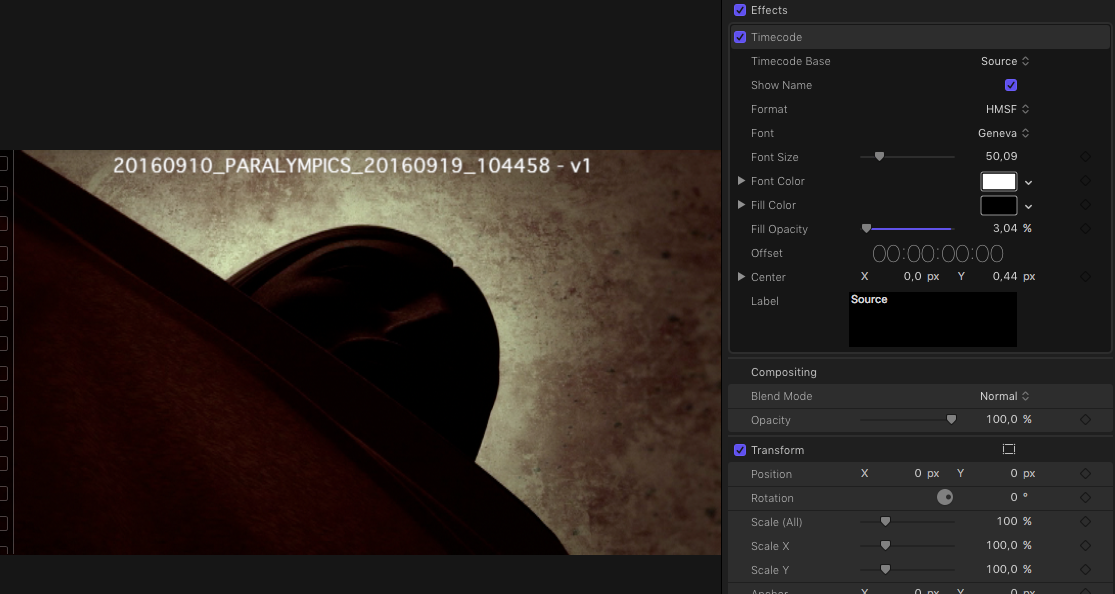
- Ronny
Of course you can do this.
Go to Effects > Video > Timecode and drop the Timecode effect onto any clip. You will see the TC and the name of the clip burnt-in over the video.
- Ronny
Please Log in to join the conversation.

30 Nov 2016 08:24 - 30 Nov 2016 09:10 #83457
by Schnurr
Replied by Schnurr on topic Burn-in clip name
Hi Louis,
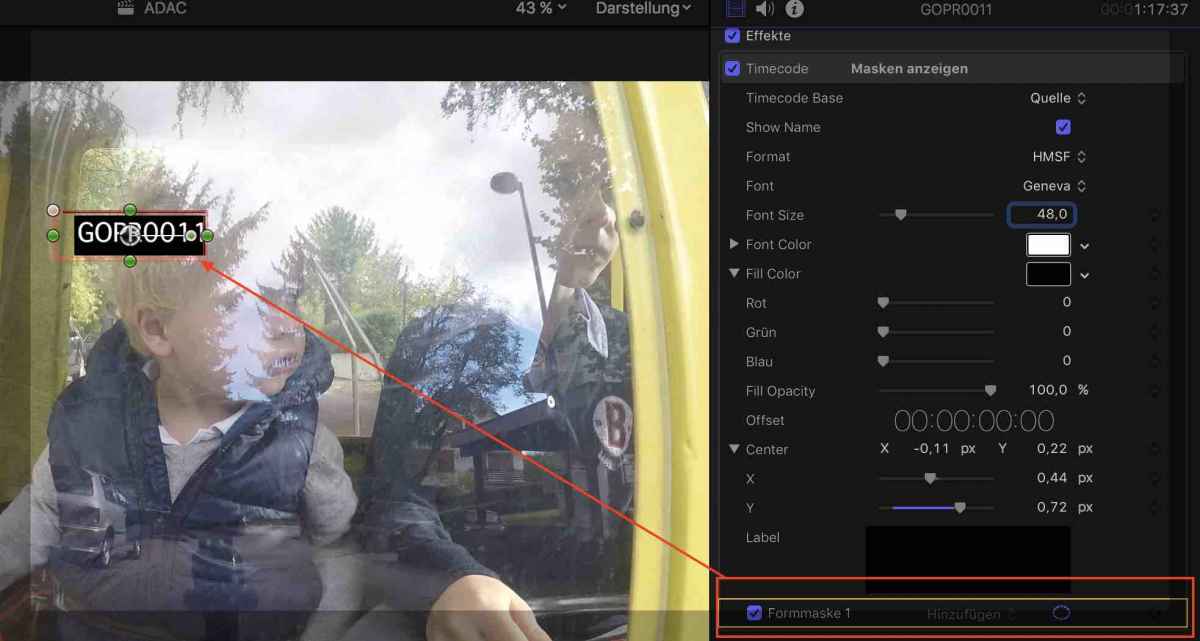
in case you just want to burn in the clip name "...watermark the current clip name? " then you need to apply a mask too in order to avoid the display of the TC information. Play around with the edges of the mask to adjust the shape what is cool.
Otherwise check out free plugins like www.coremelt.com/2015-10-15-12-16-33/coremeltfree.html
Tobias
in case you just want to burn in the clip name "...watermark the current clip name? " then you need to apply a mask too in order to avoid the display of the TC information. Play around with the edges of the mask to adjust the shape what is cool.
Otherwise check out free plugins like www.coremelt.com/2015-10-15-12-16-33/coremeltfree.html
Tobias
Last edit: 30 Nov 2016 09:10 by Schnurr.
Please Log in to join the conversation.
- ronny courtens
-
- Offline
- Moderator
-
Less
More
- Posts: 4455
- Thank you received: 962
30 Nov 2016 08:40 #83458
by ronny courtens
Replied by ronny courtens on topic Burn-in clip name
If you don't want the time code, you can move the title insert to the top of your image so you only see the clip name like I did in the screenshot I posted.
You can add a solid black box (or any other colored box) under your clip name, or you can reduce the Fill opacity to make the box transparent.
Or you can use the free plugin that Schnurr has mentioned. As you see, there are many ways you can do this in FCP X.
- Ronny
You can add a solid black box (or any other colored box) under your clip name, or you can reduce the Fill opacity to make the box transparent.
Or you can use the free plugin that Schnurr has mentioned. As you see, there are many ways you can do this in FCP X.
- Ronny
Please Log in to join the conversation.
- louis.kreusel
-
Topic Author
- Offline
- New Member
-
Less
More
- Posts: 2
- Thank you received: 0
15 Dec 2016 00:24 #84001
by louis.kreusel
Replied by louis.kreusel on topic Burn-in clip name
Thanks guys for the replies! The "name" checkbox in the Timecode generator is what I'm looking for. It's not perfect since if I just want the name of the current clip I'll need to mask out the timecode. I hope Apple will create a new "clip name" generator soon.
Please Log in to join the conversation.
