


- Posts: 33
- Thank you received: 1
3 Post Moderation Rule for New Boarders (25 Jan 2021)
New boarders will have their posts moderated - Don't worry if you cannot see your post immediately.
Copy and PASTE multiple story lines- not possible?
29 Nov 2016 13:23 #83420
by FCPman
Copy and PASTE multiple story lines- not possible? was created by FCPman
All I want to do is copy and paste story lines but it doesn't seem to be possible.
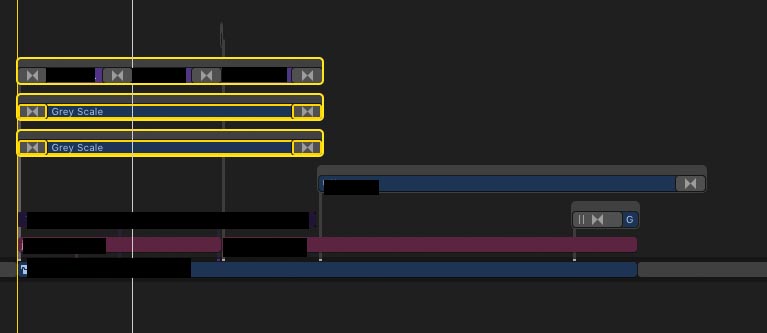
Here is what I did: Created a box that's just an outline with Greyscale 1 (masked) and Greyscale 2 (inverted mask) and then I've got TEXT on top. That box with the text is supposed to be some kind of information box.
Now I need this a lot of times in my time line at different places and with a DIFFERENT LENGTH aka the grey scale will be longer/shorter sometimes and the text will also be longer/shorter sometimes. This is why I did NOT nest everything / put it inside a compound clip.
So yes all I want to do is copy and paste more than 1 story line and paste it at different positions but it doesn't work. If I select all 3 it only pastes 1 story line if I use CMD + V. Any idea what I can do about this?
If you suggest I should use a compound clip let me know what would be the best way to tackle this because I need my 3 story lines (with different times) at 43 positions in the movie. A simple copy and paste would be exactly what I want but I know it's too much too ask
Here is what I did: Created a box that's just an outline with Greyscale 1 (masked) and Greyscale 2 (inverted mask) and then I've got TEXT on top. That box with the text is supposed to be some kind of information box.
Now I need this a lot of times in my time line at different places and with a DIFFERENT LENGTH aka the grey scale will be longer/shorter sometimes and the text will also be longer/shorter sometimes. This is why I did NOT nest everything / put it inside a compound clip.
So yes all I want to do is copy and paste more than 1 story line and paste it at different positions but it doesn't work. If I select all 3 it only pastes 1 story line if I use CMD + V. Any idea what I can do about this?
If you suggest I should use a compound clip let me know what would be the best way to tackle this because I need my 3 story lines (with different times) at 43 positions in the movie. A simple copy and paste would be exactly what I want but I know it's too much too ask
Please Log in to join the conversation.

29 Nov 2016 13:56 #83421
by lichinho
Replied by lichinho on topic Copy and PASTE multiple story lines- not possible?
Just a thought: you could create a Generator or Title in Motion, with published parameters such as the size of those boxes. Then this whole construction would be in your timeline as a single clip, fully editable and easily copied to wherever you need it.
Please Log in to join the conversation.
- Tom Wolsky
-

- Offline
- Moderator
-

29 Nov 2016 14:09 - 29 Nov 2016 14:10 #83422
by Tom Wolsky
Replied by Tom Wolsky on topic Copy and PASTE multiple story lines- not possible?
You're not selecting the storylines correctly. You can't select a mix of storylines and clips. Select like this to copy
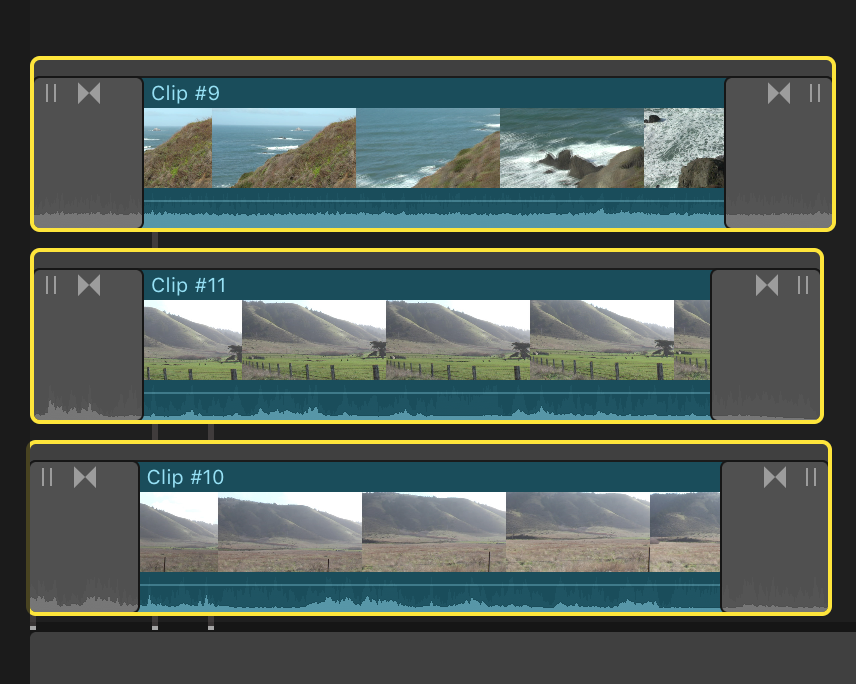
Then you can paste like this
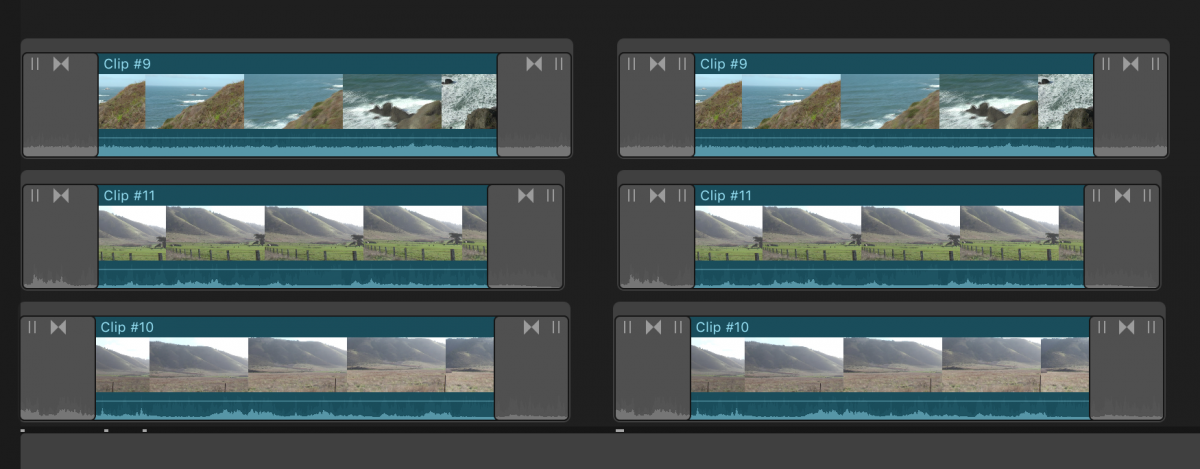
Then you can paste like this
Last edit: 29 Nov 2016 14:10 by Tom Wolsky.
Please Log in to join the conversation.

29 Nov 2016 15:36 #83427
by JoeEditor
Replied by JoeEditor on topic Copy and PASTE multiple story lines- not possible?
Tom hit the nail on the head, to add to his comment. Click the Storyline Bar above the clips themselves. Selecting individual clips is just that. Selecting the bar above them, is selecting the Storyline as a whole container. Then you can move, copy/paste multiple storylines just as you want to do.
Another option is make a Compound. Inside that Compound, they'll all be placed in the Primary Storyline. Select them all, do a Lift From Storyline, so they're in a connected storyline, inside the compound. Primary will just be a long gap clip. When you need it, drop it into a Project timeline, then Break Apart Clip Items (Shift-Cmd-G). They will remain in the connected storyline format. Just an alternative idea.
Another option is make a Compound. Inside that Compound, they'll all be placed in the Primary Storyline. Select them all, do a Lift From Storyline, so they're in a connected storyline, inside the compound. Primary will just be a long gap clip. When you need it, drop it into a Project timeline, then Break Apart Clip Items (Shift-Cmd-G). They will remain in the connected storyline format. Just an alternative idea.
Please Log in to join the conversation.
