


- Posts: 582
- Thank you received: 5
3 Post Moderation Rule for New Boarders (25 Jan 2021)
New boarders will have their posts moderated - Don't worry if you cannot see your post immediately.
Image sequence to video - edit trouble in FCPX
27 Nov 2016 18:07 #83371
by Neguah
Image sequence to video - edit trouble in FCPX was created by Neguah
Have taken some time-lapse sequences. Edit in Lightroom and rendered in AE (best settings and lossless).
It's around 240 images and 10 second video. It's quicktime-format and around 700mb.
Before FCPX update I had no problem editing the videofile, but after the update the clip, or the preview turns black whenever I do any changes to clip. And often it takes some seconds before it comes back to normal. Editing is a nightmare. Had to run the sequence through encoder and render it to H.264 to be able to work with the file in FCPX. But then again. The file is heavily compressed.
So, why is this happening?
Have the iMac 4.0ghz M395X and 8gb ram.
It's around 240 images and 10 second video. It's quicktime-format and around 700mb.
Before FCPX update I had no problem editing the videofile, but after the update the clip, or the preview turns black whenever I do any changes to clip. And often it takes some seconds before it comes back to normal. Editing is a nightmare. Had to run the sequence through encoder and render it to H.264 to be able to work with the file in FCPX. But then again. The file is heavily compressed.
So, why is this happening?
Have the iMac 4.0ghz M395X and 8gb ram.
Please Log in to join the conversation.
- Tom Wolsky
-

- Offline
- Moderator
-

27 Nov 2016 19:12 #83374
by Tom Wolsky
Replied by Tom Wolsky on topic Image sequence to video - edit trouble in FCPX
"(best settings and lossless)"
Could you give the complete specs of this including the codec?
Could you give the complete specs of this including the codec?
Please Log in to join the conversation.

27 Nov 2016 19:29 #83377
by spurratic
Replied by spurratic on topic Image sequence to video - edit trouble in FCPX
I wonder if it would be worthwhile to attempt to use Compressor instead of AE in order to convert the images to a video file.
Compressor File/open image sequence
Then export to Pro Res and edit away in FCPX.
If that works it might point to some sort of compatibility issues between AE and FCPX.
Compressor File/open image sequence
Then export to Pro Res and edit away in FCPX.
If that works it might point to some sort of compatibility issues between AE and FCPX.
Please Log in to join the conversation.
- Tom Wolsky
-
- Offline
- Moderator
-
27 Nov 2016 19:39 #83378
by Tom Wolsky
Replied by Tom Wolsky on topic Image sequence to video - edit trouble in FCPX
You should be able to export to ProRes at an appropriate frame size and frame rate directly from AE.
Please Log in to join the conversation.

27 Nov 2016 20:36 #83380
by Redifer
Replied by Redifer on topic Image sequence to video - edit trouble in FCPX
I agree. In After Effects export to a 1920x1080 ProRes 422HQ Quicktime. If you really want uncompressed quality, use the ANIMATION codec, not Uncompressed. But you'll be hard-pressed to notice much (if any) difference. Either way FCPX can handle that just fine.
Please Log in to join the conversation.
- Andreas Kiel
-

- Offline
- Platinum Member
-

Less
More
- Posts: 1077
- Thank you received: 189
28 Nov 2016 13:59 #83394
by Andreas Kiel
Replied by Andreas Kiel on topic Image sequence to video - edit trouble in FCPX
Maybe it sounds stupid - for me old QT Player is still the best choice for image sequences.
No re-crompression, fast and flexible.
- Andreas
No re-crompression, fast and flexible.
- Andreas
Please Log in to join the conversation.
28 Nov 2016 17:38 #83400
by Neguah
Replied by Neguah on topic Image sequence to video - edit trouble in FCPX
Ahh well, I figured it out.
I chose ProRes, and now it's easy as.
Best settings and lossless is standard if I doesn't choose anything. But now I will go for ProRes. So much easier to work with in FCPX!
I tried QT player, but I couldn't figure it out. Then AE came, and since I need to do some editing and stabilization in AE I chose AE. Thank you for your help!
I chose ProRes, and now it's easy as.
Best settings and lossless is standard if I doesn't choose anything. But now I will go for ProRes. So much easier to work with in FCPX!
I tried QT player, but I couldn't figure it out. Then AE came, and since I need to do some editing and stabilization in AE I chose AE. Thank you for your help!
Please Log in to join the conversation.
- Andreas Kiel
-
- Offline
- Platinum Member
-
Less
More
- Posts: 1077
- Thank you received: 189
28 Nov 2016 18:01 #83404
by Andreas Kiel
As said it's fast, doesn't need re-compression, and a ref movie is flexible, since you can change individual files of the sequence.
- Andreas
Replied by Andreas Kiel on topic Image sequence to video - edit trouble in FCPX
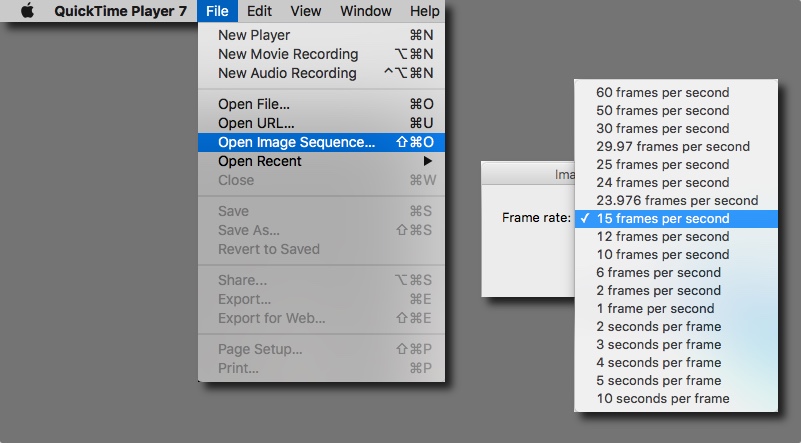
Sorry my bad. With "old" I meant QT Player 7. Use "Open Image Sequence ...", select frame rate and save either as reference or self-contained movie.Neguah wrote: ...I tried QT player, but I couldn't figure it out...
As said it's fast, doesn't need re-compression, and a ref movie is flexible, since you can change individual files of the sequence.
- Andreas
Please Log in to join the conversation.

28 Nov 2016 20:05 #83407
by JoeEditor
Replied by JoeEditor on topic Image sequence to video - edit trouble in FCPX
Please Log in to join the conversation.
28 Nov 2016 20:33 - 28 Nov 2016 20:34 #83410
by Redifer
Replied by Redifer on topic Image sequence to video - edit trouble in FCPX
The problem with doing it in Quicktime itself is that if you're importing shots from a DSLR and the resolution is 25 megapixels per frame, you're not going to get a video file that plays back with any kind of speed or consistency. BUT you can export that into a weirdly-shaped ProRes file (since DSLR shots aren't 16:9 or 4:3) and that should help.
Last edit: 28 Nov 2016 20:34 by Redifer.
Please Log in to join the conversation.
28 Nov 2016 23:08 #83411
by JoeEditor
Replied by JoeEditor on topic Image sequence to video - edit trouble in FCPX
Why wouldn't you get speed or consistency? I have been shooing time lapses for years with a DSLR and converting that to ProRes video files with QT7 very successfully. Or maybe I'm missing the point?
Please Log in to join the conversation.
