


- Posts: 228
- Thank you received: 16
3 Post Moderation Rule for New Boarders (25 Jan 2021)
New boarders will have their posts moderated - Don't worry if you cannot see your post immediately.
Renaming Clips in FCPX don't get actualized in index view ?
24 Nov 2016 16:49 - 24 Nov 2016 16:53 #83205
by Schnurr
Hi,
I renamed clips and thought that the index would update automatically to show as well the updated names... In this case I changed "Dortweil 9 to Dortweil GoPro 9"...
Is there a way to update the index ? In addition used clips are display orange from camera1 but used clips from camera2 are not displayed orange in the viewer... strange for me too. Any idea.
Closed the library a couple of times but doesn't fix the problem.
Tobias
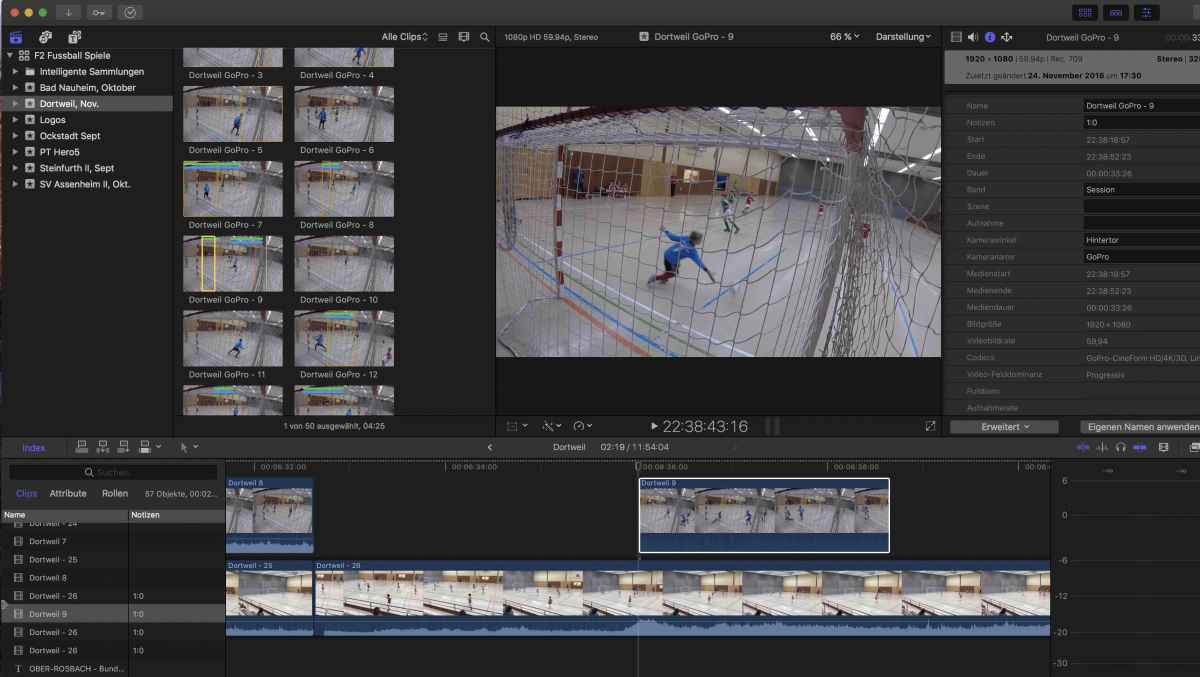
I renamed clips and thought that the index would update automatically to show as well the updated names... In this case I changed "Dortweil 9 to Dortweil GoPro 9"...
Is there a way to update the index ? In addition used clips are display orange from camera1 but used clips from camera2 are not displayed orange in the viewer... strange for me too. Any idea.
Closed the library a couple of times but doesn't fix the problem.
Tobias
Last edit: 24 Nov 2016 16:53 by Schnurr.
Please Log in to join the conversation.
- Tom Wolsky
-

- Offline
- Moderator
-

24 Nov 2016 17:26 #83208
by Tom Wolsky
Replied by Tom Wolsky on topic Renaming Clips in FCPX don't get actualized in index view ?
Where are you changing the name? Browser clips and clips in the project are separate instances of the media. If you want the index to change you have to rename the clip in the timeline.
Please Log in to join the conversation.
24 Nov 2016 17:37 - 24 Nov 2016 17:37 #83210
by Schnurr
Replied by Schnurr on topic Renaming Clips in FCPX don't get actualized in index view ?
Hi Tom,
1st of all thanks for having a look into that. I changed the names via FCPX "clipname change" function"/Screenshot.
In the information section (right side) the new names are shown correctly. But if I take a clip from the view and include it in the timeline and change then the name of the USED clip I would assume & expect that FCPX is changed that too in the timeline.
"rename clip in the timeline" would mean from my point of view double work ;-((
Any idea why the used clips are not marked in orange too? View->Used media is turn ON.
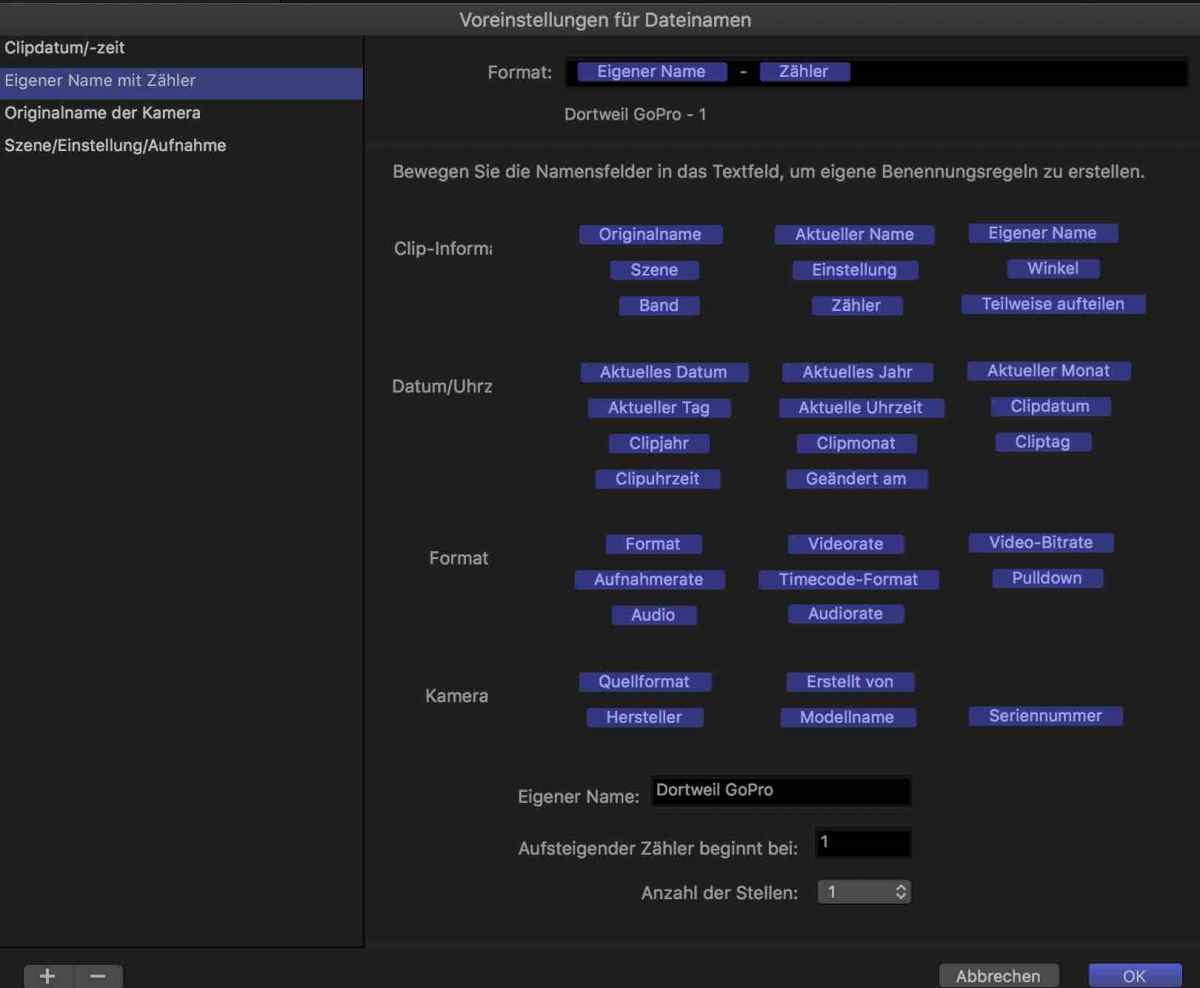
1st of all thanks for having a look into that. I changed the names via FCPX "clipname change" function"/Screenshot.
In the information section (right side) the new names are shown correctly. But if I take a clip from the view and include it in the timeline and change then the name of the USED clip I would assume & expect that FCPX is changed that too in the timeline.
"rename clip in the timeline" would mean from my point of view double work ;-((
Any idea why the used clips are not marked in orange too? View->Used media is turn ON.
Last edit: 24 Nov 2016 17:37 by Schnurr.
Please Log in to join the conversation.
- Tom Wolsky
-
- Offline
- Moderator
-
24 Nov 2016 17:56 #83211
by Tom Wolsky
Replied by Tom Wolsky on topic Renaming Clips in FCPX don't get actualized in index view ?
That only controls browser clips before they're put into the timeline unfortunately.
Please Log in to join the conversation.
24 Nov 2016 18:16 #83212
by Schnurr
Replied by Schnurr on topic Renaming Clips in FCPX don't get actualized in index view ?
ahhh okay thanks. Wired behaviour will raise a feedback request so that maybe in 4-5 years it get's fixed. 
Please Log in to join the conversation.


25 Nov 2016 18:59 #83271
by dmb
Replied by dmb on topic Renaming Clips in FCPX don't get actualized in index view ?
The missing Used Media indicators might be a long standing bug, which I'd very much like fixed. When you rename a clip in the timeline, the next time you run FCPX the Used Media indicators will no longer be present. I would make a lot of use of being able to rename timeline clips and having Used Media indicators.
If this is what you are experiencing, please submit feedback: www.apple.com/feedback/finalcutpro.html
If this is what you are experiencing, please submit feedback: www.apple.com/feedback/finalcutpro.html
Please Log in to join the conversation.
- nils.dettmann
-

- Offline
- Elite Member
-

Less
More
- Posts: 161
- Thank you received: 13
25 Nov 2016 20:35 #83275
by nils.dettmann
Replied by nils.dettmann on topic Renaming Clips in FCPX don't get actualized in index view ?
I think the problem with missing media indicators lies deeper within the way FCPX handles source files.
You can easily have different representations of the same source file in your library.
Internally there is a certain unique id to every file on your harddisk but that is never to be seen in the library.
When a clip is put into any type of timeline it becomes a new instance of this clip with no real connection to the clip in the library (compounds are different).
It´s even possible to have clips in the timeline that are nor present in any event in the library.
This happens quite frequently on Resolve roundtrips.
I think with the way FCPX manages media today there is no consistent way of showing used media.
You can easily have different representations of the same source file in your library.
Internally there is a certain unique id to every file on your harddisk but that is never to be seen in the library.
When a clip is put into any type of timeline it becomes a new instance of this clip with no real connection to the clip in the library (compounds are different).
It´s even possible to have clips in the timeline that are nor present in any event in the library.
This happens quite frequently on Resolve roundtrips.
I think with the way FCPX manages media today there is no consistent way of showing used media.
Please Log in to join the conversation.
26 Nov 2016 10:31 - 26 Nov 2016 10:41 #83303
by Schnurr
Replied by Schnurr on topic Renaming Clips in FCPX don't get actualized in index view ?
@Dmb
As I figured out right now clips get only indicated as "used/orange" when you put it in the primary timeline. Putting a clip in a secondary timeline as I did this will not result in a "used clip" indiction. From my basic and hobbist usage that doesn't make sense. In addition would be cool to have the iMovie feature "show me where I used the clip in the timeline" especially in a Pro version.
Feedback I did sent but as the other posts show Apple seems to be be purely developing further Apps (iWorks, M5, iM etc pp) would be interested to know how big the FC 1/2P X Dev team is out of their 1x0.000 employees
www.fcp.co/forum/4-final-cut-pro-x-fcpx/...-for-future-versions
@Nils
"I think with the way FCPX manages media today there is no consistent way of showing used media."
Aha speaks for the big 10.3 relaunch and the statement "the best Final Cut Pro ever". Anyway good to know that it's a software "feature" as Apple would call it
Lets wait then for the next new big release
Thanks for looking into that
Tobias
As I figured out right now clips get only indicated as "used/orange" when you put it in the primary timeline. Putting a clip in a secondary timeline as I did this will not result in a "used clip" indiction. From my basic and hobbist usage that doesn't make sense. In addition would be cool to have the iMovie feature "show me where I used the clip in the timeline" especially in a Pro version.
Feedback I did sent but as the other posts show Apple seems to be be purely developing further Apps (iWorks, M5, iM etc pp) would be interested to know how big the FC 1/2P X Dev team is out of their 1x0.000 employees
www.fcp.co/forum/4-final-cut-pro-x-fcpx/...-for-future-versions
@Nils
"I think with the way FCPX manages media today there is no consistent way of showing used media."
Aha speaks for the big 10.3 relaunch and the statement "the best Final Cut Pro ever". Anyway good to know that it's a software "feature" as Apple would call it
Lets wait then for the next new big release
Thanks for looking into that
Tobias
Last edit: 26 Nov 2016 10:41 by Schnurr.
Please Log in to join the conversation.
- Karsten Schlüter
-

- Offline
- Moderator
-
Less
More
- Posts: 3790
- Thank you received: 718
26 Nov 2016 11:07 #83306
by Karsten Schlüter
can not reenact that. Wherever I put media in a project, it is tagged by the orange bar…-
Generally spoken:
FCPX is a data-base. You can easily 'confuse' any data-base by changing its files (name, location,…) 'off' the intended workflow.
In this case, in the intended workflow it isn't designated to rename clips AFTER applying to a project - that simple.
Organising/managing/structuring media is by concept done in the Media-Browser … so, why should I go 'backwards' while editing and rename clips? "Make up your mind first"
… what are clip-names good for anyhow, I'd like to add … other metas are of much higher interest.
Replied by Karsten Schlüter on topic Renaming Clips in FCPX don't get actualized in index view ?
Schnurr wrote: … clips get only indicated as "used/orange" when you put it in the primary timeline. Putting a clip in a secondary timeline as I did this will not result in a "used clip" indiction. …
can not reenact that. Wherever I put media in a project, it is tagged by the orange bar…-
Generally spoken:
FCPX is a data-base. You can easily 'confuse' any data-base by changing its files (name, location,…) 'off' the intended workflow.
In this case, in the intended workflow it isn't designated to rename clips AFTER applying to a project - that simple.
Organising/managing/structuring media is by concept done in the Media-Browser … so, why should I go 'backwards' while editing and rename clips? "Make up your mind first"
… what are clip-names good for anyhow, I'd like to add … other metas are of much higher interest.
Please Log in to join the conversation.
26 Nov 2016 11:33 - 26 Nov 2016 11:37 #83308
by Schnurr
Sorry Karsten, you are right I "made" the mistake and changed the filename WITHIN FC1/2PX and thought that Apple would be able to manage that user interaction within its Database
Thanks that I should make up my mind first instead of believing that FC would be able to reindex which would be a simple and easy to implement What about when you figure out later ups I would like to have the names changed. And again I changed everything WITHIN FCX and not outside. As such a "Pro" App should be able to manage that (my view)
I think its up to the user whether clip names or meta data would be preferred especially when the "Index" function shows first as a standard set the Clip NAMES!
Anyway I call the whole thing a bug and not a feature
Tobias
Tobias
Replied by Schnurr on topic Renaming Clips in FCPX don't get actualized in index view ?
Karsten Schlüter wrote:
Schnurr wrote: … clips get only indicated as "used/orange" when you put it in the primary timeline. Putting a clip in a secondary timeline as I did this will not result in a "used clip" indiction. …
can not reenact that. Wherever I put media in a project, it is tagged by the orange bar…-
Generally spoken:
FCPX is a data-base. You can easily 'confuse' any data-base by changing its files (name, location,…) 'off' the intended workflow.
In this case, in the intended workflow it isn't designated to rename clips AFTER applying to a project - that simple.
Organising/managing/structuring media is by concept done in the Media-Browser … so, why should I go 'backwards' while editing and rename clips? "Make up your mind first"
… what are clip-names good for anyhow, I'd like to add … other metas are of much higher interest.
Sorry Karsten, you are right I "made" the mistake and changed the filename WITHIN FC1/2PX and thought that Apple would be able to manage that user interaction within its Database
Thanks that I should make up my mind first instead of believing that FC would be able to reindex which would be a simple and easy to implement
What about when you figure out later ups I would like to have the names changed. And again I changed everything WITHIN FCX and not outside. As such a "Pro" App should be able to manage that (my view)I think its up to the user whether clip names or meta data would be preferred especially when the "Index" function shows first as a standard set the Clip NAMES!
Anyway I call the whole thing a bug and not a feature
Tobias
Tobias
Last edit: 26 Nov 2016 11:37 by Schnurr.
Please Log in to join the conversation.
- Karsten Schlüter
-
- Offline
- Moderator
-
Less
More
- Posts: 3790
- Thank you received: 718
26 Nov 2016 11:59 #83309
by Karsten Schlüter
It's not my job to defend Apple's - maybe - concept, all I said is, that the intended workflow doesn't match yours - you can call that a flaw or missing features, but, from Apple's perspective, I don't see a bug, nor a need.
Imagine for a second collaborative working (pro feature, not our tiny soccer penny stuff) … you rename clips in the timeline, I don't, so? Who's King in the database? …
At one point in the workflow, you have to set a point-of-no-return, an all-possible was never in Apple's DNA.
How is that handled in Premiere? just for comparison?
…
Replied by Karsten Schlüter on topic Renaming Clips in FCPX don't get actualized in index view ?
Schnurr wrote: … Anyway I call the whole thing a bug and not a feature
…
It's not my job to defend Apple's - maybe - concept, all I said is, that the intended workflow doesn't match yours - you can call that a flaw or missing features, but, from Apple's perspective, I don't see a bug, nor a need.
Imagine for a second collaborative working (pro feature, not our tiny soccer penny stuff) … you rename clips in the timeline, I don't, so? Who's King in the database? …
At one point in the workflow, you have to set a point-of-no-return, an all-possible was never in Apple's DNA.
How is that handled in Premiere? just for comparison?
…
Please Log in to join the conversation.
26 Nov 2016 19:25 #83338
by dmb
Replied by dmb on topic Renaming Clips in FCPX don't get actualized in index view ?
Karsten: You state that renaming clips in the timeline is not an intended workflow for the software. This is clearly not the case, for which there is ample evidence. First, the contextual menu that results from control-clicking on a clip in the timeline provides an option to rename the clip. Second, renaming clips in the timeline is described in the manual.
It is important that you understand the software prior to describing a bug as being the fault of the user.
You go on to propose that renaming clips in the timeline is the the "correct" workflow, implying that those who do so are "going backwards". There are a number of situations in which renaming clips in the timeline would enhance the workflow.
Because you do not use, or perhaps understand, a workflow does not make it invalid.
It is important that you understand the software prior to describing a bug as being the fault of the user.
You go on to propose that renaming clips in the timeline is the the "correct" workflow, implying that those who do so are "going backwards". There are a number of situations in which renaming clips in the timeline would enhance the workflow.
Because you do not use, or perhaps understand, a workflow does not make it invalid.
Please Log in to join the conversation.
26 Nov 2016 19:32 #83339
by dmb
Replied by dmb on topic Renaming Clips in FCPX don't get actualized in index view ?
Schnurr: I wanted to let you know that I can not reproduce either of the issues you are seeing. Specifically, when I rename a clip in the timeline, the name in the timeline subsequently updates.
Second, Used Media ranges do occur in the Event Browser for clips I've placed as a connected clip (either inside or outside of a secondary storyline.) Used Media ranges do not occur on clips within a compound clip that is in the timeline. Nor do there appear for clips within an audition. I think having Used Media ranges in both situations would be useful.
I'm responding to let you know that the odd behavior you are seeing isn't "normal".
Second, Used Media ranges do occur in the Event Browser for clips I've placed as a connected clip (either inside or outside of a secondary storyline.) Used Media ranges do not occur on clips within a compound clip that is in the timeline. Nor do there appear for clips within an audition. I think having Used Media ranges in both situations would be useful.
I'm responding to let you know that the odd behavior you are seeing isn't "normal".
Please Log in to join the conversation.
26 Nov 2016 20:44 #83342
by Schnurr
Hi I didn't rename the clips in the timeline I used the function as you can see in my second screenshot. Used media isn't show for the ones user might rename due to any valid reason. If I stick to the original name conversion the used ones are as well shown in the secondary timeline.
Tobias
Replied by Schnurr on topic Renaming Clips in FCPX don't get actualized in index view ?
dmb wrote: Schnurr: I wanted to let you know that I can not reproduce either of the issues you are seeing. Specifically, when I rename a clip in the timeline, the name in the timeline subsequently updates.
.
Hi I didn't rename the clips in the timeline I used the function as you can see in my second screenshot. Used media isn't show for the ones user might rename due to any valid reason. If I stick to the original name conversion the used ones are as well shown in the secondary timeline.
Tobias
Please Log in to join the conversation.
26 Nov 2016 22:03 #83346
by dmb
Replied by dmb on topic Renaming Clips in FCPX don't get actualized in index view ?
Tobias - I must have misunderstood your original question. If I understand correctly, what you are referring to is that after you move a clip into the timeline, then change the name of that clip in the Event Browser, the name is not changed in the timeline. This is what happens for me as well. It has been that way for as long as I can remember. This behavior is, as Tom mentioned, by design.
Please Log in to join the conversation.
