


- Posts: 21
- Thank you received: 0
3 Post Moderation Rule for New Boarders (25 Jan 2021)
New boarders will have their posts moderated - Don't worry if you cannot see your post immediately.
Filmstrip view in browser
24 Nov 2016 10:24 #83187
by Hypnoman
Filmstrip view in browser was created by Hypnoman
When I view clips in the browser in filmstrip mode, some of them are outlined with a very thin red line. What does this signify?
Also, some of the clips have a symbol at the beginning, presumably to indicate whether it's a synchronised clip, or a multicam clip, or whatever.
Is there a key to these symbols anywhere? I'm guessing they're in the official manual somewhere, but the indexing is so bad.
Hypnoman
Also, some of the clips have a symbol at the beginning, presumably to indicate whether it's a synchronised clip, or a multicam clip, or whatever.
Is there a key to these symbols anywhere? I'm guessing they're in the official manual somewhere, but the indexing is so bad.
Hypnoman
Please Log in to join the conversation.

24 Nov 2016 11:28 #83191
by lichinho
Replied by lichinho on topic Filmstrip view in browser
Could you post some screenshots?
Please Log in to join the conversation.
- ronny courtens
-

- Offline
- Moderator
-

Less
More
- Posts: 4455
- Thank you received: 962
24 Nov 2016 12:17 #83192
by ronny courtens
Replied by ronny courtens on topic Filmstrip view in browser
Hi Martin, welcome to the forums.
Can you post a screenshot of one of the clips that are outlined with a red line?
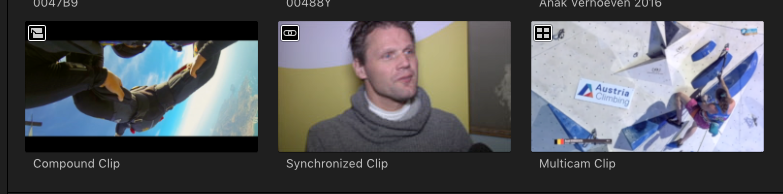
Yes, synchronized clips, multicam clips and compound clips have a specific symbol.
From left to right you can see a compound clip, a synchronized clip and a multicam clip:
- Ronny
Can you post a screenshot of one of the clips that are outlined with a red line?
Yes, synchronized clips, multicam clips and compound clips have a specific symbol.
From left to right you can see a compound clip, a synchronized clip and a multicam clip:
- Ronny
Please Log in to join the conversation.
24 Nov 2016 12:38 #83194
by Hypnoman
Replied by Hypnoman on topic Filmstrip view in browser
Thanks for clarification on the symbols Is it in the manual anywhere?
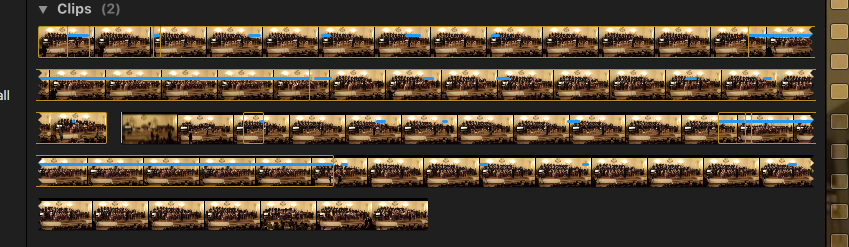
Here's a screenshot of the red line around clips.
MST
Here's a screenshot of the red line around clips.
MST
Please Log in to join the conversation.
- ronny courtens
-
- Offline
- Moderator
-
Less
More
- Posts: 4455
- Thank you received: 962
25 Nov 2016 10:44 #83239
by ronny courtens
Replied by ronny courtens on topic Filmstrip view in browser
You can find them in the manual, but not in a very organized way. The manual is really just an overview of application.
Do you mean the orange lines? Those are Range indicators. They indicate where ranges (In/Out) have been set on a clip.
I feel you are very new to FCP X, so welcome to the community. My advice would be to watch some basic training videos on the internet (just google FCP X Basics) to get familiar with the interface and the basic functionality. Then import some footage and develop you skills on a very simple project. You will see that FCP X is very intuitive, and I'm sure you will make a lot of progress fairly quickly.
And of course we are always here if you have any questions or problems.
- Ronny
Do you mean the orange lines? Those are Range indicators. They indicate where ranges (In/Out) have been set on a clip.
I feel you are very new to FCP X, so welcome to the community. My advice would be to watch some basic training videos on the internet (just google FCP X Basics) to get familiar with the interface and the basic functionality. Then import some footage and develop you skills on a very simple project. You will see that FCP X is very intuitive, and I'm sure you will make a lot of progress fairly quickly.
And of course we are always here if you have any questions or problems.
- Ronny
Please Log in to join the conversation.
25 Nov 2016 19:01 #83272
by Hypnoman
Replied by Hypnoman on topic Filmstrip view in browser
Thanks, and thanks for the welcome to the group.
Actually I've been using FCP X since (literally) the day it came out, so I know my way around the features I use pretty well . But most of my work involves editing one long multi-cam clip in the timeline (switching angles, adding effects and so forth), so I'm not that knowledgeable about selecting ranges of clips in the browser.
Anyhow, here's another screenshot to show what's puzzling me: why are some sections of the clip outlined in a thin red line, whereas others are outlined in a thick yellow line?
Best,
Martin
Actually I've been using FCP X since (literally) the day it came out, so I know my way around the features I use pretty well
. But most of my work involves editing one long multi-cam clip in the timeline (switching angles, adding effects and so forth), so I'm not that knowledgeable about selecting ranges of clips in the browser.Anyhow, here's another screenshot to show what's puzzling me: why are some sections of the clip outlined in a thin red line, whereas others are outlined in a thick yellow line?
Best,
Martin

Please Log in to join the conversation.
- Tom Wolsky
-

- Offline
- Moderator
-
25 Nov 2016 23:22 #83292
by Tom Wolsky
Replied by Tom Wolsky on topic Filmstrip view in browser
The two thick outlines normally indicate that've been selected, like with a Cmd-click.
Please Log in to join the conversation.
26 Nov 2016 09:09 #83300
by Hypnoman
Replied by Hypnoman on topic Filmstrip view in browser
Yes, I know what the thick yellow outlines are; it's the thin red outlines which are puzzling me.
MST
MST
Please Log in to join the conversation.
- Tom Wolsky
-
- Offline
- Moderator
-
26 Nov 2016 09:53 #83301
by Tom Wolsky
Replied by Tom Wolsky on topic Filmstrip view in browser
The thin lines indicate other I/O selections that have been made in the clip.
Please Log in to join the conversation.

27 Nov 2016 13:23 #83365
by Hypnoman
Replied by Hypnoman on topic Filmstrip view in browser
So there's a distinction between sections of the clip which have been selected (outlined in heavy yellow) and 'other I/O selections' (outlined in thin red). That's a bit subtle for me. Is it an important distinction?
MST
MST
Please Log in to join the conversation.
27 Nov 2016 13:26 #83366
by Hypnoman
Replied by Hypnoman on topic Filmstrip view in browser
At risk of sounding flippant, you're missing the red outline around sections of the clip.
My colour vision isn't very good, but in the attachment to my last posting, some sections of the clip are outlined heavily in yellow-orange, whereas some are outlined with a very thin red-orange line. Does that help?
MST
My colour vision isn't very good, but in the attachment to my last posting, some sections of the clip are outlined heavily in yellow-orange, whereas some are outlined with a very thin red-orange line. Does that help?
MST
Please Log in to join the conversation.
- Tom Wolsky
-
- Offline
- Moderator
-
27 Nov 2016 13:28 #83367
by Tom Wolsky
Replied by Tom Wolsky on topic Filmstrip view in browser
The different in the image is posted is that if you pressed an edit function like Append the two selected items will go to the timeline while the other selections will.
Please Log in to join the conversation.
27 Nov 2016 19:19 #83375
by JoeEditor
Replied by JoeEditor on topic Filmstrip view in browser
Heavy yellow are selected ranges.
Thin yellow are unselected ranges.
Like Tom said.
Simple as that.
Thin yellow are unselected ranges.
Like Tom said.
Simple as that.
Please Log in to join the conversation.
