


- Posts: 33
- Thank you received: 1
3 Post Moderation Rule for New Boarders (25 Jan 2021)
New boarders will have their posts moderated - Don't worry if you cannot see your post immediately.
Where are my background tasks that are not yet complete?
22 Nov 2016 10:55 #83074
by FCPman
Where are my background tasks that are not yet complete? was created by FCPman
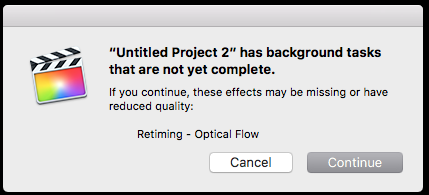
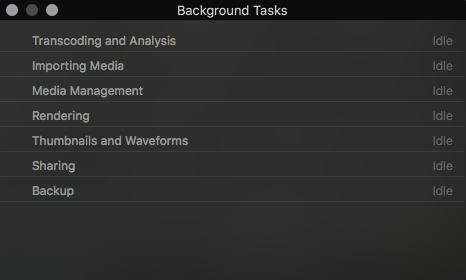
So I want to export my project. I did some slow motion clips and applied Optical Flow to those. Everything is on IDLE in my Background Tasks (Rendering kicks off after 1 Second and I have waited. Nothing happens) so I assume it’s done rendering YET when I try to export my movie I get the message „Your Project has background tasks that are not yet complete“.
I’ve tried MODIFY - Render all. Nothing happens.
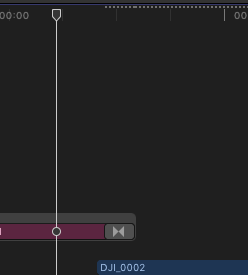
I also have a DOTTED line above one clip which FCPX struggles to play properly each time. I would assume that this dotted line means something like „isn’t rendered yet“ like a yellow line above clips in Premiere.
So what do I do? How do I get it to render? Thanks a lot.
I’ve tried MODIFY - Render all. Nothing happens.
I also have a DOTTED line above one clip which FCPX struggles to play properly each time. I would assume that this dotted line means something like „isn’t rendered yet“ like a yellow line above clips in Premiere.
So what do I do? How do I get it to render? Thanks a lot.
Please Log in to join the conversation.


22 Nov 2016 13:42 #83088
by JoeEditor
Replied by JoeEditor on topic Where are my background tasks that are not yet complete?
I get that a lot, also. I know others who get it. It's a bug. Fill out the feedback page.
I've answered that message clicking Continue, and everything seemed fine.
I've answered that message clicking Continue, and everything seemed fine.
Please Log in to join the conversation.
12 Jan 2017 23:35 #84794
by anim8r
Replied by anim8r on topic Where are my background tasks that are not yet complete?
I only noticed this happening after installing FCPX Hacks. Do you guys have it installed also?
Please Log in to join the conversation.
13 Jan 2017 04:18 #84798
by JoeEditor
Replied by JoeEditor on topic Where are my background tasks that are not yet complete?
nope, it makes me nervous.
Please Log in to join the conversation.
13 Jan 2017 06:40 #84799
by Axel
Some time ago. Wanted to see the "scrolling timeline" in action. Didn't add any useful functionality to FCP X, so I didn't bother to install it for Sierra and 10.3.
I can reproduce the issue insofar, as aborted optical-flow background tasks (force-quit and probably crash) remain unfinished after relaunch and can only be triggered by deleting the retiming and applying it again - in which case they apparently aren't aware of the progress before.
Replied by Axel on topic Where are my background tasks that are not yet complete?
anim8r wrote: I only noticed this happening after installing FCPX Hacks. Do you guys have it installed also?
Some time ago. Wanted to see the "scrolling timeline" in action. Didn't add any useful functionality to FCP X, so I didn't bother to install it for Sierra and 10.3.
I can reproduce the issue insofar, as aborted optical-flow background tasks (force-quit and probably crash) remain unfinished after relaunch and can only be triggered by deleting the retiming and applying it again - in which case they apparently aren't aware of the progress before.
Please Log in to join the conversation.
13 Jan 2017 12:14 #84803
by JoeEditor
Replied by JoeEditor on topic Where are my background tasks that are not yet complete?
I get the incomplete Optical Flow background warning a lot, and never have crashes. Known bug, report it.
Please Log in to join the conversation.
13 Jan 2017 16:44 #84813
by anim8r
Replied by anim8r on topic Where are my background tasks that are not yet complete?
Thanks, I'll report it then.
Please Log in to join the conversation.
- boris.ulzibat
-

- Offline
- New Member
-

Less
More
- Posts: 1
- Thank you received: 0
07 Jun 2017 10:34 #88645
by boris.ulzibat
Replied by boris.ulzibat on topic Where are my background tasks that are not yet complete?
Today I have found what might be a solution to this bug.
Starting from the beginning of your project skim through it by repeatedly pressing the "Down" key, and pausing for a second on each clip. Sometimes you will get a stabilisation message "Analyzing for..." that will quickly disappear. If it does not disappear right away it means that FCPX thinks it is done with this clip, but after that you modified it somehow, maybe applied a transition, so now there is a part of clip yet not stabilized. If so, turn the stabilisation for this clip on and off again.
Worked like a charm for me.
Hope this helps!
Boris
Starting from the beginning of your project skim through it by repeatedly pressing the "Down" key, and pausing for a second on each clip. Sometimes you will get a stabilisation message "Analyzing for..." that will quickly disappear. If it does not disappear right away it means that FCPX thinks it is done with this clip, but after that you modified it somehow, maybe applied a transition, so now there is a part of clip yet not stabilized. If so, turn the stabilisation for this clip on and off again.
Worked like a charm for me.
Hope this helps!
Boris
Please Log in to join the conversation.


16 Jul 2017 00:32 #89421
by steve223
Replied by steve223 on topic Where are my background tasks that are not yet complete?
I have the same issue, it's quite annoying and unfortunately, FCPX does not tell you which clip it has issues with as the background tasks don't show any pending tasks, I have that mostly when using stabilising feature
Please Log in to join the conversation.
- jakefantom
-
- Offline
- New Member
-
Less
More
- Posts: 7
- Thank you received: 0
05 Apr 2023 18:48 #124877
by jakefantom
Replied by jakefantom on topic Where are my background tasks that are not yet complete?
Boris, thanks for this. Your solution actually works, although it is very time consuming for longer projects. The other workaround is instead of using the Share option, you can choose "Send to Compressor." A two-hour file that kept generating the worthless "background tasks are not yet complete" message just zoomed right along to completion when output through "Send to Compressor."
Please Log in to join the conversation.
