




- Posts: 35
- Thank you received: 4
3 Post Moderation Rule for New Boarders (25 Jan 2021)
New boarders will have their posts moderated - Don't worry if you cannot see your post immediately.
FCPX Timecode not continuous
21 Nov 2016 22:51 - 21 Nov 2016 22:52 #83066
by dmb
FCPX Timecode not continuous was created by dmb
First off, I'd like to thank everyone who participates in this forum - especially the moderators who put in a lot of time here. My work is better because of what I've learned here; and I've enjoyed contributing a couple of answers of my own.
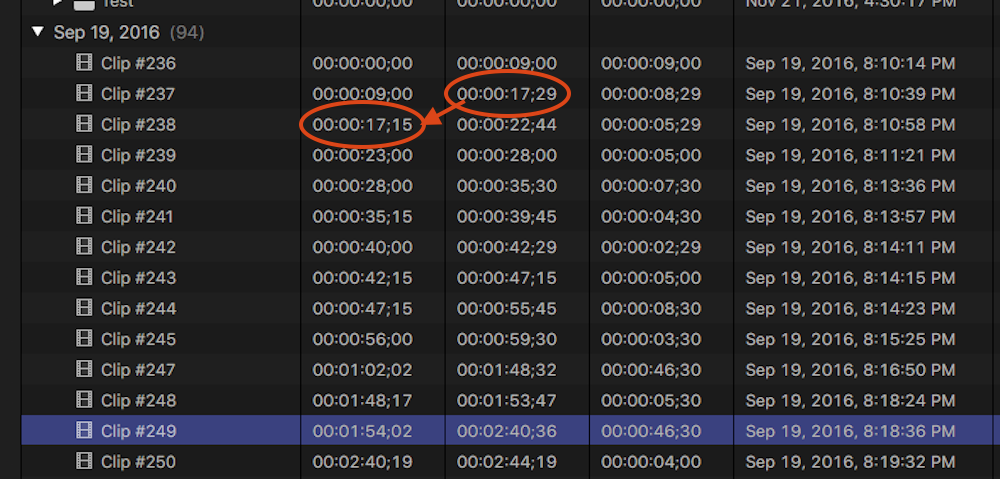
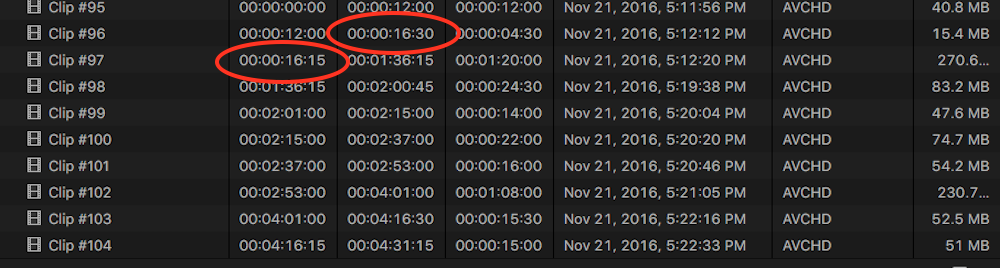
I have noticed that the timecode of clips recorded sequentially is not necessarily continuous. I have attached two screenshots of the FCPX Event Browser, each showing a series of clips that were recorded sequentially. Once screenshot is when the camera is set for timecode in Drop Frame, the other for camera timecode in Non Drop Frame. Although, as there were recorded in 59.94p, it was my understanding that Drop Frame does not apply.
Note that in each case, the timecode is not necessarily continuous from clip to clip. In fact, for some clips (as circled in red) the ending timecode for a clip is AFTER the beginning timecode of the subsequent clip - which seems especially strange and leads me to believe it is not related to Drop Frame/Non Drop Frame.
Furthermore, for Drop Frame Clips, there are some clips when the starting time plus duration does not equal the ending time (see Clip #249, highlighted in blue.)
The clips were recorded in a Canon C100 Mark II, AVCHD format, 59.94p FPS. The camera timecode was set to Rec Run (running only when recording), for which the manual states that continuous timecode is recorded from clip to clip.
I am using FCPX 10.3 on macOS 10.12.1.
Can anyone provide an explanation for the non continuous timecode and discrepancy between start, duration and end? I looked online for discussions of this and was surprised not to find any. If you know of any relevant discussions, please let me know.
I have noticed that the timecode of clips recorded sequentially is not necessarily continuous. I have attached two screenshots of the FCPX Event Browser, each showing a series of clips that were recorded sequentially. Once screenshot is when the camera is set for timecode in Drop Frame, the other for camera timecode in Non Drop Frame. Although, as there were recorded in 59.94p, it was my understanding that Drop Frame does not apply.
Note that in each case, the timecode is not necessarily continuous from clip to clip. In fact, for some clips (as circled in red) the ending timecode for a clip is AFTER the beginning timecode of the subsequent clip - which seems especially strange and leads me to believe it is not related to Drop Frame/Non Drop Frame.
Furthermore, for Drop Frame Clips, there are some clips when the starting time plus duration does not equal the ending time (see Clip #249, highlighted in blue.)
The clips were recorded in a Canon C100 Mark II, AVCHD format, 59.94p FPS. The camera timecode was set to Rec Run (running only when recording), for which the manual states that continuous timecode is recorded from clip to clip.
I am using FCPX 10.3 on macOS 10.12.1.
Can anyone provide an explanation for the non continuous timecode and discrepancy between start, duration and end? I looked online for discussions of this and was surprised not to find any. If you know of any relevant discussions, please let me know.
Last edit: 21 Nov 2016 22:52 by dmb.
Please Log in to join the conversation.


21 Nov 2016 23:22 #83067
by bogiesan
Replied by bogiesan on topic FCPX Timecode not continuous
Curious, indeed, but I don't see that you have enough information to assume this is an FCPX issue. How have you determined the timecode was not recorded that way in the camera?
You might want to check Canon's support site. If they have a forum, look for FCPX users and post your inquiry. There might be more FCPX users over there than there are Canon users here.
You might want to check Canon's support site. If they have a forum, look for FCPX users and post your inquiry. There might be more FCPX users over there than there are Canon users here.
Please Log in to join the conversation.
22 Nov 2016 02:01 #83071
by dmb
Replied by dmb on topic FCPX Timecode not continuous
I should have been more explicit - I don't assume this is a FCPX issue. It might very well be a camera issue. As I mentioned, I have looked online (specifically, Canon's website, on a couple of user websites for Canon cameras and did general Google searches) but did not find useful information. So, I was hoping someone here would be able to explain what is happening.
Please Log in to join the conversation.
22 Nov 2016 19:18 #83109
by Schnurr
Replied by Schnurr on topic FCPX Timecode not continuous
Hi
Based on my experience as "start" value FCPX takes the "firstframe" Information from the clip. Maybe you can check with Bouke from www.videotoolshed.com/handcrafted-timecode-tools/qtchange/ who is very helpful and has a great product support. Check as well with mediainfo app what vales are stored in the file. With qt change you can adjust them.
Tobias
Based on my experience as "start" value FCPX takes the "firstframe" Information from the clip. Maybe you can check with Bouke from www.videotoolshed.com/handcrafted-timecode-tools/qtchange/ who is very helpful and has a great product support. Check as well with mediainfo app what vales are stored in the file. With qt change you can adjust them.
Tobias
Please Log in to join the conversation.
23 Nov 2016 00:56 - 23 Nov 2016 00:58 #83132
by dmb
Replied by dmb on topic FCPX Timecode not continuous
Thank you, Schnurr, for the tip about the MediaInfo and QTChange apps. Using MediaInfo to look at both the original .mts files (on the camera card) as well as the .mov files created by FCPX was very interesting. As far as I can tell, what I am seeing is a sort of "rounding error" in converting the information in the .mts files into what is displayed in the FCPX event browser and as the source timecode. It seems to be more complex than a simple "rounding error", but at this point in my understanding, I will just leave the description at that.
QTChange won't run in Sierra (the developer states that at least some installations of Sierra are effected) on my computer. It might shed more light on the subject, so I'll keep an eye out for an update.
Thanks again for responding.
QTChange won't run in Sierra (the developer states that at least some installations of Sierra are effected) on my computer. It might shed more light on the subject, so I'll keep an eye out for an update.
Thanks again for responding.
Last edit: 23 Nov 2016 00:58 by dmb.
Please Log in to join the conversation.
