


- Posts: 141
- Thank you received: 2
3 Post Moderation Rule for New Boarders (25 Jan 2021)
New boarders will have their posts moderated - Don't worry if you cannot see your post immediately.
Kozuka Font Not Displaying Correctly
21 Nov 2016 14:42 - 21 Nov 2016 14:44 #83046
by AlexMaxim
Kozuka Font Not Displaying Correctly was created by AlexMaxim
Hi there guys,
I hope that this post finds you all in excellent spirits, and having a great start to the week.
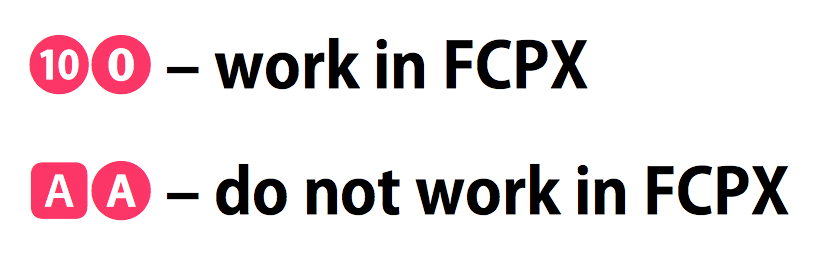
We are experiencing a strange problem with FCPX: it is not displaying some characters from the Kozuka Gothic Pro B font: specifically, if we copy-paste an encircled letter character from OpenOffice into FCPX, this does not work.
Conversely, if we copy-paste an encircled number, it does work.
I have attached a screen shot to visually explain this.
Any ideas what may be going on?
I hope that this post finds you all in excellent spirits, and having a great start to the week.
We are experiencing a strange problem with FCPX: it is not displaying some characters from the Kozuka Gothic Pro B font: specifically, if we copy-paste an encircled letter character from OpenOffice into FCPX, this does not work.
Conversely, if we copy-paste an encircled number, it does work.
I have attached a screen shot to visually explain this.
Any ideas what may be going on?
Last edit: 21 Nov 2016 14:44 by AlexMaxim.
Please Log in to join the conversation.
- michael.wiser
-

- Offline
- New Member
-

Less
More
- Posts: 13
- Thank you received: 4
21 Nov 2016 17:08 #83053
by michael.wiser
Replied by michael.wiser on topic Kozuka Font Not Displaying Correctly
My guess is it having something to do with open office. I just tried a copy and paste from Pages to final cut and it worked fine. Does the text display properly when you manually type it in?
Please Log in to join the conversation.
21 Nov 2016 21:57 #83064
by AlexMaxim
Thank you for your kind response! Much to my embarrassment I do not not how to enter these characters manually. Also, I do not have a copy of Pages. Would it work from any other programme? I have tried in Word 2008 and those characters are not showing under Insert>Symbol.
If it helps, the same issue is evident in Motion 5.
Replied by AlexMaxim on topic Kozuka Font Not Displaying Correctly
michael.wiser wrote: My guess is it having something to do with open office. I just tried a copy and paste from Pages to final cut and it worked fine. Does the text display properly when you manually type it in?
Thank you for your kind response! Much to my embarrassment I do not not how to enter these characters manually. Also, I do not have a copy of Pages. Would it work from any other programme? I have tried in Word 2008 and those characters are not showing under Insert>Symbol.
If it helps, the same issue is evident in Motion 5.
Please Log in to join the conversation.
- michael.wiser
-
- Offline
- New Member
-
Less
More
- Posts: 13
- Thank you received: 4
22 Nov 2016 19:21 - 22 Nov 2016 21:16 #83110
by michael.wiser
Replied by michael.wiser on topic Kozuka Font Not Displaying Correctly
So. I'm not sure how to file this. Definitely under the "Not Helpful" section. but I downloaded OpenOffice and tried it myself and it seemed to work.
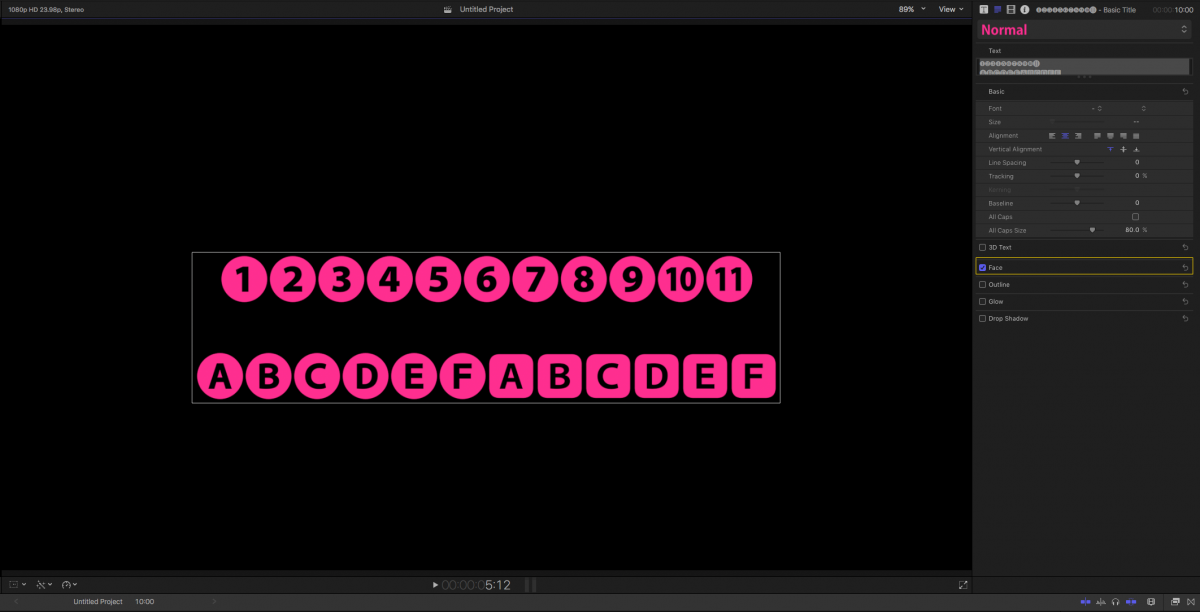
The screen shot was after I copied them from OpenOffice into final cut.
what version of software are you using. OS, FCP, and Open Office?
for me I am on El Cap 10.11.6, using 10.3 of Final Cut, and Open Office is 4.1.3
The screen shot was after I copied them from OpenOffice into final cut.
what version of software are you using. OS, FCP, and Open Office?
for me I am on El Cap 10.11.6, using 10.3 of Final Cut, and Open Office is 4.1.3
Last edit: 22 Nov 2016 21:16 by michael.wiser.
Please Log in to join the conversation.
22 Nov 2016 21:50 #83115
by AlexMaxim
Firstly, thank you so much for going to the trouble of downloading OpenOffice and testing this out! I sincerely appreciate this.
I am running OS X 10.8.5, FCPX 10.0.9 and OpenOffice 3.4.1. I did try downloading OpenOffice 4.1.1 about a year or so ago, but for some reason it wasn't very stable on my system. Maybe I should try again?
N.B. I cannot d/l a new version of FCPX from the App Store unless I upgrade to Sierra, which I am wary of.
Replied by AlexMaxim on topic Kozuka Font Not Displaying Correctly
michael.wiser wrote: So. I'm not sure how to file this. Definitely under the "Not Helpful" section. but I downloaded OpenOffice and tried it myself and it seemed to work.
The screen shot was after I copied them from OpenOffice into final cut.
what version of software are you using. OS, FCP, and Open Office?
for me I am on El Cap 10.11.6, using 10.3 of Final Cut, and Open Office is 4.1.3
Firstly, thank you so much for going to the trouble of downloading OpenOffice and testing this out! I sincerely appreciate this.
I am running OS X 10.8.5, FCPX 10.0.9 and OpenOffice 3.4.1. I did try downloading OpenOffice 4.1.1 about a year or so ago, but for some reason it wasn't very stable on my system. Maybe I should try again?
N.B. I cannot d/l a new version of FCPX from the App Store unless I upgrade to Sierra, which I am wary of.
Please Log in to join the conversation.
- michael.wiser
-
- Offline
- New Member
-
Less
More
- Posts: 13
- Thank you received: 4
22 Nov 2016 22:14 #83120
by michael.wiser
Replied by michael.wiser on topic Kozuka Font Not Displaying Correctly
No problem. It started to bug me that I couldn't see the specific characters you were referring to, and couldn't find them in Pages.
The biggest issue I see is that you are running old versions of everything, and I'm guessing your problems would be solved if you were to just upgraded the software. However I know that to update FCP you are going to have to update you OS. which starts to become a bigger ordeal. (especially depending on how old your hardware is).
So if upgrading isn't an option, the longer solution is to make them yourself in motion. type in the letter and put a circle behind it, or rounded square. would be A LOT more tedious. But it would get you the results you are looking for.
The biggest issue I see is that you are running old versions of everything, and I'm guessing your problems would be solved if you were to just upgraded the software. However I know that to update FCP you are going to have to update you OS. which starts to become a bigger ordeal. (especially depending on how old your hardware is).
So if upgrading isn't an option, the longer solution is to make them yourself in motion. type in the letter and put a circle behind it, or rounded square. would be A LOT more tedious. But it would get you the results you are looking for.
Please Log in to join the conversation.


22 Nov 2016 22:16 #83121
by JoeEditor
Replied by JoeEditor on topic Kozuka Font Not Displaying Correctly
What exactly are your Mac's hardware specs? What year and model?
Please Log in to join the conversation.
22 Nov 2016 23:11 #83129
by AlexMaxim
Yes, you are quite right. I would definitely upgrade if I could guarantee the integrity of my data during post-Sierra, but I have read so many horror stories that I do not want to risk it.
Re: making the characters in Motion, that is an ingenious idea! If all else fails I will do this. I guess that it might take a bit of work to get the proportions right, but needs must.
Thank you so much once again for your kind assistance!
Replied by AlexMaxim on topic Kozuka Font Not Displaying Correctly
michael.wiser wrote: No problem. It started to bug me that I couldn't see the specific characters you were referring to, and couldn't find them in Pages.
The biggest issue I see is that you are running old versions of everything, and I'm guessing your problems would be solved if you were to just upgraded the software. However I know that to update FCP you are going to have to update you OS. which starts to become a bigger ordeal. (especially depending on how old your hardware is).
So if upgrading isn't an option, the longer solution is to make them yourself in motion. type in the letter and put a circle behind it, or rounded square. would be A LOT more tedious. But it would get you the results you are looking for.
Yes, you are quite right. I would definitely upgrade if I could guarantee the integrity of my data during post-Sierra, but I have read so many horror stories that I do not want to risk it.
Re: making the characters in Motion, that is an ingenious idea! If all else fails I will do this. I guess that it might take a bit of work to get the proportions right, but needs must.
Thank you so much once again for your kind assistance!
Please Log in to join the conversation.
22 Nov 2016 23:13 #83130
by AlexMaxim
15" MacBook Pro Retina (mid-2012), OS X 10.8.5 (2013).
Replied by AlexMaxim on topic Kozuka Font Not Displaying Correctly
FCPX.guru wrote: What exactly are your Mac's hardware specs? What year and model?
15" MacBook Pro Retina (mid-2012), OS X 10.8.5 (2013).
Please Log in to join the conversation.
23 Nov 2016 03:06 #83135
by JoeEditor
Replied by JoeEditor on topic Kozuka Font Not Displaying Correctly
I don't know where all these Sierra "horror stories" are coming from. I've got four workstations at a TV studio running it, and three at home, no serious issues.
Please Log in to join the conversation.
- michael.wiser
-
- Offline
- New Member
-
Less
More
- Posts: 13
- Thank you received: 4
23 Nov 2016 04:10 #83138
by michael.wiser
Replied by michael.wiser on topic Kozuka Font Not Displaying Correctly
I have to agree with Alex here. As much as I am one to jump on new software, I tried installing Sierra 3 times on my Mac Pro and each time it became an unresponsive pile of silicone and anodized aluminum...
That being said. I see no reason why you couldn't upgrade to a more recent OS. El Cap works fine.
That being said. I see no reason why you couldn't upgrade to a more recent OS. El Cap works fine.
Please Log in to join the conversation.
23 Nov 2016 21:16 #83159
by AlexMaxim
The reported issues are coming from systems which have upgraded to Sierra, rather than those that have shipped with it. If your computers are non-native Sierra devices which have made the leap successfully, that is fantastic, but the risk remains.
Replied by AlexMaxim on topic Kozuka Font Not Displaying Correctly
FCPX.guru wrote: I don't know where all these Sierra "horror stories" are coming from. I've got four workstations at a TV studio running it, and three at home, no serious issues.
The reported issues are coming from systems which have upgraded to Sierra, rather than those that have shipped with it. If your computers are non-native Sierra devices which have made the leap successfully, that is fantastic, but the risk remains.
Please Log in to join the conversation.
23 Nov 2016 21:19 - 23 Nov 2016 21:22 #83160
by AlexMaxim
I was all ready to upgrade to El Capitan or something similar, but there have also been data leakage issues for some computers making the switch to El Capitan from Mountain Lion. I can't really justify the risk of losing data for something that is ultimately not mandatory, because I lack the expertise to put things right if they go wrong.
Replied by AlexMaxim on topic Kozuka Font Not Displaying Correctly
michael.wiser wrote: I have to agree with Alex here. As much as I am one to jump on new software, I tried installing Sierra 3 times on my Mac Pro and each time it became an unresponsive pile of silicone and anodized aluminum...
That being said. I see no reason why you couldn't upgrade to a more recent OS. El Cap works fine.
I was all ready to upgrade to El Capitan or something similar, but there have also been data leakage issues for some computers making the switch to El Capitan from Mountain Lion. I can't really justify the risk of losing data for something that is ultimately not mandatory, because I lack the expertise to put things right if they go wrong.
Last edit: 23 Nov 2016 21:22 by AlexMaxim.
Please Log in to join the conversation.
