


- Posts: 13
- Thank you received: 4
3 Post Moderation Rule for New Boarders (25 Jan 2021)
New boarders will have their posts moderated - Don't worry if you cannot see your post immediately.
Saving Library to a SAN or Supported SMB
- michael.wiser
-
 Topic Author
- Offline
- New Member
-

Less
More
18 Nov 2016 18:06 #82965
by michael.wiser
Saving Library to a SAN or Supported SMB was created by michael.wiser
Is there a list somewhere of preferred SAN devices, or supported SMB locations to use to share libraries to? my office just upgraded out backbone and I would love to stop using the Sparse bundle trick. Any help would be appreciated.
Please Log in to join the conversation.
- ronny courtens
-

- Offline
- Moderator
-

Less
More
- Posts: 4455
- Thank you received: 962
20 Nov 2016 08:19 #83000
by ronny courtens
Replied by ronny courtens on topic Saving Library to a SAN or Supported SMB
Hi Michael, welcome to the forums.
I don't think anyone needs to use the Sparse bundle trick anymore. What kind of shared storage solution are you using at the office?
- Ronny
I don't think anyone needs to use the Sparse bundle trick anymore. What kind of shared storage solution are you using at the office?
- Ronny
Please Log in to join the conversation.
- michael.wiser
-
Topic Author
- Offline
- New Member
-
Less
More
- Posts: 13
- Thank you received: 4
20 Nov 2016 08:39 #83002
by michael.wiser
Replied by michael.wiser on topic Saving Library to a SAN or Supported SMB
We are using a Synology NAS (RS3614) and connecting over 10g cat 6
Please Log in to join the conversation.
- ronny courtens
-
- Offline
- Moderator
-
Less
More
- Posts: 4455
- Thank you received: 962
20 Nov 2016 14:43 #83011
by ronny courtens
Replied by ronny courtens on topic Saving Library to a SAN or Supported SMB
A Synology NAS is cheap but not very fast or user-friendly, so you may have to change quite a few settings to make this work. What operating system are you running, and what version of FCP X?
- Ronny
- Ronny
Please Log in to join the conversation.
- ronny courtens
-
- Offline
- Moderator
-
Less
More
- Posts: 4455
- Thank you received: 962
20 Nov 2016 15:20 #83012
by ronny courtens
Replied by ronny courtens on topic Saving Library to a SAN or Supported SMB
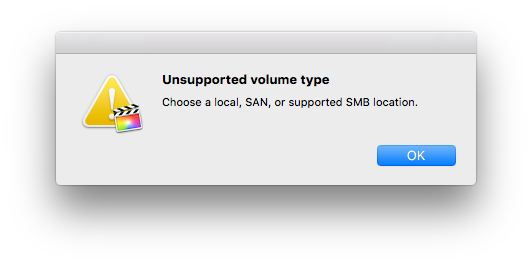
From the error message you have posted, I assume you are working with FCP X 10.3.
Are you working over NFS or over SMB on the Synology?
10.3 allows storing Libraries over SMB, but this won't work with your Synology until the DSM gets updated to version 6.1, which should support SMB 4.4. (4.3.4 is required for FCP X 10.3).
Anyway you will still get better Read performance over NFS, and you should not have any problems storing 10.3 Libraries on an NFS share. So that's the first thing you should try.
- Ronny
Are you working over NFS or over SMB on the Synology?
10.3 allows storing Libraries over SMB, but this won't work with your Synology until the DSM gets updated to version 6.1, which should support SMB 4.4. (4.3.4 is required for FCP X 10.3).
Anyway you will still get better Read performance over NFS, and you should not have any problems storing 10.3 Libraries on an NFS share. So that's the first thing you should try.
- Ronny
Please Log in to join the conversation.
- michael.wiser
-
Topic Author
- Offline
- New Member
-
Less
More
- Posts: 13
- Thank you received: 4
21 Nov 2016 16:24 #83049
by michael.wiser
Replied by michael.wiser on topic Saving Library to a SAN or Supported SMB
I have been using AFP. Older yes, but in my testing it was giving me after data speeds. However when I try using SMB it doesn't work. Our machines are on 10.11.6.
I just got into the office and am going to check what DSM version we are on.
I just got into the office and am going to check what DSM version we are on.
Please Log in to join the conversation.
- ronny courtens
-
- Offline
- Moderator
-
Less
More
- Posts: 4455
- Thank you received: 962
21 Nov 2016 20:35 #83058
by ronny courtens
Replied by ronny courtens on topic Saving Library to a SAN or Supported SMB
You cannot store FCP X Libraries on an AFP share, so that won't work and that's why you are getting the error message.
Since FCP X 10.3 you can store Libraries on an SMB share, but SMB is not ideal because the speeds are not brilliant and it does not support Hard Links which are crucial for FCP X management. SMB is only useful when you work with mixed environments, such as using PCs and Macs with the same server.
The best way for working with FCP X in a shared storage environment remains NFS. If you can enable NFS on your Synology, that would be the solution to your problem.
- Ronny
Since FCP X 10.3 you can store Libraries on an SMB share, but SMB is not ideal because the speeds are not brilliant and it does not support Hard Links which are crucial for FCP X management. SMB is only useful when you work with mixed environments, such as using PCs and Macs with the same server.
The best way for working with FCP X in a shared storage environment remains NFS. If you can enable NFS on your Synology, that would be the solution to your problem.
- Ronny
Please Log in to join the conversation.
- michael.wiser
-
Topic Author
- Offline
- New Member
-
Less
More
- Posts: 13
- Thank you received: 4
21 Nov 2016 21:11 #83060
by michael.wiser
Replied by michael.wiser on topic Saving Library to a SAN or Supported SMB
I know that Final Cut doesn't support saving to an AFP volume. So far SMB hasn't worked either (I have tried connecting to it both ways). I checked this morning and our Synology is currently on DSM 6.0.2 and it looks like 6.1 is only in beta. So I will have to wait until that update is available to try again.
Please Log in to join the conversation.
- ronny courtens
-
- Offline
- Moderator
-
Less
More
- Posts: 4455
- Thank you received: 962
21 Nov 2016 21:17 #83061
by ronny courtens
Replied by ronny courtens on topic Saving Library to a SAN or Supported SMB
That's correct. It won't work until DSM 6.1 gets released, and even then you are not going to get optimized speeds and you won't be able to use Hard Links. NFS is the only way to make FCP X run perfectly on a shared storage system if you want to store your Libraries on the server.
- Ronny
- Ronny
Please Log in to join the conversation.
- michael.wiser
-
Topic Author
- Offline
- New Member
-
Less
More
- Posts: 13
- Thank you received: 4
21 Nov 2016 21:26 #83062
by michael.wiser
Replied by michael.wiser on topic Saving Library to a SAN or Supported SMB
I just tried setting up NFS and I wasn't able to connect to it at all. So Ill have to do a little more research, I'm guessing I just set it up wrong.
Please Log in to join the conversation.
