


- Posts: 45
- Thank you received: 5
3 Post Moderation Rule for New Boarders (25 Jan 2021)
New boarders will have their posts moderated - Don't worry if you cannot see your post immediately.
Try the Touch Bar in FCPx without the MBP
- EdgarRothermich
-
 Topic Author
- Offline
- Senior Member
-

Less
More
15 Nov 2016 03:18 #82771
by EdgarRothermich
Try the Touch Bar in FCPx without the MBP was created by EdgarRothermich
You can try FCPx with the new Touch Bar implementation without the MacBookPro.
Here is the download and installation instructions for that hack.
github.com/bikkelbroeders/TouchBarDemoApp
It works. At least on the Mac using the mouse. The iOS installation for the real touch operation is a little bit more tricky and I haven't tried that yet.
Here is a screenshot. That thing on the bottom is the floating Touch Bar that can be shown/hidden with the fn key.
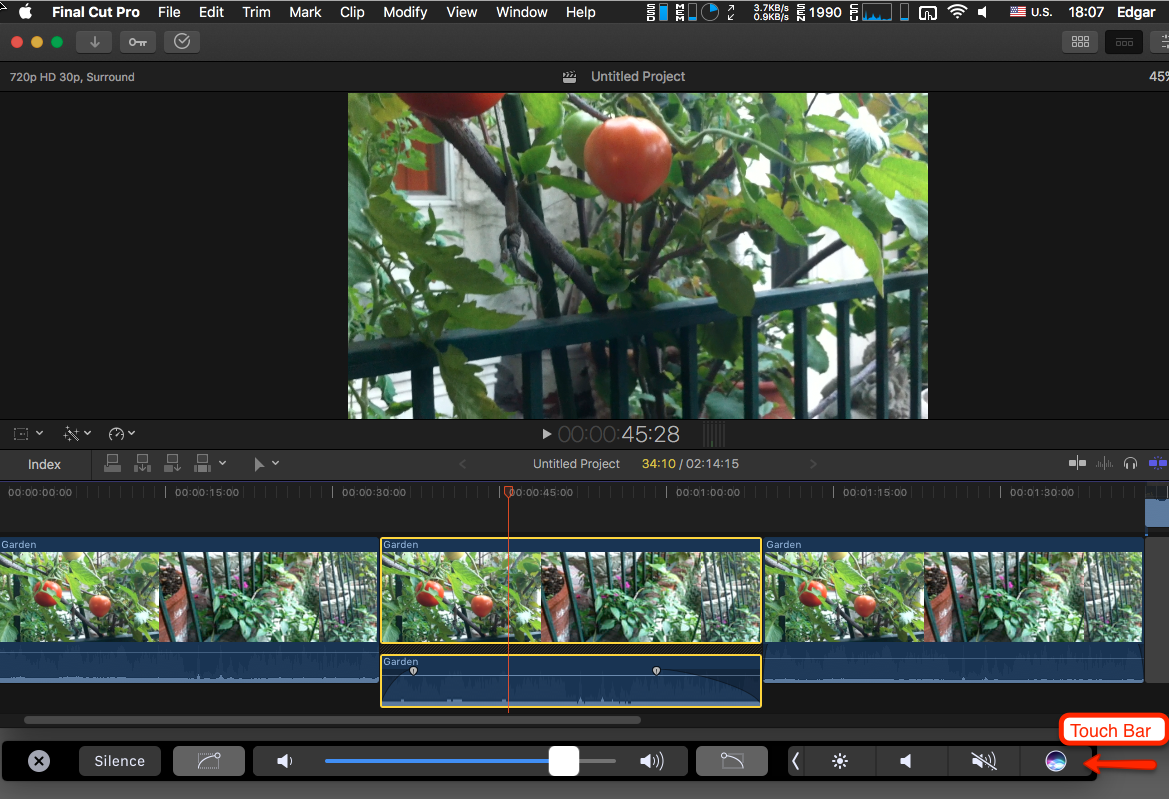
Here is the download and installation instructions for that hack.
github.com/bikkelbroeders/TouchBarDemoApp
It works. At least on the Mac using the mouse. The iOS installation for the real touch operation is a little bit more tricky and I haven't tried that yet.
Here is a screenshot. That thing on the bottom is the floating Touch Bar that can be shown/hidden with the fn key.
Please Log in to join the conversation.


15 Nov 2016 04:42 #82772
by Redifer
Replied by Redifer on topic Try the Touch Bar in FCPx without the MBP
Doesn't look like it does much.
Please Log in to join the conversation.
- EdgarRothermich
-
Topic Author
- Offline
- Senior Member
-
Less
More
- Posts: 45
- Thank you received: 5
15 Nov 2016 04:45 #82773
by EdgarRothermich
Replied by EdgarRothermich on topic Try the Touch Bar in FCPx without the MBP
The Touch bar is dynamic, so where you click in FCPx it will present different controls.
The official user guide doesn't mention the Touch Bar at all, or provide a list with all the functions that are supported. SO I guess it is treasure hunt time.
The official user guide doesn't mention the Touch Bar at all, or provide a list with all the functions that are supported. SO I guess it is treasure hunt time.
Please Log in to join the conversation.
- Karsten Schlüter
-

- Offline
- Moderator
-

Less
More
- Posts: 3790
- Thank you received: 718
15 Nov 2016 05:24 #82775
by Karsten Schlüter
Replied by Karsten Schlüter on topic Try the Touch Bar in FCPx without the MBP
Thanks, Edgar, for sharing - that new thingie seems to hit a nerve, when it gets its own simulation … 
Two things I've learned:
• 'sideloading' - whooo, spooky! Makes me instantly hesitant to do a test-drive, I have to admit (I'm a mouse-pusher, no clue of those Dev-Fu…)
• the few demoes I've seen so far on YT et al completely miss the point of the TouchBar - it does NOT just replace f-keys and existing keyboard-shortcuts (hum, well, it does, … too) but is a 'second screen with touch ability':
a Play-button for QT? spacebar? switching screens in a browser? ctrl-tab? …
no need for that.
BUT, for example the miniature representation of the timeline to find and go to specific locations - that's interesting!
… anyhow, just to feed my curiosity, dl&install&running Xcode, 'sideloading' stuff , plus me using a MTP for years with FCPX anyhow (swoosh!!) .... I guess, I can control my temper, and wait until the nMBp hits the shelfs of my local AppleStore!
But always impressed by the ingenuity of some people.
Again, thanks for sharing, Edgar!
Two things I've learned:
• 'sideloading' - whooo, spooky! Makes me instantly hesitant to do a test-drive, I have to admit (I'm a mouse-pusher, no clue of those Dev-Fu…)
• the few demoes I've seen so far on YT et al completely miss the point of the TouchBar - it does NOT just replace f-keys and existing keyboard-shortcuts (hum, well, it does, … too) but is a 'second screen with touch ability':
a Play-button for QT? spacebar? switching screens in a browser? ctrl-tab? …
no need for that.
BUT, for example the miniature representation of the timeline to find and go to specific locations - that's interesting!
… anyhow, just to feed my curiosity, dl&install&running Xcode, 'sideloading' stuff , plus me using a MTP for years with FCPX anyhow (swoosh!!) .... I guess, I can control my temper, and wait until the nMBp hits the shelfs of my local AppleStore!
But always impressed by the ingenuity of some people.
Again, thanks for sharing, Edgar!
Please Log in to join the conversation.
15 Nov 2016 09:41 #82781
by Redifer
Replied by Redifer on topic Try the Touch Bar in FCPx without the MBP
Installing that was easy. No sideloading, at least not on the Mac. If you wanna do it on your iPad or whatever that'll take some work. But the Mac version you just download, open it (right click > Open) and then toggle it on and off with the fn button. Doesn't seem tremendously useful to be honest. I didn't see a mini timeline, just buttons I could interact with. It would change a bit depending on where I clicked. I was gonna take a snapshot of it running when once I pressed command+Shift+4 the buttons changed to help me take a screen cap and were no longer relevant to FCPX.
If you have a new Mac Book Pro... cool. If you dont, don't feel too jealous. It's not like DJs will actually use the touch bar to do DJ things or anything. That'd be silly.
If you have a new Mac Book Pro... cool. If you dont, don't feel too jealous. It's not like DJs will actually use the touch bar to do DJ things or anything. That'd be silly.
Please Log in to join the conversation.
