


- Posts: 138
- Thank you received: 9
3 Post Moderation Rule for New Boarders (25 Jan 2021)
New boarders will have their posts moderated - Don't worry if you cannot see your post immediately.
Can't find audio feature in 10.3
14 Nov 2016 14:40 #82736
by Schwyhart
Can't find audio feature in 10.3 was created by Schwyhart
I'm looking for a tool that leveled out the audio by a percentage slider. It used to just click on the audio/video and in the attributes panel, under Audio Enhancements, you could find this feature. Now, I have no idea. Basically, it would bring up low waveforms and bring down the high waveforms.
Any ideas?
Any ideas?
Please Log in to join the conversation.


14 Nov 2016 15:09 #82741
by JoeEditor
Replied by JoeEditor on topic Can't find audio feature in 10.3
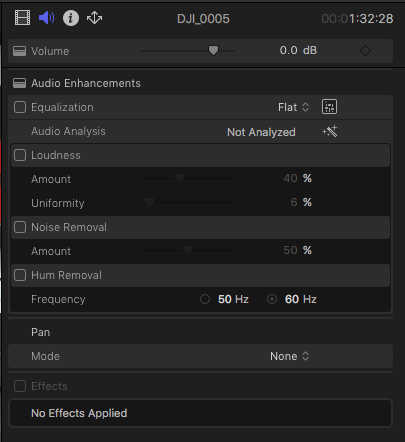
You're talking about a compressor. But the Loudness adjustment did a similar function. It is still there. But it is a block, not a slide out section, now.
Please Log in to join the conversation.
14 Nov 2016 16:27 - 14 Nov 2016 16:29 #82753
by Schwyhart
Replied by Schwyhart on topic Can't find audio feature in 10.3
I figured it out.
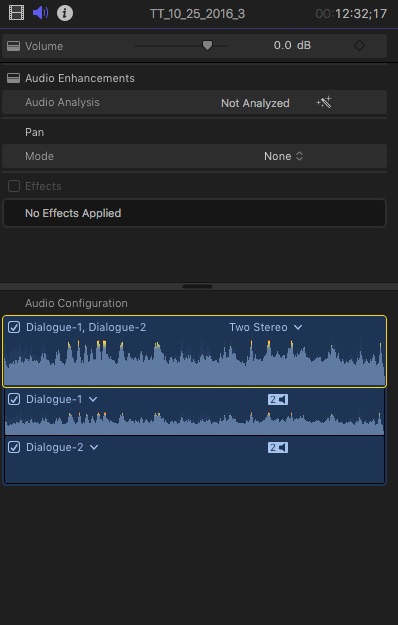
Under Audio Configuration, I have to uncheck Dialogue-2. When I do that, Equalization pops up under Audio Enhancements. Weird.
*I still don't have the option for Loudness, which is what I need.
Under Audio Configuration, I have to uncheck Dialogue-2. When I do that, Equalization pops up under Audio Enhancements. Weird.
*I still don't have the option for Loudness, which is what I need.
Last edit: 14 Nov 2016 16:29 by Schwyhart.
Please Log in to join the conversation.
- Tom Wolsky
-

- Offline
- Moderator
-

14 Nov 2016 16:39 #82754
by Tom Wolsky
Replied by Tom Wolsky on topic Can't find audio feature in 10.3
Select one of the two stereo pairs. Check that there is a show/hide button when you move the pointer opposite audio analysis.
Please Log in to join the conversation.
14 Nov 2016 16:57 #82757
by Schwyhart
Replied by Schwyhart on topic Can't find audio feature in 10.3
Good grief....that's all it was! That's too hidden.
Please Log in to join the conversation.
- flaminghick
-

- Offline
- Senior Member
-

Less
More
- Posts: 54
- Thank you received: 0
16 Nov 2016 00:15 #82795
by flaminghick
Replied by flaminghick on topic Can't find audio feature in 10.3
It's way too hidden.
I don't see any reason why the only track you COULD effect isn't selected by default.
Like...wtf.
Why aren't all the options simply in a list?
I don't see any reason why the only track you COULD effect isn't selected by default.
Like...wtf.
Why aren't all the options simply in a list?
Please Log in to join the conversation.
