


- Posts: 2
- Thank you received: 0
3 Post Moderation Rule for New Boarders (25 Jan 2021)
New boarders will have their posts moderated - Don't worry if you cannot see your post immediately.
Camera movement as in lyric videos
- niklas.overthetop
-
 Topic Author
- Offline
- New Member
-

Less
More
13 Nov 2016 08:33 #82670
by niklas.overthetop
Camera movement as in lyric videos was created by niklas.overthetop
Hey guys!
I'm trying to figure out how do something like in this video: (2:05min)
I need a way to fly over a large image, swiveling the camera and showing text at certain stops. Downloaded the Pixel Film Studios PROPATH Plugin but how do I put the text in the right perspective? And how can I make sure that the next move starts from the same point the previous one stopped at?
I'm trying to figure out how do something like in this video: (2:05min)
I need a way to fly over a large image, swiveling the camera and showing text at certain stops. Downloaded the Pixel Film Studios PROPATH Plugin but how do I put the text in the right perspective? And how can I make sure that the next move starts from the same point the previous one stopped at?
Please Log in to join the conversation.
- Karsten Schlüter
-

- Offline
- Moderator
-

Less
More
- Posts: 3790
- Thank you received: 718
13 Nov 2016 14:36 - 13 Nov 2016 14:37 #82680
by Karsten Schlüter
Replied by Karsten Schlüter on topic Camera movement as in lyric videos
Saw your post at finalcutprofi.de - there you were gentle enough and warned of the audio-track 
That is simple to accomplish - in Motion:
Create layers of diff. Z-depth
Plus, play with DoF of the virtual camera which flies around your set.
my example is done in minutes …
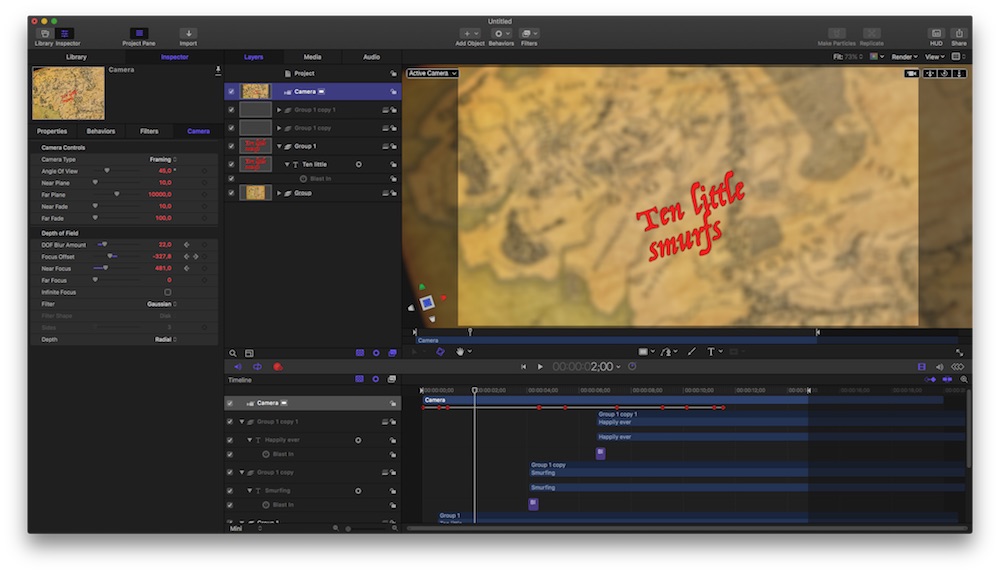
oh, and Welome, Niklas, to fcp.co
That is simple to accomplish - in Motion:
Create layers of diff. Z-depth
Plus, play with DoF of the virtual camera which flies around your set.
my example is done in minutes …
oh, and Welome, Niklas, to fcp.co
Last edit: 13 Nov 2016 14:37 by Karsten Schlüter.
Please Log in to join the conversation.
- niklas.overthetop
-
Topic Author
- Offline
- New Member
-
Less
More
- Posts: 2
- Thank you received: 0
13 Nov 2016 14:59 #82681
by niklas.overthetop
Replied by niklas.overthetop on topic Camera movement as in lyric videos
Thanks! That's an answer I can work with .
But in your example, the text seems to be hovering over the map, is this also controlled via the depth DoF settings? And did you put in the text with motion?
I'm fairly new to motion and it's usage...
.But in your example, the text seems to be hovering over the map, is this also controlled via the depth DoF settings? And did you put in the text with motion?
I'm fairly new to motion and it's usage...
Please Log in to join the conversation.


13 Nov 2016 16:16 #82686
by JoeEditor
Replied by JoeEditor on topic Camera movement as in lyric videos
Add a Wriggle parameter behavior to get that shaky look, too. Like Karsten said, super simple in Motion.
Please Log in to join the conversation.
- Karsten Schlüter
-
- Offline
- Moderator
-
Less
More
- Posts: 3790
- Thank you received: 718
14 Nov 2016 10:00 #82717
by Karsten Schlüter
Yes, all done in Motion, I've attached the project file - quick'n dirty done, don't expect a perfect documentation
No, the 'hovering' is because of diff. z-valuas = position in depth, of the titles, the background and the camera.
The DoF , reps. the diff. focus layers are just some eye-candy, to give the whole thing more depth. Open my project in M5 and you'll see.
The cam animation, btw, is done 'interactively' : swicthON Motion's rec-mode, jump to each time position and adjust cams position and angle - really no rocket science.
The title-animation is a canned Text-Behaviour, applied just for demonstration purposes, mimicking your example.
If you prefer German as conversation language, send me a PM …
or met me in Berlin, this Friday at the FCPXworld tour, I'm the old man with the crook :woohoo:
Replied by Karsten Schlüter on topic Camera movement as in lyric videos
niklas.overthetop wrote: … the text seems to be hovering over the map, is this also controlled via the depth DoF settings? And did you put in the text with motion?
...
Yes, all done in Motion, I've attached the project file - quick'n dirty done, don't expect a perfect documentation
No, the 'hovering' is because of diff. z-valuas = position in depth, of the titles, the background and the camera.
The DoF , reps. the diff. focus layers are just some eye-candy, to give the whole thing more depth. Open my project in M5 and you'll see.
The cam animation, btw, is done 'interactively' : swicthON Motion's rec-mode, jump to each time position and adjust cams position and angle - really no rocket science.
The title-animation is a canned Text-Behaviour, applied just for demonstration purposes, mimicking your example.
If you prefer German as conversation language, send me a PM …
or met me in Berlin, this Friday at the FCPXworld tour, I'm the old man with the crook :woohoo:
Please Log in to join the conversation.
