


- Posts: 33
- Thank you received: 1
3 Post Moderation Rule for New Boarders (25 Jan 2021)
New boarders will have their posts moderated - Don't worry if you cannot see your post immediately.
animate "complex" stuff in FCPX - is it even possible?
11 Nov 2016 10:59 #82576
by FCPman
animate "complex" stuff in FCPX - is it even possible? was created by FCPman
I was trying to animate something like an advanced slide show (still images) that also contained some video footage inside. After 4 days I gave up and switched to Premiere, I was happy and finished the project from scratch within 2 days.
I will explain what I did and what I was trying to achieve because I HOPE you will tell me what I did wrong / how I could have tackled it WAY better in FCPX.
This is NOT a FCPX bashing thread. I want to educate myself here and I hope that I can learn from your knowledge. Please let us focus on FCPX so please no advise on using AE or Motion instead because I’ve managed to do it all in Premiere and yes I know Premiere isn’t FCPX. Maybe there are some great FCPX plug ins that I am unaware which would have made life way easier.
First of all there is no ease in or ease out or any kind of keyframe interpolation inside FPCX. So I am not able to animate the position of pictures „flying in“ any advanced/nice looking way. No bezier handles…all I have is „smooth“ and linear. Is there any work around?
I’ve used that 3d tilt and rotate effect Premiere has a lot for my images (you know rotating a flat plane). I’ve got a motion template for a 3d rotation like FCP 7 used to have. VERY NICE. Almost what I want. Now my problem is: The picture gets cut off once its outside of it’s own bounding box or whatever you want to call it (imagine the picture is 800 x 800 pixels, you have a 800 x 800 pixels framing/box around it. If you rotate it on any axis and it moves outside of that bounding box it will get cut there like a mask).
There is a logo/corner bug at the top left corner. Now here is what I did in Premiere: Added that logo to the top most layer and dragged it out for minutes and then I’ve left it there and I could always see it and see how it works with the rest of the film (plus if I had a client next to me he would start crying why the logo is suddenly gone if it wasn’t there). Now here are the options I have in FCPX (I might be mistaken. I hope so. This applies for the entire thread that I hope I am wrong):
1)The logo is a connected clip and I will drag it out like I did in Premiere. Now if I add any footage it will be on top of my logo so I will constantly have to put the logo ON TOP if I add anything new.
2)Add the logo on top once the film is done (which a client sitting next to me wouldn’t understand and isn’t that nice because I would like to see the logo the entire time while working on the film)
I had text slide in with a directional blur (not sure if that’s the name in Premiere). The directional blur in FCPX is very weak. I just want to see stripes going in one direction for a moment. FCPX’s amount 32 isn’t enough and I do not want to drag 100x Directional blur on top of my text. Maybe I can build a proper directional blur inside Motion (where would I start? What would I use?)
First I animated polaroids flying into the scene each with a drop zone inside Motion. I’ve build a generator for FCPX and I was happy. Then there were a lot of changes: Animate this picture like that and this should come from that side… I had to go back to Motion, do the changes, export it again (maybe under a new name because the old one wasn’t that bad), put it into FCPX and then add each picture to the drop zone again just to find out they want more changes…
So I’ve build the polaroid fly in animation in Premiere. I’ve made 1 polaroid a nest which looked like this:
Track 3: polaroid graphic
Track 2: Solid which worked as a layer mask
Track 1: Actual picture/footage which would get masked by Track 2
How do I even create a layer mask inside FCPX?
Now all I had to do was duplicate my nest and replace the footage.
After that I animated all my pictures flying in from different sides. I put the nest and each polaroid nest inside a folder. At a later point in time I needed another polaroid fly in animation. So I just duplicated my polaroid folder and all I had to do was change the footage again and maybe alter the positions from where the graphics fly into the scene. Can this fast and simple workflow be applied to FCPX as well? Duplicate folder which duplicates all the content and then I can just quickly alter all this?
################
Thanks a lot for reading this and your patience. I held back posting this for weeks and altered this post countless of times. This is meant to be a civilised and friendly discussion. If you interpret anything I say as harsh I'd like to apologise in advance because it is NOT meant this way (I want to use FCPX instead of switching back to Premiere).
I will explain what I did and what I was trying to achieve because I HOPE you will tell me what I did wrong / how I could have tackled it WAY better in FCPX.
This is NOT a FCPX bashing thread. I want to educate myself here and I hope that I can learn from your knowledge. Please let us focus on FCPX so please no advise on using AE or Motion instead because I’ve managed to do it all in Premiere and yes I know Premiere isn’t FCPX. Maybe there are some great FCPX plug ins that I am unaware which would have made life way easier.
First of all there is no ease in or ease out or any kind of keyframe interpolation inside FPCX. So I am not able to animate the position of pictures „flying in“ any advanced/nice looking way. No bezier handles…all I have is „smooth“ and linear. Is there any work around?
I’ve used that 3d tilt and rotate effect Premiere has a lot for my images (you know rotating a flat plane). I’ve got a motion template for a 3d rotation like FCP 7 used to have. VERY NICE. Almost what I want. Now my problem is: The picture gets cut off once its outside of it’s own bounding box or whatever you want to call it (imagine the picture is 800 x 800 pixels, you have a 800 x 800 pixels framing/box around it. If you rotate it on any axis and it moves outside of that bounding box it will get cut there like a mask).
There is a logo/corner bug at the top left corner. Now here is what I did in Premiere: Added that logo to the top most layer and dragged it out for minutes and then I’ve left it there and I could always see it and see how it works with the rest of the film (plus if I had a client next to me he would start crying why the logo is suddenly gone if it wasn’t there). Now here are the options I have in FCPX (I might be mistaken. I hope so. This applies for the entire thread that I hope I am wrong):
1)The logo is a connected clip and I will drag it out like I did in Premiere. Now if I add any footage it will be on top of my logo so I will constantly have to put the logo ON TOP if I add anything new.
2)Add the logo on top once the film is done (which a client sitting next to me wouldn’t understand and isn’t that nice because I would like to see the logo the entire time while working on the film)
I had text slide in with a directional blur (not sure if that’s the name in Premiere). The directional blur in FCPX is very weak. I just want to see stripes going in one direction for a moment. FCPX’s amount 32 isn’t enough and I do not want to drag 100x Directional blur on top of my text. Maybe I can build a proper directional blur inside Motion (where would I start? What would I use?)
First I animated polaroids flying into the scene each with a drop zone inside Motion. I’ve build a generator for FCPX and I was happy. Then there were a lot of changes: Animate this picture like that and this should come from that side… I had to go back to Motion, do the changes, export it again (maybe under a new name because the old one wasn’t that bad), put it into FCPX and then add each picture to the drop zone again just to find out they want more changes…
So I’ve build the polaroid fly in animation in Premiere. I’ve made 1 polaroid a nest which looked like this:
Track 3: polaroid graphic
Track 2: Solid which worked as a layer mask
Track 1: Actual picture/footage which would get masked by Track 2
How do I even create a layer mask inside FCPX?
Now all I had to do was duplicate my nest and replace the footage.
After that I animated all my pictures flying in from different sides. I put the nest and each polaroid nest inside a folder. At a later point in time I needed another polaroid fly in animation. So I just duplicated my polaroid folder and all I had to do was change the footage again and maybe alter the positions from where the graphics fly into the scene. Can this fast and simple workflow be applied to FCPX as well? Duplicate folder which duplicates all the content and then I can just quickly alter all this?
################
Thanks a lot for reading this and your patience. I held back posting this for weeks and altered this post countless of times. This is meant to be a civilised and friendly discussion. If you interpret anything I say as harsh I'd like to apologise in advance because it is NOT meant this way (I want to use FCPX instead of switching back to Premiere).
Please Log in to join the conversation.


11 Nov 2016 18:18 - 11 Nov 2016 18:19 #82589
by JoeEditor
Replied by JoeEditor on topic animate "complex" stuff in FCPX - is it even possible?
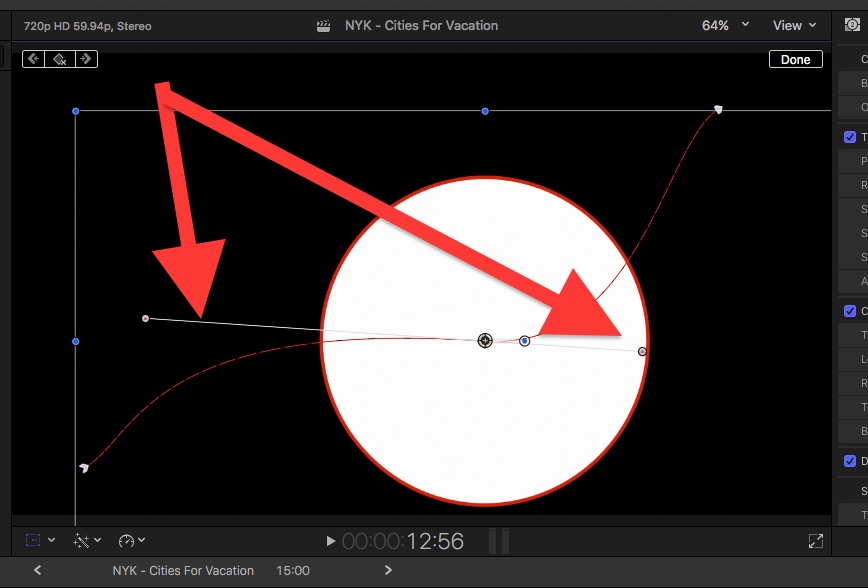
You mean bezier handles in FCPX don't exist? Seems like a project I'd do in Motion. I'm not totally clear on what you're doing, I'd want to actually see it. But, seems there's easier ways to do what I "think" you're trying to do. I'll let the local graphics gurus pipe in on this.
Last edit: 11 Nov 2016 18:19 by JoeEditor.
Please Log in to join the conversation.

11 Nov 2016 19:28 #82594
by Pielle
Replied by Pielle on topic animate "complex" stuff in FCPX - is it even possible?
I think that if you want to have all the tools you need to make animations you must use Motion. I usually build the various scenes in Motion and then move to FCPX for editing. This way of working allows me to use the best of both programs without jumping back and forth and lose a lot of time
Please Log in to join the conversation.
- Karsten Schlüter
-

- Offline
- Moderator
-

Less
More
- Posts: 3790
- Thank you received: 718
12 Nov 2016 04:03 #82599
by Karsten Schlüter
Replied by Karsten Schlüter on topic animate "complex" stuff in FCPX - is it even possible?
… to comment a few (sorry, lost in text …):
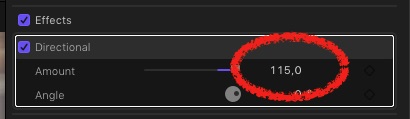
Directional Blur/'32' limit = as in most filters, type in a value, or, simply click'n drag onto the number
logo-bug across the timeline = why does the stack order matters in the beginning?
ease-in/out = use Motion, use Behaviours, avoid keyframes:
www.fcp.co/final-cut-pro/tutorials/1885-...workflow-in-fcpx-now
flying pics = use my free plugin :lol:
final word: if Premiere offers the better workflow for you/this project … use it. Why not? Comps and animations are not FCPX main domain, I would use Motion for it. AND reconsider your workflow - e.g. I would add a logo-bug at the very end of editing, And why is it a compound anyhow?? (Internal joke, sorry)
Directional Blur/'32' limit = as in most filters, type in a value, or, simply click'n drag onto the number
logo-bug across the timeline = why does the stack order matters in the beginning?
ease-in/out = use Motion, use Behaviours, avoid keyframes:
www.fcp.co/final-cut-pro/tutorials/1885-...workflow-in-fcpx-now
flying pics = use my free plugin :lol:
final word: if Premiere offers the better workflow for you/this project … use it. Why not? Comps and animations are not FCPX main domain, I would use Motion for it. AND reconsider your workflow - e.g. I would add a logo-bug at the very end of editing, And why is it a compound anyhow?? (Internal joke, sorry)
Please Log in to join the conversation.
- ronny courtens
-

- Offline
- Moderator
-
Less
More
- Posts: 4455
- Thank you received: 962
12 Nov 2016 05:58 #82600
by ronny courtens
Replied by ronny courtens on topic animate "complex" stuff in FCPX - is it even possible?
Agreed with all the above. If you want to do mograph work, you should use Motion or AE because that's what these applications are made for. You said you could do this work in 2 days in Premiere, you would have spent much less time if you had done it in Motion or in After Effects. Your time is valuable, use the right tools for the job you need to do.
- Ronny
- Ronny
Please Log in to join the conversation.
- mattsmithlyons
-

- Offline
- New Member
-

Less
More
- Posts: 8
- Thank you received: 1
12 Nov 2016 17:46 #82652
by mattsmithlyons
Replied by mattsmithlyons on topic animate "complex" stuff in FCPX - is it even possible?
Check out the post on FCP.co from a couple of days ago on editing without keyframes in FCP. It was quite amazing and may give you some ideas on how to approach this.
Please Log in to join the conversation.

13 Nov 2016 01:28 #82659
by Redifer
Replied by Redifer on topic animate "complex" stuff in FCPX - is it even possible?
It appears that nobody read much of your text. Everyone is telling you to use Motion when you specifically asked them not to suggest Motion or After Effects. I agree, FCPX should be able to do anything Premiere can in terms of the animation you're doing. For one, it's very inconvenient to do everything n Motion when it could be done much more quickly and easily in FCPX if it were built to allow such things. Secondly, the integration between FCPX and Motion is not very good. For example you can't open a clip you have on the timeline, animate it in Motion (being able to see everything in the FCPX timeline at that point, clips underneath or above, etc), save it and have the changes take place in FCPX. It SHOULD work that way but sadly it doesn't. I would accept that as a workaround if it worked that way.
To answer your ultimate question, no, complex animation is not currently possible in FCPX.
To answer your ultimate question, no, complex animation is not currently possible in FCPX.
Please Log in to join the conversation.
- Bretwilliams
-

- Offline
- Senior Member
-

Less
More
- Posts: 74
- Thank you received: 28
13 Nov 2016 02:04 #82660
by Bretwilliams
Replied by Bretwilliams on topic animate "complex" stuff in FCPX - is it even possible?
In the viewer, for easing, switch the path to smooth (which adds bezier handles) and then grab the bezier handle for the point you want to ease and drag the bezier handle back toward the keyframe. It's unfortunate that's the only awkward workaround that sorta works. It works best on a straight up or down path so you can also lock the handle to the X or Y axis whilst dragging them back toward the keyframe. Apple has decided to loop together spatial and temporal interpolation into something called smooth and this seems to be the only way around it.
Please Log in to join the conversation.
- Bretwilliams
-
- Offline
- Senior Member
-
Less
More
- Posts: 74
- Thank you received: 28
13 Nov 2016 02:09 #82661
by Bretwilliams
Replied by Bretwilliams on topic animate "complex" stuff in FCPX - is it even possible?
And if you want to round trip to motion, use xsend motion
www.automaticduck.com/#xsend-motion
from automatic duck. It's not free, but you only have to buy it once. It's free next month and every month thereafter.
After you send a portion of your timeline to motion, publish it back as a generator and put it in your timeline. Now whenever you change it in Motion, it will update in FCP X. EXCEPT for all the cool custom behaviors and parameters you publish while you're in Motion so you don't need to open it in Motion again. . Still waiting on AE to some up with something vaguely similar.
After you send a portion of your timeline to motion, publish it back as a generator and put it in your timeline. Now whenever you change it in Motion, it will update in FCP X. EXCEPT for all the cool custom behaviors and parameters you publish while you're in Motion so you don't need to open it in Motion again.
. Still waiting on AE to some up with something vaguely similar. Please Log in to join the conversation.
13 Nov 2016 03:52 #82663
by JoeEditor
Replied by JoeEditor on topic animate "complex" stuff in FCPX - is it even possible?
Again, what you want to do is actually easy in FCPX, you're just going about it in a complex way. And yes, you do have ease in/out with keyframes.
Please Log in to join the conversation.
13 Nov 2016 10:05 - 13 Nov 2016 10:05 #82675
by Redifer
Only with X/Y movement. Nobody seems to understand this. I keep saying it over and over. There are no ease options on scaling or rotation or any other transform option. ALL video keyframes in FCP7 had ease options. They dropped the ball on FCPX in this particular regard. And they are behind Premiere in this area as well. It is something that they should fix, but seemingly refuse to. I'm guessing those who choose FCPX don't generally do very complex projects that would warrant the desire for such features, otherwise its users would probably make more noise about it.
As far as the Xsend to Motion, wouldn't you end up with tons of generators living inside of FCPX? That would be kind of annoying.
Replied by Redifer on topic animate "complex" stuff in FCPX - is it even possible?
FCPX Guru wrote: And yes, you do have ease in/out with keyframes.
Only with X/Y movement. Nobody seems to understand this. I keep saying it over and over. There are no ease options on scaling or rotation or any other transform option. ALL video keyframes in FCP7 had ease options. They dropped the ball on FCPX in this particular regard. And they are behind Premiere in this area as well. It is something that they should fix, but seemingly refuse to. I'm guessing those who choose FCPX don't generally do very complex projects that would warrant the desire for such features, otherwise its users would probably make more noise about it.
As far as the Xsend to Motion, wouldn't you end up with tons of generators living inside of FCPX? That would be kind of annoying.
Last edit: 13 Nov 2016 10:05 by Redifer.
Please Log in to join the conversation.
- Tom Wolsky
-

- Offline
- Moderator
-
13 Nov 2016 10:52 #82676
by Tom Wolsky
Replied by Tom Wolsky on topic animate "complex" stuff in FCPX - is it even possible?
Consolidate the generators into the libraries that use them.
Please Log in to join the conversation.
13 Nov 2016 22:14 - 13 Nov 2016 22:15 #82697
by Redifer
Legit question: How do you consolidate Generators? I thought all Generators were available to every library at all times.
Back to the original topic:
Try making the clip into a compound clip (ALT + G) and adding the tilt 3D effect to that.
Replied by Redifer on topic animate "complex" stuff in FCPX - is it even possible?
Tom Wolsky wrote: Consolidate the generators into the libraries that use them.
Legit question: How do you consolidate Generators? I thought all Generators were available to every library at all times.
Back to the original topic:
FCPman wrote: The picture gets cut off once its outside of it’s own bounding box or whatever you want to call it (imagine the picture is 800 x 800 pixels, you have a 800 x 800 pixels framing/box around it.
Try making the clip into a compound clip (ALT + G) and adding the tilt 3D effect to that.
What I would do is put the bug on after the edit was locked. Just place it on top of everything.FCPman wrote: There is a logo/corner bug at the top left corner.
I'm not sure if you're talking about the built-in motion blur of a transition or using the Directional Blur filter and keyframing the values over time as the item moves onto and off of the screen. But the value on the filter goes much higher than 32 as another member already posted. You can't adjust the motion blur at all in transitions that come stock in FCPX.FCPman wrote: I had text slide in with a directional blur
I'm not sure what the issue is with this one. I'd have to see what you're trying to do.FCPman wrote: First I animated polaroids flying into the scene each with a drop zone inside Motion....
Last edit: 13 Nov 2016 22:15 by Redifer.
Please Log in to join the conversation.
- Tom Wolsky
-
- Offline
- Moderator
-
13 Nov 2016 23:04 #82698
by Tom Wolsky
Replied by Tom Wolsky on topic animate "complex" stuff in FCPX - is it even possible?
Project properties you can set Motion content location to the default Motion Templates folder or the library. If you change it to library you can consolidate the used Motion content into the library.
Please Log in to join the conversation.
