


- Posts: 10
- Thank you received: 0
3 Post Moderation Rule for New Boarders (25 Jan 2021)
New boarders will have their posts moderated - Don't worry if you cannot see your post immediately.
(Control + D) - change duration frustration
- WillRogersFAN
-
 Topic Author
- Offline
- New Member
-

Less
More
10 Nov 2016 14:41 #82533
by WillRogersFAN
(Control + D) - change duration frustration was created by WillRogersFAN
Gang,
Before the 10.3 update I was able to use Control +D to change my duration and get a timecode readout on the project/timeline bar. Right now and in 10.3, when I change duration of an image I can still use Control + D, but I am flying blind as to how many zeros I have entered, until I press return and either look at the inspector or the timeline timecode. Am I missing something or somewhere that I can either turn this functionality back on or is it on and I am missing it in the revised GUI? Is this a known bug or feature that needs to get added back or no one else uses? My apologizes if this topic is a repeat and is being discussed elsewhere.
I have attached both areas of the new GUI where I can get a timecode readout, but neither show my revised duration being entered when I type it.
Before the 10.3 update I was able to use Control +D to change my duration and get a timecode readout on the project/timeline bar. Right now and in 10.3, when I change duration of an image I can still use Control + D, but I am flying blind as to how many zeros I have entered, until I press return and either look at the inspector or the timeline timecode. Am I missing something or somewhere that I can either turn this functionality back on or is it on and I am missing it in the revised GUI? Is this a known bug or feature that needs to get added back or no one else uses? My apologizes if this topic is a repeat and is being discussed elsewhere.
I have attached both areas of the new GUI where I can get a timecode readout, but neither show my revised duration being entered when I type it.
Attachment ScreenShot2016-11-10at8.29.52AM.png not found
Attachment ScreenShot2016-11-10at8.32.18AM.png not found
Attachments:
Please Log in to join the conversation.
- Karsten Schlüter
-

- Offline
- Moderator
-

Less
More
- Posts: 3790
- Thank you received: 718
10 Nov 2016 14:52 #82536
by Karsten Schlüter
Replied by Karsten Schlüter on topic (Control + D) - change duration frustration
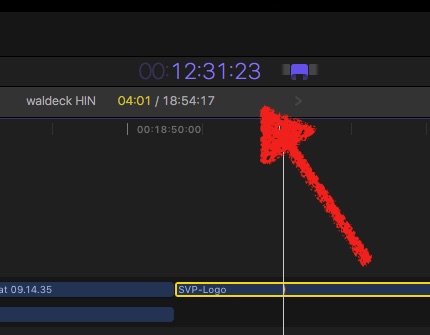
hmm? .. what you enter appears in the Dashboard-as in previous versions .......
Please Log in to join the conversation.

10 Nov 2016 14:57 #82540
by odedh
Replied by odedh on topic (Control + D) - change duration frustration
What Karsten said
Please Log in to join the conversation.
- WillRogersFAN
-
Topic Author
- Offline
- New Member
-
Less
More
- Posts: 10
- Thank you received: 0
10 Nov 2016 15:01 - 10 Nov 2016 15:03 #82542
by WillRogersFAN
Replied by WillRogersFAN on topic (Control + D) - change duration frustration
With two monitors they have split up the dashboard in the new update. My timecode is under the "Viewer" on the right and it allows me to see my readout. In the past in was above the timeline/project area. I am able to see the timecode as it changes there! Thanks guys. I have been using FCPX for a long while now and I have become a creature of habit!
Tried to insert an image, but maybe I have reached my image threshold.
Tried to insert an image, but maybe I have reached my image threshold.
Last edit: 10 Nov 2016 15:03 by WillRogersFAN.
Please Log in to join the conversation.
