


- Posts: 119
- Thank you received: 2
3 Post Moderation Rule for New Boarders (25 Jan 2021)
New boarders will have their posts moderated - Don't worry if you cannot see your post immediately.
10.3 & Noise Removal Tab
- Videopixels
-
 Topic Author
- Offline
- Premium Member
-

Less
More
07 Nov 2016 14:40 #82343
by Videopixels
10.3 & Noise Removal Tab was created by Videopixels
Hi.
So I'm loving 10.3 but could someone please help me find background noise reduction tab, it's not appearing under audio enhancements in the inspector so guessing it must be somewhere else.
Thanks
So I'm loving 10.3 but could someone please help me find background noise reduction tab, it's not appearing under audio enhancements in the inspector so guessing it must be somewhere else.
Thanks
Please Log in to join the conversation.


07 Nov 2016 14:52 - 07 Nov 2016 14:56 #82345
by dgwvideo
Creating history....one edit at a time !
Replied by dgwvideo on topic 10.3 & Noise Removal Tab
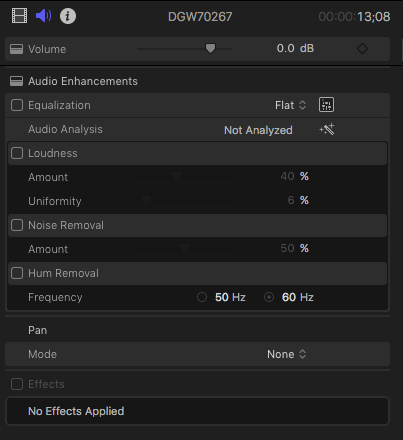
You have to click the "audio analysis" section from the audio tab in the inspector to show the options. By default they are hidden. If you don't see them, click a clip in the timeline first. MORE CLEARER - mouse over the right side of the analysis section until SHOW appears and click that.
Creating history....one edit at a time !
Last edit: 07 Nov 2016 14:56 by dgwvideo.
Please Log in to join the conversation.
- Videopixels
-
Topic Author
- Offline
- Premium Member
-
Less
More
- Posts: 119
- Thank you received: 2
07 Nov 2016 18:10 #82356
by Videopixels
Replied by Videopixels on topic 10.3 & Noise Removal Tab
Thank you.
I knew those options must be somewhere but could not get them to appear, I possibly did not have the clip selected will definitely give it another shot.
Thanks again for your help.
I knew those options must be somewhere but could not get them to appear, I possibly did not have the clip selected will definitely give it another shot.
Thanks again for your help.
Please Log in to join the conversation.
- Videopixels
-
Topic Author
- Offline
- Premium Member
-
Less
More
- Posts: 119
- Thank you received: 2
08 Nov 2016 06:03 #82406
by Videopixels
Replied by Videopixels on topic 10.3 & Noise Removal Tab
Hi, it's as I though. The options are actually not coming up. I'm wondering if it has something to do with the XAVC footage which just got support in the latest update.
Everything is updated and I don't use any audio plugins as external software.
Everything is updated and I don't use any audio plugins as external software.
Please Log in to join the conversation.
- Videopixels
-
Topic Author
- Offline
- Premium Member
-
Less
More
- Posts: 119
- Thank you received: 2
08 Nov 2016 06:18 #82408
by Videopixels
Replied by Videopixels on topic 10.3 & Noise Removal Tab
Hi, so you may have been meaning this but I was able to pull up the options by clicking on the yellow triangle on the actual audio track in the inspector.
Thanks for your help!
Thanks for your help!
Please Log in to join the conversation.
08 Nov 2016 13:57 #82432
by dgwvideo
Creating history....one edit at a time !
Replied by dgwvideo on topic 10.3 & Noise Removal Tab
If I recall correctly, it seems that the first time I tried to locate those parameters they did not appear and only after I opened the eq panel and closed it the "show" button appeared for analysis. Some functions in the inspector seem to require a mouse over to see activation or hide it before the words become visible. Wondering if this could be a slightly buggy UI thing. Ever since, though it seems to work fine when mousing over to bring up the "show" for those options. I was not clicking anything on the inspector waveform.
Creating history....one edit at a time !
Please Log in to join the conversation.
- flaminghick
-
- Offline
- Senior Member
-

Less
More
- Posts: 54
- Thank you received: 0
08 Nov 2016 21:53 #82463
by flaminghick
Replied by flaminghick on topic 10.3 & Noise Removal Tab
So a couple things I'm noticing here.
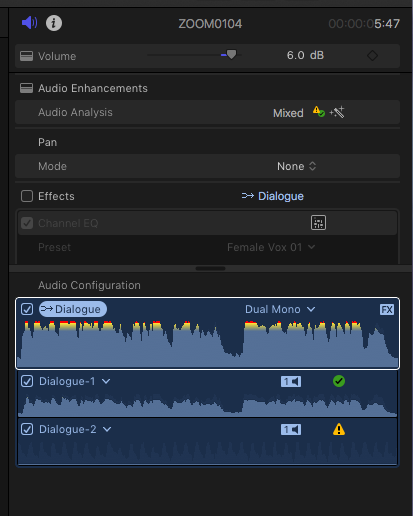
I have audio clips I've recorded that are set to dual mono. When they are selected, I cannot get the "show" button to appear until I have selected the track in the inspector that has the waveform, below the one that is selected by default right below where it says "Audio Configuration" (see photo...this is how it comes up default and "show" does not appear until I select the track below. Strange.)
Another think I'm noticing is that it's not allowing me to post the loudness as an attribute...something I use constantly, or used to. Do you guys think this is a bug?
I have audio clips I've recorded that are set to dual mono. When they are selected, I cannot get the "show" button to appear until I have selected the track in the inspector that has the waveform, below the one that is selected by default right below where it says "Audio Configuration" (see photo...this is how it comes up default and "show" does not appear until I select the track below. Strange.)
Another think I'm noticing is that it's not allowing me to post the loudness as an attribute...something I use constantly, or used to. Do you guys think this is a bug?
Please Log in to join the conversation.

09 Nov 2016 00:12 #82466
by JoeEditor
Replied by JoeEditor on topic 10.3 & Noise Removal Tab
Yes, you have to select a track, because they are handled independently of each other. Volume, pan, effects, are all unique to each track.
But, that said, now you can also apply Volume, pan effects to the top layer of the audio, like a Compound Clip type of behavior.
But, that said, now you can also apply Volume, pan effects to the top layer of the audio, like a Compound Clip type of behavior.
Please Log in to join the conversation.
- flaminghick
-
- Offline
- Senior Member
-
Less
More
- Posts: 54
- Thank you received: 0
09 Nov 2016 00:41 #82467
by flaminghick
Replied by flaminghick on topic 10.3 & Noise Removal Tab
Okay...in the previous version, it would default to the ACTIVE track.
Now it's defaulting to the top track, which I have already turned off. This doesn't seem right. I've been working this way for over a year and the previous version knew not to select a track I wasn't working with (or maybe it selected all of them).
On top of that...I can't paste audio attributes for loudness. So since I can't select multiple synced audio clips and change the parameters (because it's defaulting to the non-active track and I therefore can't reveal the Audio Enhancements panel) I have to do every single one individually.
If anyone can think of a workaround or point out something else I can try I would really appreciate it.
Now it's defaulting to the top track, which I have already turned off. This doesn't seem right. I've been working this way for over a year and the previous version knew not to select a track I wasn't working with (or maybe it selected all of them).
On top of that...I can't paste audio attributes for loudness. So since I can't select multiple synced audio clips and change the parameters (because it's defaulting to the non-active track and I therefore can't reveal the Audio Enhancements panel) I have to do every single one individually.
If anyone can think of a workaround or point out something else I can try I would really appreciate it.
Please Log in to join the conversation.
09 Nov 2016 01:52 #82471
by JoeEditor
Replied by JoeEditor on topic 10.3 & Noise Removal Tab
Do the copy/paste in the timeline. Put all the subroles in lanes.
Please Log in to join the conversation.
- flaminghick
-
- Offline
- Senior Member
-
Less
More
- Posts: 54
- Thank you received: 0
09 Nov 2016 17:34 - 09 Nov 2016 17:35 #82491
by flaminghick
Replied by flaminghick on topic 10.3 & Noise Removal Tab
I'm doing the copy/paste in the timeline. The option to paste the loudness settings doesn't come up.
Last edit: 09 Nov 2016 17:35 by flaminghick.
Please Log in to join the conversation.
09 Nov 2016 18:13 #82494
by JoeEditor
Replied by JoeEditor on topic 10.3 & Noise Removal Tab
Wow, really? I'll have to test that. Loudness is not in the Paste Attributes? That sucks...
Please Log in to join the conversation.
- flaminghick
-
- Offline
- Senior Member
-
Less
More
- Posts: 54
- Thank you received: 0
09 Nov 2016 18:21 #82496
by flaminghick
Replied by flaminghick on topic 10.3 & Noise Removal Tab
Please let me know if it works for you or not!!
Thanks dude.
Thanks dude.
Please Log in to join the conversation.
