


- Posts: 170
- Thank you received: 4
3 Post Moderation Rule for New Boarders (25 Jan 2021)
New boarders will have their posts moderated - Don't worry if you cannot see your post immediately.
A lot of missing media alerts after 10.3 upgrade, but media not missing?
06 Nov 2016 23:11 #82310
by scotopia
Hi All,
As the topic states after I upgraded my library to 10.3 I see a good number of my events and their projects have the yellow ! stop sign symbol that denotes missing media, but going through the projects everything looks fine, and pulling up the relink media dialogue shows no missing media. Has anyone else experienced this or know what I can do to have Final Cut explicitly tell me what it thinks is wrong? Thanks.
As the topic states after I upgraded my library to 10.3 I see a good number of my events and their projects have the yellow ! stop sign symbol that denotes missing media, but going through the projects everything looks fine, and pulling up the relink media dialogue shows no missing media. Has anyone else experienced this or know what I can do to have Final Cut explicitly tell me what it thinks is wrong? Thanks.
Please Log in to join the conversation.


06 Nov 2016 23:17 - 06 Nov 2016 23:19 #82312
by dgwvideo
Creating history....one edit at a time !
Replied by dgwvideo on topic A lot of missing media alerts after 10.3 upgrade, but media not missing?
I haven't seen this issue occur. The missing media alerts can also be for transitions and effects as well as titles and generators so have you checked that any of those used in 10.3 are not the issue? Some vendor plugins may need to be updated. Here is a list of the alert icons:
support.apple.com/kb/PH12711?locale=en_US&viewlocale=en_US
support.apple.com/kb/PH12711?locale=en_US&viewlocale=en_US
Creating history....one edit at a time !
Last edit: 06 Nov 2016 23:19 by dgwvideo.
Please Log in to join the conversation.
07 Nov 2016 00:41 - 07 Nov 2016 00:41 #82315
by scotopia
Replied by scotopia on topic A lot of missing media alerts after 10.3 upgrade, but media not missing?
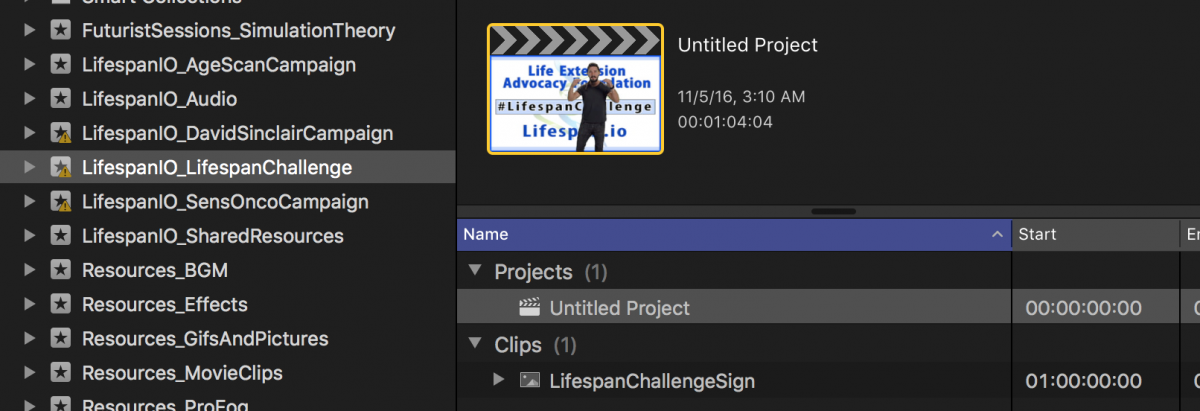
Thanks, but i'm not actually seeing any warning signs on clips or anything like that, just the Events and Projects. In the picture attached you'll actually see an event that has only one media element and one project, neither of which are missing, have warnings, or any effects missing etc... but you can see the warning sign on the event. I have no idea why, and no idea how I can get Final Cut to tell me what is required to remove this symbol. Thanks.
Last edit: 07 Nov 2016 00:41 by scotopia.
Please Log in to join the conversation.
- nils.dettmann
-

- Offline
- Elite Member
-

Less
More
- Posts: 161
- Thank you received: 13
07 Nov 2016 08:43 #82324
by nils.dettmann
Replied by nils.dettmann on topic A lot of missing media alerts after 10.3 upgrade, but media not missing?
I had this and it went away after some time...
Please Log in to join the conversation.

07 Nov 2016 09:50 #82325
by pszilard
Replied by pszilard on topic A lot of missing media alerts after 10.3 upgrade, but media not missing?
I see the same on some projects.
Also I am loosing audio! Driving me nuts.
Also I am loosing audio! Driving me nuts.
Please Log in to join the conversation.
07 Nov 2016 19:00 #82360
by scotopia
Replied by scotopia on topic A lot of missing media alerts after 10.3 upgrade, but media not missing?
Any one have ideas? Those badges are driving me nuts 
Please Log in to join the conversation.

09 Nov 2016 00:50 #82468
by meegwell
Replied by meegwell on topic A lot of missing media alerts after 10.3 upgrade, but media not missing?
May or may not be related, but there seems to be a known issue with certain media files and the sierra upgrade which I assume many of us did at a similar time as 10.3.
discussions.apple.com/thread/7677818
discussions.apple.com/thread/7677818
Please Log in to join the conversation.
09 Nov 2016 18:44 #82497
by scotopia
Replied by scotopia on topic A lot of missing media alerts after 10.3 upgrade, but media not missing?
I haven't upgraded to Sierra yet and am still seeing the issue. Thanks for the reply.
Please Log in to join the conversation.
- nils.dettmann
-
- Offline
- Elite Member
-
Less
More
- Posts: 161
- Thank you received: 13
09 Nov 2016 19:26 #82500
by nils.dettmann
Replied by nils.dettmann on topic A lot of missing media alerts after 10.3 upgrade, but media not missing?
Not on Sierra either...
Please Log in to join the conversation.
10 Nov 2016 18:16 #82553
by scotopia
Replied by scotopia on topic A lot of missing media alerts after 10.3 upgrade, but media not missing?
Still have this issue... nils you said it went away after a while mysteriously? Thanks.
Please Log in to join the conversation.
11 Nov 2016 18:32 #82591
by scotopia
Replied by scotopia on topic A lot of missing media alerts after 10.3 upgrade, but media not missing?
Anyone else seeing this issue or its mysterious disappearance? Thanks.
Please Log in to join the conversation.
13 Nov 2016 03:17 - 13 Nov 2016 03:17 #82662
by scotopia
Replied by scotopia on topic A lot of missing media alerts after 10.3 upgrade, but media not missing?
Can anyone tell me if there is a way for me to somehow see what Final Cut thinks is wrong, why it is showing the alert icons? Is there a log or something somewhere I can read?
I just tried deleting the flexolibrary file so that it would regenerate but the issue persists. It also tried to create projects called Backup in some of my events that were empty projects, and a log file said if failed to repair them. This seemingly doesn't matter because they never existed in the first place...
I just tried deleting the flexolibrary file so that it would regenerate but the issue persists. It also tried to create projects called Backup in some of my events that were empty projects, and a log file said if failed to repair them. This seemingly doesn't matter because they never existed in the first place...
Last edit: 13 Nov 2016 03:17 by scotopia.
Please Log in to join the conversation.


10 May 2017 11:44 #87944
by oldsoul
Replied by oldsoul on topic A lot of missing media alerts after 10.3 upgrade, but media not missing?
Same problem going on here. Upgraded to Sierra and 10.3 and certain projects have the caution icon with no effects transitions or missing media. I'm going to try and copy the contents of the project and paste into a new project.
Please Log in to join the conversation.
10 May 2017 12:57 #87953
by oldsoul
Replied by oldsoul on topic A lot of missing media alerts after 10.3 upgrade, but media not missing?
If I simply make a new event and copy the items over the caution symbols went away. Clearly a bug but so far a not so bad solution. I reported it to Apple.
Please Log in to join the conversation.
10 May 2017 13:17 #87955
by oldsoul
Replied by oldsoul on topic A lot of missing media alerts after 10.3 upgrade, but media not missing?
Actually I just discovered if you go into the project that has the caution symbol and just select all and copy the symbol goes away. Very strange but OK, whatever.
Please Log in to join the conversation.
11 May 2017 00:46 #87970
by scotopia
Replied by scotopia on topic A lot of missing media alerts after 10.3 upgrade, but media not missing?
Dude...you've done it! No longer will those yellow warning signs haunt my workflow...THANKS!
Please Log in to join the conversation.
