


- Posts: 971
- Thank you received: 46
3 Post Moderation Rule for New Boarders (25 Jan 2021)
New boarders will have their posts moderated - Don't worry if you cannot see your post immediately.
Sending XML to producer to render on his Mac?
Less
More
05 Nov 2016 03:14 - 05 Nov 2016 03:27 #82230
by MsJustine
Sending XML to producer to render on his Mac? was created by MsJustine
Hi Everyone..
I had a thought at 2am this morning, id it possible to send something, I thought maybe XML, to the producer, who is wanting me to edit, the XML of my edit, so that he can use the material he gave me to compile the video I edited here on my suspect MacBook Pro laptop?
I have no idea if this is possible, I think it should be possible, if yes, how do I do it? More to the point, will all the had work I put into ensuring the chroma-key is 100% correct be sent so that all he has to do is "open" the xml, re-link and "share", thus preventing any suspect purple flashes on my laptop from affecting the final 3minute video?
The workflow I imagine is like this.. I get full Rez media--edit+chroma-key-create XML [hopefully]-send to producer-he reads XML on his system-"shares" full res video mov on his end.
Possible???
I had a thought at 2am this morning, id it possible to send something, I thought maybe XML, to the producer, who is wanting me to edit, the XML of my edit, so that he can use the material he gave me to compile the video I edited here on my suspect MacBook Pro laptop?
I have no idea if this is possible, I think it should be possible, if yes, how do I do it? More to the point, will all the had work I put into ensuring the chroma-key is 100% correct be sent so that all he has to do is "open" the xml, re-link and "share", thus preventing any suspect purple flashes on my laptop from affecting the final 3minute video?
The workflow I imagine is like this.. I get full Rez media--edit+chroma-key-create XML [hopefully]-send to producer-he reads XML on his system-"shares" full res video mov on his end.
Possible???
Last edit: 05 Nov 2016 03:27 by MsJustine.
Please Log in to join the conversation.

05 Nov 2016 08:09 #82233
by Gabba84
Replied by Gabba84 on topic Sending XML to producer to render on his Mac?
If the producer has all the media, fcpx installed and all the plugins used in your project, yes, it is possible. But you may need some testing because it can be that some third party plugins don't translate well via xml. If the test goes wrong, maybe you can pre-render just the more complex parts of the edit, then send and xml of the timeline and obviously the rendered movs. This in order to reduce the sent media. You can export and import xml from the "file" menu.
Please Log in to join the conversation.
Less
More
- Posts: 971
- Thank you received: 46
05 Nov 2016 08:23 #82234
by MsJustine
Replied by MsJustine on topic Sending XML to producer to render on his Mac?
No plug-ins used, all standard to FCPX, what I need is to know if I finish the edit on my laptop, send the XML, all the hard work I put into the chroma-key is sent, so that all he has to do, is open the XML, render, share-I get paid...
This is not a complex edit, 3 minutes, and it has taken countless renders, try this, try that, still no closer to figure out what the purple squares are, at this point, I would only be too happy to get on a plane tomorrow, head to Apple HQ, have them take a look, it would be cheaper than buying a new iMac for more than 20 months rent...
Apple if you are reading, I can be in the USA leave Tuesday, shooting on Mondays, Tuesday to Friday free..
This is not a complex edit, 3 minutes, and it has taken countless renders, try this, try that, still no closer to figure out what the purple squares are, at this point, I would only be too happy to get on a plane tomorrow, head to Apple HQ, have them take a look, it would be cheaper than buying a new iMac for more than 20 months rent...
Apple if you are reading, I can be in the USA leave Tuesday, shooting on Mondays, Tuesday to Friday free..
Please Log in to join the conversation.
05 Nov 2016 10:49 #82236
by Gabba84
Replied by Gabba84 on topic Sending XML to producer to render on his Mac?
Ok, ok. So, try to export an xml of your project. Then create a new library, import that xml and verify if all is well.
Please Log in to join the conversation.


05 Nov 2016 13:28 #82239
by JoeEditor
Replied by JoeEditor on topic Sending XML to producer to render on his Mac?
Apple retail stores do repair work, not HQ. But if you ever have access to an Apple retail store, let them check your hardware.
XML should work for sure. Only one caveat, FCPX version numbers. Is your producer on 10.3?
If he is, use "current" version.
If now, use "previous" version.
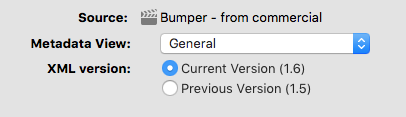
XML should work for sure. Only one caveat, FCPX version numbers. Is your producer on 10.3?
If he is, use "current" version.
If now, use "previous" version.
Please Log in to join the conversation.
Less
More
- Posts: 971
- Thank you received: 46
05 Nov 2016 13:33 #82241
by MsJustine
Replied by MsJustine on topic Sending XML to producer to render on his Mac?
I wanted Apple FCPX Dev to take a look and tell me what the purple squares and tiny dots mean, I would suspect the "Previous version" would be best.
Thanks for the advice, I have tried everything, just cannot pin it down, what I would give to have a 2nd laptop to check on...
Thanks for the advice, I have tried everything, just cannot pin it down, what I would give to have a 2nd laptop to check on...
Please Log in to join the conversation.
Less
More
- Posts: 971
- Thank you received: 46
07 Nov 2016 16:21 #82351
by MsJustine
Replied by MsJustine on topic Sending XML to producer to render on his Mac?
Seeing as the fault was tracked down to a suspected bug in FCPX, corruption of the save effect as preset! After many trials and experiments, I was able to isolate and confirm it was a chroma-key effect, thanks everyone!
Please Log in to join the conversation.
