


3 Post Moderation Rule for New Boarders (25 Jan 2021)
New boarders will have their posts moderated - Don't worry if you cannot see your post immediately.
Delivery audio for broadcast woes…
- finalbug.net
-
 Topic Author
- Offline
- Platinum Member
-

- Absence of Quality is the essence of squareness.
Less
More
03 Nov 2016 09:28 - 03 Nov 2016 09:29 #82064
by finalbug.net
Delivery audio for broadcast woes… was created by finalbug.net
Hi FCPers
I have been delivering modest/sporadic amounts of stuff for broadcast (Germany) since the days of BetaSP!
For about a year now I have been delivering MXF files to one particular large broadcaster.
And every second time they say that there is something wrong with the files.
Usually the audio. e.g. distorted.
In my FCP 4 book (Advanced Editing & Finishing Techniques) on page 670
It tells me that my -12 in FCP is 0 in TV land.
So far so good?
How much tolerance do I have?
I am relying solely on the audio Meters in FCP
And this is some thing that also really confuses me.
They want a mxf file with 4 tracks.
They want atmo/music/dialogue on 1&2 and atmo/music/dialogue on 3&4
I am guessing here but they add a voice over and maybe use this track layout to do some mixing on the fly?
So when I double up my tracks in a MXF file they are going to get twice as loud right?
Which if I am understanding this correctly means that my -12db becomes -6db.
I am mixing as well as I can in FCPX, using MXF4mac Player to eye ball my levels for the final export and listening on kick ass monitor speakers.
There has to be a better way. What mistakes am I making how do you guys do this?
There is no line of communication to the audio guys they seem to live under a rock on another planet.
I suspect that my mistakes/lack of accurate audio meters in FCPX are being exacerbated by the doubling of tracks!
thanks for any tips
Paul
I have been delivering modest/sporadic amounts of stuff for broadcast (Germany) since the days of BetaSP!
For about a year now I have been delivering MXF files to one particular large broadcaster.
And every second time they say that there is something wrong with the files.
Usually the audio. e.g. distorted.
In my FCP 4 book (Advanced Editing & Finishing Techniques) on page 670
It tells me that my -12 in FCP is 0 in TV land.
So far so good?
How much tolerance do I have?
I am relying solely on the audio Meters in FCP
And this is some thing that also really confuses me.
They want a mxf file with 4 tracks.
They want atmo/music/dialogue on 1&2 and atmo/music/dialogue on 3&4
I am guessing here but they add a voice over and maybe use this track layout to do some mixing on the fly?
So when I double up my tracks in a MXF file they are going to get twice as loud right?
Which if I am understanding this correctly means that my -12db becomes -6db.
I am mixing as well as I can in FCPX, using MXF4mac Player to eye ball my levels for the final export and listening on kick ass monitor speakers.
There has to be a better way. What mistakes am I making how do you guys do this?
There is no line of communication to the audio guys they seem to live under a rock on another planet.
I suspect that my mistakes/lack of accurate audio meters in FCPX are being exacerbated by the doubling of tracks!
thanks for any tips
Paul
Last edit: 03 Nov 2016 09:29 by finalbug.net.
Please Log in to join the conversation.
- finalbug.net
-
Topic Author
- Offline
- Platinum Member
-
- Absence of Quality is the essence of squareness.
03 Nov 2016 11:24 #82068
by finalbug.net
Replied by finalbug.net on topic Delivery audio for broadcast woes…
The more I think about it I am inclined to believe that I have to get this:
fcpxpert.net/2016/07/18/calm-down-legalize-your-mix/
Sooner rather than later.
Still interested to hear if there any holes in my logic?
fcpxpert.net/2016/07/18/calm-down-legalize-your-mix/
Sooner rather than later.
Still interested to hear if there any holes in my logic?
Please Log in to join the conversation.

03 Nov 2016 11:59 #82070
by JoeEditor
Replied by JoeEditor on topic Delivery audio for broadcast woes…
"-12 in FCP is 0 in TV land." No, that's not quite it. There is a difference in the measurement between a digital audio meter, and an analog audio meter. But all digital audio meters are the same, all analog audio meters are the same. Working with each is different. Example; go over 0dbs in digital and you're distorting, but in analog you can go as much as 20dbs over 0 and not have any unwanted effects. So it isn't TV land, it is analog vs digital.
TV land has very touchy standards. Each network may have slightly different specs. In general, here in the US, one network I submit shows to says don't usually go over -4 for standard def, -12 for high def. So you need to get the specs from the broadcaster, and stick to those as maximums, not goals. Stay slightly below their spec, you're good.
But in digital, no matter who or where you are, 0dbs is 0dbs, period.
The Klangfreund LUFS Meter is very handy for doing broadcast.
As for audio doubling in loudness when you double tracks, no. It is not linear like that, it is logarithmic. Two clips at -6 dos will not automatically equal +6 dos. They'll be slightly over the original -6 dbs. Yes, it is additive, but not linear.
Plus, just because you have a specific db level set for a clip, does not determine now loud or soft that clip actually is. That really depends on how loud or soft the original was. I can have two voice over clips from the same person, recorded on two different days, in two different studios. I bet you anything they will NOT be the same on audio meters at their default level setting of 0dbs.
FCPX's audio meters are pretty accurate. I'm using them for broadcast daily and find them to be pretty spot on. But again, you need more than just those meters. I love the Klangfreund LUFS Meter and other tools available for nailing the royal PITA broadcast audio levels.
Would be nice if we had a "Broadcast Safe Audio" filter, but I'm not sure how that would work.
TV land has very touchy standards. Each network may have slightly different specs. In general, here in the US, one network I submit shows to says don't usually go over -4 for standard def, -12 for high def. So you need to get the specs from the broadcaster, and stick to those as maximums, not goals. Stay slightly below their spec, you're good.
But in digital, no matter who or where you are, 0dbs is 0dbs, period.
The Klangfreund LUFS Meter is very handy for doing broadcast.
As for audio doubling in loudness when you double tracks, no. It is not linear like that, it is logarithmic. Two clips at -6 dos will not automatically equal +6 dos. They'll be slightly over the original -6 dbs. Yes, it is additive, but not linear.
Plus, just because you have a specific db level set for a clip, does not determine now loud or soft that clip actually is. That really depends on how loud or soft the original was. I can have two voice over clips from the same person, recorded on two different days, in two different studios. I bet you anything they will NOT be the same on audio meters at their default level setting of 0dbs.
FCPX's audio meters are pretty accurate. I'm using them for broadcast daily and find them to be pretty spot on. But again, you need more than just those meters. I love the Klangfreund LUFS Meter and other tools available for nailing the royal PITA broadcast audio levels.
Would be nice if we had a "Broadcast Safe Audio" filter, but I'm not sure how that would work.
Please Log in to join the conversation.
- finalbug.net
-
Topic Author
- Offline
- Platinum Member
-
- Absence of Quality is the essence of squareness.
03 Nov 2016 12:47 #82073
by finalbug.net
Replied by finalbug.net on topic Delivery audio for broadcast woes…
Hi FCPX.guru
First off thanks for your detailed response.
I need to run all this through my brain a couple of times.
Do some research and test some things and will get back to you.
all the best
Paul
First off thanks for your detailed response.
I need to run all this through my brain a couple of times.
Do some research and test some things and will get back to you.
all the best
Paul
Please Log in to join the conversation.
- finalbug.net
-
Topic Author
- Offline
- Platinum Member
-
- Absence of Quality is the essence of squareness.
08 Nov 2016 10:11 - 08 Nov 2016 10:15 #82420
by finalbug.net
Replied by finalbug.net on topic Delivery audio for broadcast woes…
Hi FCPX.guru and Co
Ok this is also partly for my own benefit:
Out with the old in with the new:
Traditionally the db scale was used to measure a "ceiling" for peak.
And the LUFS scale is a measure of “average" integrated loudness.
(Also other stuff like: True Peak, Short Term Loudness, Momentary Loudness and Loudness Range.)
Which means they measure the same thing in different ways!
So finding a place on a scale where they are the same is kind of pointless.
Mixing Strategies:
1) First and foremost mix by ear on my Monitor speakers using the VO as an anchor element.
a) Mix to an educated guess of the db equivalent of -23 LUFS using the FCP meters.
b) Mix to any reference point I want e.g. 0db using my FCP meters and adjust to -23 LUFS later.
Option (b) seems preferable to me for a number of reasons
1) A good way to ease into the world of LUF mixing
2) I have all the space/screen real estate on the audio meters in FCPX I might as well use it all
3) I have this weird situation where I need to double up 1&2 and 3&4 before exporting!*
*I still do not understand why the TV station require this?
Learning from mistakes:
Here is an e.g. of my mixing before and after the -23 LUFS adjustment. I am obviously in Europe.
Assuming I am reading this correctly?
The Loudness Range of the program was OK.
Which for me is a big relief.
And the True peaks were OK.
Which means that: In an old fashioned sense I was not to loud?
The problem was that my LUFS were too high (in my case the voice over)
In a more up to date audio delivery world my LUFS/average of my voice over was too loud.
The -23 LUFS adjustment moves every thing down into a legal range.
Also my Loudness Range seems to get moved down accordingly as well.
If any one reading this has any thoughts or comments I am all ears…
thanks
Paul
Before:
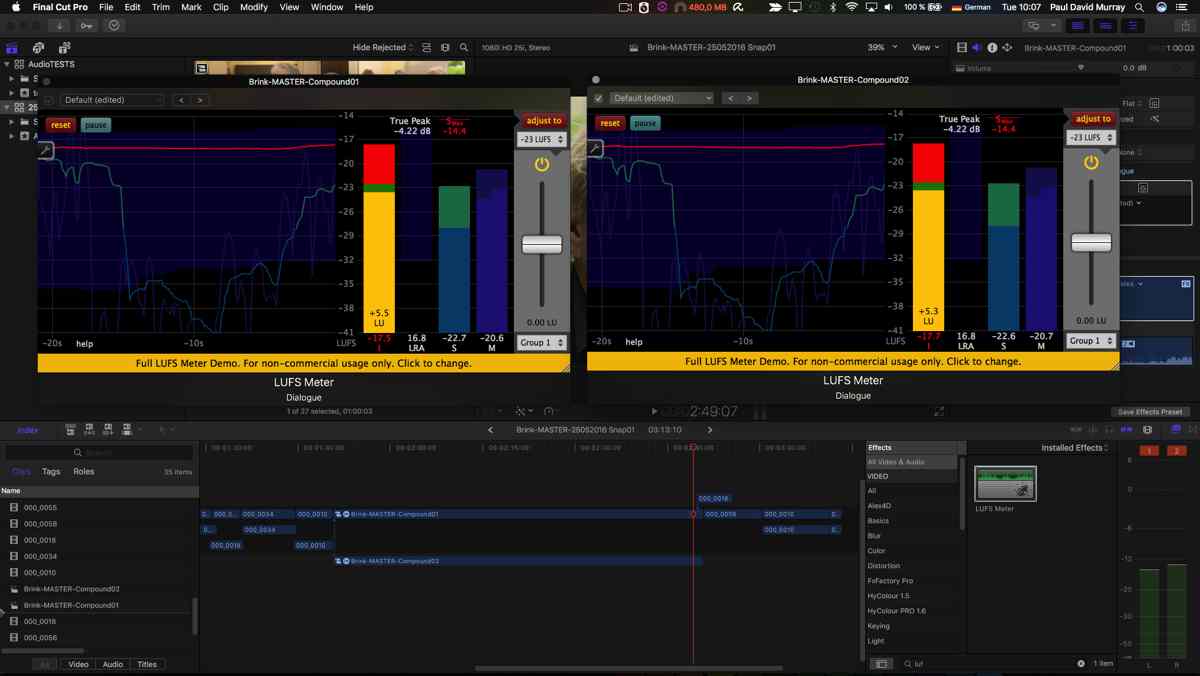
After:
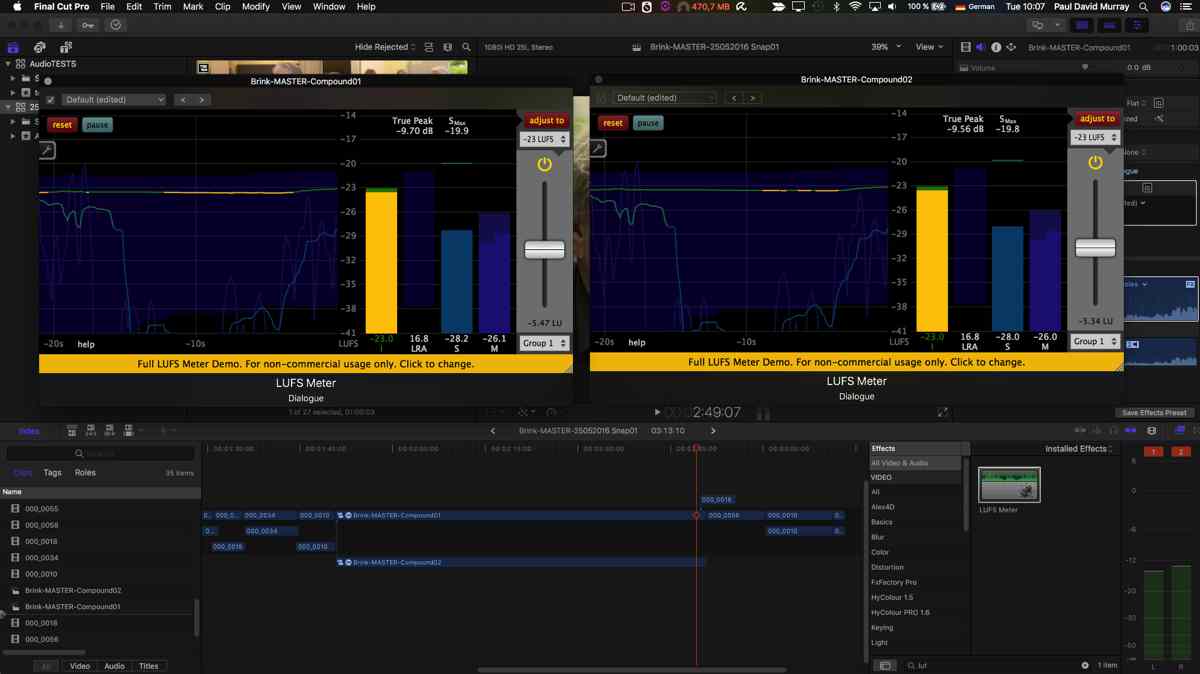
Ok this is also partly for my own benefit:
Out with the old in with the new:
Traditionally the db scale was used to measure a "ceiling" for peak.
And the LUFS scale is a measure of “average" integrated loudness.
(Also other stuff like: True Peak, Short Term Loudness, Momentary Loudness and Loudness Range.)
Which means they measure the same thing in different ways!
So finding a place on a scale where they are the same is kind of pointless.
Mixing Strategies:
1) First and foremost mix by ear on my Monitor speakers using the VO as an anchor element.
a) Mix to an educated guess of the db equivalent of -23 LUFS using the FCP meters.
b) Mix to any reference point I want e.g. 0db using my FCP meters and adjust to -23 LUFS later.
Option (b) seems preferable to me for a number of reasons
1) A good way to ease into the world of LUF mixing
2) I have all the space/screen real estate on the audio meters in FCPX I might as well use it all
3) I have this weird situation where I need to double up 1&2 and 3&4 before exporting!*
*I still do not understand why the TV station require this?
Learning from mistakes:
Here is an e.g. of my mixing before and after the -23 LUFS adjustment. I am obviously in Europe.
Assuming I am reading this correctly?
The Loudness Range of the program was OK.
Which for me is a big relief.
And the True peaks were OK.
Which means that: In an old fashioned sense I was not to loud?
The problem was that my LUFS were too high (in my case the voice over)
In a more up to date audio delivery world my LUFS/average of my voice over was too loud.
The -23 LUFS adjustment moves every thing down into a legal range.
Also my Loudness Range seems to get moved down accordingly as well.
If any one reading this has any thoughts or comments I am all ears…
thanks
Paul
Before:
After:
Last edit: 08 Nov 2016 10:15 by finalbug.net.
Please Log in to join the conversation.
08 Nov 2016 17:04 #82442
by JoeEditor
Replied by JoeEditor on topic Delivery audio for broadcast woes…
I'm still wrapping my head around LUFs...
Please Log in to join the conversation.
- simon.a.billington
-

- Offline
- Elite Member
-

Less
More
- Posts: 179
- Thank you received: 10
09 Nov 2016 01:50 #82470
by simon.a.billington
Replied by simon.a.billington on topic Delivery audio for broadcast woes…
FCPX Guru is right. Judging from some of your following comments, it sounds like you are starting to get the hand of the concept.
Finding out the particular standards of the station and setting up a LUF meter, like the WLM , accordingly can be really helpful, even quintessential. Learning how to read a LUF meter can take some practice, however.
However, clipping your audio, or outputting your audio too "hot" for their standards are only two of the ways audio can get distorted. Albeit, two of the most common ways...
So is there any other type of processing you are doing to your signal before outputting??
Finding out the particular standards of the station and setting up a LUF meter, like the WLM , accordingly can be really helpful, even quintessential. Learning how to read a LUF meter can take some practice, however.
However, clipping your audio, or outputting your audio too "hot" for their standards are only two of the ways audio can get distorted. Albeit, two of the most common ways...
So is there any other type of processing you are doing to your signal before outputting??
Please Log in to join the conversation.
- finalbug.net
-
Topic Author
- Offline
- Platinum Member
-
- Absence of Quality is the essence of squareness.
09 Nov 2016 11:13 - 09 Nov 2016 11:16 #82477
by finalbug.net
Replied by finalbug.net on topic Delivery audio for broadcast woes…
Hi simon, FCPX.guru & Co
I have now bought the full version of the plugin from klangfreund.
It is more in my price range than the WLM tool.
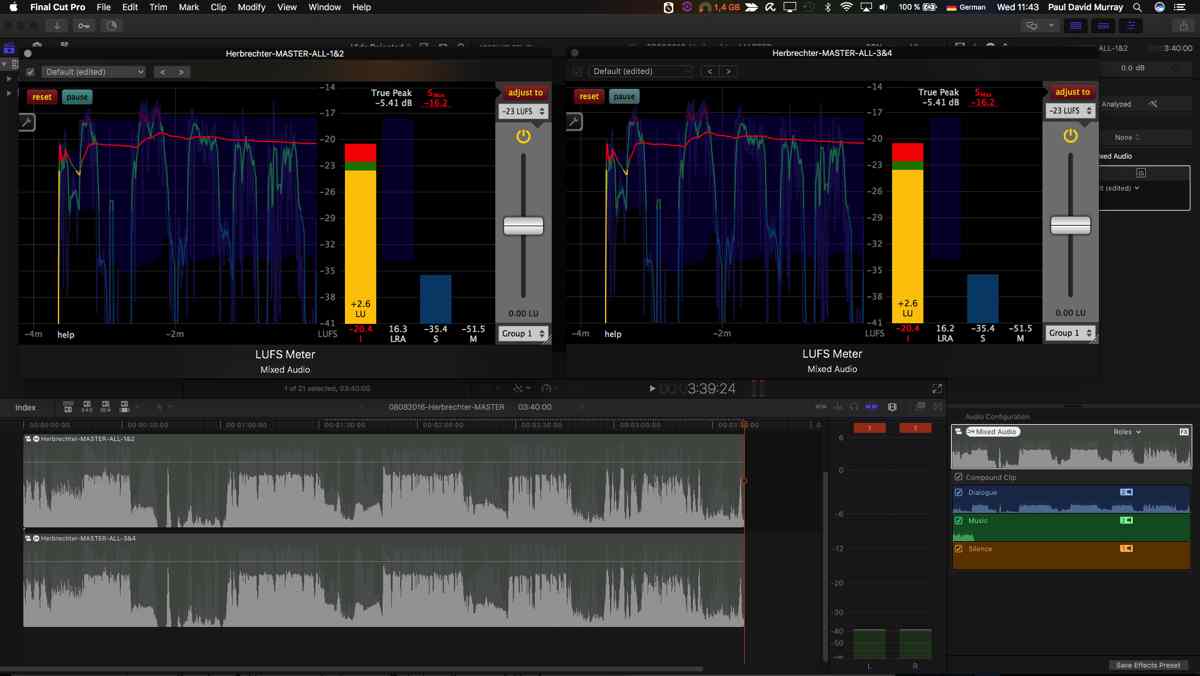
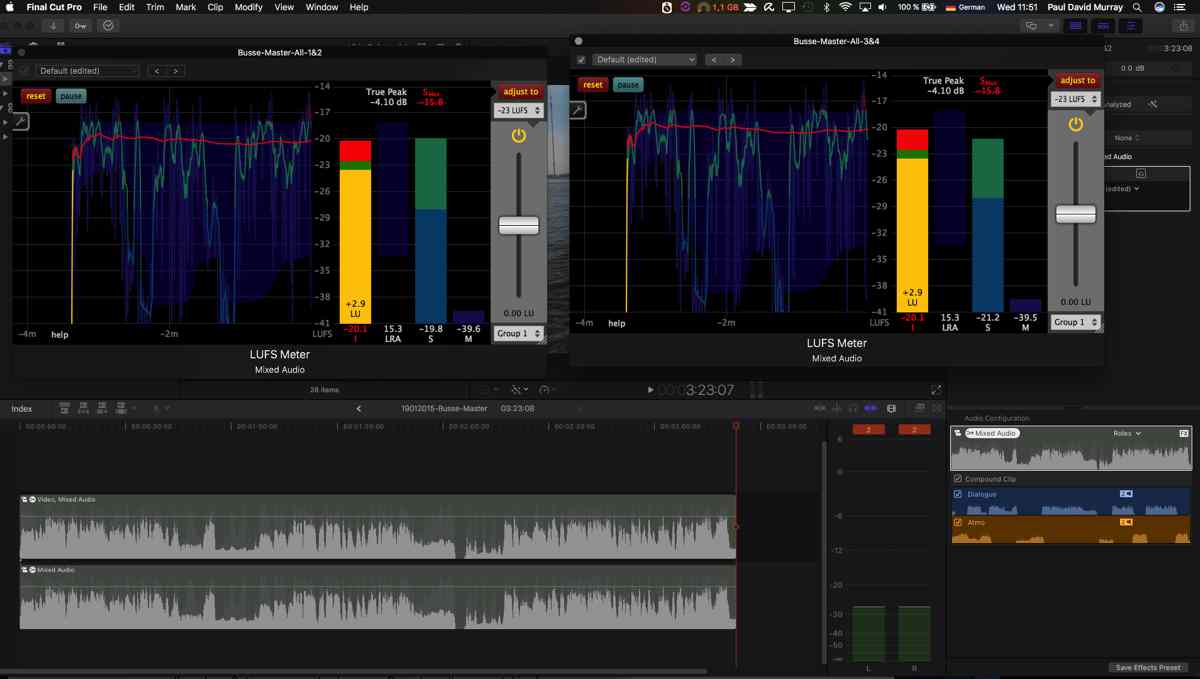
Here are more tests:
Before eg 02:
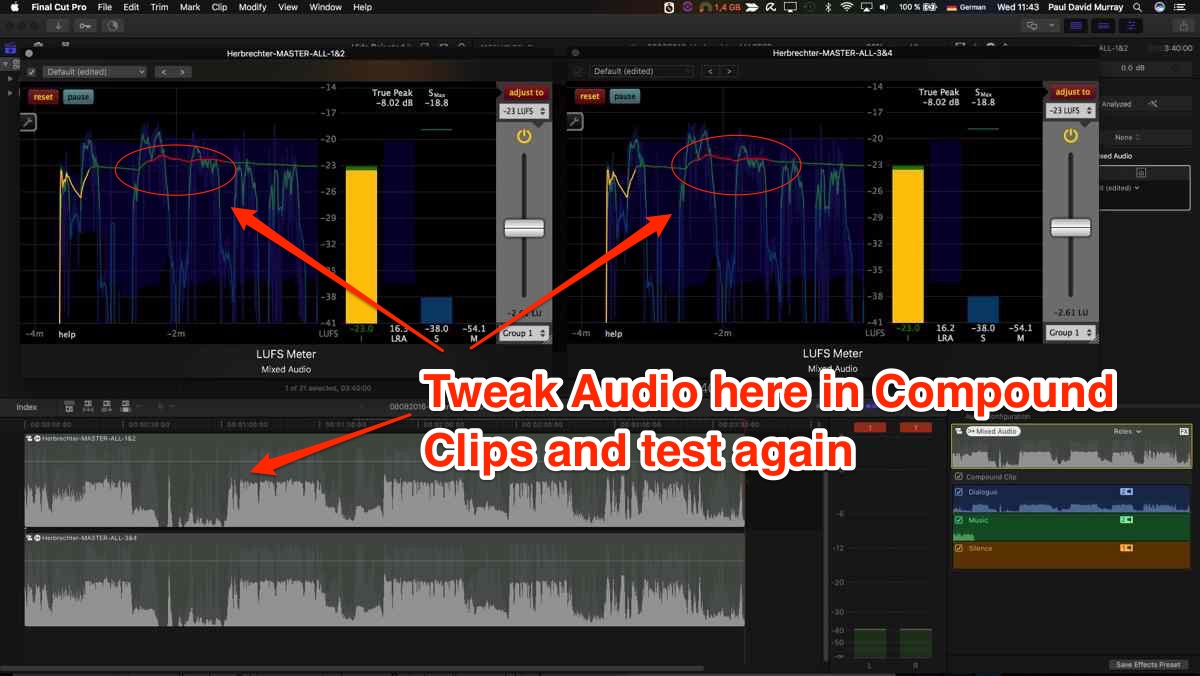
After eg 02:
Before eg 03:
After eg 03:
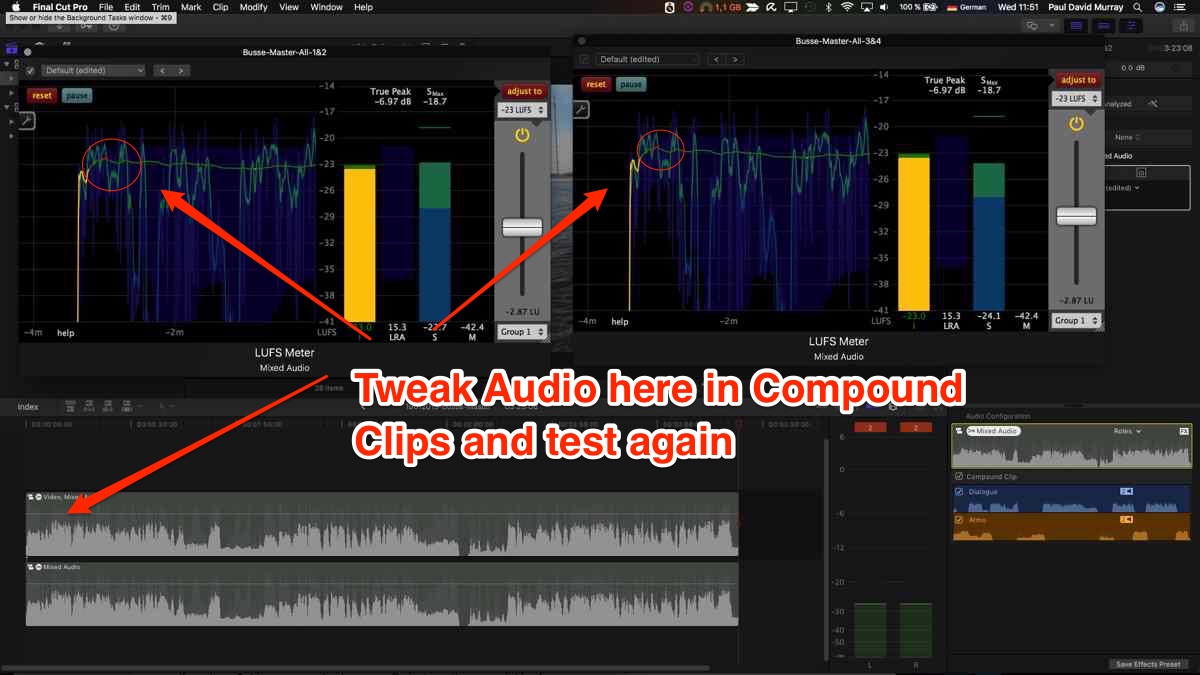
After hitting the adjust button in both I see that there are still areas...that are red.
So I would imagine I would have to either:
a) Go into my compound clip & at the time code where the audio is still red. Fine tune. Test again.
b) Adjust to eg -24 LUFS (quick and dirty) Playback and double check.
Obviously (a) is preferable.
As of now this is all I am doing to test.
It is already taking a lot of the guess work out.
I am doing more research and testing.
Have a job Thursday/Friday where I need to get this right!
Any suggestions/tool ideas/feed back more than welcome...
Concrete suggestions for other things to keep an eye out for?
thanks
Paul
I have now bought the full version of the plugin from klangfreund.
It is more in my price range than the WLM tool.
Here are more tests:
Before eg 02:
After eg 02:
Before eg 03:
After eg 03:
After hitting the adjust button in both I see that there are still areas...that are red.
So I would imagine I would have to either:
a) Go into my compound clip & at the time code where the audio is still red. Fine tune. Test again.
b) Adjust to eg -24 LUFS (quick and dirty) Playback and double check.
Obviously (a) is preferable.
As of now this is all I am doing to test.
It is already taking a lot of the guess work out.
I am doing more research and testing.
Have a job Thursday/Friday where I need to get this right!
Any suggestions/tool ideas/feed back more than welcome...
Concrete suggestions for other things to keep an eye out for?
thanks
Paul
Last edit: 09 Nov 2016 11:16 by finalbug.net.
Please Log in to join the conversation.

09 Nov 2016 14:57 - 09 Nov 2016 15:07 #82484
by ptfigg
Replied by ptfigg on topic Delivery audio for broadcast woes…
Here's where you need to be careful - the FCPX meters are Sample Peak Meters (aka PPM) that measure nothing more than signal level. They DO NOT measure and/or display the Integrated/Program Loudness descriptor that is specified in whatever Broadcast spec. you are targeting.
LUFS == "Loudness Units relative to Full Scale." Integrated/Program Loudness (measured in LUFS) is an indication of average, perceptual, Loudness over time - or over the entire duration of an audio segment. That's the first "target" that you need to adhere to.
The second target in any given Broadcast spec is the Maximum True Peak. This is not the same as common Sample Peaks. For example a Sample Peak level of -1.0 dBFS may very well contain clipped samples due to interpolation of samples. These are referred to Intersample Peaks (ISP's). Broadcast specs. require ISP compliance. This is the most accurate method of making sure the audio is not clipped. The prevention of ISP's is especially important when the audio will be converted to a lossy codec for distribution.
You need a compliment Loudness Meter to measure both descriptors. Some work only in real-time (while mixing). Others also support off-line measurements.
The bottom line is you can't rely on the FCPX meters for Broadcast spec. compliance. The sole purpose of the FCPX meters is to monitor signal level and to avoid any potential instances of clipping or over-shoots. The inherent scale does not correspond to the Absolute LUFS scale on a Loudness Meter.
There are many ways to achieve specification compliance. For RT mixing - be aware of the Short Term Loudness descriptor (3 sec. window) as well as the Integrated Loudness descriptor. An ITU compliant Peak Limiter capable of measuring/preventing Intersample Peaks should be implemented and set to adhere to the spec's target. For example -1.0 dBTP.
Working on a calibrated system will help, once you develop an audible feel for whatever spec you are targeting. Preserve your dynamics, maximize intelligibility, and optimize your mix. After all is said and done you can easily apply a global gain offset to the entire mix to fine tune adherence to your compliance target(s). Of course you need to be conscious of headroom. If the gain offset is subtractive, it should be pretty straight forward. OTOH if you need to add gain, you may need to adopt a more complex processing workflow. I can elaborate on this. This process is referred to as Loudness Normalization.
Also, there are a few offline tools to consider. iZotope's RX Loudness Control is Pro Tools dependent. iZotope's RX5 Audio Editor includes a Loudness compliance processing module. Nugen Audio offers LM Correct. And check into the desktop version of Auphonic. Using these tools, you simply define your targets and process.
I'm not familiar with the meter that you are using. However it does contain the descriptors that you need to be aware of. You must develop an understanding of the compliance descriptors before you can perform compliant mixes and use the meter to it's full potential.
Loudness Meters that I use/recommend: Nugen's VisLM 2, and TC Electronics line of Loudness Radar Meters. I also own their newly released desktop Loudness Meter Clarity M.
-paul.
@produceNewMedia
LUFS == "Loudness Units relative to Full Scale." Integrated/Program Loudness (measured in LUFS) is an indication of average, perceptual, Loudness over time - or over the entire duration of an audio segment. That's the first "target" that you need to adhere to.
The second target in any given Broadcast spec is the Maximum True Peak. This is not the same as common Sample Peaks. For example a Sample Peak level of -1.0 dBFS may very well contain clipped samples due to interpolation of samples. These are referred to Intersample Peaks (ISP's). Broadcast specs. require ISP compliance. This is the most accurate method of making sure the audio is not clipped. The prevention of ISP's is especially important when the audio will be converted to a lossy codec for distribution.
You need a compliment Loudness Meter to measure both descriptors. Some work only in real-time (while mixing). Others also support off-line measurements.
The bottom line is you can't rely on the FCPX meters for Broadcast spec. compliance. The sole purpose of the FCPX meters is to monitor signal level and to avoid any potential instances of clipping or over-shoots. The inherent scale does not correspond to the Absolute LUFS scale on a Loudness Meter.
There are many ways to achieve specification compliance. For RT mixing - be aware of the Short Term Loudness descriptor (3 sec. window) as well as the Integrated Loudness descriptor. An ITU compliant Peak Limiter capable of measuring/preventing Intersample Peaks should be implemented and set to adhere to the spec's target. For example -1.0 dBTP.
Working on a calibrated system will help, once you develop an audible feel for whatever spec you are targeting. Preserve your dynamics, maximize intelligibility, and optimize your mix. After all is said and done you can easily apply a global gain offset to the entire mix to fine tune adherence to your compliance target(s). Of course you need to be conscious of headroom. If the gain offset is subtractive, it should be pretty straight forward. OTOH if you need to add gain, you may need to adopt a more complex processing workflow. I can elaborate on this. This process is referred to as Loudness Normalization.
Also, there are a few offline tools to consider. iZotope's RX Loudness Control is Pro Tools dependent. iZotope's RX5 Audio Editor includes a Loudness compliance processing module. Nugen Audio offers LM Correct. And check into the desktop version of Auphonic. Using these tools, you simply define your targets and process.
I'm not familiar with the meter that you are using. However it does contain the descriptors that you need to be aware of. You must develop an understanding of the compliance descriptors before you can perform compliant mixes and use the meter to it's full potential.
Loudness Meters that I use/recommend: Nugen's VisLM 2, and TC Electronics line of Loudness Radar Meters. I also own their newly released desktop Loudness Meter Clarity M.
-paul.
@produceNewMedia
Last edit: 09 Nov 2016 15:07 by ptfigg. Reason: typo
Please Log in to join the conversation.
- finalbug.net
-
Topic Author
- Offline
- Platinum Member
-
- Absence of Quality is the essence of squareness.
10 Nov 2016 11:36 - 11 Nov 2016 06:29 #82519
by finalbug.net
Replied by finalbug.net on topic Delivery audio for broadcast woes…
I have looked at pretty much all of the tools suggested here.
They seem to range roughly from 250-900$
When I view the tutorial for one of the more expensive ones:
It seems to be doing pretty much what Klangford is doing inside FCPX with the help of a plugin on a compound clip. Ditto the other options that I have checked out.
Klangford seems a little clunky but it works and I believe that I both understand it and can read it now. In all fairness the full version of the Klangford LUFS tool is closer to 55€.
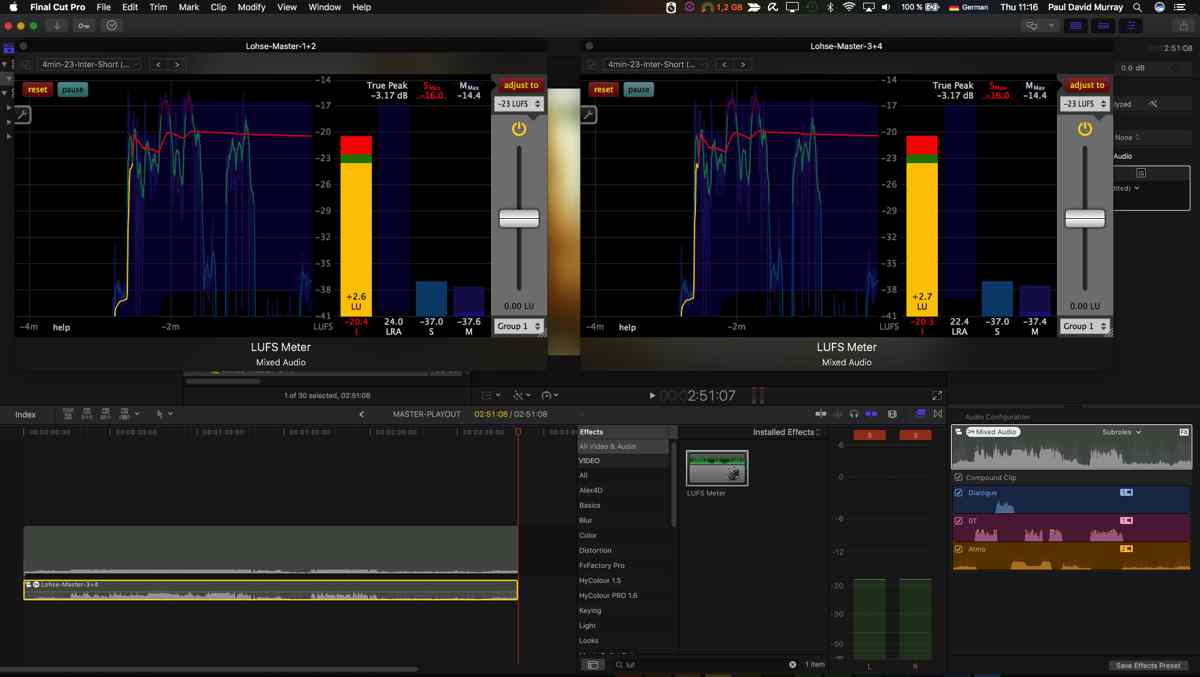
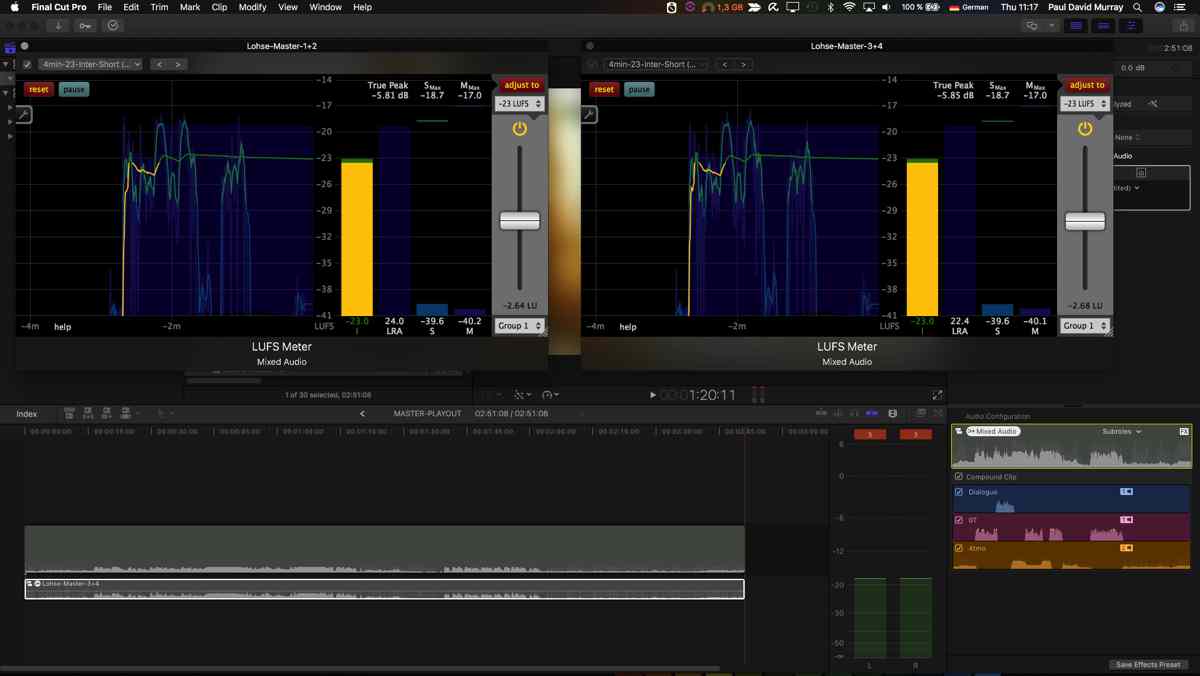
Here is an example of my latest test run which looks pretty much OK as far as I can see?
Before:
After:
Regardless of the price I am wary of buying something and then round tripping to e.g. Pro Tools First/FCPX/Compressor etc. I will be working to a tight deadline and there are too many things that could go wrong. Last but by no means least I know little or nothing about Pro Tools…
I am slowly coming to the conclusion that I will stick with Klangford for the moment.And use it to practice taking my mixing into the realm of legal LUFS with the help of my ear/brain and monitor speakers. I also need to calibrate the speakers sooner rather than later!!!
In the long term I plan on investigating if I could get the Meter Clarity M to play with FCPX (Possible with the help of Rogue Amoeba Audio Hijack/Soundflower or similar. USB or even my Apogee Duet) As far as I can tell it is selling for about 600$ which for a box that sits on your desk seems reasonable to me.
Thanks to to any one/every one who chipped in here
kind regards
Paul
They seem to range roughly from 250-900$
When I view the tutorial for one of the more expensive ones:
It seems to be doing pretty much what Klangford is doing inside FCPX with the help of a plugin on a compound clip. Ditto the other options that I have checked out.
Klangford seems a little clunky but it works and I believe that I both understand it and can read it now. In all fairness the full version of the Klangford LUFS tool is closer to 55€.
Here is an example of my latest test run which looks pretty much OK as far as I can see?
Before:
After:
Regardless of the price I am wary of buying something and then round tripping to e.g. Pro Tools First/FCPX/Compressor etc. I will be working to a tight deadline and there are too many things that could go wrong. Last but by no means least I know little or nothing about Pro Tools…
I am slowly coming to the conclusion that I will stick with Klangford for the moment.And use it to practice taking my mixing into the realm of legal LUFS with the help of my ear/brain and monitor speakers. I also need to calibrate the speakers sooner rather than later!!!
In the long term I plan on investigating if I could get the Meter Clarity M to play with FCPX (Possible with the help of Rogue Amoeba Audio Hijack/Soundflower or similar. USB or even my Apogee Duet) As far as I can tell it is selling for about 600$ which for a box that sits on your desk seems reasonable to me.
Thanks to to any one/every one who chipped in here
kind regards
Paul
Last edit: 11 Nov 2016 06:29 by finalbug.net.
Please Log in to join the conversation.
- simon.a.billington
-
- Offline
- Elite Member
-
Less
More
- Posts: 179
- Thank you received: 10
20 Nov 2016 13:53 #83007
by simon.a.billington
Replied by simon.a.billington on topic Delivery audio for broadcast woes…
Yeah those meters are quite pricey. Waves seem to have monthly sales and even weekend sales, that's when I picked up WLM for really cheap. I do love that the Plus version has Intersample Peak Limiter, ensuring no overs and a trim feature for those quick and dirty level fixes.
I also have Insight that came with RX and that, too is pricey, but also handy.
Black Friday is coming up, there might be a bargain out there for those still needing a loudness meter.
I also have Insight that came with RX and that, too is pricey, but also handy.
Black Friday is coming up, there might be a bargain out there for those still needing a loudness meter.
Please Log in to join the conversation.
