


- Posts: 971
- Thank you received: 46
3 Post Moderation Rule for New Boarders (25 Jan 2021)
New boarders will have their posts moderated - Don't worry if you cannot see your post immediately.
Graphic bug? Fault?
Less
More
03 Nov 2016 05:12 #82046
by MsJustine
Graphic bug? Fault? was created by MsJustine
Hi All,
I have just started editing in 10.3, and all seems ok, until I noticed this strange purple square, rectangle appearing on sky timeline, in the viewer, I thought it was a software bug, so I re-formatted, re-installed Mac OS Sierra, FCPx 10.2.3, edited, the squares appeared, re-installed Sierra, FCPX 10.2.3, the squares appeared.
I re-installed Sierra, and FCPX, 10.3, all fine, although rendering is a crawl, super slow, everything seemed fine, then the purple squares appeared, and all snapshots are contaminated, that on SHARE, you see it in the final video...
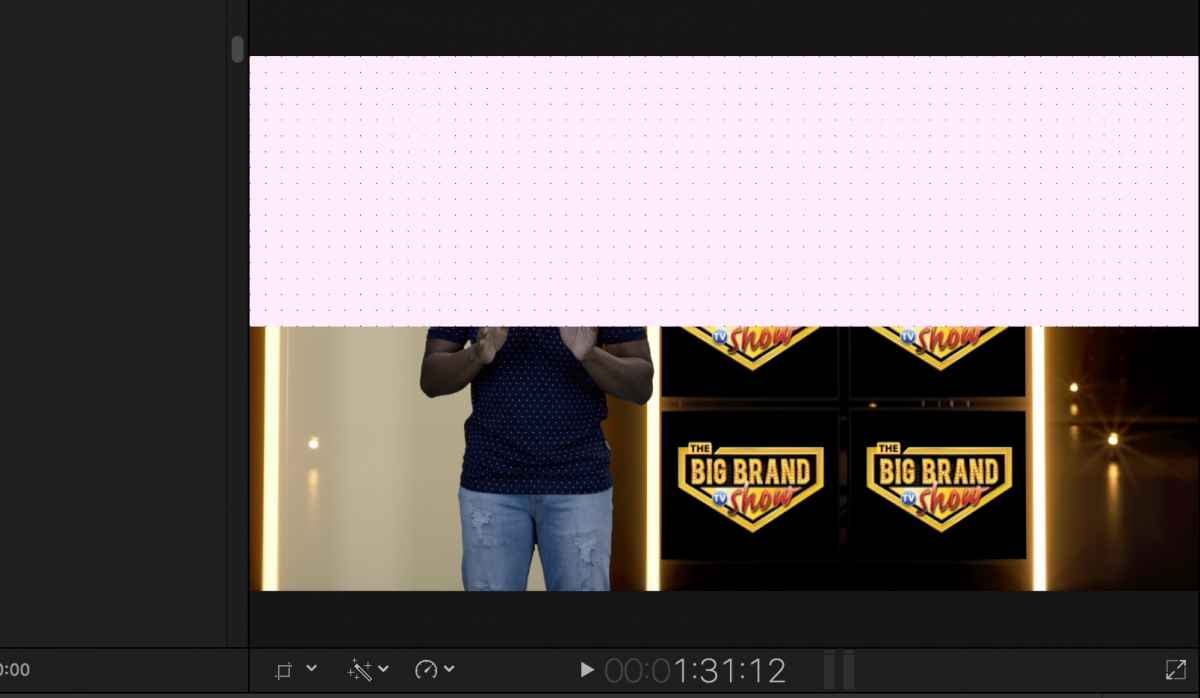
I have just started editing in 10.3, and all seems ok, until I noticed this strange purple square, rectangle appearing on sky timeline, in the viewer, I thought it was a software bug, so I re-formatted, re-installed Mac OS Sierra, FCPx 10.2.3, edited, the squares appeared, re-installed Sierra, FCPX 10.2.3, the squares appeared.
I re-installed Sierra, and FCPX, 10.3, all fine, although rendering is a crawl, super slow, everything seemed fine, then the purple squares appeared, and all snapshots are contaminated, that on SHARE, you see it in the final video...
Please Log in to join the conversation.
- Scott Markowitz
-

- Offline
- Elite Member
-

Less
More
- Posts: 161
- Thank you received: 31
03 Nov 2016 16:31 #82086
by Scott Markowitz
Replied by Scott Markowitz on topic Graphic bug? Fault?
Yikes.
What kind of media are you working with?
Are you working with Original Media or Optimized Media?
Are you using any effects on the clip?
I have found that the Shape Mask, in particular, introduces problems upon sharing.
What kind of media are you working with?
Are you working with Original Media or Optimized Media?
Are you using any effects on the clip?
I have found that the Shape Mask, in particular, introduces problems upon sharing.
Please Log in to join the conversation.
Less
More
- Posts: 971
- Thank you received: 46
03 Nov 2016 16:46 #82089
by MsJustine
Replied by MsJustine on topic Graphic bug? Fault?
Hi Scott,
Original media, if I use anything other than original media, the graphics alpha channel will not work, I am not sure exactly how the graphics are created, maybe Adobe something.
The media is a mix of animation codec, prores 422, uncompressed 8bit ARGB, the video itself is shot on a RED ?Dragon? I think it is, a RED something with black cards, the camera costs more than 20times my car!!
The effect is chroma key, nothing fancy, I have no idea how to use the fancy pants stuff you buy for $99, core melt. So confusing.
Here is the thing, it is so random, it is not there during edit, I erase the render files, re-boot, change where the renders occur, the purple squares return, even on sharing, to my mind this is a bug, it is not repeatable, it does not respect the video, I tried changing the video from 1080i to 1080p, re-installs.
This purple square cost me a 1 year gig. so I am a bit annoyed!!
Original media, if I use anything other than original media, the graphics alpha channel will not work, I am not sure exactly how the graphics are created, maybe Adobe something.
The media is a mix of animation codec, prores 422, uncompressed 8bit ARGB, the video itself is shot on a RED ?Dragon? I think it is, a RED something with black cards, the camera costs more than 20times my car!!
The effect is chroma key, nothing fancy, I have no idea how to use the fancy pants stuff you buy for $99, core melt. So confusing.
Here is the thing, it is so random, it is not there during edit, I erase the render files, re-boot, change where the renders occur, the purple squares return, even on sharing, to my mind this is a bug, it is not repeatable, it does not respect the video, I tried changing the video from 1080i to 1080p, re-installs.
This purple square cost me a 1 year gig. so I am a bit annoyed!!
Please Log in to join the conversation.

03 Nov 2016 17:35 #82094
by jamecude
Replied by jamecude on topic Graphic bug? Fault?
Does your computer have an Intel Iris graphics card? If so, are you able to go back to El Capitan, and try again?
Please Log in to join the conversation.
Less
More
- Posts: 971
- Thank you received: 46
03 Nov 2016 17:40 - 03 Nov 2016 17:43 #82095
by MsJustine
Replied by MsJustine on topic Graphic bug? Fault?
That is not such a stupid idea, El Cap and FCPX 10.2.3. Then again, I was trying to edit on Sierra+FCPx 10.2.3 and the graphics glitch started.
Going back to El Cap and 10.2.3 FCPX? So frustrating not having anyone to talk to about this.. Of course Apple Feedback are not going to respond, not to a 10.2.3 issue, Sierra is a mess, combined with 10.3, who knows what the problems are.
It does not help that Intel have no idea about IRIS and Mac OS!! Intel only deal with Win8 to Win10!!
Going back to El Cap and 10.2.3 FCPX? So frustrating not having anyone to talk to about this.. Of course Apple Feedback are not going to respond, not to a 10.2.3 issue, Sierra is a mess, combined with 10.3, who knows what the problems are.
It does not help that Intel have no idea about IRIS and Mac OS!! Intel only deal with Win8 to Win10!!
Last edit: 03 Nov 2016 17:43 by MsJustine.
Please Log in to join the conversation.
03 Nov 2016 17:59 #82096
by jamecude
Replied by jamecude on topic Graphic bug? Fault?
Go to the Apple Menu and choose About This Mac. What kind of graphics card(s) is listed? There have been reports that a similar issue can occur on Sierra, but does not occur on El Capitan.
The Feedback page is not tech support. For that, go to getsupport.apple.com .
The Feedback page is not tech support. For that, go to getsupport.apple.com .
Please Log in to join the conversation.
- CBlakeston
-
- Offline
- Elite Member
-
Less
More
- Posts: 175
- Thank you received: 5
03 Nov 2016 18:00 #82097
by CBlakeston
Replied by CBlakeston on topic Graphic bug? Fault?
If the bug appears randomly and presumably only with this project. Can you not export a final edit twice? Then Import those into a new project and whenever you see a glitch, just overlay the 2nd export over those frames? If you edit out the glitches you have a perfect timeline to export.
Please Log in to join the conversation.

03 Nov 2016 18:01 #82098
by Seamusvfx
Replied by Seamusvfx on topic Graphic bug? Fault?
For arguments sake does it occur when you change to proxy media? I know you don't want to work in proxy but it could tell you if it its a codec interpretation problem which could be relatively simply solved.
Please Log in to join the conversation.
Less
More
- Posts: 971
- Thank you received: 46
03 Nov 2016 18:13 #82101
by MsJustine
Replied by MsJustine on topic Graphic bug? Fault?
Intel IRIS 1585MB for the graphics card/
I have tried your idea of replacing bad with good, done the delete all trace of render files, changed where the render goes to render, changed hard drives, everything.
Totally random, even explained in great detail how expensive this "bug" glitch is going to cost, it has cost me a great freelance gig that was going to last 52 weeks.
So frustrating as it is so random, I cannot say it is this codec or that codec, as when I disable clips, snapshot and share, no problems, or there are problems, I don't give a single hoot if it is on the timeline, but it is on the share video, which is useless to me, it started in 10.2.3, then migrated to 10.3, I have never had this problem before, so I don't expect it to be hardware related, as for video, I don't know enough to do massive fast re-encodes using Compressor, which really makes things impossible, Compressor sorry is so badly designed, it should be more like the old Automater, a logic path system, the new 2016 Compressor I have no idea if it works, most of the time it spits out errors..
So I find the video I want to compressor, I use Finder-Encode using Prores, wait for it to encode, drop that folder onto Compressor, and red error messages, sometimes, sometimes it works, right now the workflow in FCPX+Compressor is just bad, not useful or helpful.
Quicktime 7 is a blessing, the best few $ I ever spent, guard that license key like a hawk.. And it still works, I simply have no idea what to do, I tried asking for help on twitter, a Skype call, 2am my time, no problem, been up for the last 3 days trying to fix this, it is a 3min video that has taken the better part of 100 hours to troubleshoot.
At this point I simply have no ideas...Exhausted!
I have tried your idea of replacing bad with good, done the delete all trace of render files, changed where the render goes to render, changed hard drives, everything.
Totally random, even explained in great detail how expensive this "bug" glitch is going to cost, it has cost me a great freelance gig that was going to last 52 weeks.
So frustrating as it is so random, I cannot say it is this codec or that codec, as when I disable clips, snapshot and share, no problems, or there are problems, I don't give a single hoot if it is on the timeline, but it is on the share video, which is useless to me, it started in 10.2.3, then migrated to 10.3, I have never had this problem before, so I don't expect it to be hardware related, as for video, I don't know enough to do massive fast re-encodes using Compressor, which really makes things impossible, Compressor sorry is so badly designed, it should be more like the old Automater, a logic path system, the new 2016 Compressor I have no idea if it works, most of the time it spits out errors..
So I find the video I want to compressor, I use Finder-Encode using Prores, wait for it to encode, drop that folder onto Compressor, and red error messages, sometimes, sometimes it works, right now the workflow in FCPX+Compressor is just bad, not useful or helpful.
Quicktime 7 is a blessing, the best few $ I ever spent, guard that license key like a hawk.. And it still works, I simply have no idea what to do, I tried asking for help on twitter, a Skype call, 2am my time, no problem, been up for the last 3 days trying to fix this, it is a 3min video that has taken the better part of 100 hours to troubleshoot.
At this point I simply have no ideas...Exhausted!
Please Log in to join the conversation.
Less
More
- Posts: 971
- Thank you received: 46
03 Nov 2016 18:15 #82102
by MsJustine
Replied by MsJustine on topic Graphic bug? Fault?
If it is a codec issue? How will I know, what I know is that I use the same media 4 times, for roughly the same duration each time, and the glitch only appears ramdomly, I have no idea which clip will induce it, I don't know enough about massive re-encoding...
Please Log in to join the conversation.
- CBlakeston
-
- Offline
- Elite Member
-
Less
More
- Posts: 175
- Thank you received: 5
03 Nov 2016 18:15 #82103
by CBlakeston
Replied by CBlakeston on topic Graphic bug? Fault?
So to clarify. A brand new project also experiences this bug?
It sounds like the GPU in your mac may be broken. Do you have another Mac you can try opening the project on. Backup your hard drive with Super Duper and boot from that. Go to an Apple store if you have to?
It sounds like the GPU in your mac may be broken. Do you have another Mac you can try opening the project on. Backup your hard drive with Super Duper and boot from that. Go to an Apple store if you have to?
Please Log in to join the conversation.
- CBlakeston
-
- Offline
- Elite Member
-
Less
More
- Posts: 175
- Thank you received: 5
03 Nov 2016 18:18 #82105
by CBlakeston
Replied by CBlakeston on topic Graphic bug? Fault?
Have you tried optimising all footage and sharing then? By sharing i'm guessing you mean exporting a final edit into a master file?
Please Log in to join the conversation.
- CBlakeston
-
- Offline
- Elite Member
-
Less
More
- Posts: 175
- Thank you received: 5
03 Nov 2016 18:18 #82106
by CBlakeston
Replied by CBlakeston on topic Graphic bug? Fault?
or to save time.. optimise the clips that glitch?
Please Log in to join the conversation.
Less
More
- Posts: 971
- Thank you received: 46
03 Nov 2016 18:19 #82107
by MsJustine
Replied by MsJustine on topic Graphic bug? Fault?
Apple Store, um, nope that we do not have those here.. Apple resellers yes, but they are just terrible importers that sell tv's and washing machines and bad telephone handsets.
Broken GPU.. Nope, it is not that, I have not had this problem and not on the other project I edited, just this one, something since Sierra and 10.2.3...Before Sierra, not an issue.
This is a late 2013 13inch MacBook Pro, 8 GB RAM, hardware is 100/% functional, as for Sierra, and 10.2.3 and 10.3=faulty.
Broken GPU.. Nope, it is not that, I have not had this problem and not on the other project I edited, just this one, something since Sierra and 10.2.3...Before Sierra, not an issue.
This is a late 2013 13inch MacBook Pro, 8 GB RAM, hardware is 100/% functional, as for Sierra, and 10.2.3 and 10.3=faulty.
Please Log in to join the conversation.
03 Nov 2016 18:19 - 03 Nov 2016 18:21 #82108
by Seamusvfx
Replied by Seamusvfx on topic Graphic bug? Fault?
If you run off proxy (or optimised), it will all have re-encoded everything to prores so it might work as a way to check. If you don't know enough to batch re-encode then nows the time to learn.
Last edit: 03 Nov 2016 18:21 by Seamusvfx.
Please Log in to join the conversation.
Less
More
- Posts: 971
- Thank you received: 46
03 Nov 2016 18:20 - 03 Nov 2016 18:21 #82109
by MsJustine
Replied by MsJustine on topic Graphic bug? Fault?
If I change the clips, then the alpha channel breaks, optimizing and proxy are no go for me!
By change the clips I mean convert to other than what was imported.
The simple fact is. Apple have steamrolled through a workflow that they Apple think is best, and now broken FCPX, it was fine until Sierra.
By change the clips I mean convert to other than what was imported.
The simple fact is. Apple have steamrolled through a workflow that they Apple think is best, and now broken FCPX, it was fine until Sierra.
Last edit: 03 Nov 2016 18:21 by MsJustine.
Please Log in to join the conversation.
03 Nov 2016 18:21 #82110
by jamecude
Replied by jamecude on topic Graphic bug? Fault?
Try this:
How to downgrade from macOS Sierra to El Capitan: Remove macOS Sierra and go back to OS X 10.11 El Capitan
www.macworld.co.uk/how-to/mac-software/h...acos-sierra-3581872/
How to downgrade from macOS Sierra to El Capitan: Remove macOS Sierra and go back to OS X 10.11 El Capitan
www.macworld.co.uk/how-to/mac-software/h...acos-sierra-3581872/
Please Log in to join the conversation.
03 Nov 2016 18:23 #82111
by Seamusvfx
Replied by Seamusvfx on topic Graphic bug? Fault?
The idea is to isolate the problem so you can solve it. Its quicker to encode than step back a os version.
Please Log in to join the conversation.
- CBlakeston
-
- Offline
- Elite Member
-
Less
More
- Posts: 175
- Thank you received: 5
03 Nov 2016 18:26 - 03 Nov 2016 18:27 #82114
by CBlakeston
Replied by CBlakeston on topic Graphic bug? Fault?
It doesn't matter if it didn't happen before. It's happens now. And it looks like a GPU glitch. Something could have just broken.
Blaming Apple is just wasting your energy right now. It won't help you find a work around. This is why every website says don't update OS or software during a project. - not that it helps you now
Videos with an alpha channel shouldn't lose it when you optimise. Pro res also has an alpha channel. If you're now on FCPX 10.3 try changing the optimise settings to the highest flavour of pro res and optimising. ?
Have you tried rendering the timeline before exporting out?
Blaming Apple is just wasting your energy right now. It won't help you find a work around. This is why every website says don't update OS or software during a project. - not that it helps you now
Videos with an alpha channel shouldn't lose it when you optimise. Pro res also has an alpha channel. If you're now on FCPX 10.3 try changing the optimise settings to the highest flavour of pro res and optimising. ?
Have you tried rendering the timeline before exporting out?
Last edit: 03 Nov 2016 18:27 by CBlakeston.
Please Log in to join the conversation.
Less
More
- Posts: 971
- Thank you received: 46
03 Nov 2016 18:30 - 03 Nov 2016 18:32 #82116
by MsJustine
Replied by MsJustine on topic Graphic bug? Fault?
I agree, and thank you for all the advice, A new re-install of El Cap, and 10.2.3.
The only problem I have is will this re-install of El Cap and 10.2.3 pick up the new codecs? I What I do not know is if using the ones before any upgrade is going to work, or if I need to install pro codecs, and if I do, the App Store will maybe not pick it up...
Yes I have tried everything, re-installs of Sierra, 10.2.3, re-install of Sierra and 10.3, change render locations, NO to the do you want to copy, deleted all render files in all "show package contents, "shared" before render and shared after render.
It is not an hardware issue, but a bug in either the pro codec package, Sierra, or FCPX, after all FCPX 10.3 was a GUI rewrite not a reworking of the entire FCP data.
If not was brand new, it would have been a new install not an upgrade.
Apple copied pasted 90% of the 10.2.3 code in, they did not recode, only the user interface is new, the rest is tired broken code from 10.0.0
The only problem I have is will this re-install of El Cap and 10.2.3 pick up the new codecs? I What I do not know is if using the ones before any upgrade is going to work, or if I need to install pro codecs, and if I do, the App Store will maybe not pick it up...
Yes I have tried everything, re-installs of Sierra, 10.2.3, re-install of Sierra and 10.3, change render locations, NO to the do you want to copy, deleted all render files in all "show package contents, "shared" before render and shared after render.
It is not an hardware issue, but a bug in either the pro codec package, Sierra, or FCPX, after all FCPX 10.3 was a GUI rewrite not a reworking of the entire FCP data.
If not was brand new, it would have been a new install not an upgrade.
Apple copied pasted 90% of the 10.2.3 code in, they did not recode, only the user interface is new, the rest is tired broken code from 10.0.0
Last edit: 03 Nov 2016 18:32 by MsJustine.
Please Log in to join the conversation.
