


- Posts: 9
- Thank you received: 0
3 Post Moderation Rule for New Boarders (25 Jan 2021)
New boarders will have their posts moderated - Don't worry if you cannot see your post immediately.
Sony SxS Driver not working with Mac OS Sierra
03 Nov 2016 02:49 #82044
by wookeez
Sony SxS Driver not working with Mac OS Sierra was created by wookeez
Has anyone found a fix for the Sony S x S card driver and fcp with the latest macOS Sierra? Apple says it is not thier issue and I need to contact Sony. There has to be a work around for this. Thanks!
Please Log in to join the conversation.
04 Nov 2016 16:23 #82193
by Finbo
Replied by Finbo on topic Sony SxS Driver not working with Mac OS Sierra
Have you found an answer to this?
What driver are you currently using...is it the latest one?
Sony on its website says the latest UDF driver is compatible with Mac OS 10.10 or later.
www.sonycreativesoftware.com/sxsudfdriver
What driver are you currently using...is it the latest one?
Sony on its website says the latest UDF driver is compatible with Mac OS 10.10 or later.
www.sonycreativesoftware.com/sxsudfdriver
Please Log in to join the conversation.
04 Nov 2016 16:25 #82194
by Finbo
Replied by Finbo on topic Sony SxS Driver not working with Mac OS Sierra
Ah, after clicking download to check things further, I now see that the most up to date version 2.2.0 supports El Capitan, but there's no mention of Sierra...as yet.
Please Log in to join the conversation.
04 Nov 2016 17:21 #82198
by wookeez
Replied by wookeez on topic Sony SxS Driver not working with Mac OS Sierra
:S No luck on a solution. From what I am reading, Sony takes a long time to update and keep up with macOS, so it may be a while. The only options are the downgrade back to the previous OS, which is a pain or like I am doing now. Pulling the footage down to my laptop with older version and then dumping the movie files into my Mac Pro via external drive. Such a pain....
Please Log in to join the conversation.
- HeyChristian
-

- Offline
- New Member
-

Less
More
- Posts: 6
- Thank you received: 0
05 Nov 2016 21:09 #82266
by HeyChristian
Replied by HeyChristian on topic Sony SxS Driver not working with Mac OS Sierra
ANSWER TO THIS?
Please Log in to join the conversation.


14 Dec 2016 06:36 #83973
by mmorache
Replied by mmorache on topic Sony SxS Driver not working with Mac OS Sierra
I got an email from a Sony support guy who told me that they're expecting an update by the end of the month (December).
So annoying.
I can still read sxs cards, but at an incredibly slow rate. I'll be very happy when this update gets posted.
-Mark
So annoying.
I can still read sxs cards, but at an incredibly slow rate. I'll be very happy when this update gets posted.
-Mark
Please Log in to join the conversation.
15 Dec 2016 13:23 #84009
by wookeez
Replied by wookeez on topic Sony SxS Driver not working with Mac OS Sierra
Thank you, that gives me hope. I currently have to use an older laptop, save down the files, then transfer the huge files to an external and re-import into FCP on my main Mac.
Please Log in to join the conversation.
16 Dec 2016 20:29 #84063
by Finbo
Replied by Finbo on topic Sony SxS Driver not working with Mac OS Sierra
Interesting that you received a reply from Sony. I've posed this question to several of its departments without any luck at all.
So you're news about a forthcoming update is interesting. What I do find strange is Sony updated the driver for El Capitan about a month's after its release. So, not sure why this one is taking so long.
So you're news about a forthcoming update is interesting. What I do find strange is Sony updated the driver for El Capitan about a month's after its release. So, not sure why this one is taking so long.
Please Log in to join the conversation.


17 Dec 2016 00:23 #84065
by dgwvideo
While you're waiting for an updated driver, consider installing Sony's free Catalyst Browse app on your main mac. You can import the card and transcode directly to a variety of ProRes and other flavors. Save the transcoded files somewhere where you can import into FCPX leaving them in place and you won't need to duplicate any files for your FCPX project. Catalyst browse also lets you make selects on the clips, nice color grading adjustments, etc. Seems more efficient than converting on an old laptop, copying to a drive and offloading from the drive.
Creating history....one edit at a time !
Replied by dgwvideo on topic Sony SxS Driver not working with Mac OS Sierra
wookeez wrote: I currently have to use an older laptop, save down the files, then transfer the huge files to an external and re-import into FCP on my main Mac.
While you're waiting for an updated driver, consider installing Sony's free Catalyst Browse app on your main mac. You can import the card and transcode directly to a variety of ProRes and other flavors. Save the transcoded files somewhere where you can import into FCPX leaving them in place and you won't need to duplicate any files for your FCPX project. Catalyst browse also lets you make selects on the clips, nice color grading adjustments, etc. Seems more efficient than converting on an old laptop, copying to a drive and offloading from the drive.
Creating history....one edit at a time !
Please Log in to join the conversation.
21 Dec 2016 12:39 #84160
by Finbo
Replied by Finbo on topic Sony SxS Driver not working with Mac OS Sierra
Please Log in to join the conversation.
- Bluebicycle
-

- Offline
- Premium Member
-

Less
More
- Posts: 80
- Thank you received: 5
12 May 2017 11:18 #88009
by Bluebicycle
Replied by Bluebicycle on topic Sony SxS Driver not working with Mac OS Sierra
Does anyone know if this is now working in Sierra? I don't have card to hand and am trying to remotely assist a BBC Camerman. He is unable to see his Sonnet Thunderbolt reader at all. Any screen grabs of the where the drivers live with in the System Report would be handy.
I was under the impression that the reader is plug an play and you need the UDF driver from Sony to read the files on the card
I was under the impression that the reader is plug an play and you need the UDF driver from Sony to read the files on the card
Please Log in to join the conversation.
12 May 2017 19:52 #88012
by Finbo
Replied by Finbo on topic Sony SxS Driver not working with Mac OS Sierra
As posted above, the updated SxS driver has been working in Mac OS Sierra for quite a while.
And, yes , it should be just a case of putting the card into the reader and all the clips will then appear on the screen ready for import.
And, yes , it should be just a case of putting the card into the reader and all the clips will then appear on the screen ready for import.
Please Log in to join the conversation.
- Bluebicycle
-
- Offline
- Premium Member
-
Less
More
- Posts: 80
- Thank you received: 5
12 May 2017 20:36 #88013
by Bluebicycle
Replied by Bluebicycle on topic Sony SxS Driver not working with Mac OS Sierra
Not showing up for some reason. Is this the only driver you need now?
Please Log in to join the conversation.
13 May 2017 02:09 #88014
by wookeez
Replied by wookeez on topic Sony SxS Driver not working with Mac OS Sierra
Yes, once I downloaded the new drivers everything worked magically. I hope your issue is resolved soon.
Please Log in to join the conversation.
13 May 2017 15:30 #88019
by Finbo
Replied by Finbo on topic Sony SxS Driver not working with Mac OS Sierra
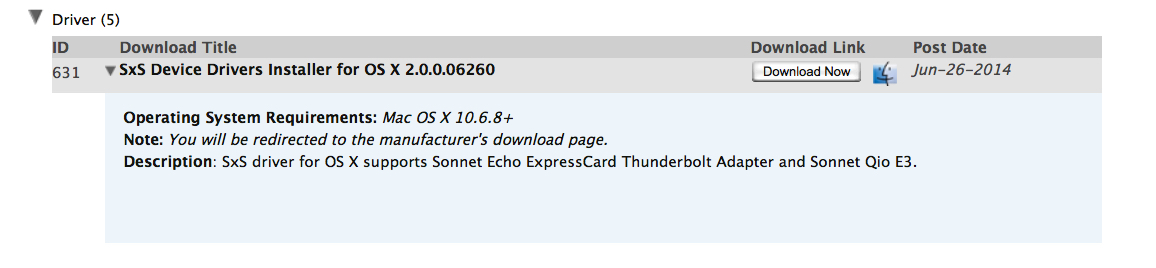
There's also a driver for the Sonnet card reader. Has this been downloaded?
Please Log in to join the conversation.
- Bluebicycle
-
- Offline
- Premium Member
-
Less
More
- Posts: 80
- Thank you received: 5
13 May 2017 15:46 - 13 May 2017 15:48 #88021
by Bluebicycle
Replied by Bluebicycle on topic Sony SxS Driver not working with Mac OS Sierra
I think he has installed both. So just to be clear you need to install this see attached screen grab and the latest Sony UDF driver. Even on Sierra?
Last edit: 13 May 2017 15:48 by Bluebicycle. Reason: Edit
Please Log in to join the conversation.
14 May 2017 07:09 #88032
by Finbo
Replied by Finbo on topic Sony SxS Driver not working with Mac OS Sierra
Yes, that's the one.
On my MacBook Pro, I only need these two drivers and everything works perfectly.
Depending on your friends set up, on older machines, you may also need Sony's XAVC/XDCam plug in for Apple - PDZK-LT2.
This can be downloaded from the same site as its UDF driver.
Is he using the latest FCPX too with Sierra?
On my MacBook Pro, I only need these two drivers and everything works perfectly.
Depending on your friends set up, on older machines, you may also need Sony's XAVC/XDCam plug in for Apple - PDZK-LT2.
This can be downloaded from the same site as its UDF driver.
Is he using the latest FCPX too with Sierra?
Please Log in to join the conversation.
- Bluebicycle
-
- Offline
- Premium Member
-
Less
More
- Posts: 80
- Thank you received: 5
14 May 2017 08:21 #88033
by Bluebicycle
Replied by Bluebicycle on topic Sony SxS Driver not working with Mac OS Sierra
Thanks Finbo. That clears it up. Because he is running Avid on a Dongle and can't get past V7 he is unable to update the Mac OS past 10.10! So as a workaround, I supplied him with a bootable TB drive, with Sierra 10.12.4 and FCPX 10.3.3, but I didn't install any Software for his Sonnet reader.
He has, I think, a 2014 15 " MBPro with 2 TB ports. With that version of FCPX he shouldn't need the Sony XDCam Plugin for FCP.
I'll point him to this thread many thanks again John.
He has, I think, a 2014 15 " MBPro with 2 TB ports. With that version of FCPX he shouldn't need the Sony XDCam Plugin for FCP.
I'll point him to this thread many thanks again John.
Please Log in to join the conversation.
