


- Posts: 197
- Thank you received: 27
3 Post Moderation Rule for New Boarders (25 Jan 2021)
New boarders will have their posts moderated - Don't worry if you cannot see your post immediately.
FCPX Project - Export List of Clips Used?
02 Nov 2016 20:09 #82014
by smg669
FCPX Project - Export List of Clips Used? was created by smg669
Is there a way to export a list of the clips used in an FCPX Project? Perhaps a method to parse and extract that data from an FCPXML file? I know about PrimariesExporter but hoping to find a way to do just the clip names that doesn't require a software purchase.
Please Log in to join the conversation.

02 Nov 2016 21:13 #82022
by Overturf
Replied by Overturf on topic FCPX Project - Export List of Clips Used?
There might be some XML-way, not sure. But if all else fails you could try to just screenshot your media browser and have an OCR work on that. Could work.
Please Log in to join the conversation.
- Carsten Orlt
-

- Offline
- Platinum Member
-

Less
More
- Posts: 422
- Thank you received: 82
02 Nov 2016 21:46 #82025
by Carsten Orlt
Replied by Carsten Orlt on topic FCPX Project - Export List of Clips Used?
It will cost you some money but it's the best money I ever spent and because it's on the App Store updates have been free so far and plentiful:
Producers Best Friend from Intelligent Assistance.
I know it's not what you were looking for but this is the Swiss Army knife for every kind of report on your footage/edits. It's just brilliant.
my 2 cents
Producers Best Friend from Intelligent Assistance.
I know it's not what you were looking for but this is the Swiss Army knife for every kind of report on your footage/edits. It's just brilliant.
my 2 cents
Please Log in to join the conversation.

08 Jun 2023 22:12 #125832
by Slaughter
Replied by Slaughter on topic FCPX Project - Export List of Clips Used?
I'm also wondering about this. Is there a mortgage repayment friendly way of doing so in 2023? This app is hundreds of dollars for an Aussie, thanks to the crummy exchange rate.
I'm a little shocked if there isn't a native way to get this done...
I'm a little shocked if there isn't a native way to get this done...
Please Log in to join the conversation.

08 Jun 2023 22:54 - 08 Jun 2023 23:03 #125833
by VTC
Replied by VTC on topic FCPX Project - Export List of Clips Used?
Other text editors may be able to refine the search (only showing each occurrence by itself & not as a group) but using BBEdit searching for mp4-'all' gives the first result as a list. Verbose but handy in locating where the actual file resided.

Searching for clip name- 'all' gives a less complicated result somewhat eliminating the duplicate use of the same file.
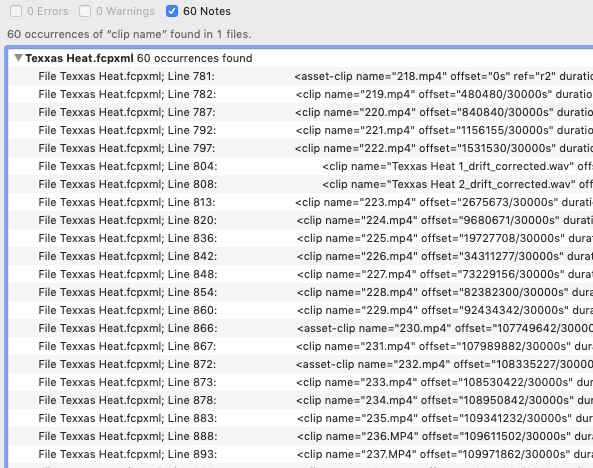
Searching for clip name- 'all' gives a less complicated result somewhat eliminating the duplicate use of the same file.
Last edit: 08 Jun 2023 23:03 by VTC.
Please Log in to join the conversation.
08 Jun 2023 23:19 #125834
by TerryB
Replied by TerryB on topic FCPX Project - Export List of Clips Used?
CommandPost has a timeline index export to csv that might work for you.
commandpost.io
Please Log in to join the conversation.
09 Jun 2023 00:09 #125835
by Slaughter
Replied by Slaughter on topic FCPX Project - Export List of Clips Used?
Thanks. These solutions probably don't do the job, though - which would be not only a dedicated list of clips used but also their individual durations - essential for an EDL. This is the first time I've needed to do this, though, so maybe my thinking is 'pie in the sky'....
Please Log in to join the conversation.


09 Jun 2023 04:48 #125838
by sc_fox
Replied by sc_fox on topic FCPX Project - Export List of Clips Used?
You can try:
fcpxtemplates.com/fcp-clips-used-in-project/
I just created it so I don't really know how useful it is. It doesn't really handle Compound Clips or Synchronized Clips other than to list them *as* a clip.
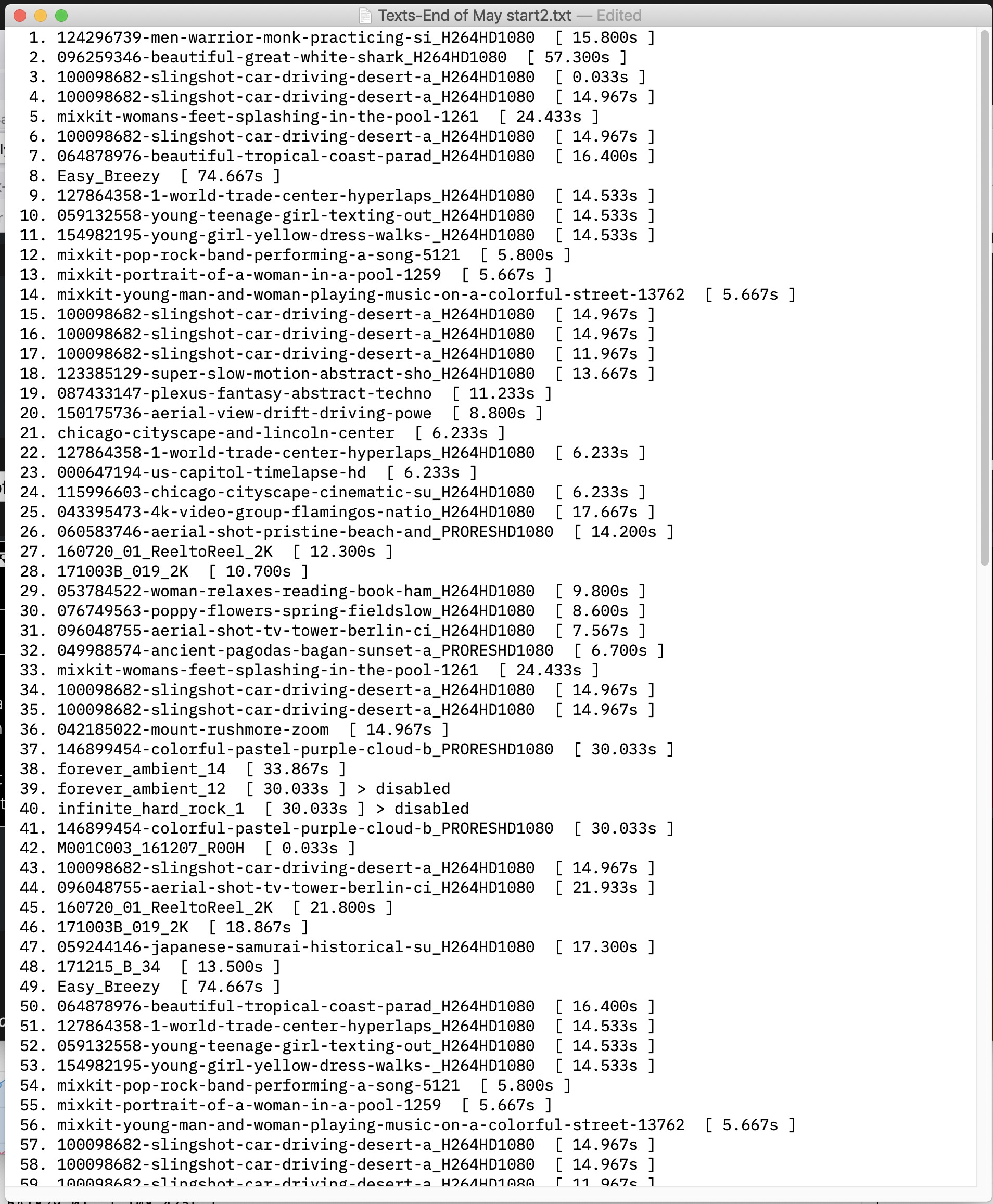
As requested by Slaughter, it displays the clip's duration (in seconds to 3 decimal places) and if the clip is disabled in the storyline, that is indicated as well.
Here's a sample:
I don't have a lot of time to work on it, so if you have any requests, it may take me awhile to get around to them.
HTH
fcpxtemplates.com/fcp-clips-used-in-project/
I just created it so I don't really know how useful it is. It doesn't really handle Compound Clips or Synchronized Clips other than to list them *as* a clip.
As requested by Slaughter, it displays the clip's duration (in seconds to 3 decimal places) and if the clip is disabled in the storyline, that is indicated as well.
Here's a sample:
I don't have a lot of time to work on it, so if you have any requests, it may take me awhile to get around to them.
HTH
Please Log in to join the conversation.
09 Jun 2023 04:48 #125839
by sc_fox
Replied by sc_fox on topic FCPX Project - Export List of Clips Used?
PS - I forgot to mention — it *includes* audio clips!
Please Log in to join the conversation.
09 Jun 2023 06:03 #125841
by Slaughter
Replied by Slaughter on topic FCPX Project - Export List of Clips Used?
Ok! Now this looks promising. Thanks, I will try this out....
Please Log in to join the conversation.
14 Jun 2023 07:48 - 14 Jun 2023 07:53 #125927
by Slaughter
Replied by Slaughter on topic FCPX Project - Export List of Clips Used?
@sc_fox
It appears to be broken. Won't accept uploads.
"Attempt to upload was unsuccessful"
Have tried 4 different browsers (Chrome, Brave, Firefox, Safari), all with the same result.
The XML file is definitely a .fcpxml file.
How were you able to get it to accept uploads?
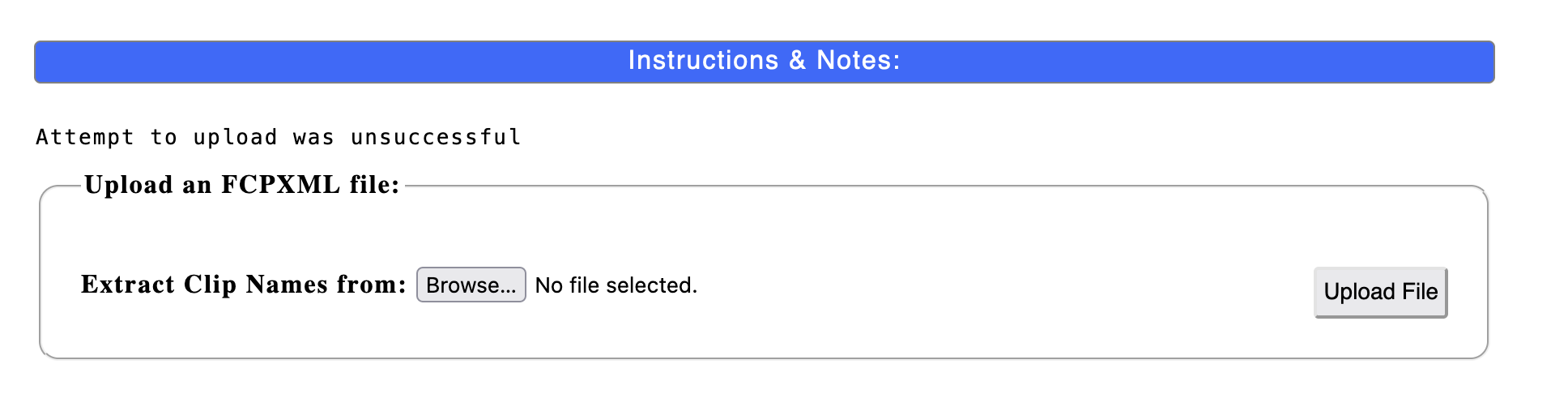
(noting that when this error message appears, my selected file disappears from the browser window, so, no, I didn't forget to hit the "upload" button....)
Ugh. I've tried to upload this 5 times. Every time, I can see a "waiting for..." message at bottom of browser, so *something* is happening, then boom, "Attempt to upload unsuccessful". Sigh.
PS - I forgot to mention — it *includes* audio clips!
It appears to be broken. Won't accept uploads.
"Attempt to upload was unsuccessful"
Have tried 4 different browsers (Chrome, Brave, Firefox, Safari), all with the same result.
The XML file is definitely a .fcpxml file.
How were you able to get it to accept uploads?
(noting that when this error message appears, my selected file disappears from the browser window, so, no, I didn't forget to hit the "upload" button....)
Ugh. I've tried to upload this 5 times. Every time, I can see a "waiting for..." message at bottom of browser, so *something* is happening, then boom, "Attempt to upload unsuccessful". Sigh.
Last edit: 14 Jun 2023 07:53 by Slaughter.
Please Log in to join the conversation.
14 Jun 2023 17:01 #125929
by sc_fox
Replied by sc_fox on topic FCPX Project - Export List of Clips Used?
I, obviously, need to work on the UI for this tool, which is just a web page form. The Instructions & Notes — "blue bar" — is really a giant page-wide button [it really doesn't *look* like a button]. When clicked, the instructions for the form drop down and will be hidden again when the button is "toggled". The page was hand-coded so a lot of the fancy wordpress stuff you see these days was not used.
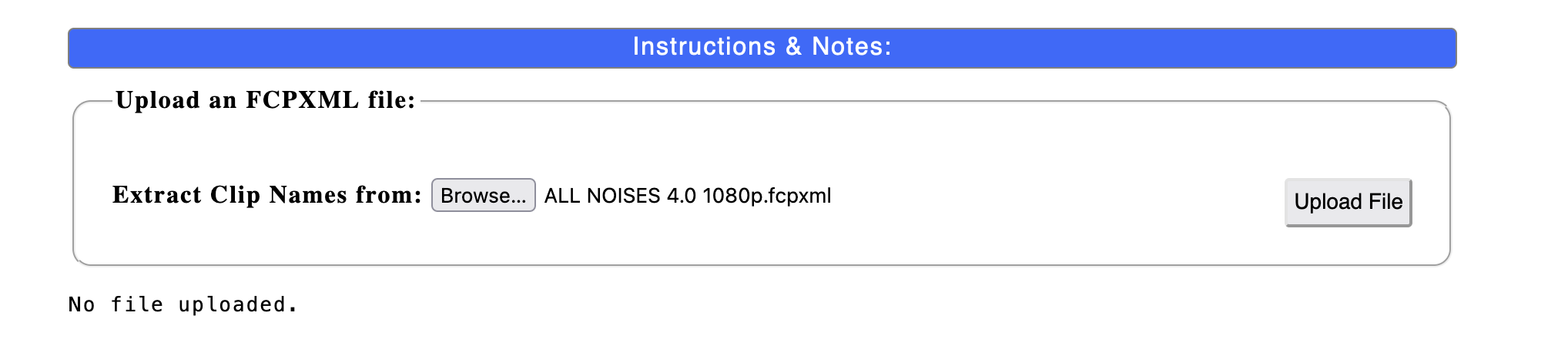
You have to Extract Clip Names From [Browse button] first to find your .fcpxml file. Once you do that you should see the file name next to the Browse button. Selecting the fcpxml file will display its name next to the browse button which will indicate the file is ready for upload. Then click the Upload button (I'm sorry this is a two step function).
Once you click the Upload button, you should see the Clip names in an outlined area beneath the form along with a Download button (IF any clip names were found!)
Note: as soon as you hit the Upload button, the uploaded clip name next to browse goes back to being "No file selected". That is because as soon as your fcpxml file is uploaded, it is "captured" in the web page and the uploaded file is deleted from the server. This is for your privacy and copyright protection. It is nearly instantaneous!
This is what the page should look like after uploading an fcpxml:
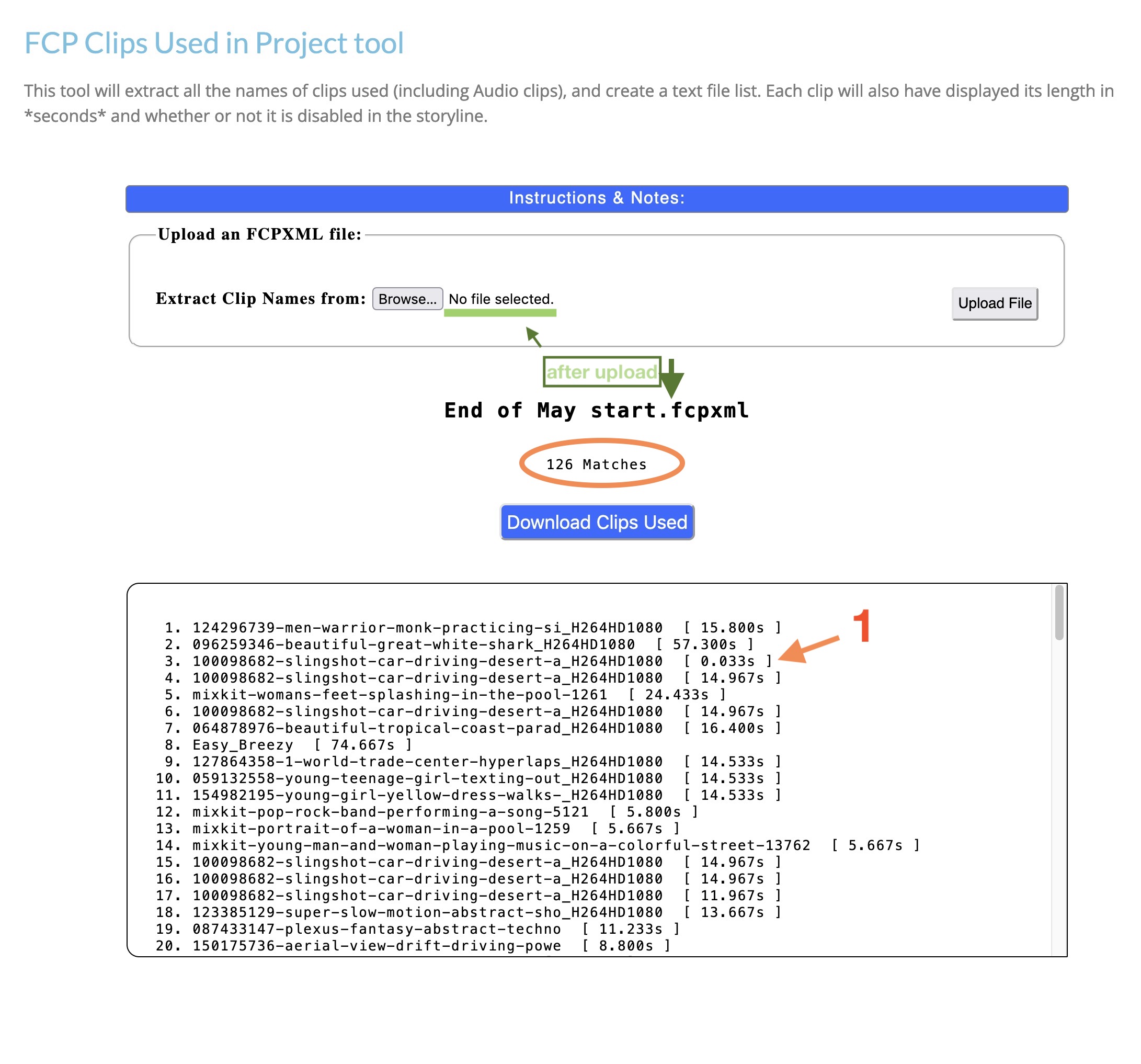
The script will indicate how many clips were found and add a download button (as Text file). The number in the brackets is how long the clip is in the project. Time is in seconds to 3 decimal places (rounded). There can also be an indicator for any clip in the storyline that has been disabled ("> disabled" appended to the end of the line).
I actually *found* a single frame clip (at #1) which I hadn't noticed in the project.
HTH
You have to Extract Clip Names From [Browse button] first to find your .fcpxml file. Once you do that you should see the file name next to the Browse button. Selecting the fcpxml file will display its name next to the browse button which will indicate the file is ready for upload. Then click the Upload button (I'm sorry this is a two step function).
Once you click the Upload button, you should see the Clip names in an outlined area beneath the form along with a Download button (IF any clip names were found!)
Note: as soon as you hit the Upload button, the uploaded clip name next to browse goes back to being "No file selected". That is because as soon as your fcpxml file is uploaded, it is "captured" in the web page and the uploaded file is deleted from the server. This is for your privacy and copyright protection. It is nearly instantaneous!
This is what the page should look like after uploading an fcpxml:
The script will indicate how many clips were found and add a download button (as Text file). The number in the brackets is how long the clip is in the project. Time is in seconds to 3 decimal places (rounded). There can also be an indicator for any clip in the storyline that has been disabled ("> disabled" appended to the end of the line).
I actually *found* a single frame clip (at #1) which I hadn't noticed in the project.
HTH
Please Log in to join the conversation.
14 Jun 2023 23:35 #125937
by Slaughter
Replied by Slaughter on topic FCPX Project - Export List of Clips Used?
@SC_fox
No, the form is broken.
I *did* use the "choose file" button first.
I *did* navigate to my xml file (and again, it *is* a valid xml file which I was able to select).
I *did* end the process by hitting the "upload" button.
The browser, again, tells me "waiting for fcxtemplates.com...." - so it is doing *something*.
The message I get is "Attempt to upload was unsuccessful".
Every. Single. Time.
I have now tried this in *five* browsers. The fifth was on my work PC. So this fails on Safari, Firefox, Brave and Chrome on Mac, and fails on Chrome on PC.
No, the form is broken.
I *did* use the "choose file" button first.
I *did* navigate to my xml file (and again, it *is* a valid xml file which I was able to select).
I *did* end the process by hitting the "upload" button.
The browser, again, tells me "waiting for fcxtemplates.com...." - so it is doing *something*.
The message I get is "Attempt to upload was unsuccessful".
Every. Single. Time.
I have now tried this in *five* browsers. The fifth was on my work PC. So this fails on Safari, Firefox, Brave and Chrome on Mac, and fails on Chrome on PC.
Please Log in to join the conversation.
15 Jun 2023 00:05 #125939
by sc_fox
Replied by sc_fox on topic FCPX Project - Export List of Clips Used?
You keep referring to an XML file. FCP 10.6.6 exports XML as *fcpxmld "bundles" — all previous versions exported an *.fcpxml file. An fcpxmld "file" will not work with this script which requires .fcpxml which you can get out of your XML file by right clicking and XML "bundle" and Show Package Contents (or whatever it's labelled these days) and copy or move the .fcpxml file out of it. Then browse for and upload the fcpxml file. I think it is likely automatically named "Info.fcpxml".
If this doesn't work, I have a couple of other things I can check out.
[*The script might be accepting .fcpxmld "files" because the text probably matches (I'll probably have to do something about that!), but it does not know how to deal with the internal file structure. I'm still running Mojave and the FCP 10.6.6 XML export examples I received appear on my desktop as simple folders through which I can easily navigate even via the script's browse button.]
If this doesn't work, I have a couple of other things I can check out.
[*The script might be accepting .fcpxmld "files" because the text probably matches (I'll probably have to do something about that!), but it does not know how to deal with the internal file structure. I'm still running Mojave and the FCP 10.6.6 XML export examples I received appear on my desktop as simple folders through which I can easily navigate even via the script's browse button.]
Please Log in to join the conversation.
15 Jun 2023 00:37 #125940
by Slaughter
Yes, jah, si, oui,
I have created a .fcpxml file
I am not attempting to upload a bundle
I am aware that with the newer form of XML export a package is created and you have to "show package contents"
to access the actual xml file etc etc etc etc
I have told fcpx to create an older version of an XML export which creates an XML file not a bundle
but in any case I have tried uploading both via package contents (and yes I moved the XML file a separate location first so it can be navigated to)
and again we are talking about an actual .fcpxml file
The upload process will not even accept a bundle anyway
It is literally impossible to select one. It's greyed out.
The only way we could be having this conversation is if I had actual XML files here.... which I do.
Replied by Slaughter on topic FCPX Project - Export List of Clips Used?
You keep referring to an XML file. FCP 10.6.6 exports XML as *fcpxmld "bundles" — all previous versions exported an *.fcpxml file. An fcpxmld "file" will not work with this script which requires .fcpxml which you can get out of your XML file by right clicking and XML "bundle" and Show Package Contents (or whatever it's labelled these days) and copy or move the .fcpxml file out of it. Then browse for and upload the fcpxml file. I think it is likely automatically named "Info.fcpxml".
Yes, jah, si, oui,
I have created a .fcpxml file
I am not attempting to upload a bundle
I am aware that with the newer form of XML export a package is created and you have to "show package contents"
to access the actual xml file etc etc etc etc
I have told fcpx to create an older version of an XML export which creates an XML file not a bundle
but in any case I have tried uploading both via package contents (and yes I moved the XML file a separate location first so it can be navigated to)
and again we are talking about an actual .fcpxml file
The upload process will not even accept a bundle anyway
It is literally impossible to select one. It's greyed out.
The only way we could be having this conversation is if I had actual XML files here.... which I do.
Please Log in to join the conversation.
15 Jun 2023 00:58 #125941
by sc_fox
Replied by sc_fox on topic FCPX Project - Export List of Clips Used?
Please try again! I've changed file permissions — let's see if that helps!
Please Log in to join the conversation.
15 Jun 2023 02:48 #125942
by Slaughter
Replied by Slaughter on topic FCPX Project - Export List of Clips Used?
Still "Attempt to upload was unsuccessful"
I'd need to try again on my home Mac to be 100% sure this is still the form blocking things
As the work PC can have some firewall issues
So now that you've changed permissions, I'll try again at home tonight and report back....
I'd need to try again on my home Mac to be 100% sure this is still the form blocking things
As the work PC can have some firewall issues
So now that you've changed permissions, I'll try again at home tonight and report back....
Please Log in to join the conversation.
15 Jun 2023 03:08 #125943
by sc_fox
Replied by sc_fox on topic FCPX Project - Export List of Clips Used?
Great! Thank you!
Please Log in to join the conversation.
15 Jun 2023 21:45 #125959
by Slaughter
Replied by Slaughter on topic FCPX Project - Export List of Clips Used?
Have checked -
Sorry, the form is still broken. Same problem....
Probably makes sense for me to just email you the XML file, if you don't mind uploading it yourself and then copying and pasting the output clip data for me?
Sorry, the form is still broken. Same problem....
Probably makes sense for me to just email you the XML file, if you don't mind uploading it yourself and then copying and pasting the output clip data for me?
Please Log in to join the conversation.
15 Jun 2023 21:59 #125960
by sc_fox
Replied by sc_fox on topic FCPX Project - Export List of Clips Used?
Yeah okay... I'd like to see if there's a format problem
sightcreations at gmail dot com
sightcreations at gmail dot com
Please Log in to join the conversation.
