


- Posts: 112
- Thank you received: 7
3 Post Moderation Rule for New Boarders (25 Jan 2021)
New boarders will have their posts moderated - Don't worry if you cannot see your post immediately.
creating a dvd from an iMac
01 Nov 2016 23:50 #81886
by Endoh935
creating a dvd from an iMac was created by Endoh935
Heya fellas,
i need to make a dvd. i know i can do it on my macbook pro. but how can i achieve that on the iMac. because i need to add a menu at the front of the dvd/video with clickable links to chapters in the dvd/video.
any help would be appreciated.
p.s i thought i'd ask here first, before i start looking in youtube. : )
i need to make a dvd. i know i can do it on my macbook pro. but how can i achieve that on the iMac. because i need to add a menu at the front of the dvd/video with clickable links to chapters in the dvd/video.
any help would be appreciated.
p.s i thought i'd ask here first, before i start looking in youtube. : )
Please Log in to join the conversation.


02 Nov 2016 02:05 #81893
by dgwvideo
Creating history....one edit at a time !
Replied by dgwvideo on topic creating a dvd from an iMac
The latest Compressor v4.3 is supposed to offer basic menu ability and it will certainly do chapters if you use the "Create Disc" preset. I haven't tested the menu options.
Creating history....one edit at a time !
Please Log in to join the conversation.

02 Nov 2016 04:07 #81916
by JoeEditor
Replied by JoeEditor on topic creating a dvd from an iMac
Compressor now offers the exact same DVD authoring options that have been in FCPX.
Please Log in to join the conversation.
02 Nov 2016 04:47 #81918
by dgwvideo
Creating history....one edit at a time !
Replied by dgwvideo on topic creating a dvd from an iMac
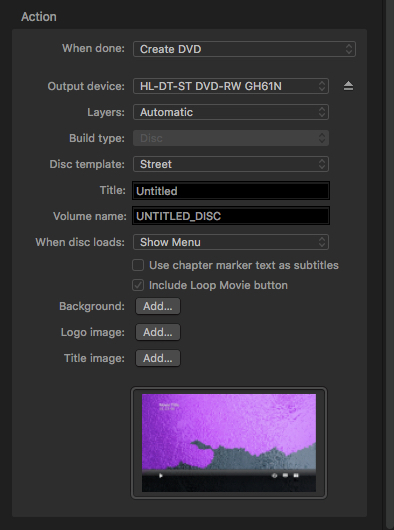
While not much for authoring, the new compressor has a revamped action menu with some new disc templates and the ability to add logos and title images plus an option for a loop movie button.
Creating history....one edit at a time !
Please Log in to join the conversation.
- Karsten Schlüter
-

- Offline
- Moderator
-

Less
More
- Posts: 3790
- Thank you received: 718
02 Nov 2016 07:31 #81922
by Karsten Schlüter
… used stone-old iDVD for my once-in-a-year disk productions, without the fancy blingbling themes, but I read lately, with Sierra iDVD is finally one foot into the grave …
So, it looks like, Compressor is the way to go.-
… not to forget the hundreds of other useful features it has to offer.
Thanks Dan for sharing!
Replied by Karsten Schlüter on topic creating a dvd from an iMac
dgwvideo wrote: … the new compressor has a revamped action menu with some new disc templates and the ability to add logos and title images plus an option for a loop movie button.…
… used stone-old iDVD for my once-in-a-year disk productions, without the fancy blingbling themes, but I read lately, with Sierra iDVD is finally one foot into the grave …
So, it looks like, Compressor is the way to go.-
… not to forget the hundreds of other useful features it has to offer.
Thanks Dan for sharing!
Please Log in to join the conversation.
02 Nov 2016 16:58 #81997
by Endoh935
Replied by Endoh935 on topic creating a dvd from an iMac
Thanks guys,
I did a test run using IDVD (on the macbook pro) - here's my round a bout way of doing it.
On my imac I created 'chapter markers' on the project, then exported as 'export file' to desktop. Then I put the project on a usb stick, transferring it to the macbook pro. I opened up IDVD & created it there using there templates & burned to dvd. It's not custom, but it'll suffice.
p.s I don't have a 'superdrive' to burn discs from the imac.
I did a test run using IDVD (on the macbook pro) - here's my round a bout way of doing it.
On my imac I created 'chapter markers' on the project, then exported as 'export file' to desktop. Then I put the project on a usb stick, transferring it to the macbook pro. I opened up IDVD & created it there using there templates & burned to dvd. It's not custom, but it'll suffice.
p.s I don't have a 'superdrive' to burn discs from the imac.
Please Log in to join the conversation.
