


- Posts: 81
- Thank you received: 5
3 Post Moderation Rule for New Boarders (25 Jan 2021)
New boarders will have their posts moderated - Don't worry if you cannot see your post immediately.
Selecting only one audio role with range tool. HELP!
- Vlastavision
-
 Topic Author
- Offline
- Premium Member
-

Less
More
01 Nov 2016 20:27 - 01 Nov 2016 20:28 #81861
by Vlastavision
Selecting only one audio role with range tool. HELP! was created by Vlastavision
Is there a way to select a particular audio role so that when I play the timeline and press I and O it will not select a range on the video lane but one particular audio lane? It's frustrating me a little bit that it is always selecting the video instead of the connected audio that I want to select. I hope I explained that clearly. Thanks!
I'm asking about 10.3 version.
I'm asking about 10.3 version.
Last edit: 01 Nov 2016 20:28 by Vlastavision.
Please Log in to join the conversation.
- ronny courtens
-

- Offline
- Moderator
-

Less
More
- Posts: 4455
- Thank you received: 962
01 Nov 2016 21:30 #81876
by ronny courtens
Replied by ronny courtens on topic Selecting only one audio role with range tool. HELP!
Hey Vlastimir,
Is this what you mean?
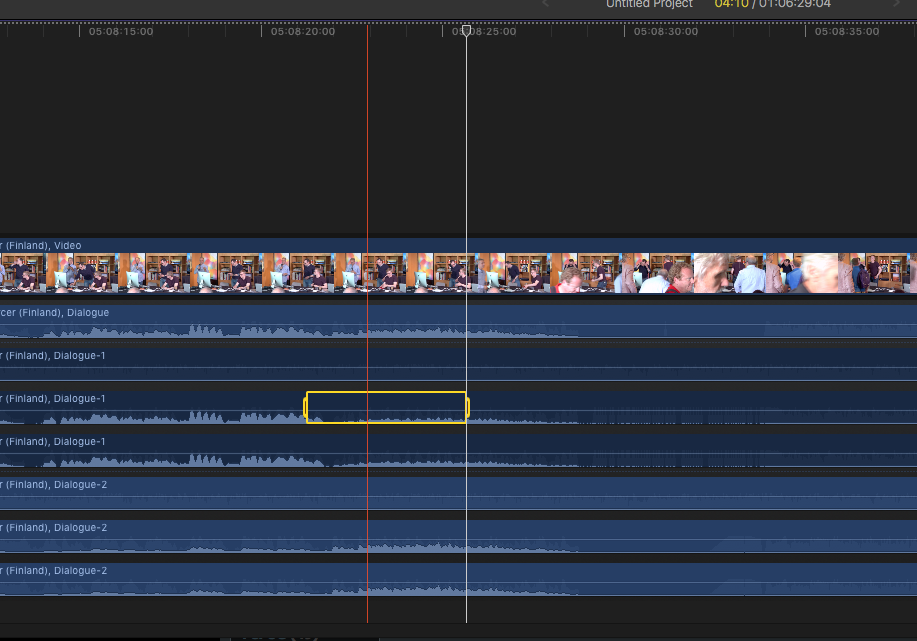
BTW: great to see someone from Serbia here!
- Ronny
Is this what you mean?
BTW: great to see someone from Serbia here!
- Ronny
Please Log in to join the conversation.
- Vlastavision
-
Topic Author
- Offline
- Premium Member
-
Less
More
- Posts: 81
- Thank you received: 5
02 Nov 2016 01:18 #81889
by Vlastavision
Replied by Vlastavision on topic Selecting only one audio role with range tool. HELP!
That's exactly what I mean! Thank you! How do I do that on the keyboard? 
Thanks for the kind words Ronny, you're a true gent! Any FCPX tours in the Balkans? Have you ever worked in this par of Europe?
Thanks for the kind words Ronny, you're a true gent! Any FCPX tours in the Balkans? Have you ever worked in this par of Europe?
Please Log in to join the conversation.

02 Nov 2016 04:03 #81914
by EditorGuy
Replied by EditorGuy on topic Selecting only one audio role with range tool. HELP!
R for the Range tool, click and drag.
Please Log in to join the conversation.
- Vlastavision
-
Topic Author
- Offline
- Premium Member
-
Less
More
- Posts: 81
- Thank you received: 5
02 Nov 2016 22:10 #82026
by Vlastavision
Replied by Vlastavision on topic Selecting only one audio role with range tool. HELP!
Yeah, I know how to use range tool. It's just a bit crude and imprecise to click and drag for some things. I'd like to be able to play the entire timeline but only highlight one audio lane so that I can mark in and out in that lane only while it's playing. Also, they should introduce global range tool, that would select all audio and video from one point to another point.
It's just a bit crude and imprecise to click and drag for some things. I'd like to be able to play the entire timeline but only highlight one audio lane so that I can mark in and out in that lane only while it's playing. Also, they should introduce global range tool, that would select all audio and video from one point to another point. Please Log in to join the conversation.


02 Nov 2016 23:59 #82038
by JoeEditor
Replied by JoeEditor on topic Selecting only one audio role with range tool. HELP!
A range on a clip in the Timeline does actually act as a global range. Export and only the timeline within that range (not just that clip).
How would FCPX know what clip, in a stack of clips, you wanted to highlight?
I guess if you selected a clip, started playback, and could use i and o on it, that would be a neat trick.
Feedback page.
How would FCPX know what clip, in a stack of clips, you wanted to highlight?
I guess if you selected a clip, started playback, and could use i and o on it, that would be a neat trick.
Feedback page.
Please Log in to join the conversation.
