


- Posts: 51
- Thank you received: 1
3 Post Moderation Rule for New Boarders (25 Jan 2021)
New boarders will have their posts moderated - Don't worry if you cannot see your post immediately.
10.3 Strange Export Warning
01 Nov 2016 09:06 #81816
by DFPete
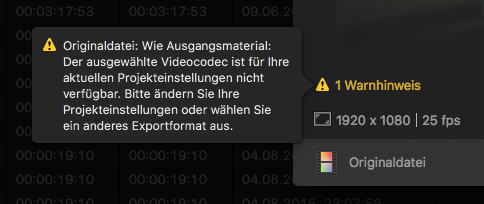
When I want to export a project to an original file (aka ProRes422HQ in my case)
I get this strange warning.
I've got this also when my project was set to 422 or LT, doesn't matter.
I changed my project settings several times but the warning won't disappear.
Sorry for attaching this in german, maybe I could try to translate this:
Original file: Source material:
The selected video codec isn't available in your actual project settings.
Please change your project settings and choose a different export format.
Any ideas?
10.3 Strange Export Warning was created by DFPete
When I want to export a project to an original file (aka ProRes422HQ in my case)
I get this strange warning.
I've got this also when my project was set to 422 or LT, doesn't matter.
I changed my project settings several times but the warning won't disappear.
Sorry for attaching this in german, maybe I could try to translate this:
Original file: Source material:
The selected video codec isn't available in your actual project settings.
Please change your project settings and choose a different export format.
Any ideas?
Please Log in to join the conversation.


01 Nov 2016 09:56 #81822
by JoeEditor
Replied by JoeEditor on topic 10.3 Strange Export Warning
So, on the PLUS side, we now have error messages (in all 3 pro video apps) that are explicit and tell you exactly what the issue is.
So, you have 422 or LT project, and want to export HQ. Well, that makes no sense. HQ in this case eats up drive space that gains you nothing. But to the point, FCPX has a technical, internal issue with this. Did you perhaps speak too harshly to it and hurt its feelings? Just kidding.
Try rebooting the Mac, then trashing preferences.
So, you have 422 or LT project, and want to export HQ. Well, that makes no sense. HQ in this case eats up drive space that gains you nothing. But to the point, FCPX has a technical, internal issue with this. Did you perhaps speak too harshly to it and hurt its feelings? Just kidding.
Try rebooting the Mac, then trashing preferences.
Please Log in to join the conversation.
02 Nov 2016 08:09 #81929
by DFPete
Replied by DFPete on topic 10.3 Strange Export Warning
No, my project settings are always the same like these I want to export to. Now I have a HQ timeline and want to export to HQ (source). I get the same warning.
Trashed the preferences, rebooted - did not made the trick! Must be a bug. Submit feedback, hope to be fixed.
Trashed the preferences, rebooted - did not made the trick! Must be a bug. Submit feedback, hope to be fixed.
Please Log in to join the conversation.
02 Nov 2016 10:36 #81940
by JoeEditor
Replied by JoeEditor on topic 10.3 Strange Export Warning
Did you install the latest version of Pro Video Support and Camera Support?
Please Log in to join the conversation.
