


- Posts: 33
- Thank you received: 1
3 Post Moderation Rule for New Boarders (25 Jan 2021)
New boarders will have their posts moderated - Don't worry if you cannot see your post immediately.
How to edit audio time units in FCPX?
31 Oct 2016 13:29 #81704
by FCPman
How to edit audio time units in FCPX? was created by FCPman
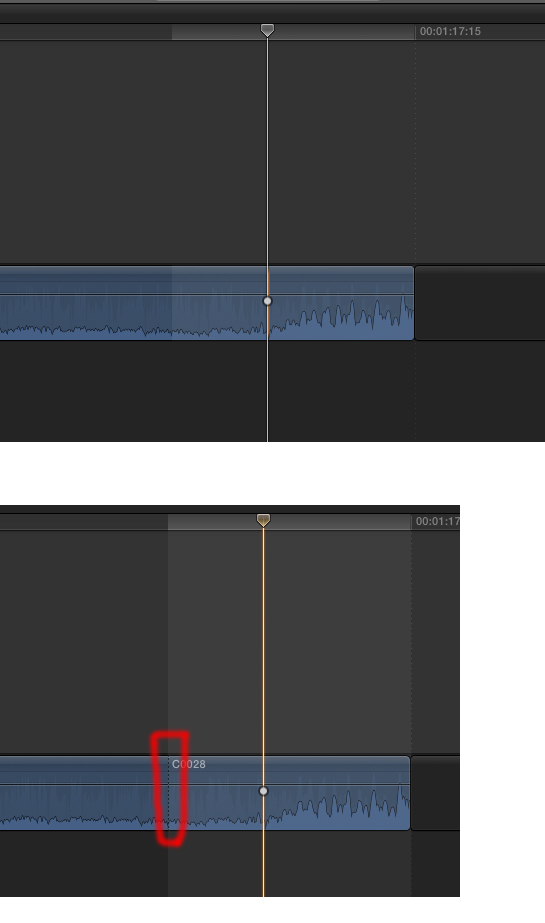
I want to add a VERY precise edit. Going from one frame to the next won't do the trick here. Here is what I want to do (done in Premiere):
It's not possible in FCPX and I am just out of luck. Right? Looking forward to "Not possible. Period."
It's not possible in FCPX and I am just out of luck. Right? Looking forward to "Not possible. Period."
Please Log in to join the conversation.
31 Oct 2016 13:30 #81705
by FCPman
Replied by FCPman on topic How to edit audio time units in FCPX?
It appears that posting youtube videos with time codes gets ignored by this forum so the exact time code is 5m30s. Thank you very much in advance.
Please Log in to join the conversation.
- Tom Wolsky
-

- Offline
- Moderator
-

31 Oct 2016 13:38 #81707
by Tom Wolsky
Replied by Tom Wolsky on topic How to edit audio time units in FCPX?
Edit audio down to 1/80th of a frame. Not sample level.
Please Log in to join the conversation.
31 Oct 2016 13:40 #81708
by FCPman
Replied by FCPman on topic How to edit audio time units in FCPX?
Thank you very much for the reply. Now I have to admit that I have no clue at all how to do this. Could you kindly tell me the exact steps required / what I have to do. Thanks in advance.
Please Log in to join the conversation.
- Tom Wolsky
-
- Offline
- Moderator
-
31 Oct 2016 13:44 #81709
by Tom Wolsky
Replied by Tom Wolsky on topic How to edit audio time units in FCPX?
Zoom into the time line as far as you can go. You'll see an area that indicates one frame. You can use keyfranes within that area.
Please Log in to join the conversation.
31 Oct 2016 13:47 #81710
by FCPman
Replied by FCPman on topic How to edit audio time units in FCPX?
That's already exactly what I did and like I said it 1) won't do the trick 2) I am missing out on something.
I want to edit a dialogue as shown on the screenshot. I want to cut it where my playhead and skimmer are because this is where a NEW word starts- I don't want that word. So how do I get rid of it? Thanks
I want to edit a dialogue as shown on the screenshot. I want to cut it where my playhead and skimmer are because this is where a NEW word starts- I don't want that word. So how do I get rid of it? Thanks
Please Log in to join the conversation.

31 Oct 2016 13:59 #81712
by EditorGuy
Replied by EditorGuy on topic How to edit audio time units in FCPX?
Your editing humanly imperceptible detail. But, here's how it's done.
www.fcp.co/final-cut-pro/tutorials/1191-...thin-final-cut-pro-x
www.fcp.co/final-cut-pro/tutorials/1191-...thin-final-cut-pro-x
Please Log in to join the conversation.
- Tom Wolsky
-
- Offline
- Moderator
-
31 Oct 2016 15:30 #81730
by Tom Wolsky
Replied by Tom Wolsky on topic How to edit audio time units in FCPX?
You can only cut video on frames. You can reduce the audio to nothing to remove the sound. You can detach the audio and then cut it at the subframe level. Of course if you pull up the audio you're pulling it out of sync.
Please Log in to join the conversation.
