


- Posts: 5
- Thank you received: 0
3 Post Moderation Rule for New Boarders (25 Jan 2021)
New boarders will have their posts moderated - Don't worry if you cannot see your post immediately.
I'm getting white boxes with black dots in my video? (Pics Inside)
30 Oct 2016 20:07 - 31 Oct 2016 02:15 #81659
by BabyMale
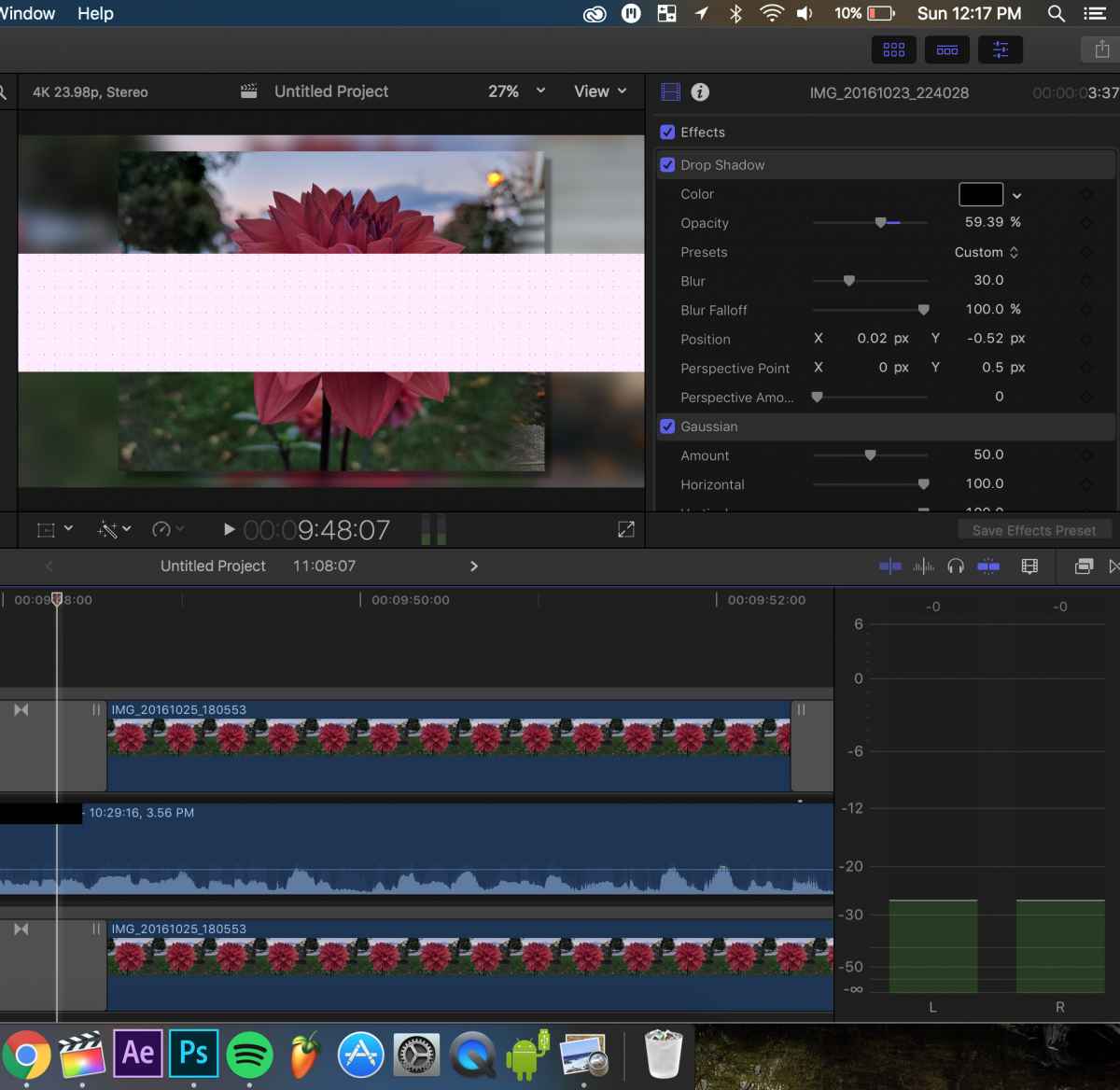
Ever since I switched to Sierra, I've noticed this problem (Before & also after the recent Final Cut Pro X Redesign it appeared)
I'm filming in 4k 24fps from my Panasonic Lumix Gh4.
It happens so often to me, using all different types of plugins or none at all that I can't believe I can't find anything else on this internet about it.
Randomly, white boxes with black dots will appear inside my preview windows (only after being background rendered) and this will also be seen in my final exported render.
They only appear for 1 frame in different areas of the video. Sometimes, they're small, somethings big, sometimes squares - long rectangles etc...
I've noticed this usually happens around something that seems more graphics intensive like a 3rd party effects (I've tried with different plugins from different companies), or a built-in transition or something like that. When I remove the effect (even sometimes just taking off the built in color correction effect works)
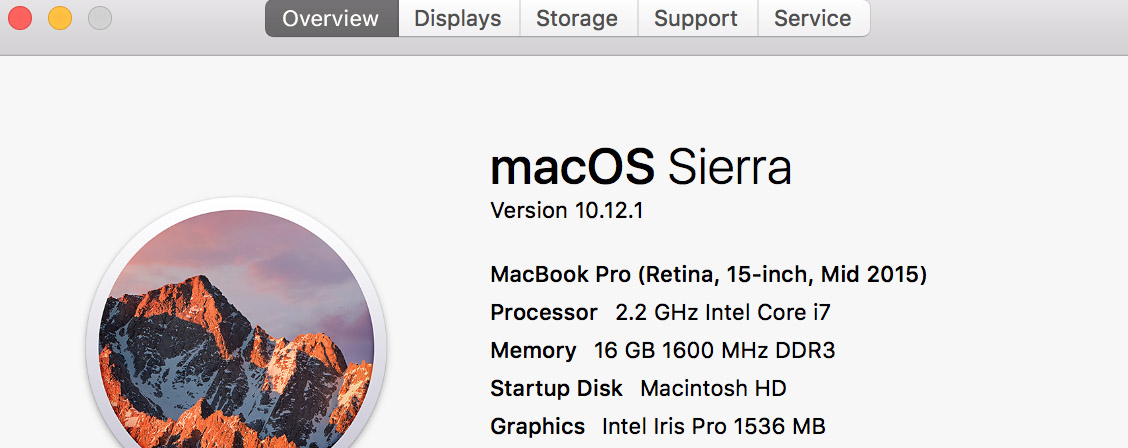
Since this only appears to happen in areas where I have a lot of effects or transitions or plugins, it makes me wonder - is my computer too slow to handle this? (Specs picture attached) Maybe it's because I'm pulling my clips from an External USB 3.0 Harddrive?
I'm filming in 4k 24fps from my Panasonic Lumix Gh4.
It happens so often to me, using all different types of plugins or none at all that I can't believe I can't find anything else on this internet about it.
Randomly, white boxes with black dots will appear inside my preview windows (only after being background rendered) and this will also be seen in my final exported render.
They only appear for 1 frame in different areas of the video. Sometimes, they're small, somethings big, sometimes squares - long rectangles etc...
I've noticed this usually happens around something that seems more graphics intensive like a 3rd party effects (I've tried with different plugins from different companies), or a built-in transition or something like that. When I remove the effect (even sometimes just taking off the built in color correction effect works)
Since this only appears to happen in areas where I have a lot of effects or transitions or plugins, it makes me wonder - is my computer too slow to handle this? (Specs picture attached) Maybe it's because I'm pulling my clips from an External USB 3.0 Harddrive?
Last edit: 31 Oct 2016 02:15 by BabyMale.
Please Log in to join the conversation.


31 Oct 2016 00:45 #81663
by dgwvideo
Creating history....one edit at a time !
Replied by dgwvideo on topic I'm getting white boxes with black dots in my video? (Pics Inside)
This could possibly be a graphics card issue. What are your computer specs?
Creating history....one edit at a time !
Please Log in to join the conversation.
31 Oct 2016 02:11 - 31 Oct 2016 02:16 #81666
by BabyMale
Replied by BabyMale on topic I'm getting white boxes with black dots in my video? (Pics Inside)
It's a 15" Retina with i7 and no graphics card. Pic attached. I was thinking it could be a graphics problem...
4k videos with color correction + transitions usually trigger this I guess when I add one too many effects...
4k videos with color correction + transitions usually trigger this I guess when I add one too many effects...
Last edit: 31 Oct 2016 02:16 by BabyMale.
Please Log in to join the conversation.
31 Oct 2016 04:01 #81669
by dgwvideo
Creating history....one edit at a time !
Replied by dgwvideo on topic I'm getting white boxes with black dots in my video? (Pics Inside)
Well you do have a graphics card built in. It is the Intel Iris as shown in your pic. Try optimizing your 4K media to Prores when importing if you aren't already. 4K content can be fairly demanding on computer resources, especially when layering multiple clips, and optimizing will make your editing a bit easier on the system. This is also recommended by Apple for GH4 footage in 2K or 4K frame sizes. If you still see the random blocks with optimized footage, try a fresh single clip optimized with no transition or effect. Do the blocks appear if you render the clip? Have you tried switching the viewer to "better performance" and have you tried working with proxy media? Add an effect and color grade step by step to see if you can narrow it down to a particular process. There could still be an issue with the onboard graphics card, but a particular effect may also be causing this. Perhaps someone with a similar MacBook can comment on the performance of that particular i7 system.
Creating history....one edit at a time !
Please Log in to join the conversation.
31 Oct 2016 04:27 - 31 Oct 2016 04:28 #81670
by BabyMale
Ok thanks for your help, I'll try all of that but will any of this be able to fix it even if the final exported render shows the white boxes as well?
I'll try tomorrow though. And it's not a particular plugin, because it happens in random places, in different projects where different plugins and effects are used.
I'll keep this thread updated. If I still haven't responded after this, I haven't tested these new methods yet.
Replied by BabyMale on topic I'm getting white boxes with black dots in my video? (Pics Inside)
dgwvideo wrote: Well you do have a graphics card built in. It is the Intel Iris as shown in your pic. Try optimizing your 4K media to Prores when importing if you aren't already. 4K content can be fairly demanding on computer resources, especially when layering multiple clips, and optimizing will make your editing a bit easier on the system. This is also recommended by Apple for GH4 footage in 2K or 4K frame sizes. If you still see the random blocks with optimized footage, try a fresh single clip optimized with no transition or effect. Do the blocks appear if you render the clip? Have you tried switching the viewer to "better performance" and have you tried working with proxy media? Add an effect and color grade step by step to see if you can narrow it down to a particular process. There could still be an issue with the onboard graphics card, but a particular effect may also be causing this. Perhaps someone with a similar MacBook can comment on the performance of that particular i7 system.
Ok thanks for your help, I'll try all of that but will any of this be able to fix it even if the final exported render shows the white boxes as well?
I'll try tomorrow though. And it's not a particular plugin, because it happens in random places, in different projects where different plugins and effects are used.
I'll keep this thread updated. If I still haven't responded after this, I haven't tested these new methods yet.
Last edit: 31 Oct 2016 04:28 by BabyMale.
Please Log in to join the conversation.
31 Oct 2016 05:12 #81671
by dgwvideo
Hard to say but it's worth trying with optimized media. Since you mention the issue presents itself especially as you add transitions and effects, you may be reaching a point as you edit where your system is running out of resources.
Creating history....one edit at a time !
Replied by dgwvideo on topic I'm getting white boxes with black dots in my video? (Pics Inside)
BabyMale wrote: Ok thanks for your help, I'll try all of that but will any of this be able to fix it even if the final exported render shows the white boxes as well?
Hard to say but it's worth trying with optimized media. Since you mention the issue presents itself especially as you add transitions and effects, you may be reaching a point as you edit where your system is running out of resources.
Creating history....one edit at a time !
Please Log in to join the conversation.
