


- Posts: 28
- Thank you received: 0
3 Post Moderation Rule for New Boarders (25 Jan 2021)
New boarders will have their posts moderated - Don't worry if you cannot see your post immediately.
Sorry, need some help again. Working with same event on multiple computers?
30 Oct 2016 16:37 #81651
by saba01
We changed over to 4 K lately. I have ordered one of these new MBP 15 maxed out with 2TB SSD. Since in the studio we have a setup with Thunderbolt 2 and a 48 TB Raid0 storage, and still working with at least 9 4K streams in multi cam, seems to be a bit sluggish, I thought it would be a nice idea to use the Thunderbold only when really needed and cut with everything on the internal 2 TB SSD. The question is do you think it makes sense and how to duplicate the Event (not the project). How would you do that?
Thanks!
Thanks!
Please Log in to join the conversation.

31 Oct 2016 10:27 #81683
by EditorGuy
Replied by EditorGuy on topic Sorry, need some help again. Working with same event on multiple computers?
First, if your Library and media are on the RAID, you don't need to worry about anything else.
To duplicate an Event, two ways to do that. First is create a new Lirary, coy the Event to it. Best if media is Managed. Second is easy if media is External; Create new Library, export Evant as XML. import that into the new Library.
Again, if everything is on the RAID, you shouldnt need to do anything.
Why is such a large RAID not a level 5 or 6?
To duplicate an Event, two ways to do that. First is create a new Lirary, coy the Event to it. Best if media is Managed. Second is easy if media is External; Create new Library, export Evant as XML. import that into the new Library.
Again, if everything is on the RAID, you shouldnt need to do anything.
Why is such a large RAID not a level 5 or 6?
Please Log in to join the conversation.
31 Oct 2016 10:39 #81684
by saba01
Replied by saba01 on topic Sorry, need some help again. Working with same event on multiple computers?
Thanks for the answer.
We choose to use Raid 0 because speed is in our case the most important (for security there is another Raid0 Thunderbold drive with 30TB) when you have always at least 9 camera angles, sometimes 16....
A question about the XML method: When finished would you sync the both events the same way? Only that you export the event from internal to external?
We choose to use Raid 0 because speed is in our case the most important (for security there is another Raid0 Thunderbold drive with 30TB) when you have always at least 9 camera angles, sometimes 16....
A question about the XML method: When finished would you sync the both events the same way? Only that you export the event from internal to external?
Please Log in to join the conversation.
31 Oct 2016 11:55 #81694
by EditorGuy
Replied by EditorGuy on topic Sorry, need some help again. Working with same event on multiple computers?
If the Events are identical, I'd just exchange the Project as an XML.
Please Log in to join the conversation.
02 Nov 2016 04:22 #81917
by saba01
Replied by saba01 on topic Sorry, need some help again. Working with same event on multiple computers?
I have tried the XML export/import. Seems to work fine. But I ran into one problem - I guess I am missing something- when I work in the parent event with multicam I see in the timeline with every cut the active camera name ( it is standing in the upper left corner of each clip in the timeline). When I work with the transferred clip there is not the camera/angle name standing, just the multi clip name (so every cut is named the same). I can not find any way to change that.
Any idea??
Any idea??
Please Log in to join the conversation.


02 Nov 2016 11:03 #81943
by JoeEditor
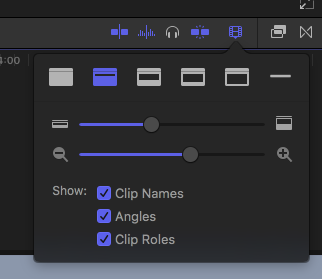
Replied by JoeEditor on topic Sorry, need some help again. Working with same event on multiple computers?
Please Log in to join the conversation.
