


3 Post Moderation Rule for New Boarders (25 Jan 2021)
New boarders will have their posts moderated - Don't worry if you cannot see your post immediately.
What's this indicator mean?
- Tom Wolsky
-
 Topic Author
- Offline
- Moderator
-

Less
More
28 Oct 2016 15:33 #81523
by Tom Wolsky
What's this indicator mean? was created by Tom Wolsky
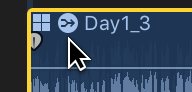
Have not seen this before, but I see it in 10.3. It's on a multicam clip in the Timeline.
Thanks.
Thanks.
Please Log in to join the conversation.
- Carsten Orlt
-

- Offline
- Platinum Member
-

Less
More
- Posts: 422
- Thank you received: 82
28 Oct 2016 16:30 #81530
by Carsten Orlt
Replied by Carsten Orlt on topic What's this indicator mean?
I think it indicates that an audio effect has been applied to the clip.
Happy editing Carsten
Happy editing Carsten
Please Log in to join the conversation.
- Tom Wolsky
-
Topic Author
- Offline
- Moderator
-
28 Oct 2016 16:47 #81534
by Tom Wolsky
Replied by Tom Wolsky on topic What's this indicator mean?
Really? That's a weirdly odd looking badge to indicate that, but thanks. I'll have to dig it out again and see.
Please Log in to join the conversation.
- ronny courtens
-

- Offline
- Moderator
-
Less
More
- Posts: 4455
- Thank you received: 962
28 Oct 2016 17:21 - 28 Oct 2016 17:24 #81535
by ronny courtens
Replied by ronny courtens on topic What's this indicator mean?
Hey Tom,
This badge is an audio mixdown indicator. It appears when you apply an audio effect to a clip, and this audio effect ripples through to every audio component inside that clip. Let me explain.
1. When you apply an audio effect to a clip, you either can apply the effect to the entire clip or you can expand its audio components and only apply the effect to one of the components.
This is a clip on the timeline with expanded components:
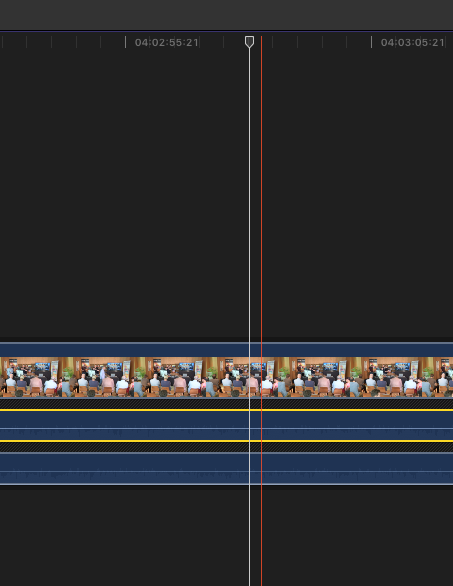
When I apply an audio effect to only one of the components, this component gets an "Fx" badge in the inspector:
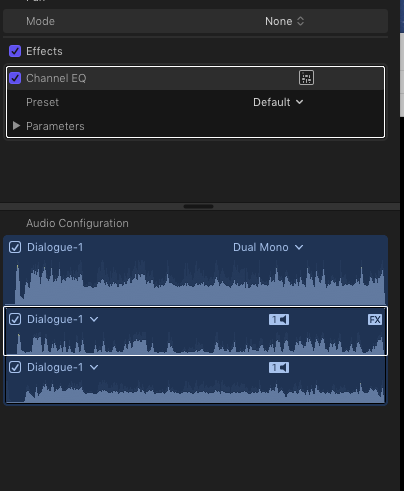
When I apply the audio effect to the entire clip, it will affect all the audio components of that clip, which actually is a mixdown, and the clip will get the audio mix down badge:
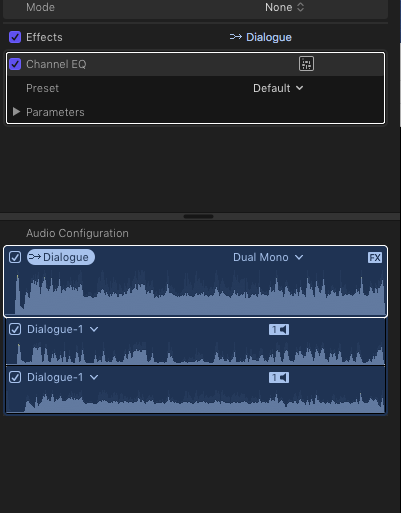
2. As you cannot expand the audio components of a clip in the multicam angle viewer, this works a little differently.
When you apply an audio effect to a clip (angle) in the angle editor, you get a message asking if you want to apply the effect to all the audio components of that angle, or only to one of the components:
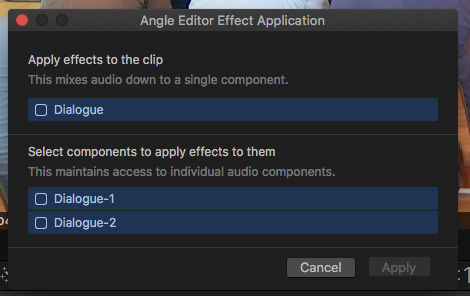
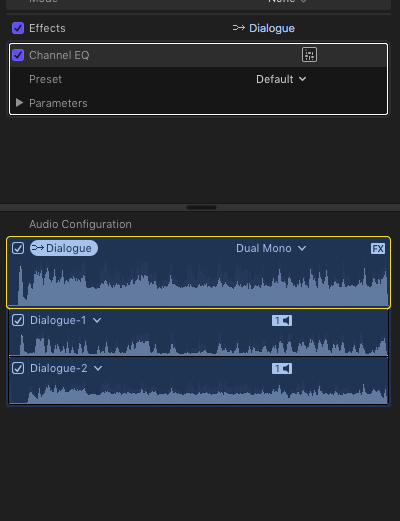
If you choose to apply the effect to the entire clip, the components will get mixed down and the mix down badge will appear on the angle in the inspector:
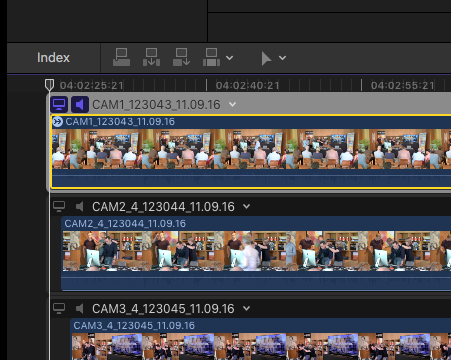
And it will also appear on the angle in the angle editor (as in your screenshot):
- Ronny
This badge is an audio mixdown indicator. It appears when you apply an audio effect to a clip, and this audio effect ripples through to every audio component inside that clip. Let me explain.
1. When you apply an audio effect to a clip, you either can apply the effect to the entire clip or you can expand its audio components and only apply the effect to one of the components.
This is a clip on the timeline with expanded components:
When I apply an audio effect to only one of the components, this component gets an "Fx" badge in the inspector:
When I apply the audio effect to the entire clip, it will affect all the audio components of that clip, which actually is a mixdown, and the clip will get the audio mix down badge:
2. As you cannot expand the audio components of a clip in the multicam angle viewer, this works a little differently.
When you apply an audio effect to a clip (angle) in the angle editor, you get a message asking if you want to apply the effect to all the audio components of that angle, or only to one of the components:
If you choose to apply the effect to the entire clip, the components will get mixed down and the mix down badge will appear on the angle in the inspector:
And it will also appear on the angle in the angle editor (as in your screenshot):
- Ronny
Last edit: 28 Oct 2016 17:24 by ronny courtens.
Please Log in to join the conversation.
- Tom Wolsky
-
Topic Author
- Offline
- Moderator
-
28 Oct 2016 17:25 #81536
by Tom Wolsky
Replied by Tom Wolsky on topic What's this indicator mean?
Thanks very much Ronny.
Please Log in to join the conversation.
