


- Posts: 18
- Thank you received: 0
3 Post Moderation Rule for New Boarders (25 Jan 2021)
New boarders will have their posts moderated - Don't worry if you cannot see your post immediately.
No Video Lanes?
28 Oct 2016 13:21 #81506
by steve.d
No Video Lanes? was created by steve.d
Any particular reason why they didn't include the lane functionality for video as well?
I know I would use a video lane functionality.
My hopes are they will add it in a future update.
Thoughts?
I know I would use a video lane functionality.
My hopes are they will add it in a future update.
Thoughts?
Please Log in to join the conversation.
- Tom Wolsky
-

- Offline
- Moderator
-

28 Oct 2016 13:30 #81507
by Tom Wolsky
Replied by Tom Wolsky on topic No Video Lanes?
You should use feedback. Could you explain what you mean by video lane functionality.
Audio lanes can rearrange themselves based on role assignments. For audio it doesn't matter of course which lanes are on top and which on the bottom. For video it matters hugely. Do you want a mechanism to automatically rearrange video lanes, or to manually restack video lanes? Not sure this is a good thing for a project where you might not know what's happening to a lane somewhere past the one hour mark.
Audio lanes can rearrange themselves based on role assignments. For audio it doesn't matter of course which lanes are on top and which on the bottom. For video it matters hugely. Do you want a mechanism to automatically rearrange video lanes, or to manually restack video lanes? Not sure this is a good thing for a project where you might not know what's happening to a lane somewhere past the one hour mark.
Please Log in to join the conversation.
- Karsten Schlüter
-

- Offline
- Moderator
-
Less
More
- Posts: 3790
- Thank you received: 718
28 Oct 2016 13:42 #81510
by Karsten Schlüter
Replied by Karsten Schlüter on topic No Video Lanes?
When I saw roles in lanes for the first time, I knew, we have a new boilerplate answer:
"Lanes are no tracks
"
Please Log in to join the conversation.


28 Oct 2016 13:44 #81513
by smg669
Replied by smg669 on topic No Video Lanes?
Tom is right. Think it through. The vertical layering of video elements on a timeline has a direct impact on their compositing order. You can rearrange audio layers until the cows come home because there is no visual component.
Video roles already adjust the colours of clips. The only thing that might be useful is to carry over the "Focus on.." functionality of audio roles - to shrink down certain video roles so they take up less vertical space. But without the benefit of lanes, this would be a visual (and a programming) mess.
Video roles already adjust the colours of clips. The only thing that might be useful is to carry over the "Focus on.." functionality of audio roles - to shrink down certain video roles so they take up less vertical space. But without the benefit of lanes, this would be a visual (and a programming) mess.
Please Log in to join the conversation.
28 Oct 2016 14:08 #81515
by steve.d
Replied by steve.d on topic No Video Lanes?
It makes sense for those reasons why they wouldn't make video lanes.
But I was thinking having lanes to organize visually, perhaps separate B Roll, titles, main storyline etc. would make sense to help organize the lanes like that. Without the ability to move them up and down. It seems like they removed the ability to shrink video roles entirely.
Previously, you could shrink roles individually, but as far as I can tell you can no longer do that for Video roles. For example, in one project I had B-Roll, Titles, Photos and Interview. Occasionally I would shrink B-Roll and Photos to help with visual clarity, but I dont think you can do that anymore.
But I was thinking having lanes to organize visually, perhaps separate B Roll, titles, main storyline etc. would make sense to help organize the lanes like that. Without the ability to move them up and down. It seems like they removed the ability to shrink video roles entirely.
Previously, you could shrink roles individually, but as far as I can tell you can no longer do that for Video roles. For example, in one project I had B-Roll, Titles, Photos and Interview. Occasionally I would shrink B-Roll and Photos to help with visual clarity, but I dont think you can do that anymore.
Please Log in to join the conversation.

29 Oct 2016 06:08 - 29 Oct 2016 06:09 #81571
by EditorGuy
Replied by EditorGuy on topic No Video Lanes?
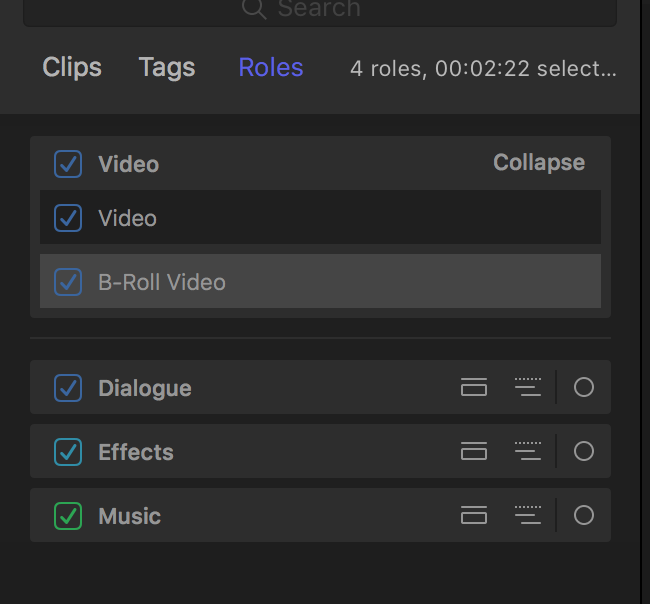
You can expand a video Roll in the Timeline Index to its subroles, select it an all of that role or subrole will highlight. Just like before. Here I have a Roll called Video, with a subrole Video and subrole B-Roll Video.
Last edit: 29 Oct 2016 06:09 by EditorGuy.
Please Log in to join the conversation.


30 Oct 2016 01:05 #81624
by Emmanuel
Replied by Emmanuel on topic No Video Lanes?
I haven't upgraded yet but for some projects I want to separate video clips as you mentioned and I just use a disabled long adjustment layers to organize them visually.
Please Log in to join the conversation.
30 Oct 2016 13:20 #81646
by EditorGuy
Replied by EditorGuy on topic No Video Lanes?
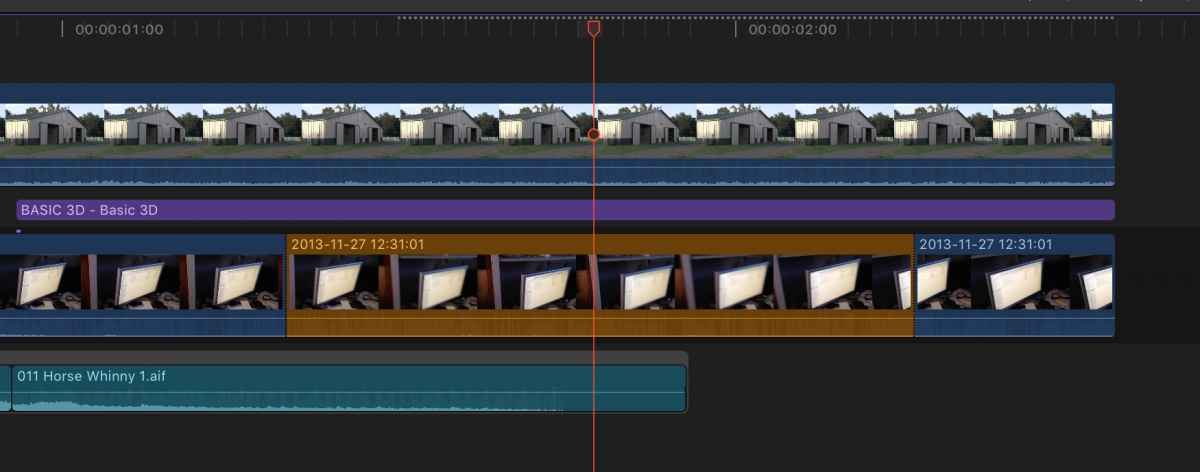
You do know that Role Colors applies to Video Roles, just like Audio Roles, right? But there's a catch. It only really works if it is a video only clip. If there is audio content, the audio role determines the color of the clip. But that gives you colored video clips, which visually works for me.
Please Log in to join the conversation.

31 Oct 2016 15:41 #81736
by rgpearson
Replied by rgpearson on topic No Video Lanes?
I'd like to see video lanes for visual organization, or at least the "Focus on" feature.
A patching option like "Send to lane" would be nice for adding b-roll clips below a title but above primary, for example. Obviously this is very track-like, but much more flexible in my opinion.
A patching option like "Send to lane" would be nice for adding b-roll clips below a title but above primary, for example. Obviously this is very track-like, but much more flexible in my opinion.
Please Log in to join the conversation.
