


- Posts: 119
- Thank you received: 0
3 Post Moderation Rule for New Boarders (25 Jan 2021)
New boarders will have their posts moderated - Don't worry if you cannot see your post immediately.
Star Filter Plug-in (PRO STAR lags too much)
28 Oct 2016 07:44 #81473
by mgmartino
Star Filter Plug-in (PRO STAR lags too much) was created by mgmartino
Do you happen to know of any plug-ins that do the effect that a "star filter" does to a camera lens?
I got this one called PRO STAR from PixelStudios.com store.pixelfilmstudios.com/product/prostar/
I love the result but every time I use it on my computer it lags like crazy. SO I think I need to look for a different solution considering my computer is pretty powerful
2015 27inch 5K imac
4.GHz Quad-Core intel Core i7
32 GB RAM
AM Raden R9
and all my libraries are kept on a Samsung t3 500GB SSD
My question is do you know of any plug-ins that can do what PRO STAR does but that are developed better to not use up so much CPU
I got this one called PRO STAR from PixelStudios.com store.pixelfilmstudios.com/product/prostar/
I love the result but every time I use it on my computer it lags like crazy. SO I think I need to look for a different solution considering my computer is pretty powerful
2015 27inch 5K imac
4.GHz Quad-Core intel Core i7
32 GB RAM
AM Raden R9
and all my libraries are kept on a Samsung t3 500GB SSD
My question is do you know of any plug-ins that can do what PRO STAR does but that are developed better to not use up so much CPU
Please Log in to join the conversation.
28 Oct 2016 07:53 #81474
by mgmartino
Replied by mgmartino on topic Star Filter Plug-in (PRO STAR lags too much)
this is the effect i want to achieve but not have it take 10 mins to render a 7 second clip
Attachments:
Please Log in to join the conversation.
- Karsten Schlüter
-

- Offline
- Moderator
-

Less
More
- Posts: 3790
- Thank you received: 718
28 Oct 2016 10:11 - 28 Oct 2016 10:14 #81486
by Karsten Schlüter
Do you own Motion?
The GLINT FILTER does, imho, exactly what you're looking for:
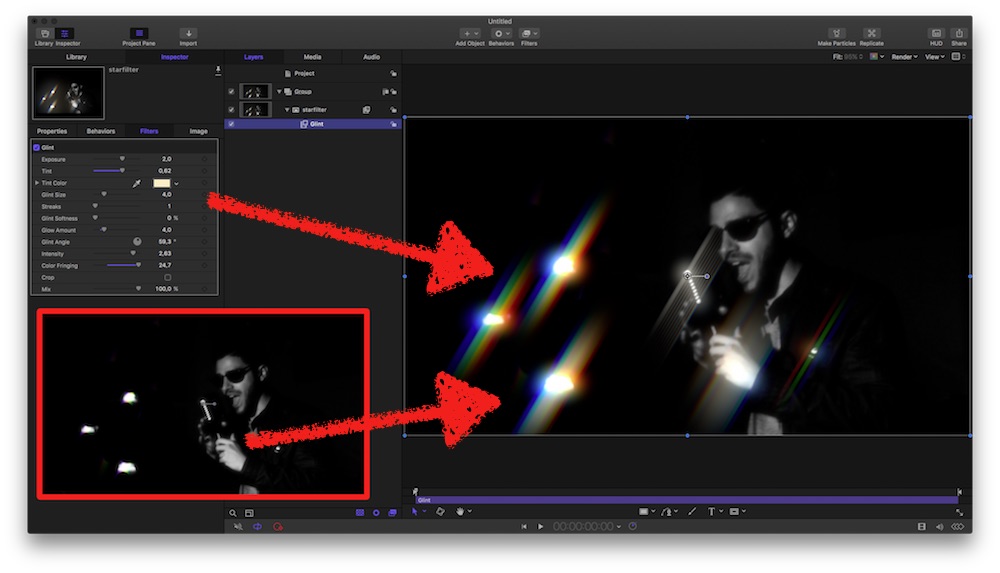
I erased the flares from your pic in Pixelmator and with some settings in the Inspector of Glint, you get this....
Tell me, if you don't own Motion 5, I can made the filter a plugin - done in seconds.
And: Glint works in real-time, even on my MacMini....
==edit==
makes fun to play with the many settings of Glint, e.g. creating a real Star-filter:
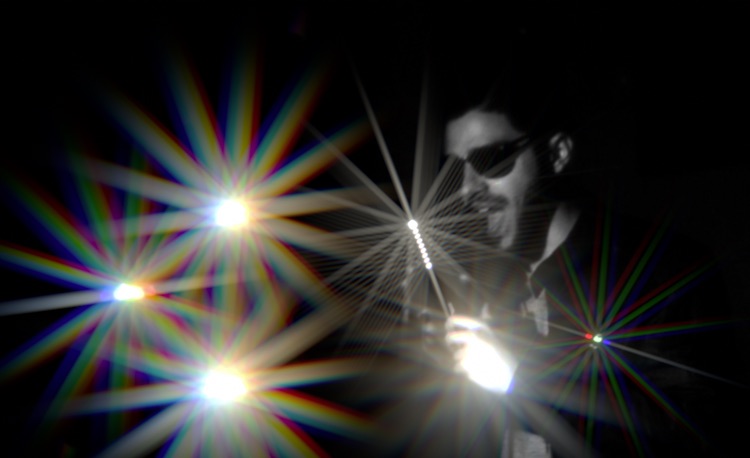
Replied by Karsten Schlüter on topic Star Filter Plug-in (PRO STAR lags too much)
mgmartino wrote: this is the effect i want to achieve but not have it take 10 mins to render a 7 second clip
Do you own Motion?
The GLINT FILTER does, imho, exactly what you're looking for:
I erased the flares from your pic in Pixelmator and with some settings in the Inspector of Glint, you get this....
Tell me, if you don't own Motion 5, I can made the filter a plugin - done in seconds.
And: Glint works in real-time, even on my MacMini....
==edit==
makes fun to play with the many settings of Glint, e.g. creating a real Star-filter:
Last edit: 28 Oct 2016 10:14 by Karsten Schlüter.
Please Log in to join the conversation.
28 Oct 2016 10:29 #81491
by mgmartino
Replied by mgmartino on topic Star Filter Plug-in (PRO STAR lags too much)
WOW that is amazing!
I do not own motion. I suppose I could get it but i think it would be best if I could do it all in Final Cut Pro so if you are able to make a plug-in that does the Glint feature that would be much appreciated.
Also what I do like about the Pro Star plug-in is that I can make a rainbow light effect over my black and white video. Will that be possible with glint? Or were you only able to do that because I already had the rainbow color in the original picture?
I do not own motion. I suppose I could get it but i think it would be best if I could do it all in Final Cut Pro so if you are able to make a plug-in that does the Glint feature that would be much appreciated.
Also what I do like about the Pro Star plug-in is that I can make a rainbow light effect over my black and white video. Will that be possible with glint? Or were you only able to do that because I already had the rainbow color in the original picture?
Please Log in to join the conversation.
- Karsten Schlüter
-
- Offline
- Moderator
-
Less
More
- Posts: 3790
- Thank you received: 718
28 Oct 2016 10:40 #81494
by Karsten Schlüter
Find out yourself:
dl and unzip attached file, drag folder into ~/Movies/Motion Templates/Effects
after relaunch of FCPX, you should find 'GLINT from Motion' in your Effects tab........
(sorry, my school kiddies waiting, afk for some hours, will reply later......)
Replied by Karsten Schlüter on topic Star Filter Plug-in (PRO STAR lags too much)
mgmartino wrote: … rainbow light effect over my black and white video. Will that be possible with glint? Or were you only able to do that because I already had the rainbow color in the original picture?
Find out yourself:
dl and unzip attached file, drag folder into ~/Movies/Motion Templates/Effects
after relaunch of FCPX, you should find 'GLINT from Motion' in your Effects tab........
(sorry, my school kiddies waiting, afk for some hours, will reply later......)
Please Log in to join the conversation.
28 Oct 2016 11:24 #81500
by mgmartino
Replied by mgmartino on topic Star Filter Plug-in (PRO STAR lags too much)
i downloaded it and put it in the proper folder but this happened when I tried to add it
Please Log in to join the conversation.
- Karsten Schlüter
-
- Offline
- Moderator
-
Less
More
- Posts: 3790
- Thank you received: 718
28 Oct 2016 13:36 - 28 Oct 2016 13:38 #81508
by Karsten Schlüter
Nothing to see nor to read … But I can assume - you get a Yellow Exclamation/RedWarning? right?
Sorry, switched to Motion 5_3 last night - which demands FCPX 10_3, and you, speculation, are on FCPX 10_2x?
Here, all latest, fully functional:
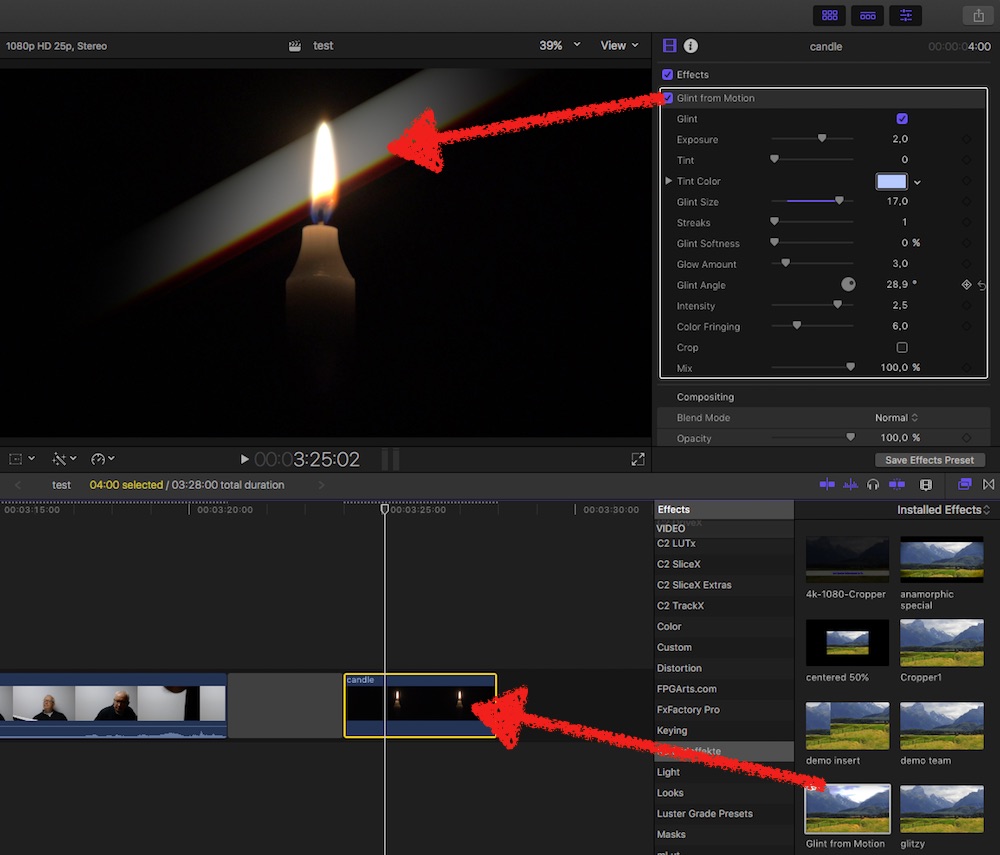
sorry!
Replied by Karsten Schlüter on topic Star Filter Plug-in (PRO STAR lags too much)
mgmartino wrote: i downloaded it and put it in the proper folder but this happened when I tried to add it
Nothing to see nor to read … But I can assume - you get a Yellow Exclamation/RedWarning? right?
Sorry, switched to Motion 5_3 last night - which demands FCPX 10_3, and you, speculation, are on FCPX 10_2x?
Here, all latest, fully functional:
sorry!
Last edit: 28 Oct 2016 13:38 by Karsten Schlüter.
Please Log in to join the conversation.
28 Oct 2016 22:18 #81559
by mgmartino
Replied by mgmartino on topic Star Filter Plug-in (PRO STAR lags too much)
yes I could have sworn I attached the pic of red exclamation point! But yeah I am on final cut pro x 10.2
But did you attach a new folder. Because I do not see it?
But did you attach a new folder. Because I do not see it?
Please Log in to join the conversation.
- Karsten Schlüter
-
- Offline
- Moderator
-
Less
More
- Posts: 3790
- Thank you received: 718
29 Oct 2016 04:57 #81566
by Karsten Schlüter
Replied by Karsten Schlüter on topic Star Filter Plug-in (PRO STAR lags too much)
no, sorry. no 'old' version of M5 at hand…
… well, I should, on some backup, but sorry, me actually too busy with other projects ...
put it on my todo list ...
If I think of it, I'll post it here ...................
… well, I should, on some backup, but sorry, me actually too busy with other projects ...
put it on my todo list ...
If I think of it, I'll post it here ...................
Please Log in to join the conversation.
31 Oct 2016 19:05 #81778
by mgmartino
Replied by mgmartino on topic Star Filter Plug-in (PRO STAR lags too much)
it's okay I will just upgrade to final cut 10.3....thank you for all your help!!
Please Log in to join the conversation.
03 Nov 2016 08:03 - 03 Nov 2016 08:06 #82058
by mgmartino
Replied by mgmartino on topic Star Filter Plug-in (PRO STAR lags too much)
SO I have been trying to Replace my PRO STAR plug-in by Pixel Film Studios with Glint by Motion and my main issue is I cannot seem to select the area I want to use the effect on like I can with PRO STAR...
PRO STAR:
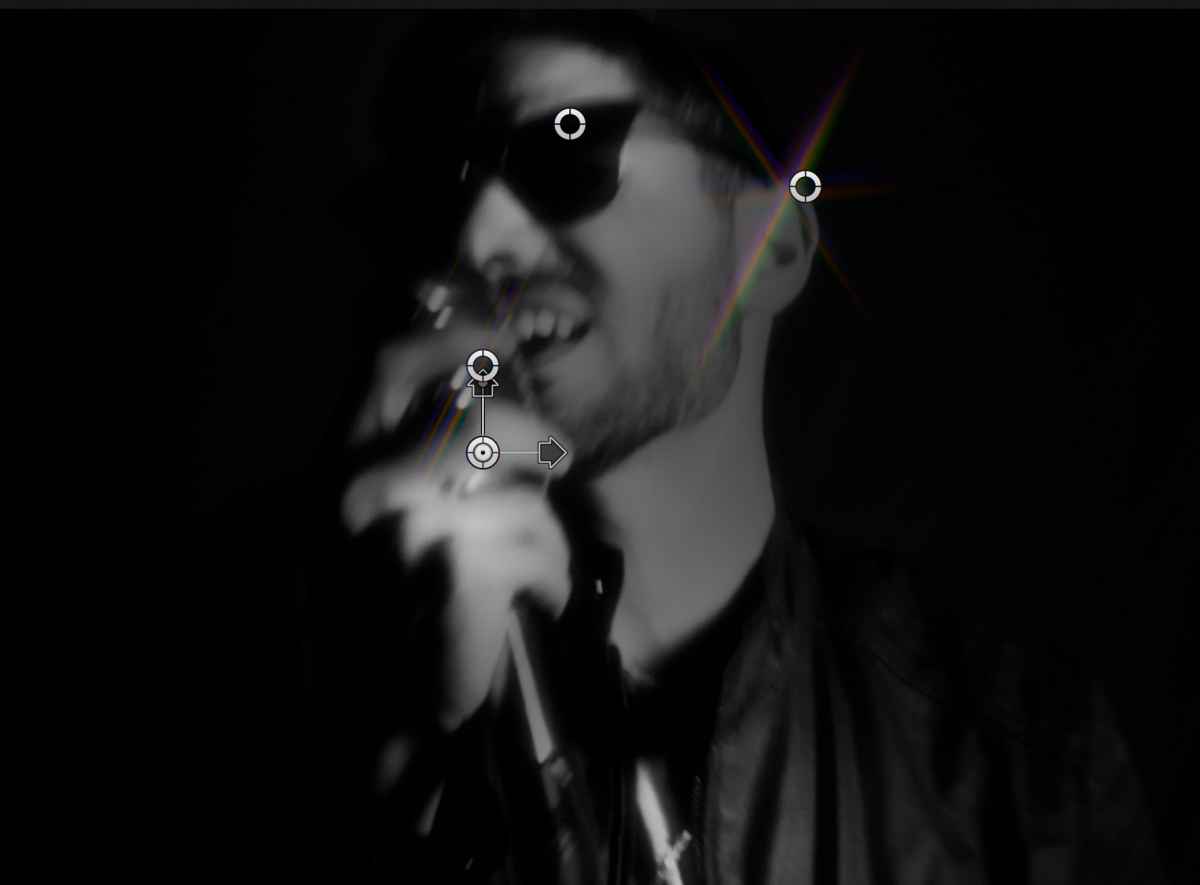
GLINT:

PRO STAR:
GLINT:
Last edit: 03 Nov 2016 08:06 by mgmartino.
Please Log in to join the conversation.
- Karsten Schlüter
-
- Offline
- Moderator
-
Less
More
- Posts: 3790
- Thank you received: 718
03 Nov 2016 08:41 #82061
by Karsten Schlüter
Replied by Karsten Schlüter on topic Star Filter Plug-in (PRO STAR lags too much)
'double' your clip (opt-drag up)
apply Mask from Effects/Masks to top lane clip
apply Glint
apply Mask from Effects/Masks to top lane clip
apply Glint
Please Log in to join the conversation.
04 Nov 2016 03:22 #82142
by mgmartino
Replied by mgmartino on topic Star Filter Plug-in (PRO STAR lags too much)
What would applying the mask to the top clip do?
How would that make it so I can choose which portions/light-sources in the clip have glint applied to them?
How would that make it so I can choose which portions/light-sources in the clip have glint applied to them?
Please Log in to join the conversation.
- Karsten Schlüter
-
- Offline
- Moderator
-
Less
More
- Posts: 3790
- Thank you received: 718
04 Nov 2016 04:55 #82143
by Karsten Schlüter
… just try, your Mac will not explode, promised. :dry:
you asked for …
… and I gave you advice to select=mask an area ... Hmm?
btw: rebuilding a commercial plugin and publishing it for free is a bit aside my ethics …
Replied by Karsten Schlüter on topic Star Filter Plug-in (PRO STAR lags too much)
mgmartino wrote: … How would that make it so I can choose which portions/light-sources in the clip have glint applied to them?
… just try, your Mac will not explode, promised. :dry:
you asked for …
… and my main issue is I cannot seem to select the area I want to use the effect on like I can with PRO STAR …
… and I gave you advice to select=mask an area ... Hmm?
btw: rebuilding a commercial plugin and publishing it for free is a bit aside my ethics …
Please Log in to join the conversation.
