




- Posts: 215
- Thank you received: 2
3 Post Moderation Rule for New Boarders (25 Jan 2021)
New boarders will have their posts moderated - Don't worry if you cannot see your post immediately.
Anyone Else Run In To App Store Not Showing Updates?
27 Oct 2016 22:01 #81427
by Shane M
Anyone Else Run In To App Store Not Showing Updates? was created by Shane M
I just upgraded to MacOS Sierra before I upgraded to FCPX, etc. and after the update, I noticed that there was a problem with the App Store Updates page...it was only showing past 30 days of Updates and none of the new ones...although it shows the number of the new updates waiting to be installed?
I can go to the FCPX page on the app store and update it directly, but none of them updates are showing on the update page up no matter what I do. I've tried deleting caches for the app store, safe boot, etc...nothing seems to work.
Anyone experience this before?
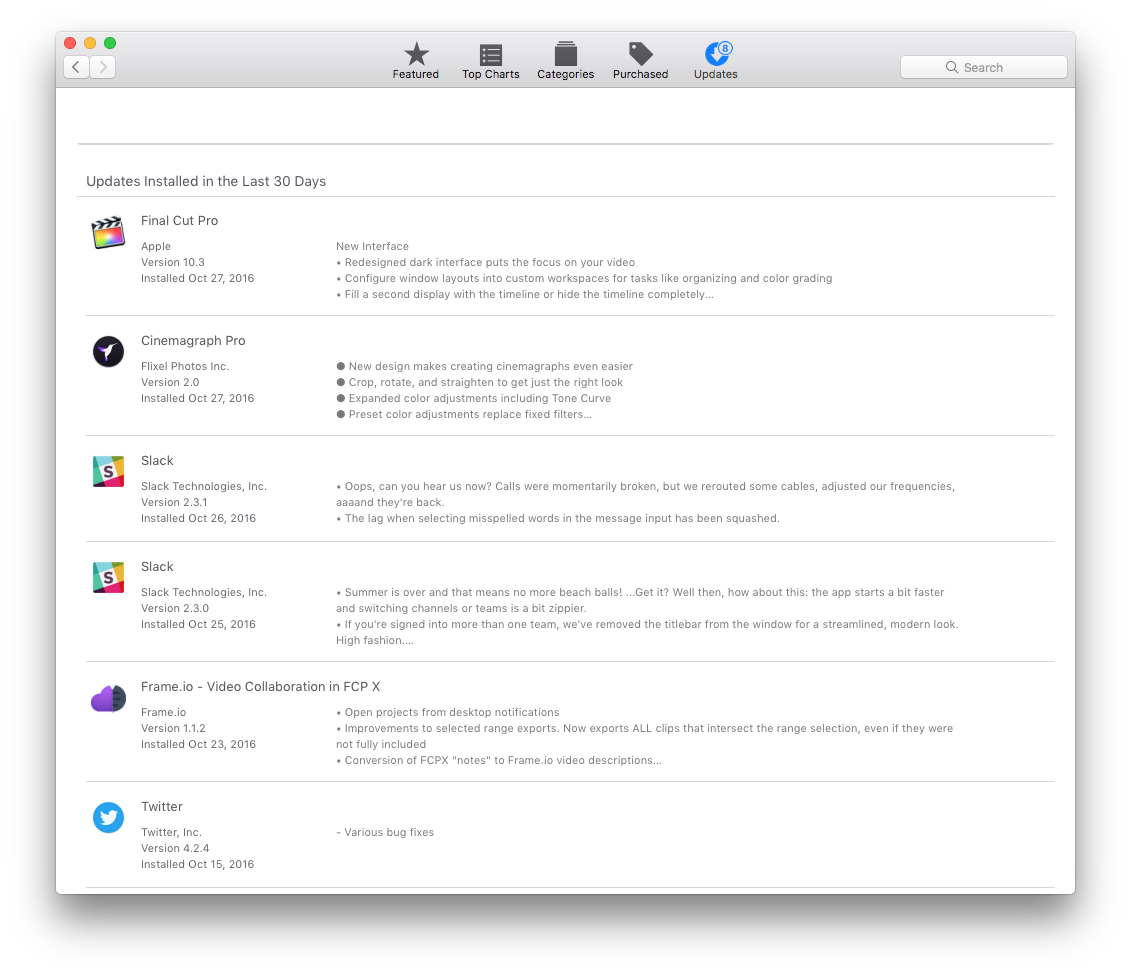
I can go to the FCPX page on the app store and update it directly, but none of them updates are showing on the update page up no matter what I do. I've tried deleting caches for the app store, safe boot, etc...nothing seems to work.
Anyone experience this before?
Please Log in to join the conversation.


27 Oct 2016 23:11 #81436
by dmb
Replied by dmb on topic Anyone Else Run In To App Store Not Showing Updates?
I'm having the same problem. I just installed macOS 10.12.1, from OS X 10.11.6. The App Store badge icon indicates that nine updates are available, but none are available on the update page itself. I tried logging out, then back into, my App Store account, to no avail.
However, on the Purchased page of the App Store, programs that have an update available are listed, and can be installed from there.
Hope that helps.
However, on the Purchased page of the App Store, programs that have an update available are listed, and can be installed from there.
Hope that helps.
Please Log in to join the conversation.


27 Oct 2016 23:11 #81437
by RevJimBob
Replied by RevJimBob on topic Anyone Else Run In To App Store Not Showing Updates?
Same problem here. Running Sierra on MBPr. Safari 10.0.1
Please Log in to join the conversation.
28 Oct 2016 00:44 #81440
by Shane M
Replied by Shane M on topic Anyone Else Run In To App Store Not Showing Updates?
Yeah i was able to get the FCPX updates etc from there, but what about other apps or the Pro Video Formats update, etc?
This is very weird...I have no idea what to try now?
This is very weird...I have no idea what to try now?
Please Log in to join the conversation.
28 Oct 2016 01:12 #81442
by dmb
Replied by dmb on topic Anyone Else Run In To App Store Not Showing Updates?
Updates are again showing in the App Store for me. Try again - perhaps for you as well.
Please Log in to join the conversation.
28 Oct 2016 01:15 #81443
by Shane M
Replied by Shane M on topic Anyone Else Run In To App Store Not Showing Updates?
Hm...still nothing. I keep checking...i guess I'll just have to wait for a while..hopefully wont have to reinstall or something drastic.
Please Log in to join the conversation.
28 Oct 2016 01:20 #81446
by dmb
Replied by dmb on topic Anyone Else Run In To App Store Not Showing Updates?
Try signing out of your account in the App Store, restarting the App, then signing back it. I had done that with no immediate effect. It was about 10 - 15 minutes later than updates again were listed in the App Store. I don't know if signing in and out caused the problem to be fixed, but it's worth a try.
Please Log in to join the conversation.


28 Oct 2016 01:43 #81450
by heyjosh
Replied by heyjosh on topic Anyone Else Run In To App Store Not Showing Updates?
I let it sit on the page for a couple of minutes. The updates popped in on their own. Initially had that extra line at the top as well.
Please Log in to join the conversation.
28 Oct 2016 02:12 #81451
by Shane M
Thanks for the idea...been trying that all day. All different combinations...sign out, safe boot...sign out, sign in to other apple ID, restart...removing cache files...on and on and on...
No effect.
GAH...
Replied by Shane M on topic Anyone Else Run In To App Store Not Showing Updates?
dmb wrote: Try signing out of your account in the App Store, restarting the App, then signing back it. I had done that with no immediate effect. It was about 10 - 15 minutes later than updates again were listed in the App Store. I don't know if signing in and out caused the problem to be fixed, but it's worth a try.
Thanks for the idea...been trying that all day. All different combinations...sign out, safe boot...sign out, sign in to other apple ID, restart...removing cache files...on and on and on...
No effect.
GAH...
Please Log in to join the conversation.

28 Oct 2016 03:29 #81457
by grailz
Replied by grailz on topic Anyone Else Run In To App Store Not Showing Updates?
I had the same problem as you Shane. What I wound up doing was updating my apps via the purchases page. When the updates finished, the lone hold out update popped up in the updates window.
Once everything updates, my updates page was completely blank. No applications updated in the last 30 days or anything like that showed up. Just a "no updates available". But my applications updated and installed.
Hope that helps.
Once everything updates, my updates page was completely blank. No applications updated in the last 30 days or anything like that showed up. Just a "no updates available". But my applications updated and installed.
Hope that helps.
Please Log in to join the conversation.
28 Oct 2016 04:35 #81460
by ddixon
Replied by ddixon on topic Anyone Else Run In To App Store Not Showing Updates?
Same thing here. I started manually doing the 8 updates, and after doing only 2 or 3 the others finally showed up. I let the screen sit there for over an hour and they never showed up - had to jump start it with a couple of manual updates. FCPX, Motion, Compressor, Pages, Numbers, Keynote, etc. - try some of those.
Please Log in to join the conversation.
28 Oct 2016 15:45 #81526
by bogiesan
Replied by bogiesan on topic Anyone Else Run In To App Store Not Showing Updates?
There must be tens or hundreds of thousands of folks trying to get software form the App Store today. Give it some time to catch up.
Please Log in to join the conversation.
