


- Posts: 109
- Thank you received: 5
3 Post Moderation Rule for New Boarders (25 Jan 2021)
New boarders will have their posts moderated - Don't worry if you cannot see your post immediately.
Pixar Textures in Motion
- DSvoboda356
-
 Topic Author
- Offline
- Premium Member
-

Less
More
22 Oct 2016 16:16 #81107
by DSvoboda356
Pixar Textures in Motion was created by DSvoboda356
Hey guys I was trying to load the pixar textures that Fox Mahoney posted about here
discussions.apple.com/docs/DOC-10001
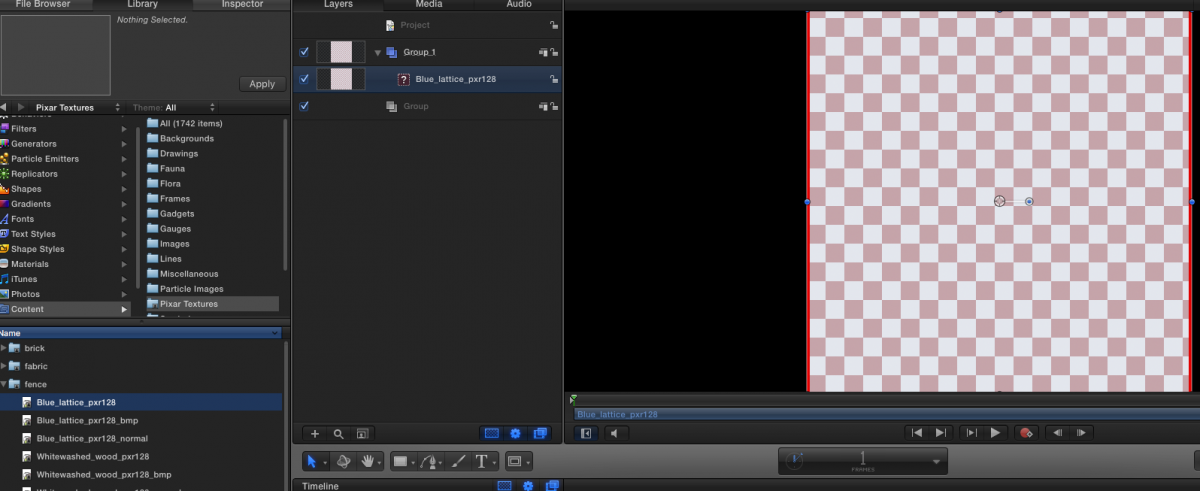
However when I follow the instructions I don't see an images I just see a checker board. Has any one else experienced this?
However when I follow the instructions I don't see an images I just see a checker board. Has any one else experienced this?
Please Log in to join the conversation.

22 Oct 2016 22:41 #81115
by EditorGuy
Replied by EditorGuy on topic Pixar Textures in Motion
Motion has lost the link to the original file. You may need to relink it.
help.apple.com/motion/mac/5.2/#/motn3ec02602
help.apple.com/motion/mac/5.2/#/motn3ec02602
Please Log in to join the conversation.

23 Oct 2016 03:12 #81116
by muddygun
Replied by muddygun on topic Pixar Textures in Motion
I've had the same problem. I tried relinking...but several problems happen. When I try to relink "Image Sequence" is greyed out; so its like its only looking for image sequences. And its look for tif files; not the .molo files that in the finder. I don't know where to go from here.
Please Log in to join the conversation.
- DSvoboda356
-
Topic Author
- Offline
- Premium Member
-
Less
More
- Posts: 109
- Thank you received: 5
23 Oct 2016 15:11 #81124
by DSvoboda356
Replied by DSvoboda356 on topic Pixar Textures in Motion
Yea that has been my problem as well.
Please Log in to join the conversation.
- MarkNelsonMovies
-
- Offline
- Elite Member
-

Less
More
- Posts: 256
- Thank you received: 48
23 Oct 2016 18:46 #81131
by MarkNelsonMovies
Replied by MarkNelsonMovies on topic Pixar Textures in Motion
I haven't really tried to work this out, (haven't gotten time),
but fox's 1mb bundle does not include the image files themselves, you'll have to download the 360mb image folder from the link further down the page ( community.renderman.pixar.com/article/11...ne-twenty-eight.html )
and then instal them somewhere (I don't know where) for Motion to find them.
If I get the time I will try to figure this out, or maybe Karsten knows?
but fox's 1mb bundle does not include the image files themselves, you'll have to download the 360mb image folder from the link further down the page ( community.renderman.pixar.com/article/11...ne-twenty-eight.html )
and then instal them somewhere (I don't know where) for Motion to find them.
If I get the time I will try to figure this out, or maybe Karsten knows?
Please Log in to join the conversation.
24 Oct 2016 16:38 #81147
by Pielle
Replied by Pielle on topic Pixar Textures in Motion
Me too as "MarkNelsonMovies" have not tried these textures, but I've built some materials
www.fcp.co/forum/utility/25449-materials-real-3d-utility
, and I think it should be done the same way. Put the folder with the files in User / Your name / Library / Application Support / Motion / Library / Materials. Put the images in TIFF or JPG (downloaded on the other link as suggested by"MarkNelsonMovies" ) in a folder inside that will call Media.
For each material in my example you find also a PNG file and a MOPR file they are only to make the 3D animation of the texture if you choose it from the library.
I hope this is helpful, let me know if it works
Pielle
For each material in my example you find also a PNG file and a MOPR file they are only to make the 3D animation of the texture if you choose it from the library.
I hope this is helpful, let me know if it works
Pielle
Please Log in to join the conversation.
- Andreas Kiel
-
- Offline
- Platinum Member
-

Less
More
- Posts: 1077
- Thank you received: 189
24 Oct 2016 19:48 #81151
by Andreas Kiel
Replied by Andreas Kiel on topic Pixar Textures in Motion
I had a short look at the Motion files (.molo). They require Motion 5.7 and the Pixar 128 Texture some_Name. tif files.
Those file paths in the .molo files point to a wrong path.
- Andreas
Those file paths in the .molo files point to a wrong path.
- Andreas
Please Log in to join the conversation.
- MarkNelsonMovies
-
- Offline
- Elite Member
-
Less
More
- Posts: 256
- Thank you received: 48
24 Oct 2016 21:02 - 24 Oct 2016 21:04 #81153
by MarkNelsonMovies
Replied by MarkNelsonMovies on topic Pixar Textures in Motion
a quick and dirty fix is to create the missing path by making a disk image with the Name 'Lacie' and the folders 'misc/Pixar Textures" and the image folders with the .tif files (brick, fabric, fence, etc...) inside that.
edit; if I have time, I may see if I can make an apple script to fix the files
edit; if I have time, I may see if I can make an apple script to fix the files
Last edit: 24 Oct 2016 21:04 by MarkNelsonMovies. Reason: add info
Please Log in to join the conversation.
- Andreas Kiel
-
- Offline
- Platinum Member
-
Less
More
- Posts: 1077
- Thank you received: 189
24 Oct 2016 21:34 #81154
by Andreas Kiel
Replied by Andreas Kiel on topic Pixar Textures in Motion
Creating this Disk Image is not such a good idea - I think.
I'll think about a better solution.
- Andreas
I'll think about a better solution.
- Andreas
Please Log in to join the conversation.
- Bernard Black
-
- Offline
- Junior Member
-

Less
More
- Posts: 34
- Thank you received: 5
25 Oct 2016 01:26 #81159
by Bernard Black
Replied by Bernard Black on topic Pixar Textures in Motion
Looking at his post, he's made a small error. .molo files are just xml, and don't contain image data, so he didn't really convert anything other than make a pointer to files specific to his hard drive.
It does look like he pulled the .jpg versions out of the original Pixar sources to clean up the folder a bit.
I expect that you could get the same result (having the materials available within Motion's library) by grabbing the originals here: community.renderman.pixar.com/article/11...ne-twenty-eight.html
And then:
• Type command-N to open a new Finder window.
• Type command-shift-G and enter ~/Library to navigate to your user library
• Navigate to Application Support > Motion > Library > Content.
• Drag and drop the Pixar128 Library folder into the Content folder.
If you don't want the .jpg versions, trash em.
It does look like he pulled the .jpg versions out of the original Pixar sources to clean up the folder a bit.
I expect that you could get the same result (having the materials available within Motion's library) by grabbing the originals here: community.renderman.pixar.com/article/11...ne-twenty-eight.html
And then:
• Type command-N to open a new Finder window.
• Type command-shift-G and enter ~/Library to navigate to your user library
• Navigate to Application Support > Motion > Library > Content.
• Drag and drop the Pixar128 Library folder into the Content folder.
If you don't want the .jpg versions, trash em.
Please Log in to join the conversation.
