


- Posts: 141
- Thank you received: 2
3 Post Moderation Rule for New Boarders (25 Jan 2021)
New boarders will have their posts moderated - Don't worry if you cannot see your post immediately.
Best way of making single-channel voiceover playback through left and right channels?
14 Oct 2016 19:06 - 14 Oct 2016 19:09 #80769
by AlexMaxim
Best way of making single-channel voiceover playback through left and right channels? was created by AlexMaxim
Hi there people,
I trust that you are all experiencing an excellent weekend.
I have a whole bunch of voiceover files (.wav files) that were recorded with a Rode NT2A microphone connected to the left channel of a Zoom H4N recorder.
Given this, what is the best way within FCPX to change the clips so that they playback through both left and right channels?
I have tried changing a clip from 'stereo' to 'dual mono'. This seems to have the effect of making the sound come from the centre of the laptop. Is this in fact the case? And is this the best way to proceed? For ease of reference, I enclose a screenshot to illustrate what I am talking about.
Any help is sincerely appreciated!
I trust that you are all experiencing an excellent weekend.
I have a whole bunch of voiceover files (.wav files) that were recorded with a Rode NT2A microphone connected to the left channel of a Zoom H4N recorder.
Given this, what is the best way within FCPX to change the clips so that they playback through both left and right channels?
I have tried changing a clip from 'stereo' to 'dual mono'. This seems to have the effect of making the sound come from the centre of the laptop. Is this in fact the case? And is this the best way to proceed? For ease of reference, I enclose a screenshot to illustrate what I am talking about.
Any help is sincerely appreciated!

Last edit: 14 Oct 2016 19:09 by AlexMaxim.
Please Log in to join the conversation.

14 Oct 2016 19:58 #80776
by EditorGuy
Replied by EditorGuy on topic Best way of making single-channel voiceover playback through left and right channels?
Changing to dual mono is the way to do it. And un-check (mute) the channel you don't need. "...from the center of the laptop" is "mono", that's what you want. You're on the right track!
Please Log in to join the conversation.
14 Oct 2016 20:10 #80779
by AlexMaxim
Thanks for your kind confirmation that I'm on the right track!
Which channel should be muted? I say this because only have the one (L).
Replied by AlexMaxim on topic Best way of making single-channel voiceover playback through left and right channels?
EditorGuy wrote: Changing to dual mono is the way to do it. And un-check (mute) the channel you don't need. "...from the center of the laptop" is "mono", that's what you want. You're on the right track!
Thanks for your kind confirmation that I'm on the right track!
Which channel should be muted? I say this because only have the one (L).
Please Log in to join the conversation.


14 Oct 2016 20:31 #80780
by Redifer
Replied by Redifer on topic Best way of making single-channel voiceover playback through left and right channels?
Uncheck the channel without any sound in it. The right channel.
Please Log in to join the conversation.
14 Oct 2016 20:43 - 14 Oct 2016 20:45 #80781
by AlexMaxim
Many thanks! Do you mean 'mono 2', as per the attached screenshot?
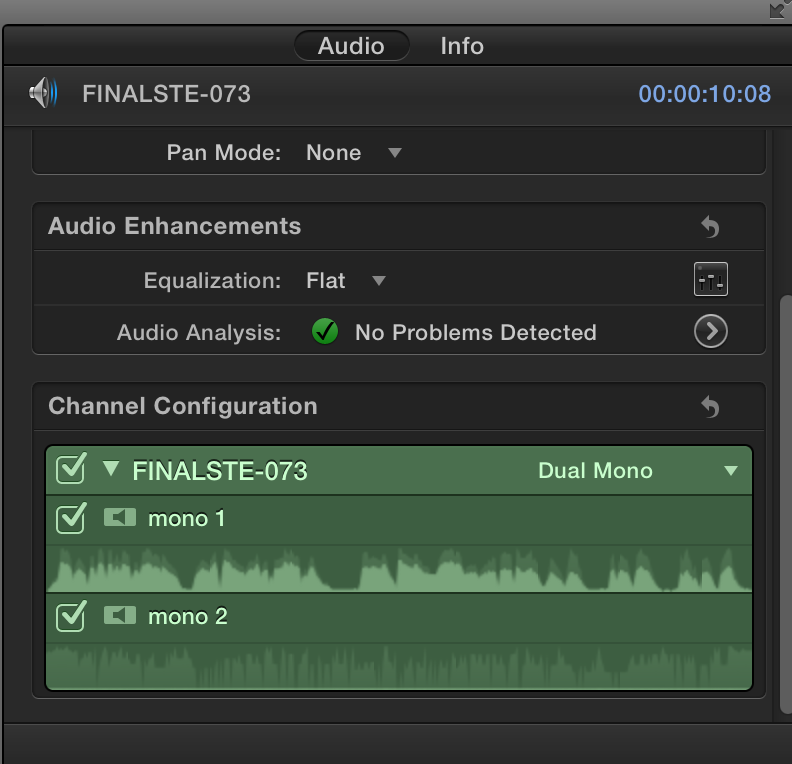
And is it strictly necessary to uncheck it? The only reason I ask is because I have hundreds of these clips.
Replied by AlexMaxim on topic Best way of making single-channel voiceover playback through left and right channels?
Redifer wrote: Uncheck the channel without any sound in it. The right channel.
Many thanks! Do you mean 'mono 2', as per the attached screenshot?
And is it strictly necessary to uncheck it? The only reason I ask is because I have hundreds of these clips.
Last edit: 14 Oct 2016 20:45 by AlexMaxim.
Please Log in to join the conversation.

14 Oct 2016 22:34 #80784
by Emmanuel
Replied by Emmanuel on topic Best way of making single-channel voiceover playback through left and right channels?
I think you don't have to uncheck them, it's ok keeping them.
Please Log in to join the conversation.
15 Oct 2016 00:01 #80785
by EditorGuy
Replied by EditorGuy on topic Best way of making single-channel voiceover playback through left and right channels?
Makes things simpler to deal with.
Screen shot shows you have audio on both channels. And by the looks of the wave forms, the same audio on both. So I'd turn off Ch 2 and move forward.
Screen shot shows you have audio on both channels. And by the looks of the wave forms, the same audio on both. So I'd turn off Ch 2 and move forward.
Please Log in to join the conversation.
15 Oct 2016 14:10 #80791
by AlexMaxim
Great stuff! That will save me a lot of work. Many thanks!
Replied by AlexMaxim on topic Best way of making single-channel voiceover playback through left and right channels?
manoucho wrote: I think you don't have to uncheck them, it's ok keeping them.
Great stuff! That will save me a lot of work. Many thanks!
Please Log in to join the conversation.
15 Oct 2016 14:12 - 15 Oct 2016 14:12 #80792
by AlexMaxim
Indeed! The audio is the same. If turning off Ch 2 doesn't make any material difference to the actual sound, then I don't mind the status quo because I have so many clips in this project: turning off Ch 2 on every one of them will be half a day's work.
Many thanks for your kind overview!
Replied by AlexMaxim on topic Best way of making single-channel voiceover playback through left and right channels?
EditorGuy wrote: Makes things simpler to deal with.
Screen shot shows you have audio on both channels. And by the looks of the wave forms, the same audio on both. So I'd turn off Ch 2 and move forward.
Indeed! The audio is the same. If turning off Ch 2 doesn't make any material difference to the actual sound, then I don't mind the status quo because I have so many clips in this project: turning off Ch 2 on every one of them will be half a day's work.
Many thanks for your kind overview!
Last edit: 15 Oct 2016 14:12 by AlexMaxim.
Please Log in to join the conversation.
15 Oct 2016 15:13 #80796
by EditorGuy
Replied by EditorGuy on topic Best way of making single-channel voiceover playback through left and right channels?
Select them all at one time, do it once. As long as all of the clips are Stereo Pairs, you can do multiple clips at once.
Either select the first one, then shift-click the last one in a row.
If not in a continuous row, command-click each to select.
Either select the first one, then shift-click the last one in a row.
If not in a continuous row, command-click each to select.
Please Log in to join the conversation.
15 Oct 2016 18:51 #80799
by AlexMaxim
This is a great tip. Thank you so much for sharing this knowledge! It will save me a lot of work.
Replied by AlexMaxim on topic Best way of making single-channel voiceover playback through left and right channels?
EditorGuy wrote: Select them all at one time, do it once. As long as all of the clips are Stereo Pairs, you can do multiple clips at once.
Either select the first one, then shift-click the last one in a row.
If not in a continuous row, command-click each to select.
This is a great tip. Thank you so much for sharing this knowledge! It will save me a lot of work.
Please Log in to join the conversation.
- dc2bluelight
-

- Offline
- New Member
-

Less
More
- Posts: 4
- Thank you received: 1
16 Oct 2016 17:00 #80817
by dc2bluelight
Replied by dc2bluelight on topic Best way of making single-channel voiceover playback through left and right channels?
I recently found that in FCP X, a single-channel mono file mixes in at 6dB lower level than a stereo (dual mono) file. This wold be a bug. You'll fix it anyway when you mix, but it makes no practical sense for FCP to do this.
Also be aware that the "loudness" tool raises the clip audio level much to high relative to the industry standard reference level. I haven't spent any time working around that, I've been applying dynamics processing outside FCP where I have familiar tools I can actually control properly.
Also be aware that the "loudness" tool raises the clip audio level much to high relative to the industry standard reference level. I haven't spent any time working around that, I've been applying dynamics processing outside FCP where I have familiar tools I can actually control properly.
Please Log in to join the conversation.

16 Oct 2016 22:11 #80828
by dgwvideo
Creating history....one edit at a time !
Replied by dgwvideo on topic Best way of making single-channel voiceover playback through left and right channels?
I agree with just about everything said here, but those waveforms look like different audio on each channel to me.
Creating history....one edit at a time !
Please Log in to join the conversation.
- Steve McGarrigle
-

- Offline
- Premium Member
-

17 Oct 2016 12:13 - 17 Oct 2016 12:25 #80843
by Steve McGarrigle
Replied by Steve McGarrigle on topic Best way of making single-channel voiceover playback through left and right channels?
Yes, that confused me as well. It doesn't look like a stereo pair or even a reference track from an onboard camera mic.
Last edit: 17 Oct 2016 12:25 by Steve McGarrigle.
Please Log in to join the conversation.
