




- Posts: 215
- Thank you received: 2
3 Post Moderation Rule for New Boarders (25 Jan 2021)
New boarders will have their posts moderated - Don't worry if you cannot see your post immediately.
Upload 2.35 Crop Footage to Youtube Without Pillar/Letter Boxing and White Line Below?
11 Oct 2016 23:32 - 11 Oct 2016 23:33 #80671
by Shane M
Upload 2.35 Crop Footage to Youtube Without Pillar/Letter Boxing and White Line Below? was created by Shane M
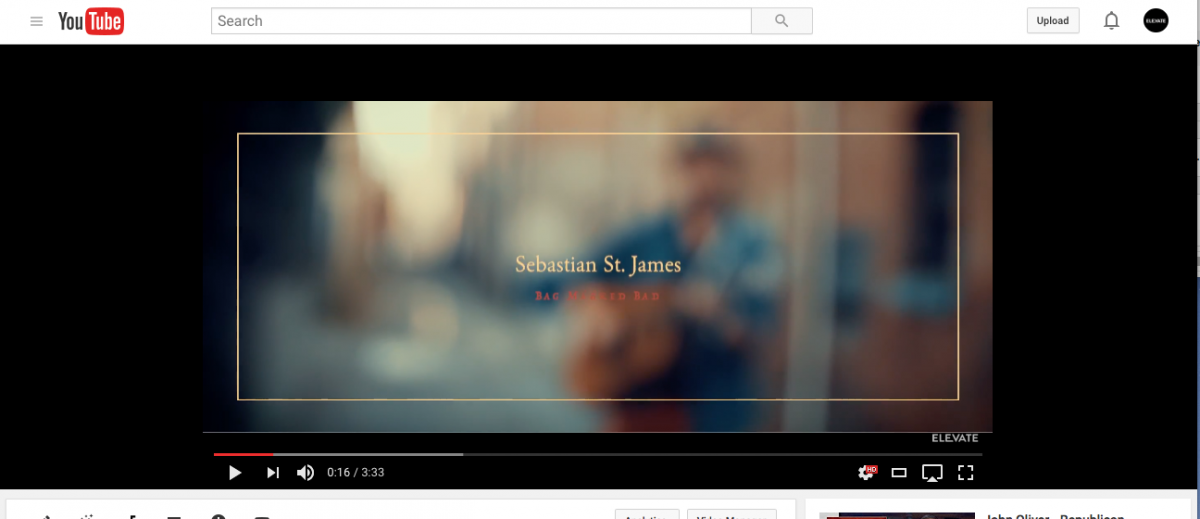
Anyone have any idea how to upload a video to Youtube without the Pillar/Letter boxing and more importantly the strange thin white line across the bottom of the frame?
I don't usually use Youtube for real work, so i'm not sure what its doing automatically, being that its not a 16x9 file...Vimeo seems to accept it, no problem.
Here is an example of it on Vimeo:
Here is an example of it on Youtube with white line across bottom of frame:
I don't usually use Youtube for real work, so i'm not sure what its doing automatically, being that its not a 16x9 file...Vimeo seems to accept it, no problem.
Here is an example of it on Vimeo:
Here is an example of it on Youtube with white line across bottom of frame:
Last edit: 11 Oct 2016 23:33 by Shane M.
Please Log in to join the conversation.
11 Oct 2016 23:35 - 11 Oct 2016 23:40 #80672
by Shane M
Replied by Shane M on topic Upload 2.35 Crop Footage to Youtube Without Pillar/Letter Boxing and White Line Below?
Here it is on Vimeo, without any boxing or white line... (wouldn't let me upload two photo attachments in first post)
Last edit: 11 Oct 2016 23:40 by Shane M.
Please Log in to join the conversation.


12 Oct 2016 04:56 #80681
by Redifer
Replied by Redifer on topic Upload 2.35 Crop Footage to Youtube Without Pillar/Letter Boxing and White Line Below?
Why does it say ELEVATE below the white line? Get rid of that and see if the line is still there.
Please Log in to join the conversation.
12 Oct 2016 05:00 - 12 Oct 2016 05:01 #80682
by Shane M
Thats just a Youtube overlay of a Logo...shouldnt make any difference?
Here is a link to the actual upload...you can see what I mean... (open it full screen in new window)
Replied by Shane M on topic Upload 2.35 Crop Footage to Youtube Without Pillar/Letter Boxing and White Line Below?
Redifer wrote: Why does it say ELEVATE below the white line? Get rid of that and see if the line is still there.
Thats just a Youtube overlay of a Logo...shouldnt make any difference?
Here is a link to the actual upload...you can see what I mean... (open it full screen in new window)
Last edit: 12 Oct 2016 05:01 by Shane M.
Please Log in to join the conversation.
