


- Posts: 69
- Thank you received: 0
3 Post Moderation Rule for New Boarders (25 Jan 2021)
New boarders will have their posts moderated - Don't worry if you cannot see your post immediately.
Exported clip name doesn't match Finder name
11 Oct 2016 18:39 #80666
by mindbend
Exported clip name doesn't match Finder name was created by mindbend
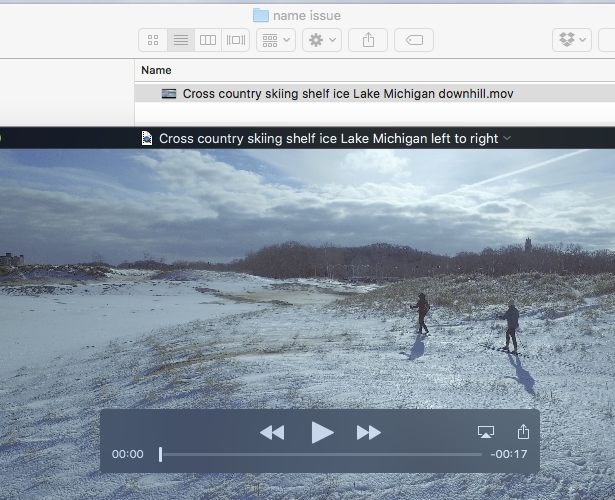
When I export/share a clip from FCPX, the name that shows in the Finder sometimes does not match the name I see when I open the clip in Quicktime Player. See the attached image.
This is a giant problem when I upload them to stock media sites because the stock site uses the incorrect name.
How does this happen and how can I avoid it and fix it in existing exports?
This is a giant problem when I upload them to stock media sites because the stock site uses the incorrect name.
How does this happen and how can I avoid it and fix it in existing exports?
Please Log in to join the conversation.
- Tom Wolsky
-

- Offline
- Moderator
-

11 Oct 2016 18:49 #80667
by Tom Wolsky
Replied by Tom Wolsky on topic Exported clip name doesn't match Finder name
How are you exporting? A master file gives you exact control of the clip name that displays in QuickTime and the file name that's saved to the computer. These can be two different things. You have to make them the same.
Please Log in to join the conversation.
- Andreas Kiel
-

- Offline
- Platinum Member
-

Less
More
- Posts: 1077
- Thank you received: 189
12 Oct 2016 08:15 - 12 Oct 2016 08:24 #80686
by Andreas Kiel
Replied by Andreas Kiel on topic Exported clip name doesn't match Finder name
mindbend,
Follow the advice Tom gave.
To equalize movie names use the below rough AppleScript.
Open ScriptEditor create a new document and copy/paste the below italic text into this document.
set theFolderPath to POSIX path of (choose folder)
set nameList to (list folder theFolderPath without invisibles)
repeat with fileName in nameList
set theFilePath to (theFolderPath & fileName) as string
set nameExtension to name extension of (info for theFilePath) as string
tell application "QuickTime Player"
set myMov to open theFilePath
set movName to name of myMov
close myMov
end tell
if not movName = fileName then
do shell script "mv " & quoted form of theFilePath & space & quoted form of (theFolderPath & movName & "." & nameExtension) as string
end if
end repeat
Then click run and navigate to the folder with the movies. The script will convert the displayed name in Finder to name displayed when opened.
- Andreas
Follow the advice Tom gave.
To equalize movie names use the below rough AppleScript.
Open ScriptEditor create a new document and copy/paste the below italic text into this document.
set theFolderPath to POSIX path of (choose folder)
set nameList to (list folder theFolderPath without invisibles)
repeat with fileName in nameList
set theFilePath to (theFolderPath & fileName) as string
set nameExtension to name extension of (info for theFilePath) as string
tell application "QuickTime Player"
set myMov to open theFilePath
set movName to name of myMov
close myMov
end tell
if not movName = fileName then
do shell script "mv " & quoted form of theFilePath & space & quoted form of (theFolderPath & movName & "." & nameExtension) as string
end if
end repeat
Then click run and navigate to the folder with the movies. The script will convert the displayed name in Finder to name displayed when opened.
- Andreas
Last edit: 12 Oct 2016 08:24 by Andreas Kiel.
Please Log in to join the conversation.
